
1. Киришүү
This manual provides detailed instructions for the safe installation, operation, and maintenance of your Lucci Air Peregrine 56-inch White Ceiling Fan with Remote, Model 21328001. The Peregrine fan features a modern design with three blades, energy-efficient direct current (DC) technology, six speeds, and high airflow. It is rated for both indoor and outdoor use in covered areas. The fan includes a 6-inch warm white GX53 light kit with 3-step dimming functionality and comes with a remote control and wall mount bracket.

Сүрөт 1.1: Алдыңкы view of the Lucci Air Peregrine 56-inch White Ceiling Fan.
2. Коопсуздук маалыматы
Please read all instructions carefully before beginning installation and retain this manual for future reference. Improper installation or use can lead to electric shock, fire, or personal injury.
- Электр коопсуздугу: Ensure the power supply is disconnected at the circuit breaker before installation or maintenance. All electrical wiring must be performed by a qualified electrician and comply with local codes and regulations.
- Монтаждоо: The ceiling fan must be mounted to a structurally sound ceiling joist or outlet box capable of supporting the fan's weight (15.92 lbs).
- Бычакты тазалоо: Maintain a minimum clearance of 7 feet from the floor to the fan blades and 18 inches from the fan blades to any walls or obstructions.
- Light Kit: Use only the specified GX53 12W 3000K bulb. Do not exceed the maximum wattage.
- Сыртта колдонуу: This fan is rated for indoor and outdoor use in covered areas. Do not expose to direct water spray.
- Алыстан башкаруу: Пультту суудан жана өтө жогорку температурадан алыс кармаңыз. Зарылчылыкка жараша батареяларды алмаштырыңыз.
3. Пакеттин мазмуну
Орнотууну улантуудан мурун, бардык компоненттердин бар экенин жана бузулбаганын текшериңиз. Эгерде кандайдыр бир тетиктер жок болсо же бузулган болсо, кардарларды колдоо кызматына кайрылыңыз.
- Ceiling Fan Motor Housing with Downrod
- Желдеткичтер (3)
- Алыстан башкаруу
- Wall Mount Bracket for Remote
- GX53 12W 3000K Light Kit (pre-installed or separate)
- Optional Metal Cap (for non-light use)
- Монтаждоочу жабдык
- Instruction Manual

Сүрөт 3.1: Бүттүview of the remote control and its features, including 6 fan speeds, reverse switch, light on/off/dimming, fan on/off, and wall mount holster. A CP2032 battery is included.
4. Орнотуу жана орнотуу
Professional installation is recommended for this ceiling fan. Ensure all power is disconnected at the main circuit breaker before beginning installation.
- Монтаждоо ордун даярдоо: Securely attach the mounting bracket to a suitable ceiling joist or fan-rated outlet box. Ensure the structure can support the fan's weight.
- Төмөнкү таякты жана моторду чогултуу: Attach the downrod to the fan motor housing. Carefully feed the electrical wires through the downrod.
- Асма желдеткичти чогултуу: Lift the fan assembly and hang it from the mounting bracket.
- Электр байланыштары: Connect the fan's electrical wires to the household wiring according to the wiring diagram provided in the separate installation guide (not included in this manual). Ensure all connections are secure.
- Бычактарды бекитүү: Securely attach the three fan blades to the motor housing using the provided screws.
- Install Light Kit (Optional): If using the light, install the GX53 12W 3000K bulb into the light kit socket. Attach the light kit to the bottom of the fan motor housing. If not using the light, install the optional metal cap.
- Коопсуз чатыр: Slide the canopy up to the ceiling and secure it to the mounting bracket, covering all wiring.
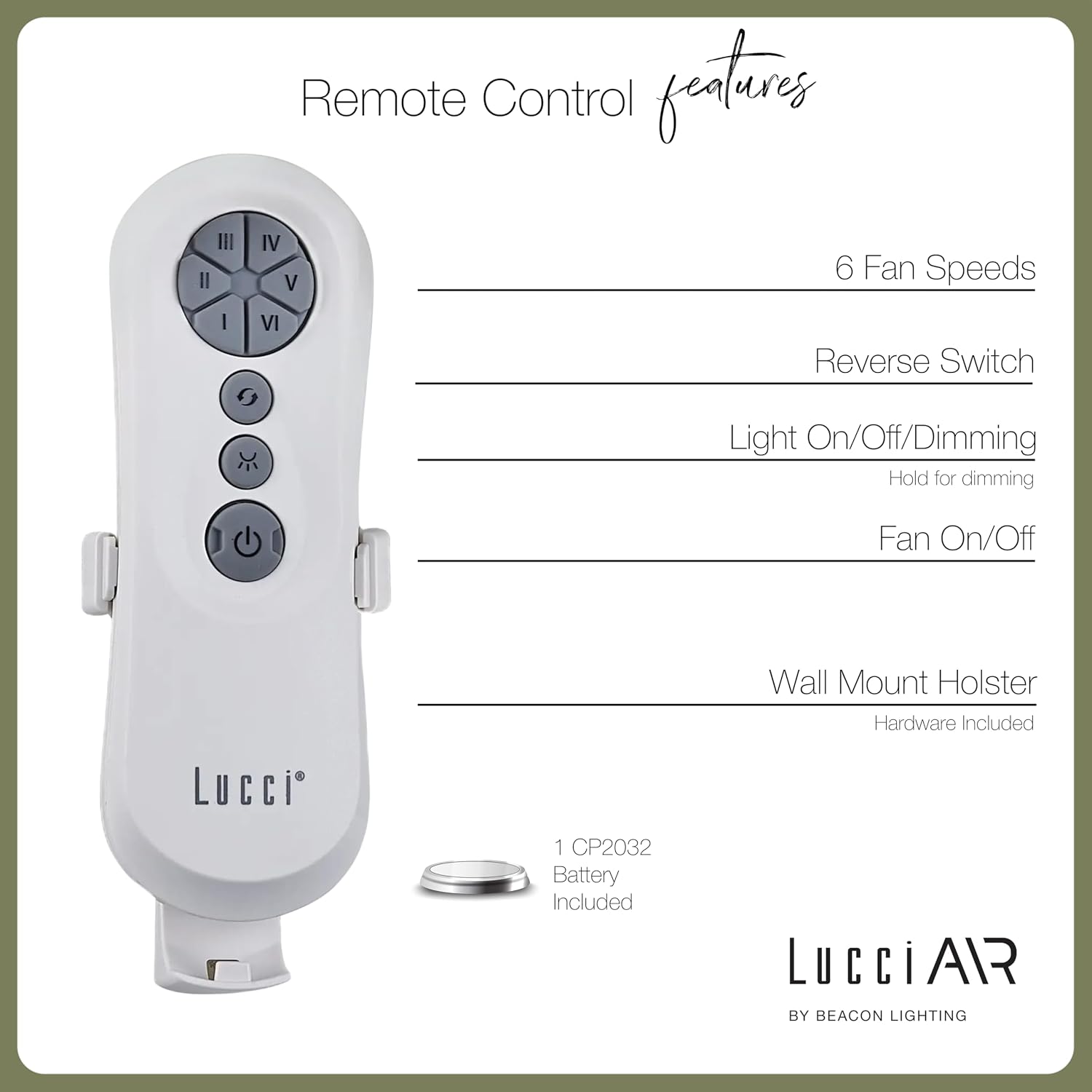
Image 4.1: Dimensional diagram of the Lucci Air Peregrine 56-inch Ceiling Fan, showing overall height, width, and blade length measurements.

Сүрөт 4.2: Төмөнкү view of the Lucci Air Peregrine fan, highlighting the integrated light kit.
5. Операция
The Lucci Air Peregrine fan is operated using the included remote control. Ensure the remote has a working CP2032 battery installed.
5.1 Алыстан башкаруу функциялары
- Желдеткичти күйгүзүү/өчүрүү: Press the power button (ⓘ) to turn the fan on or off.
- желдеткич ылдамдыгы: Use buttons I, II, III, IV, V, VI to select one of the six available fan speeds. I is the lowest speed, VI is the highest.
- Reverse Switch: Press the reverse button (↻) to change the direction of the fan blades. This function is typically used to switch between summer (downward airflow) and winter (upward airflow) modes. Note: Some models may have a manual switch on the motor housing for this function.
- Жарыкты күйгүзүү/өчүрүү/караңгылоо: Press the light button (☀) to turn the light on or off. Hold the light button to dim or brighten the light through its 3-step dimming range.
5.2 Кышкы/Жайкы режим
The fan features a manual switch on the motor housing to change between winter and summer modes. For summer operation, the blades should rotate counter-clockwise to push air downwards, creating a cooling breeze. For winter operation, the blades should rotate clockwise to draw cool air up, circulating warm air trapped near the ceiling. Adjust the switch accordingly.
6. Техникалык тейлөө
Үзгүлтүксүз техникалык тейлөө оптималдуу иштөөнү камсыз кылат жана шып желдеткичиңиздин иштөө мөөнөтүн узартат.
- Тазалоо: Желдетүүчү лопаткаларды жана мотор корпусунун чаңын мезгил-мезгили менен жумшак, гamp кездеме. Абразивдүү тазалагычтарды же эриткичтерди колдонбоңуз, анткени алар финишке зыян келтириши мүмкүн.
- Бычактын бекемдиги: Check all blade screws annually to ensure they are tight. Loose blades can cause wobbling and noise.
- Лампаны алмаштыруу: Disconnect power before replacing the GX53 light bulb. Allow the bulb to cool completely before handling.
- Алыскы батарея: Replace the CP2032 battery in the remote control when its range decreases or it stops responding.
7. Кыйынчылыктарды
Жалпы маселелер жана аларды чечүү үчүн төмөнкү таблицага кайрылыңыз.
| Көйгөй | Мүмкүн себеп | Чечим |
|---|---|---|
| Күйөрман иштебейт | желдеткичке кубат жок Бошоң зым байланыштары Алыстан башкаруу пультунун батареясы түгөндү | Электр өчүргүчтү текшерүү Бардык зымдардын туташууларынын бекем экенин текшериңиз (электр өчүрүлгөн) Алыстан башкаруунун батареясын алмаштырыңыз |
| Күйөрман солкулдайт | Бошогон бычактын бурамалары Теңдешсиз бычактар Бошоң монтаждык кронштейн | Бардык бычак бурамаларын бекемдеңиз Ensure blades are installed correctly and balanced Verify mounting bracket is securely fastened |
| Жарык иштебейт | Light bulb faulty Loose wire connection to light kit | Лампочканы алмаштырыңыз Check light kit wiring (power off) |
| Пульт иштебей жатат | Өлгөн батарея Пульт жупташтырылган жок (эгер бар болсо) | Батареяны алмаштырыңыз Refer to separate remote pairing instructions (if provided with fan) |
8. Техникалык шарттар
Key technical details for the Lucci Air Peregrine 56-inch White Ceiling Fan (Model 21328001).
| Өзгөчөлүк | Деталь |
|---|---|
| Модель аты | Peregrine |
| Модель номери | 21328001 |
| Бренд | Lucci Air |
| Түс | Ак |
| Fan Design | Шып күйөрманы |
| Power Source | DC (түз ток) |
| Продукциянын өлчөмдөрү | 56"D x 56"W x 15"H |
| Blades саны | 3 |
| Blade Length | 31.1 дюйм |
| Аба агымынын кубаттуулугу | Мүнөтүнө 6363 куб фут (CFM) |
| Ылдамдыктын саны | 6 |
| Энергияны керектөө (орточо) | 38 Вт |
| Тtage | 120Vac, 60Hz |
| Light Kit камтылган | 1x GX53 12W 3000K bulb, 1100 Lumens, 3-step dimmable |
| Башкаруу ыкмасы | Алыстан башкаруу |
| Ички/тышкы колдонуу | Indoor, Outdoor (covered areas) |
| Элемент Салмагы | 15.92 фунт |
| UPC | 811769032344 |
9. Кепилдик жана колдоо
The Lucci Air Peregrine 56-inch White Ceiling Fan comes with a чектелген өмүр бою кепилдик. For warranty claims, technical support, or replacement parts, please contact Lucci Air customer service. Keep your proof of purchase for warranty validation.
Кошумча жардам алуу үчүн, сураныч, баш багыңыз Lucci Air Store on Amazon же сатуучуңузга кайрылыңыз.