
Introduction
Сатып алганыңыз үчүн рахматasing the Naxa NT-1400 Portable 14.1-inch TV and Digital Multimedia Player. This device is designed to provide portable entertainment, featuring a built-in ATSC tuner for over-the-air HD TV reception and multimedia playback capabilities via USB. This manual provides essential information for the proper setup, operation, and maintenance of your device. Please read it thoroughly before use and retain it for future reference.
Коопсуздук маалыматы
- Кубат булагы: Use only the provided AC adapter or DC car cord. Ensure the voltage аппараттын талаптарына дал келет.
- Батареянын коопсуздугу: The device contains a rechargeable lithium battery. Do not expose to extreme temperatures, puncture, or disassemble. Dispose of batteries according to local regulations.
- Суу жана ным: Do not expose the unit to rain, moisture, or immerse it in water.
- Вентиляция: Агрегаттын айланасын туура желдетүүнү камсыз кылыңыз. Вентиляция тешиктерин жаап албаңыз.
- Тазалоо: Тазалоодон мурун электр кубатынан сууруп коюңуз. Жумшак, кургак чүпүрөктү колдонуңуз. Суюк тазалоочу каражаттардан алыс болуңуз.
- Тейлөө: Агрегатты өзүңүз тейлөөгө аракет кылбаңыз. Бардык тейлөөлөрдү квалификациялуу кызматкерлерге тапшырыңыз.
Пакеттин мазмуну
Төмөндө тизмеленген нерселердин баары пакетиңизге камтылганын текшериңиз:
- Naxa NT-1400 Portable TV Unit
- Алыстан башкаруу
- ETL AC Adapter
- DC унаа шнуру
- Тышкы антенна
- A/V кабели
- Дасторкон стенд
- Колдонуучунун Колдонмосу (бул документ)

Image: Included accessories for the Naxa NT-1400.
Продукт бүттүview
The Naxa NT-1400 features a 14.1-inch LCD screen with 1280 x 800 resolution, a built-in ATSC tuner for digital TV, and various input options for multimedia playback.

Сүрөт: алдыңкы view of the Naxa NT-1400 Portable TV.

Image: Naxa NT-1400 in a portable setting, such as an RV.
Порттор жана башкаруу элементтери
Familiarize yourself with the various ports and controls located on the unit:
- АНТ: Connect the external antenna for TV reception.
- HD-IN: HDMI input for connecting external high-definition devices.
- VGA: VGA input for connecting to computers or other compatible devices.
- AV-IN/AV-OUT: Audio/Video input and output for connecting to older devices or external displays.
- Наушник уячасы (3.5 мм): Жеке угуу үчүн.
- USB порт: Мультимедиа ойнотуу үчүн fileUSB дисктен.
- DC 12V ON/OFF: Power input for the AC adapter or DC car cord, with a power switch.
- Алдыңкы панелдин башкаруу элементтери: Volume, Channel, Menu, Input Source, Power.

Сүрөт: каптал view of the Naxa NT-1400 showing input/output ports.
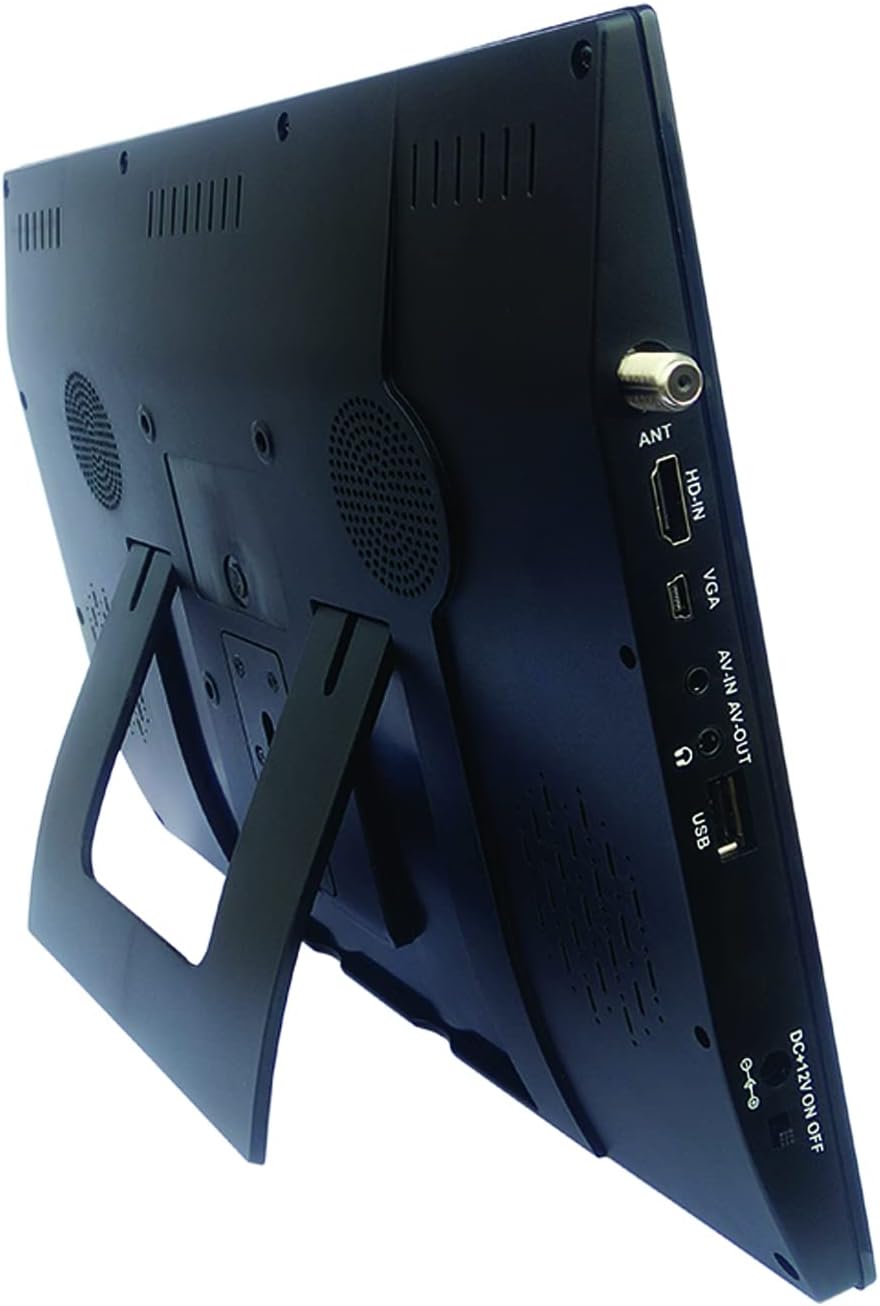
Image: Naxa NT-1400 with the integrated kickstand.
Жайгашуу
1. Аппаратты кубаттоо
- AC кубаттуулугу: Connect the ETL AC adapter to the DC 12V input on the unit and plug it into a standard wall outlet.
- Туруктуу туруксуз унаанын кубаты: Connect the DC car cord to the DC 12V input on the unit and plug it into your vehicle's 12V accessory socket.
- Ички батарея: The unit has a built-in rechargeable lithium battery. Ensure it is charged before portable use. The battery charges automatically when connected to AC or DC power.
2. Стендди бекитүү
- The unit includes an integrated flip-out kickstand for quick setup.
- For more stable placement, attach the provided tabletop stand to the back of the unit using the designated mounting points.
3. Антеннаны туташтыруу
For optimal over-the-air TV reception, connect the external antenna to the ANT port on the side of the unit. Position the antenna in an area with good signal strength.
4. Баштапкы каналды сканерлөө
After powering on the device for the first time, navigate to the 'Channel Setup' or 'Auto Scan' option in the main menu to scan for available digital TV channels. This process may take several minutes.
Иштөө нускамалары
1. Күйгүзүү/өчүрүү
Press the 'POWER' button on the unit or the remote control to turn the device on or off.
2. Киргизүү булагын тандоо
Press the 'MODE' or 'INPUT' button on the unit or remote control to cycle through available input sources: TV, USB, HDMI, VGA, AV.
3. Телевизордун иштеши
- Канал тандоо: Use the 'CH+' / 'CH-' buttons on the unit or the remote control to change channels. You can also enter channel numbers directly using the remote's numeric keypad.
- Үндү көзөмөлдөө: Use the 'VOL+' / 'VOL-' buttons on the unit or the remote control to adjust the volume.
- Меню навигациясы: Press the 'MENU' button to access settings. Use arrow keys and 'OK' on the remote to navigate and confirm selections.
4. Кулакчынды колдонуу
Plug standard 3.5mm headphones into the headphone jack for private audio listening. The internal speakers will automatically mute.
Мультимедиа ойнотуу
The Naxa NT-1400 supports playback of various multimedia fileUSB дисктен.
1. USB дискти туташтыруу
Insert your USB flash drive into the USB port on the side of the unit.
2. Accessing USB Media
Switch the input source to 'USB'. The device will display a file browser. Navigate through your folders and select the desired media file.
3. Колдоого алынган File Форматтар
- Видео: MPEG, XVID, AVC, MP4, H.264, HEVC (H.265), FLV, MKV
- Аудио: MP3
- Сүрөт: JPEG
- Текст: TXT
Техникалык тейлөө
Тазалоо
Ensure the unit is powered off and unplugged before cleaning. Use a soft, dry, lint-free cloth to wipe the screen and exterior surfaces. Do not use liquid cleaners, aerosols, or abrasive materials.
Батареяга кам көрүү
To prolong battery life, avoid fully discharging the battery frequently. If storing the unit for an extended period, charge the battery to approximately 50% and store in a cool, dry place.
Сактагыч
When not in use, store the unit in a clean, dry environment away from direct sunlight and extreme temperatures.
Проблемаларды чечүү
- Кубат жок: Ensure the AC adapter or DC car cord is securely connected and the power switch is in the 'ON' position. Check if the internal battery is charged.
- No TV Signal: Verify the external antenna is properly connected and positioned. Perform an 'Auto Scan' for channels. Signal strength can vary by location.
- Үн жок: Check the volume level. Ensure headphones are not plugged in unless intended. Verify the audio settings in the menu.
- USB ойнотуу көйгөйлөрү: Ensure the USB drive is formatted correctly (FAT32 is generally recommended). Verify that the media fileлар колдоого алынган форматтарда.
- Алыстан башкаруу иштебейт: Алыстан башкаруу пультундагы батареяны текшериңиз. Алыстан башкаруу пульту менен түзмөктүн инфракызыл сенсорунун ортосунда эч кандай тоскоолдуктар жок экенин текшериңиз.
Техникалык шарттар
| Өзгөчөлүк | Спецификация |
|---|---|
| Бренд | Naxa |
| Модель номери | NT-1400 |
| Screen Size | 14.1 дюйм |
| Дисплей технологиясы | LCD |
| Резолюция | 1280 x 800 |
| Аспект катышы | 16:9 |
| Жаңыртуу ылдамдыгы | 50/60 Гц |
| Тюнер түрү | Built-in Digital ATSC TV Tuner |
| Байланыш | HDMI, USB, VGA, AV-IN/AV-OUT |
| Динамик түрү | Камтылган |
| Батарея | 1 Литий-ион (кошулган) |
| Power Source | AC Adapter, DC Car Cord, Internal Battery |
| Продукциянын өлчөмдөрү | 1.5"D x 13.45"W x 9.2"H |
| Элемент Салмагы | 2.2 фунт |
Кепилдик жана колдоо
For warranty information, technical support, or service inquiries, please visit the official Naxa Electronics webсайтка же кардарларды тейлөө бөлүмүнө кайрылыңыз. Сатып алуу квитанциясын кепилдик дооматтары үчүн сатып алуунун далили катары сактаңыз.
Naxa Electronics: Amazon'догу Naxa дүкөнүнө баш багыңыз