
1. Коопсуздук боюнча маанилүү маалымат
Чогултуудан жана колдонуудан мурун бардык көрсөтмөлөрдү окуп чыгып, түшүнүп алыңыз. Бул көрсөтмөлөрдү аткарбоо жаракат алууга же продуктунун бузулушуна алып келиши мүмкүн.
- 145 фунт (65.7 кг) максималдуу салмак чегинен ашпаңыз.
- Exercise caution when adjusting the desk height to prevent pinching or crushing injuries. Ensure no objects or body parts are in the path of the moving desk.
- Ensure all screws and fasteners are securely tightened before using the desk. Regularly check for loose connections.
- Иш учурунда балдарды жана үй жаныбарларын столдон алыс кармаңыз.
- Партага отурбаңыз жана турбаңыз.
- If any parts are missing or damaged, do not attempt to assemble or use the desk. Contact customer support immediately.
2. Пакеттин мазмуну
Чогултууну баштоодон мурун, бардык компоненттердин бар экендигин жана бузулбагандыгын текшериңиз.
- Иш столунун панелдери (2 даана)
- Desk Legs (2) with T-shaped feet
- Motor and Control Panel
- Туташтыргыч таяк
- Кубаттуу адаптер жана кабель
- Наушник илгич
- Cable Hole Covers
- Assembly Hardware (screws, brackets, tools)
- Instruction Manual
3. Орнотуу жана чогултуу
Assembly is straightforward and typically requires one person, though two people are recommended for lifting the desktop. All necessary tools are included.
- Рамканы чогултуу: Attach the T-shaped feet to the desk legs. Connect the two desk legs using the crossbar and connecting rod. Ensure the connecting rod is properly aligned between both legs.
- Иш такта панелдерин тиркөө: Place the two desktop panels upside down on a soft, clean surface. Securely attach the metal brackets to join the two desktop pieces. Then, attach the assembled frame to the underside of the desktop using the provided screws.
- Башкаруу панелин жана кошумча жабдууларды орнотуу: Mount the digital control panel to the underside of the desktop in the desired location. Connect the motor and control panel cables. Install the headphone hook and cable hole covers.
- Туташуу кубаты: Кубат адаптерин башкаруу блогуна, андан кийин розеткага сайыңыз.
- Баштапкы орнотуу: Before first use, ensure both legs are at the same height. If not, adjust manually using the control panel.
Видео: Full installation and usage guide for the Furmax Electric Height Adjustable Standing Desk. This video demonstrates the step-by-step assembly process and initial setup procedures.

Сүрөт: A view of the underside of the desk, highlighting the motor, connecting rod, and how the two desktop panels are joined. This illustrates the robust construction and internal mechanisms.
4. Иштөө нускамалары
The Furmax Electric Height Adjustable Standing Desk features an intuitive digital control panel for easy height adjustments and memory presets.
Башкаруу панелинин функциялары:
- LED дисплей: Учурдагы столдун бийиктигин дюйм менен көрсөтөт.
- Up (▲) Key: Үстөлдү көтөрүү үчүн басып, кармап туруңуз.
- Down (▼) Key: Үстөлдү түшүрүү үчүн басып, кармап туруңуз.
- Эстутумдун алдын ала орнотуулары (1, 2): Press and hold the 'S' (Set) button, then press '1' or '2' to save the current height. To recall a saved height, simply press '1' or '2'.
The desk can be adjusted between a minimum height of 28.7 inches and a maximum height of 46.4 inches. The motor operates smoothly at 1 inch per second with low noise levels (under 50 dB).
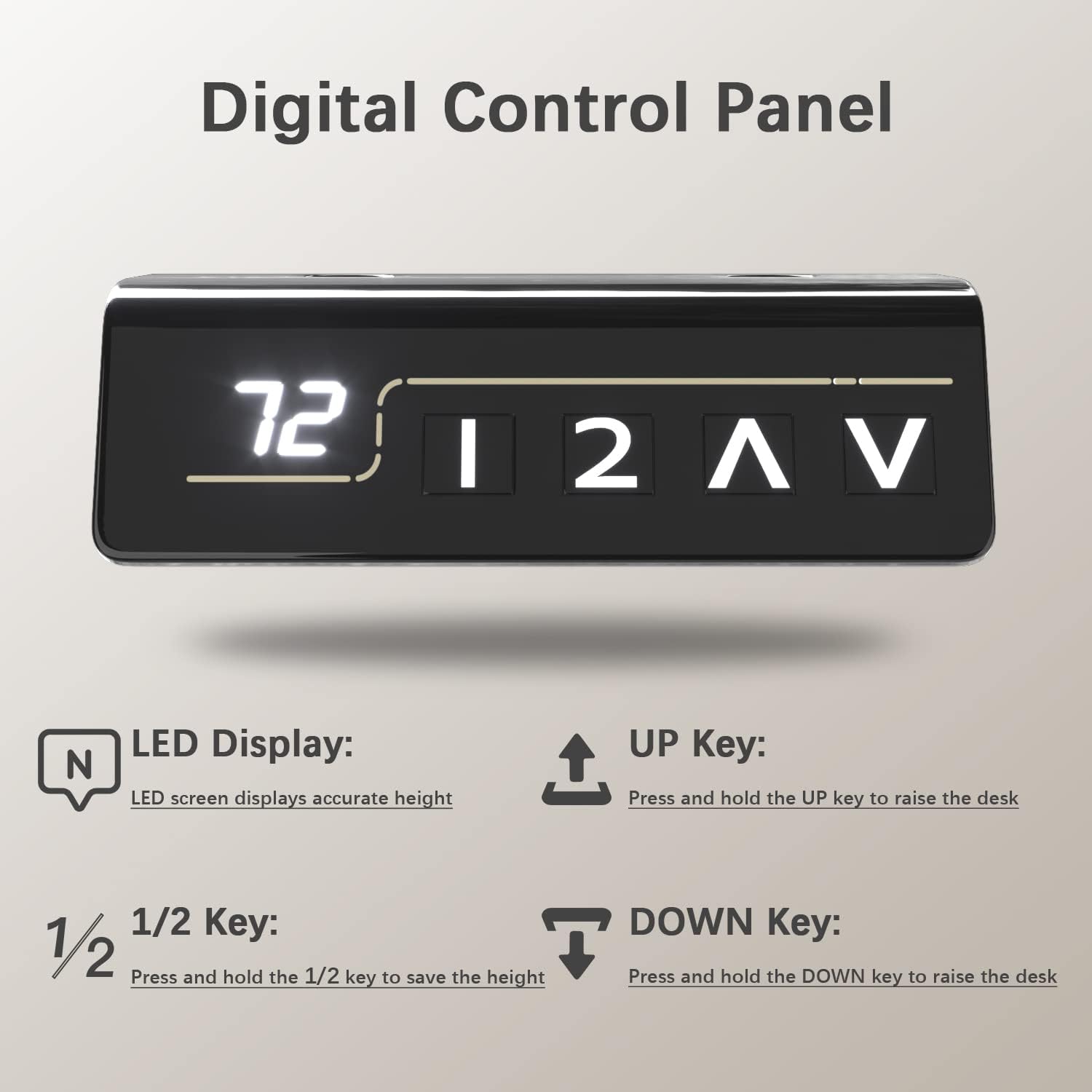
Сүрөт: А деталдуу view of the digital control panel, illustrating the LED height display and the intuitive buttons for height adjustment and memory settings.
Видео: Demonstration of the Furmax Electric Height Adjustable Desk in operation, showcasing the smooth and quiet height adjustment feature.
5. Негизги өзгөчөлүктөрү
- Электр бийиктигин жөндөө: Seamlessly switch between sitting and standing positions with the touch of a button, promoting a healthier work environment.
- Эстутум алдын ала орнотуулары: Two programmable memory settings allow you to quickly recall your preferred sitting and standing heights.
- Кең иш тактасы: The 55 x 24 inch desktop (composed of two high-class wood panels) provides ample space for multiple monitors, laptops, and office accessories. Features round desk corners and wire holes for organization.
- Туруктуу жана тынч мотор: Operates at 1 inch per second with noise levels below 50 dB, ensuring minimal disruption. Designed for over 10,000 uses.
- Мыкты курулуш: Box-frame structured steel legs with wide T-shaped feet provide excellent stability, even at maximum height.
- Коопсуздук өзгөчөлүктөрү: Includes safety lock, anti-collision function, and overheat protection for reliable operation.
- Интегралдык аксессуарлар: Comes with a convenient headphone hook and cable management holes to keep your workspace tidy.

Сүрөт: A visual representation of the desk's height range, from its lowest point of 28.7 inches to its highest point of 46.4 inches, demonstrating its versatility.
Сүрөт: Деталдаштырылган views of the practical desk hook for headphones, the stable wide T-shaped foot design, and the ergonomically designed cambered table corners.
6. Техникалык тейлөө
- Тазалоо: Иш тактасын жана алкакты жумшак менен сүртүңүз, гamp кездеме. Катуу химиялык заттардан же абразивдүү тазалагычтардан алыс болуңуз.
- Үзгүлтүксүз текшерүүлөр: Мезгил-мезгили менен бардык бурамалар менен байланыштарды текшерип туруңуз, алар бекем бойдон калууда.
- Кабелдик башкаруу: Ensure cables are neatly organized and do not interfere with the desk's movement.
7. Кыйынчылыктарды
| Көйгөй | Мүмкүн себеп | Чечим |
|---|---|---|
| Иш стол кыймылдабайт. | Power cable disconnected, motor issue, control panel malfunction. | Check power connections. Ensure the power adapter is securely plugged into the wall and the control unit. If the issue persists, contact customer support. |
| Бир калыпта эмес бийиктикти жөнгө салуу. | Connecting rod not properly installed or damaged. | Verify the connecting rod is correctly seated and secured between both legs. Perform an initial setup/reset if necessary (refer to full manual for specific reset procedures). |
| Жөндөө учурунда стол токтойт. | Overload (exceeding 145 lbs), anti-collision activated, overheat protection. | Reduce weight on the desk. Check for obstructions. Allow the motor to cool down if it has been used continuously. |
8. Техникалык шарттар
- Бренд: Furmax
- Модель номери: ST241
- Иш тактасынын өлчөмдөрү: 55" W x 24" D (139.7 cm x 60.96 cm)
- Бийиктик диапазону: 28.7" - 46.4" (72.9 см - 117.9 см)
- Салмак сыйымдуулугу: 145 фунт (65.7 кг)
- Мотор ылдамдыгы: 1 дюйм/сек
- Ызы-чуу деңгээли: 50 дБ төмөн
- Иш такта материалы: Wood (Laminated finish)
- Рамка материалы: Эритме болот
- Түсү: Brown (Desktop), Black (Frame)
- Өзгөчөлүктөрү: Electric Lift, Memory Presets, Anti-Collision, Overheat Protection, Cable Hole, Headphone Hook

Сүрөт: A comprehensive diagram detailing the dimensions of the desk (55 inches wide, 24 inches deep, and a height range of 28.7 to 48.1 inches) and its maximum weight capacity of 145 lbs.
9. Кепилдик маалыматы
This Furmax Electric Height Adjustable Standing Desk comes with a Чектелген Кепилдик. Please refer to the warranty card included in your package or contact Furmax customer support for detailed terms and conditions.
10. Кардарларды колдоо кызматы
For any questions, assistance with assembly, troubleshooting, or warranty claims, please contact Furmax customer support through the retailer's platform or the official Furmax webсайт.
Сиз да зыярат кылсаңыз болот Furmax Store on Amazon көбүрөөк маалымат жана колдоо булактары үчүн.