
1. Коопсуздук нускамалары
Сураныч, чогултуу жана колдонуу алдында бардык нускамаларды кунт коюп окуп чыгыңыз. Бул нускамаларды аткарбоо жаракатка же буюмдун бузулушуна алып келиши мүмкүн.
- Максималдуу Салмак сыйымдуулугу: Сунушталган максималдуу салмактан 65.7 кг (145 фунт) ашпаңыз.
- Motor System Safety: Ensure the motor system's safety lock, anti-collision, and overheat protection functions are working correctly.
- Ассамблея: Follow the assembly instructions precisely. Two people are recommended for assembly to prevent injury and ensure proper setup.
- Электр шаймандары: Avoid using power tools for tightening screws, especially for the desktop, as this may strip threads or damage components. Use hand tools provided or appropriate manual tools.
- Туруктуулук: The desk features a wide T-shaped foot design for stability. Ensure all feet are level on the ground before use.
- Тазалоо: Ensure there are no obstructions above or below the desk when adjusting height to prevent damage or injury.
- Балдар жана үй жаныбарлары: Иш учурунда балдарды жана үй жаныбарларын столдон алыс кармаңыз.
2. Продукт бүтүп калдыview жана өзгөчөлүктөрү
The Furmax Electric Height Adjustable Standing Desk is designed to promote a healthier work environment by allowing seamless transitions between sitting and standing positions. Its robust construction and intelligent features enhance productivity and comfort.
- Электр бийиктигин жөндөө: Easily control desk height with intuitive buttons, accommodating various user heights and preferences.
- Эстутум алдын ала орнотуулары: Features 1/2 memory keys for quick and accurate adjustment to your preferred sitting and standing heights.
- Коопсуздук өзгөчөлүктөрү: Equipped with safety lock, anti-collision, and overheat protection functions for secure operation.
- Кең иш тактасы: A large 55 x 24 inch (139.7 x 60.96 cm) wood desktop provides ample space for computers, notebooks, files, and other office supplies. Note: The desktop is divided into two pieces.
- Туруктуу жана тынч мотор: High-quality motor allows height adjustment between 28.7 to 46.4 inches (72.9 to 117.9 cm) at 1 inch/second with low noise (under 50 dB). Designed for over 10,000 uses.
- Мыкты курулуш: Box-frame structured steel legs with a wide T-shaped foot design ensure stability even at maximum height.
- Интегралдык өзгөчөлүктөрү: Includes cable holes for organization and a headphone hook for convenience.

Image: Adjustable height range of the Furmax Electric Standing Desk.
3. Пакеттин мазмуну
Before beginning assembly, ensure all parts are present and undamaged. Refer to the included parts list in your package for exact quantities.
- Иш стол (2 даана)
- Буттар (2 даана)
- Feet (2 pieces, T-shaped)
- Crossbar/Connecting Rod
- Мотор жана башкаруу кутучасы
- Санарип башкаруу панели
- Кубаттуу адаптер жана кабель
- Наушник илгич
- Монтаждоо жабдыктары (бурамалар, Аллен ачкычы ж.б.)
4. Орнотуу жана чогултуу
Follow these steps for proper assembly. It is recommended to have two people for this process.
- Жумуш мейкиндигин даярдоо: Чогулуш үчүн кенен аянтты тазалаңыз. Бардык компоненттерди жана жабдыктарды жайгаштырыңыз.
- Буттарды жана буттарды чогултуу: Attach the T-shaped feet to the bottom of each leg using the provided screws.
- Connect Legs with Crossbar: Secure the crossbar between the two legs. Ensure the connecting rod is properly inserted and aligned to transmit motor torque. Maintain equal height for both legs before securing the shaft.
- Attach Desktop Halves: Use the wooden dowels and metal plates to join the two desktop pieces securely. Tighten screws carefully by hand to avoid damage.
- Рамканы жумушчу столдун үстүнө орнотуу: Carefully place the assembled frame onto the underside of the desktop. Align screw holes and secure the frame to the desktop.
- Башкаруу кутусун жана панелди орнотуу: Mount the control box and digital control panel to the designated areas under the desktop.
- Зымдарды туташтыруу: Connect the motor, control panel, and power adapter to the control box. Use cable management clips to keep wires tidy.
- Кулакчын илгичин бекитүү: Install the headphone hook to your preferred side of the desk.
- Акыркы текшерүү: Ensure all screws are tightened, and the desk is stable. Plug in the power adapter.

Сүрөт: жарылды view of Furmax Electric Standing Desk components.
Video: Official installation guide for the Furmax Electric Height Adjustable Standing Desk.
5. Иштөө нускамалары
The digital control panel allows for easy and precise height adjustments.
- LED дисплей: The LED screen displays the current desk height in inches.
- UP Key (▲): Press and hold the UP key to raise the desk. Release to stop at the desired height.
- DOWN Key (▼): Press and hold the DOWN key to lower the desk. Release to stop at the desired height.
- Эстутумдун алдын ала орнотуулары (1, 2): To save a height, adjust the desk to your desired position, then press and hold the '1' or '2' key until you hear a beep or the display flashes. To recall a saved height, simply press the corresponding '1' or '2' key.
- Кагылышууга каршы өзгөчөлүгү: The desk is equipped with an anti-collision system. If the desk encounters an obstacle during adjustment, it will stop and reverse slightly to prevent damage.
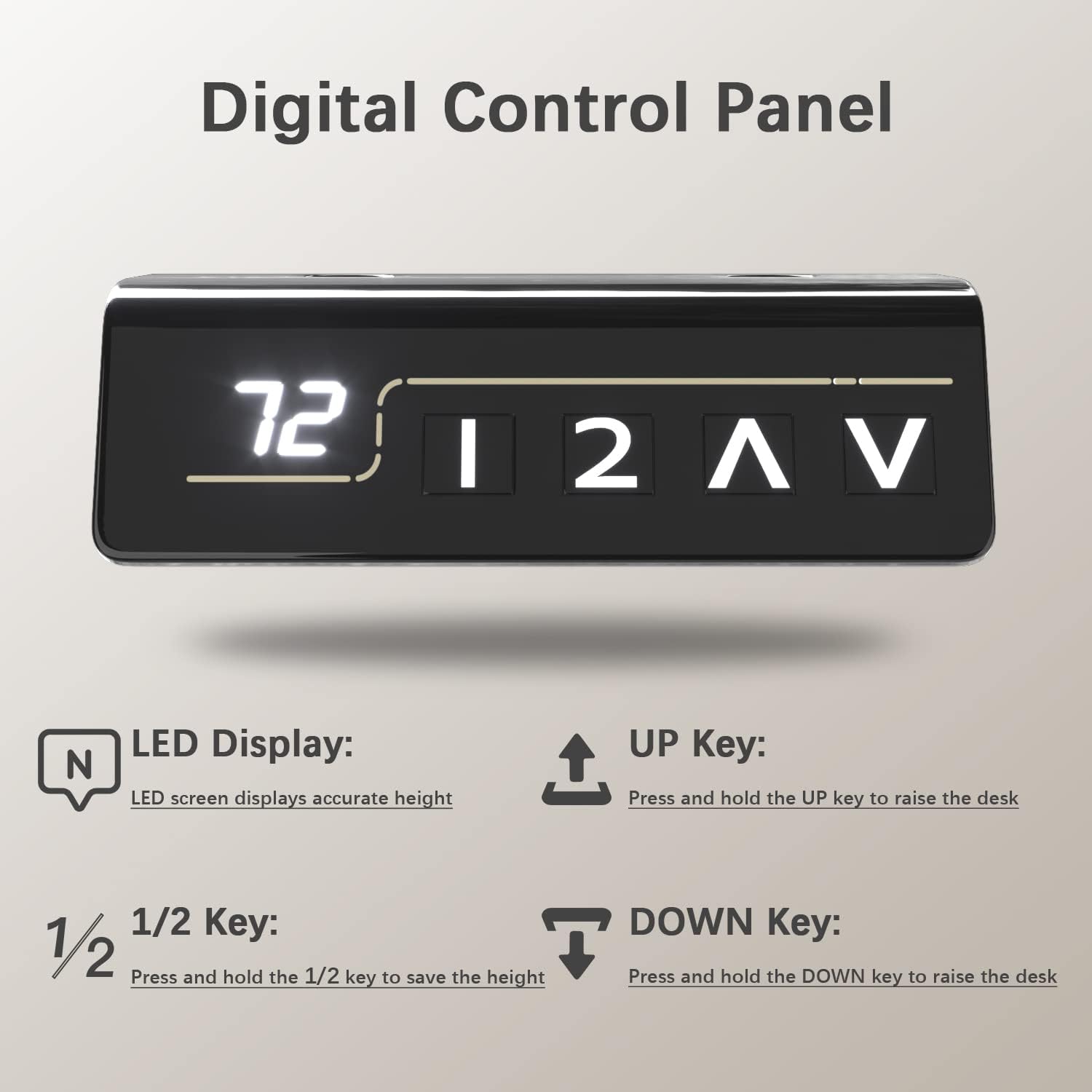
Image: Digital Control Panel.
6. Техникалык тейлөө
Үзгүлтүксүз тейлөө сиздин үстөлүңүздүн узак иштөөсүн жана оптималдуу иштешин камсыз кылат.
- Тазалоо: Иш тактасын жана алкакты жумшак менен сүртүңүз, гamp кездеме. Катуу химиялык заттардан же абразивдүү тазалагычтардан алыс болуңуз.
- Байланыштарды текшерүү: Мезгил-мезгили менен бардык бурамалар менен байланыштарды текшерип, алардын бекемдигин текшерип туруңуз. Керек болсо кайра тартыңыз.
- Кабелдик башкаруу: Keep cables organized to prevent tangling or interference with the desk's movement.
- Мотор багуу: The motor is designed for durability. Avoid overloading the desk beyond its weight capacity to prevent strain on the motor.
7. Кыйынчылыктарды
Эгер кандайдыр бир көйгөйгө туш болсоңуз, көйгөйлөрдү чечүү боюнча төмөнкү жалпы кеңештерге кайрылыңыз:
- Үстөл кыймылдабайт: Check if the power cable is securely plugged into both the desk and the wall outlet. Ensure no cables are caught or obstructing movement.
- Тегиз эмес бийиктиги: If the desk appears uneven, check that the connecting rod between the legs is properly installed and secured. Refer to the assembly instructions.
- Ката коддору: If the LED display shows an error code, consult the full user manual (if provided separately) or contact customer support for specific instructions.
- Anti-Collision Activation: If the desk stops unexpectedly, it might be due to the anti-collision feature. Remove any obstructions and try adjusting again.
8. Техникалык шарттар
| Өзгөчөлүк | Деталь |
|---|---|
| Бренд | Furmax |
| Модель номери | ST241 |
| Иш тактанын өлчөмдөрү (W x D) | 55" x 24" (139.7 см x 60.96 см) |
| Бийиктигин тууралоо диапазону | 28.7" - 46.4" (72.9 см - 117.9 см) |
| Максималдуу Салмак сыйымдуулугу | 145 фунт (65.7 кг) |
| Ылдамдык | 1 дюйм/секунда |
| Ызы-чуу деңгээли | 50 дБ төмөн |
| Иш столунун материалы | Жыгач (ламинатталган) |
| Frame Material | Металл (эритилген болот) |
| Өзгөчөлүктөр | Adjustable Height, Memory Presets, Anti-Collision, Cable Hole, Headphone Hook |

Image: Furmax Electric Standing Desk dimensions and weight capacity.
9. Кепилдик жана колдоо
This Furmax Electric Height Adjustable Standing Desk comes with a Чектелген Кепилдик. Белгилүү шарттарды жана шарттарды билүү үчүн пакетиңизге камтылган кепилдик картасын караңыз.
For technical support, troubleshooting assistance, or warranty claims, please contact Furmax customer service through the retailer where the product was purchased or visit the official Furmax webбайланыш маалыматы үчүн сайт.