
1. Коопсуздук боюнча маанилүү маалымат
Please read all instructions carefully before using the Eumspo G3 Bluetooth Headset. Keep this manual for future reference.
- Do not expose the headset or charging case to extreme temperatures, moisture, or corrosive materials.
- Аппаратты түшүрүүдөн же катуу таасирлерден сактаныңыз.
- Do not attempt to disassemble or modify the headset or charging case. This may void the warranty and cause damage.
- Балдар жана үй жаныбарлары жетпеген жерде сактаңыз.
- Берилген заряддоо кабелин жана тастыкталган кубат адаптерин гана колдонуңуз.
- Катуу үндөрдүн узакка созулушу угуунун бузулушуна алып келиши мүмкүн. Үндү коопсуз деңгээлге тууралаңыз.
2. Продукт бүтүп калдыview
The Eumspo G3 Bluetooth Headset is designed for clear communication and extended use. It features Bluetooth 5.0 connectivity, dual-mic noise cancellation, and a portable charging case.

Figure 2.1: Eumspo G3 Bluetooth Headset and Charging Case.

Figure 2.2: Headset components and controls, including the Multi-Function Button (MFB), Power On/Off, Dual-Mic Noise Cancelling, and Volume controls.
3. Кутуда эмне бар
Пакет, адатта, төмөнкүлөрдү камтыйт:
- Eumspo G3 Bluetooth Headset
- Заряддоо кутусу
- USB заряддоо кабели
- User Manual
- Ear tips/ear hooks
4. Орнотуу
4.1 Гарнитураны жана кутуну заряддоо
Биринчи колдонуудан мурун, гарнитураны жана анын заряддоо кутусун толук заряддаңыз.
- Place the headset into the charging case. Ensure it is properly seated.
- Заряддоо кутусун берилген USB кабели аркылуу кубат булагына туташтырыңыз.
- The LED indicator on the charging case will show the charging status. A full charge is indicated when the display shows 100.

Figure 4.1: The charging case provides power to the headset and displays the charge level.
4.2 Түзмөк менен жупташтыруу
Follow these steps to pair your Eumspo G3 headset with your smartphone or other Bluetooth-enabled device:
- Take the headset out of the charging case. It will automatically enter pairing mode.
- On your device, enable Bluetooth.
- Издөө available Bluetooth devices and select "G3" to connect.
- Туташтырылгандан кийин, гарнитура ийгиликтүү жупташууну көрсөтөт.
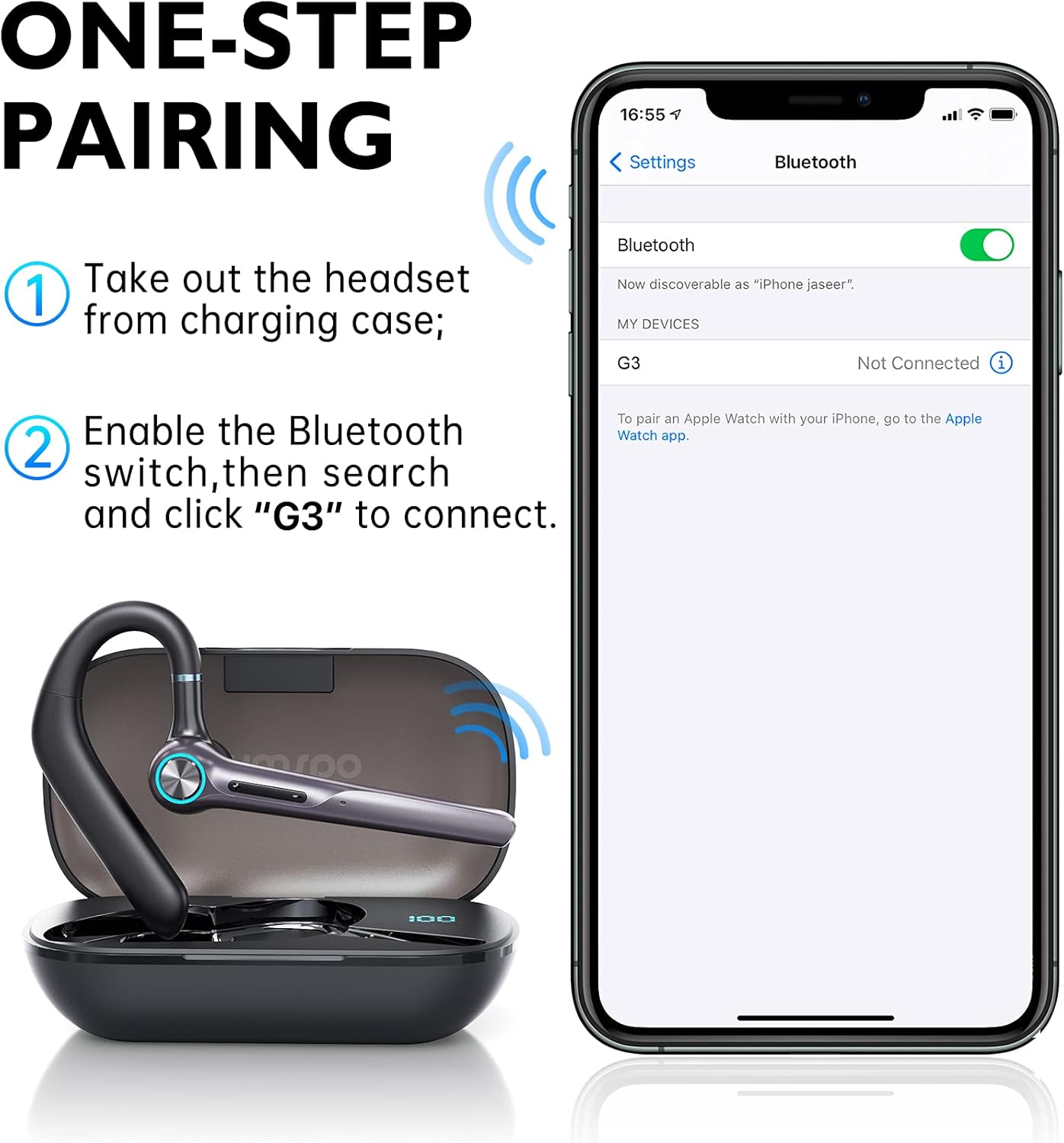
Figure 4.2: Visual guide for one-step pairing with a mobile device.
Видео 4.1: Бүттүview of the Eumspo G3 Bluetooth Noise-Cancelling Headset, demonstrating key features and usage.
5. Иштөө нускамалары
5.1 Гарнитураны тагынуу
The Eumspo G3 headset is designed for comfortable wear on either ear.
- Adjust the ear hook to fit securely over your ear.
- The headset can rotate 180 degrees to switch between the right and left ear.
- The earpiece can also rotate 270 degrees for optimal positioning and comfort.

Figure 5.1: The headset can be worn on either the right or left ear and adjusted for fit.
5.2 Basic Functions (Calls & Music)
The Multi-Function Button (MFB) and volume buttons control various headset operations.
- Күйгүзүү/өчүрүү: Press and hold the Power On/Off button.
- Чалууга жооп берүү/аяктоо: MFB баскычын бир жолу басыңыз.
- Чакырууну четке кагуу: MFB баскычын 3 секунд басып туруңуз.
- Акыркы номерди кайра терүү: Click the MFB button twice.
- Музыканы ойнотуу/тындыруу: MFB баскычын бир жолу басыңыз.
- Көлөмү: Click the "+" button once.
- Үнүн азайтуу: Click the "-" button once.
- Кийинки трек: "+" баскычын көпкө басыңыз.
- Мурунку трек: "-" баскычын көпкө басыңыз.
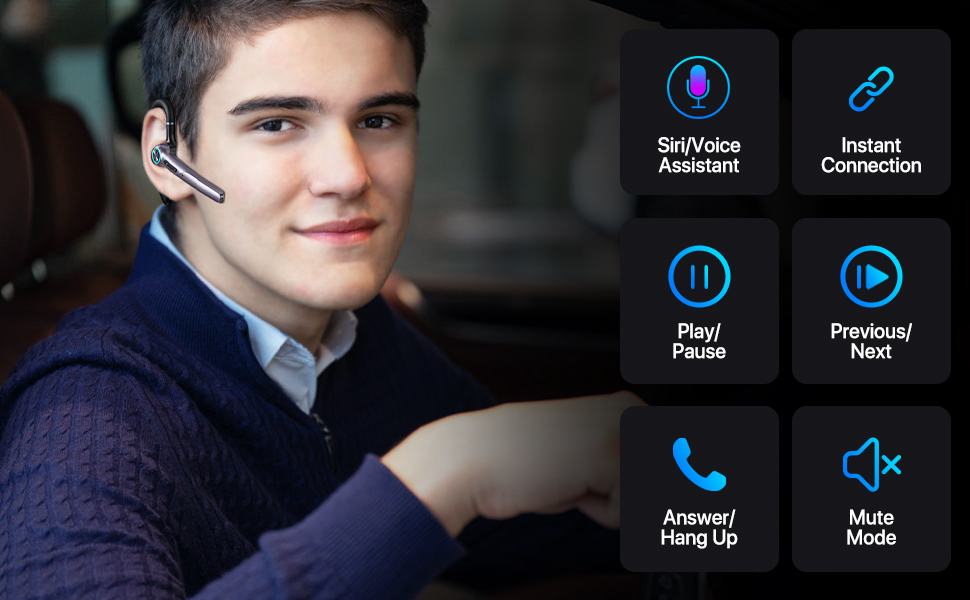
5.2-сүрөт: Детальдуу view of headset controls for various functions.
6. Техникалык тейлөө
6.1 Тазалоо
Гарнитураны үзгүлтүксүз тазалоо анын иштешин жана гигиенасын сактоого жардам берет.
- Wipe the headset and charging case with a soft, dry, lint-free cloth.
- Абразивдүү тазалагычтарды, спиртти же химиялык эриткичтерди колдонбоңуз.
- кулактын учтарын жарнама менен үзгүлтүксүз тазалаңызamp кездеме менен ороп, кайра орнотуудан мурун толугу менен кургатыңыз.
6.2 Сактоо
Колдонулбай турган учурда, гарнитураны чаңдан жана бузулуудан коргоо үчүн кубаттоочу кутучасында сактаңыз.
- Күн тийбеген, салкын, кургак жерде сактаңыз.
- If storing for an extended period, charge the headset and case periodically to maintain battery health.
7. Кыйынчылыктарды
If you encounter issues with your Eumspo G3 headset, refer to the following common solutions:
| Көйгөй | Чечим |
|---|---|
| Гарнитура күйбөйт. | Ensure the headset is charged. Place it in the charging case and connect the case to power. |
| Түзмөк менен жупташтыруу мүмкүн эмес. | Make sure Bluetooth is enabled on your device. Ensure the headset is in pairing mode (taken out of the case). Forget previous pairings on your device and try again. Move closer to the device. |
| Үн жок же үн сапаты начар. | Check the volume levels on both the headset and your connected device. Ensure the headset is properly seated in your ear. Re-pair the headset with your device. |
| Заряддоо куту заряддалбай жатат. | Verify the charging cable and power adapter are working correctly. Ensure the cable is securely connected to both the case and the power source. |
| MFB button unresponsive. | Some users have reported intermittent issues with the MFB button. Try resetting the headset by placing it back in the charging case and taking it out again. If the issue persists, contact customer support. |
8. Техникалык шарттар
| Өзгөчөлүк | Деталь |
|---|---|
| Бренд | Eumspo |
| Модель номери | G3 |
| Байланыш технологиясы | Bluetooth v5.0, Зымсыз |
| Кулак жайгаштыруу | Кулакта |
| Noise Control | Активдүү ызы-чууну жокко чыгаруу |
| Батареянын орточо иштөө мөөнөтү | 48 саат (заряддоо кутусу менен) |
| Заряддоо кутусунун кубаттуулугу | 400mAh |
| Шайкеш түзмөктөр | Android and iOS Smartphones, Laptops, Tablets |
| Сууга туруктуулук деңгээли | Суу өткөрбөйт |
| Материал | Пластик |
| Өлчөмдөр | 5.67 x 3.07 x 1.54 дюйм |
| Салмагы | 4.97 унция |
9. Кепилдик маалыматы
Eumspo products typically come with a limited warranty. Please refer to the product packaging or the official Eumspo webКепилдиктин белгилүү бир шарттары жана эрежелери үчүн сайтты караңыз. Кепилдик боюнча дооматтар үчүн сатып алганыңызды тастыктаган документти сактап коюңуз.
10. Колдоо
For further assistance, technical support, or customer service, please contact Eumspo through their official support channels. Details can usually be found on the product packaging or their webсайт.