1. Киришүү
Welcome to the T500 Plus PRO HiWatch 6 Smartwatch user manual. This guide provides essential information on setting up, operating, and maintaining your new smartwatch. The T500 Plus PRO HiWatch 6 Smartwatch offers high-quality Bluetooth calling with a built-in microphone for clear conversations. It features a long-lasting battery and an adjustable strap for a perfect fit. Customize your watch with a variety of exciting watch faces and choose from a wide range of straps to match your personal style. Its eye-catching design enhances your modern look.
2. Продукциянын өзгөчөлүктөрү
- Bluetooth чалуу: Make and receive calls directly from your watch with a high-quality microphone.
- Bluetooth Dial Pad: Conveniently dial numbers from your wrist.
- Ден соолук мониторинги: Includes Heart Rate Monitor and Blood Pressure Monitor.
- Уйкуну аныктоо: Track your sleep patterns for better health insights.
- Ыңгайлаштырылган саат жүздөрү: Choose from a variety of exciting watch faces to personalize your device.
- Алмаштырылган кайыштар: Easily swap straps to match your style.
- Узак мөөнөттүү батарея: Designed for extended use on a single charge.
3. Кутуда эмне бар
Upon opening your T500 Plus PRO HiWatch 6 Smartwatch package, you should find the following items:
- T500 Plus PRO HiWatch 6 Smartwatch Unit
- Adjustable Silicone Strap (pre-attached or separate)
- Магниттик кубаттоочу кабель
- User Manual

Figure 3.1: Package Contents. This image displays all items included in the T500 Plus PRO HiWatch 6 Smartwatch retail box, showing the watch, charging cable, and instruction booklet.
4. Орнотуу колдонмосу
4.1 Акылдуу саатты кубаттоо
Before first use, fully charge your smartwatch. Connect the magnetic charging cable to the charging points on the back of the watch and plug the USB end into a compatible power adapter (not included) or a computer's USB port.

Figure 4.1: Smartwatch and Charging Cable. This image shows the T500 Plus PRO HiWatch 6 Smartwatch with its strap detached, alongside the magnetic charging cable, illustrating how the watch connects for charging.
4.2 Боону бекитүү
If the strap is not pre-attached, slide each half of the strap into the slots on either side of the watch body until you hear a click, indicating it is securely fastened.
4.3 Күйгүзүү/өчүрүү
- Күйгүзүү: Экран күйгөнгө чейин каптал баскычын бир нече секунд басып туруңуз.
- Өчүрүү: Капталдагы баскычты басып, кармап туруңуз, андан кийин экрандагы параметрлерден "Өчүрүү" дегенди тандаңыз.
4.4 Смартфонуңуз менен жупташуу
To unlock the full potential of your smartwatch, pair it with your smartphone via Bluetooth. Download the companion app (refer to the quick start guide or packaging for app name, typically "HiWatch" or similar). Enable Bluetooth on your phone, open the app, and follow the on-screen instructions to search for and connect to your T500 Plus PRO HiWatch 6.
5. Иштөө нускамалары
5.1 Интерфейсте навигация
- Сенсордук экран: Менюларды жана функцияларды чабыттоо үчүн солго/оңго, өйдө/ылдый сүрүңүз. Тандоо үчүн таптаңыз.
- Каптал баскычы: Башкы экранга кайтуу же түзмөктү ойготуу үчүн басыңыз. Кубат параметрлери үчүн көпкө басыңыз.
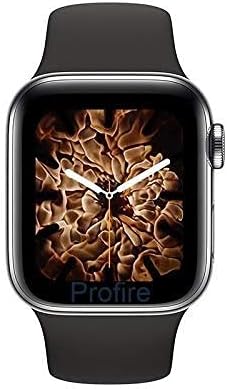
Figure 5.1: Smartwatch Display. This image shows the front of the T500 Plus PRO HiWatch 6 Smartwatch, highlighting its vibrant display and a customizable watch face.
5.2 Чалууларды кабыл алуу жана кабыл алуу
Once paired via Bluetooth, you can use the watch for calls:
- Терүү: Access the Bluetooth dial pad from the main menu and enter the number.
- Кабыл алуу: Чакыруу келгенде, жооп берүү үчүн саат экранындагы жашыл сөлөкөттү басыңыз.
5.3 Ден соолуктун мониторинги
Access the Heart Rate Monitor, Blood Pressure Monitor, and Sleep Detection features from the main menu. Ensure the watch is worn snugly on your wrist for accurate readings.
5.4 Сааттын жүзүн ыңгайлаштыруу
Swipe on the home screen or navigate through the settings menu to change your watch face. The companion app may offer additional watch face options.

Figure 5.2: Customizable Watch Faces. This image shows the product packaging highlighting three distinct watch faces available for the T500 Plus PRO HiWatch 6 Smartwatch.
6. Техникалык тейлөө жана кам көрүү
- Тазалоо: Саатты жана боону жумшак, кургак чүпүрөк менен дайыма сүртүп туруңуз. өжөр кир үчүн, бир аз d колдонууamp чүпүрөк жана кылдат кургатуу.
- Суу каршылык: While the watch may have some splash resistance, avoid submerging it in water or wearing it during swimming or showering unless explicitly stated otherwise in product specifications.
- Заряддоо: Use only the provided charging cable. Avoid exposing the charging contacts to moisture or corrosive liquids.
- Сактагыч: Колдонулбаган убакта саатты салкын, кургак жерде сактаңыз.
- Ашыкча температурадан сактаныңыз: Do not expose the watch to extreme heat or cold, as this can damage the battery and internal components.
7. Кыйынчылыктарды
| Көйгөй | Мүмкүн чечим |
|---|---|
| Саат күйбөй жатат. | Сааттын толук заряддалганын текшериңиз. Кубаттагычты кеминде 30 мүнөткө туташтырыңыз. |
| Смартфон менен жупташтыруу мүмкүн эмес. |
|
| Ден соолук көрсөткүчтөрүнүн туура эместиги. | Ensure the watch is worn snugly on your wrist, not too loose or too tight. Clean the sensors on the back of the watch. |
| Батареянын иштөө мөөнөтү кыска. | Reduce screen brightness, disable unnecessary notifications, and limit continuous health monitoring. Ensure proper charging. |
8. Техникалык шарттар
| Өзгөчөлүк | Деталь |
|---|---|
| Модель аты | T500 Plus Pro Black Smartwatch |
| Бренд | Жалпы |
| Элемент моделинин номери | T500 PLUS PRO BLACK SMARTWATCH |
| Продукциянын өлчөмдөрү | 4 x 3 x 1 см |
| Элемент Салмагы | 150 грамм |
| Screen Size | 44 миллиметр |
| Элементтин формасы | Төрт бурчтуу |
| Байланыш технологиясы | Зымсыз |
| Зымсыз байланыш стандарты | Bluetooth |
| Өзгөчөлүктөр | Уйку монитор |
| GPS | GPS жок |
| Түс | Кара |
| Стиль | Заманбап |
| Өндүрүүчү | KAROL BAGH |
| Биринчи жеткиликтүү күн | 25-июнь, 2022-жыл |
9. Кепилдик жана колдоо
For warranty information and customer support, please refer to the documentation included with your purchase or contact the retailer where you purchased the T500 Plus PRO HiWatch 6 Smartwatch. Keep your proof of purchase for warranty claims.
Көбүрөөк жардам алуу үчүн, өндүрүүчүнүн веб-сайтына да кайрылсаңыз болот website (if available) or contact their customer service department. Please have your model number (T500 PLUS PRO BLACK SMARTWATCH) and ASIN (B09WF59R7H) ready when seeking support.


