
Cuifati CUIFATIywqr0emxu88079
HRD-700 Portable Shortwave Radio User Manual
Model: CUIFATIywqr0emxu88079 | Brand: Cuifati
1. Киришүү
The HRD-700 Portable Shortwave Radio is a versatile and compact device designed for comprehensive radio reception and music playback. It supports multiple frequency bands including FM, MW, SW, WB (NOAA Weather Band), and features Bluetooth 5.0 connectivity and memory card playback. Its portable design makes it ideal for various indoor and outdoor activities.

Сүрөт 1.1: Алдыңкы view of the HRD-700 Portable Shortwave Radio with its telescopic antenna extended.
Негизги өзгөчөлүктөрү:
- Толук топту кабыл алуу: Capable of receiving FM, MW, SW, and WB (NOAA Weather Band) frequencies.
- Bluetooth 5.0 туташуусу: Seamlessly connect to Bluetooth-enabled devices for audio streaming.
- Эстутум картасын колдоо: Аудио ойнотуу files directly from a memory card (TF card).
- Automatic Search & Store: Features coding pulley switch tuning with automatic station search and storage.
- Узак мөөнөттүү батарея: Узак пайдалануу үчүн 1000mAh батарейка менен жабдылган.
- Уйку таймери: Customizable sleep timer function (10-70 minutes).
- Күчтүү аудио: Features a 3W diaphragm horn for clear and loud sound output.
- Портативдик дизайн: Compact and lightweight, designed for easy carrying.
2. Продукциянын компоненттери
Before using your HRD-700 radio, please ensure all components are present in the packaging.
Кутуда эмне бар:
- HRD-700 Portable Shortwave Radio Unit
- USB Type-C Charging Cable (Power Cord)
- Ташуу баштыгы
- Колдонуучунун Колдонмосу (бул документ)
3. Башкаруу элементтери жана функциялар
Familiarize yourself with the various parts and controls of your HRD-700 radio for optimal operation.

Image 3.1: Detailed diagram of the HRD-700 radio highlighting key components and their functions.
| Компонент | Функция |
|---|---|
| Галстук антенна | Extend for improved FM, SW, and WB reception. |
| Rotating Tuning Button | Used for manual tuning of radio frequencies. |
| Дисплей | Shows frequency, mode, battery status, and other information. |
| FM Road Pulley | Another control for tuning, possibly for fine-tuning FM. |
| Тышкы баяндамачылар | Audio output for listening to radio or music. |
| C түрү заряддоо порту | Connect the USB Type-C cable for charging the internal battery. |
| Lanyard Hole | Attachment point for a lanyard or wrist strap for portability. |
| TF Card Jack | Insert a TF (microSD) card for playing stored audio files. |
| Батарея капкагы | Access point for the internal battery. |
| Режим тандоо которуштуруу | Switch between Radio (Channel Reception), BT (Bluetooth Reception), and M.Play (TF Card Mode). |
4. Орнотуу
4.1 Батареяны заряддоо
The HRD-700 radio comes with a built-in 1000mAh rechargeable lithium battery. Before first use, it is recommended to fully charge the battery.
- Locate the Type C Charging Port on the radio.
- Connect one end of the provided USB Type-C charging cable to the radio's charging port.
- USB кабелинин экинчи учун стандарттуу USB кубат адаптерине (кошумча эмес) же компьютердин USB портуна туташтырыңыз.
- The display will indicate charging status. Once fully charged, the indicator will change or turn off.

Image 4.1: The HRD-700 radio with an illustration of its high-capacity 1000mAh lithium battery, emphasizing improved battery life.
4.2 Эстутум картасын салуу (милдеттүү эмес)
If you wish to play audio files from a memory card, follow these steps:
- Locate the TF Card Jack on the side or back of the radio.
- Gently insert a compatible TF (microSD) card into the slot until it clicks into place. Ensure the card is inserted in the correct orientation.
- Алып салуу үчүн, картаны сыртка чыкканча акырын ичкери түртүңүз.
5. Иштөө нускамалары
5.1 Күйгүзүү/өчүрүү жана үндү башкаруу
- To power on the radio, locate the power button/switch and press/slide it to the ON position.
- To power off, press/slide the power button/switch to the OFF position.
- Adjust the volume using the dedicated volume control knob or buttons. The radio features a 3W speaker capable of over 120 decibels.
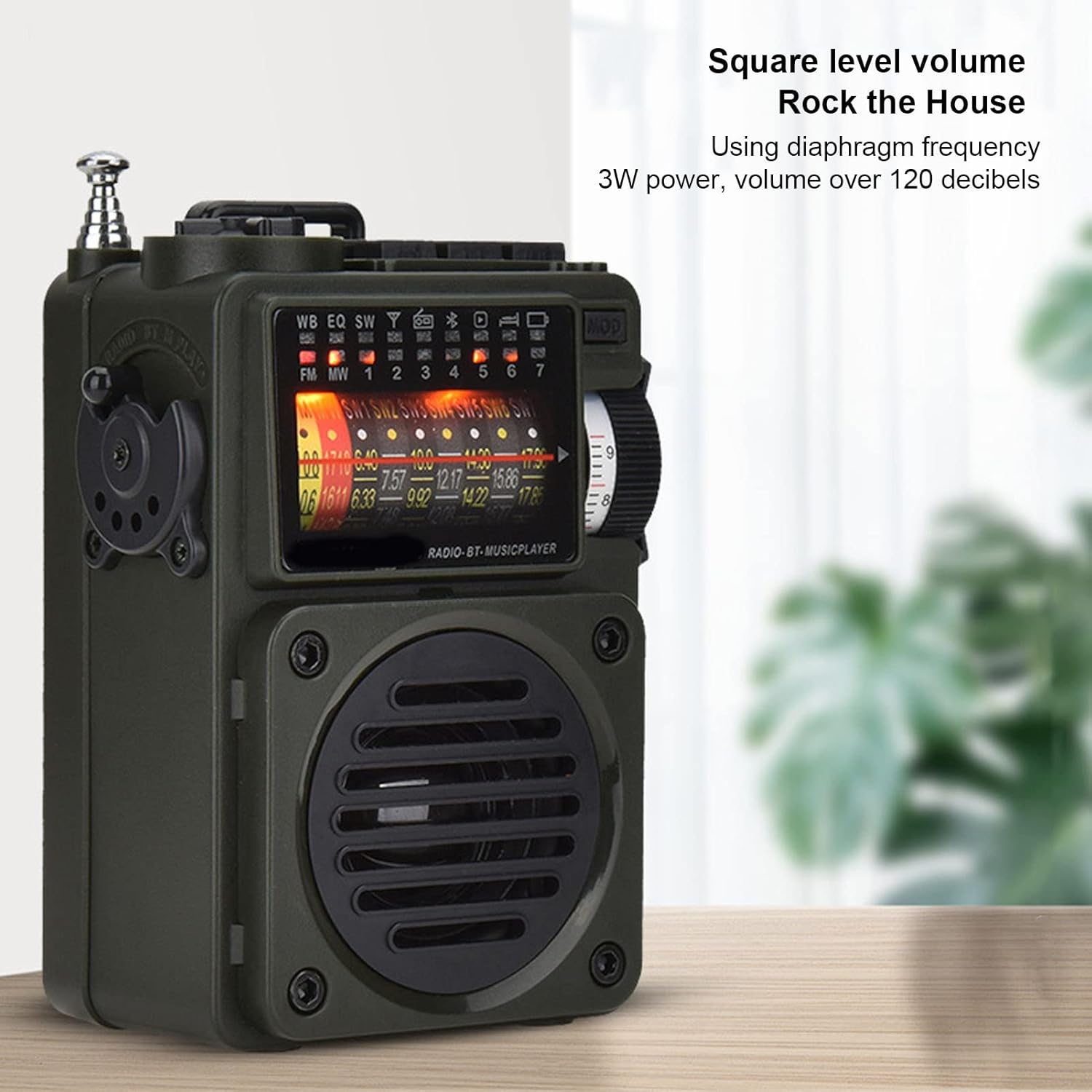
Image 5.1: The HRD-700 radio demonstrating its powerful sound output, suitable for filling a room.
5.2 Radio Reception (FM/MW/SW/WB)
The HRD-700 supports a wide range of radio bands.
- Режимди тандоо: Use the Mode Selection Switch to select "Radio" mode.
- Антеннаны узартуу: For optimal reception on FM, SW, and WB bands, fully extend the Tie Rod Antenna.
- тюнинг:
- Кол менен жөндөө: Use the Rotating Tuning Button or FM Road Pulley to manually scan for stations.
- Автоматтык издөө: Press the designated button (refer to display icons for "Auto Search") to automatically scan and store available stations.
- Станцияны кайра чакыртып алуу: After automatic search, use the tuning controls to cycle through stored stations.

Image 5.2: The HRD-700 radio's display showing various frequency bands (FM, MW, SW, WB) and tuning indicators.
5.3 Bluetooth музыка ойнотуу
Connect your smartphone or other Bluetooth devices to the HRD-700 for wireless audio streaming.
- Режимди тандоо: Use the Mode Selection Switch to select "BT" (Bluetooth) mode. The radio will enter pairing mode, indicated by a flashing Bluetooth icon on the display.
- Bluetooth иштетүү: Түзмөгүңүздө (мисалы, смартфондо) Bluetooth'ду күйгүзүп, жеткиликтүү түзмөктөрдү издеңиз.
- Жупташуу: Select "HRD-700" from the list of found devices. Once connected, the Bluetooth icon on the radio's display will become solid.
- Музыка ойнотуу: Start playing music on your connected device. Audio will now play through the HRD-700 radio.

Image 5.3: The HRD-700 radio demonstrating its wireless Bluetooth connectivity with a smartphone, offering a stable connection up to 10 meters.
5.4 Memory Card (TF Card) Playback
Play your favorite audio files түздөн-түз TF картасынан.
- Картаны кыстаруу: Ensure a TF card with audio files is properly inserted into the TF Card Jack (refer to Section 4.2).
- Режимди тандоо: Use the Mode Selection Switch to select "M.Play" (Memory Play) mode.
- Ойнотуу: The radio will automatically begin playing audio files from the TF card. Use the radio's controls (e.g., next/previous track buttons, if available) to navigate your music.
5.5 Уйку таймеринин функциясы
The sleep timer allows you to set a duration after which the radio will automatically turn off.
- Access the sleep timer setting through the radio's menu or a dedicated button (refer to display icons or specific buttons).
- Adjust the sleep timer duration between 10 and 70 minutes.
- Confirm your selection. The radio will power off automatically after the set time.
6. Техникалык тейлөө
6.1 Тазалоо
- Радионун сыртын жумшак, кургак чүпүрөк менен сүртүңүз.
- Абразивдүү тазалагычтарды, момдорду же эриткичтерди колдонбоңуз, анткени алар финишке зыян келтириши мүмкүн.
- Ар кандай тешиктерге ным кирүүдөн сактаңыз.
6.2 Сактоо
- Радиону көпкө чейин колдонбогон учурда, аны салкын, кургак жерде, күн нуру түз тийген жерден жана өтө жогорку температурадан алыс сактаңыз.
- It is advisable to partially charge the battery before long-term storage and recharge it every few months to maintain battery health.
- Use the provided carrying pouch to protect the radio from dust and scratches.
7. Кыйынчылыктарды
If you encounter issues with your HRD-700 radio, please refer to the following common problems and solutions.
| Көйгөй | Мүмкүн себеп | Чечим |
|---|---|---|
| Радио күйбөйт. | Батарея түгөнүп калды. | Charge the radio using the provided USB Type-C cable. |
| Радио кабыл алуу начар. | Антенна узартылган эмес; начар сигнал аймак; кийлигишүү. | Телескопиялык антеннаны толугу менен сунуңуз. Сигнал жакшыраак жерге жылыңыз. Электрондук тоскоолдук булактарынан алыс болуңуз. |
| Bluetooth туташпай жатат. | Radio not in BT mode; device Bluetooth off; too far from radio. | Ensure radio is in "BT" mode. Turn on Bluetooth on your device. Keep devices within 10 meters (32.8 feet). Try re-pairing. |
| No sound from memory card. | Card not inserted correctly; radio not in M.Play mode; unsupported file формат. | Re-insert the TF card. Switch to "M.Play" mode. Ensure audio fileлар шайкеш форматта. |
| Дисплей бош же бүлбүлдөп турат. | Батареянын аздыгы; ички маселе. | Charge the radio. If the problem persists, contact customer support. |
8. Техникалык шарттар
| Өзгөчөлүк | Деталь |
|---|---|
| Бренд | Cuifati |
| Модель номери | CUIFATIywqr0emxu88079 |
| Байланыш технологиясы | Bluetooth |
| Bluetooth версиясы | 5.0 (up to 10m/32.8ft stable connection range) |
| Tuner Technology | FM, AM |
| Радио топтору колдоого алынат | SW, FM, AM, WB (NOAA Weather Band) |
| Power Source | Battery Powered (1000mAh internal battery) |
| Speaker Output | 3W (over 120 decibels) |
| Дисплей технологиясы | LCD |
| Өзгөчө өзгөчөлүк | Portable, Memory Card Playback, Sleep Timer |
| Элемент Салмагы | 7.7 унция |
| Пакеттин өлчөмдөрү | 5.47 x 5 x 2.05 дюйм |
| Келип чыккан өлкө | Кытай |
9. Кепилдик жана колдоо
Cuifati products are manufactured to high-quality standards. For any questions, technical support, or warranty inquiries, please contact the seller or manufacturer directly through your purchase platform.
Сураныч, кепилдик дооматтар үчүн сатып алуу далилиңизди сактап коюңуз.
Көбүрөөк маалымат алуу үчүн, сиз иш сапары менен болот Amazon'догу Куифати дүкөнү.
Ask a question about this manual
Ask about setup, troubleshooting, compatibility, parts, safety, or missing instructions. Manuals+ will review the question and use this page’s manual context to help answer it.