
Monster MH72101
Monster Gaming гарнитурасын колдонуучунун колдонмосу
Модел: MH72101
1. Киришүү
This manual provides comprehensive instructions for the Monster Gaming Headset, designed for an immersive audio experience across various gaming platforms. Please read this manual carefully to ensure proper setup, operation, and maintenance of your headset.

Figure 1.1: The Monster Gaming Headset, showcasing its design and connectivity options.
2. Негизги өзгөчөлүктөрү
- 50 мм неодим драйверлери: High-quality drivers for enhanced acoustic sensitivity and rich audio detail.
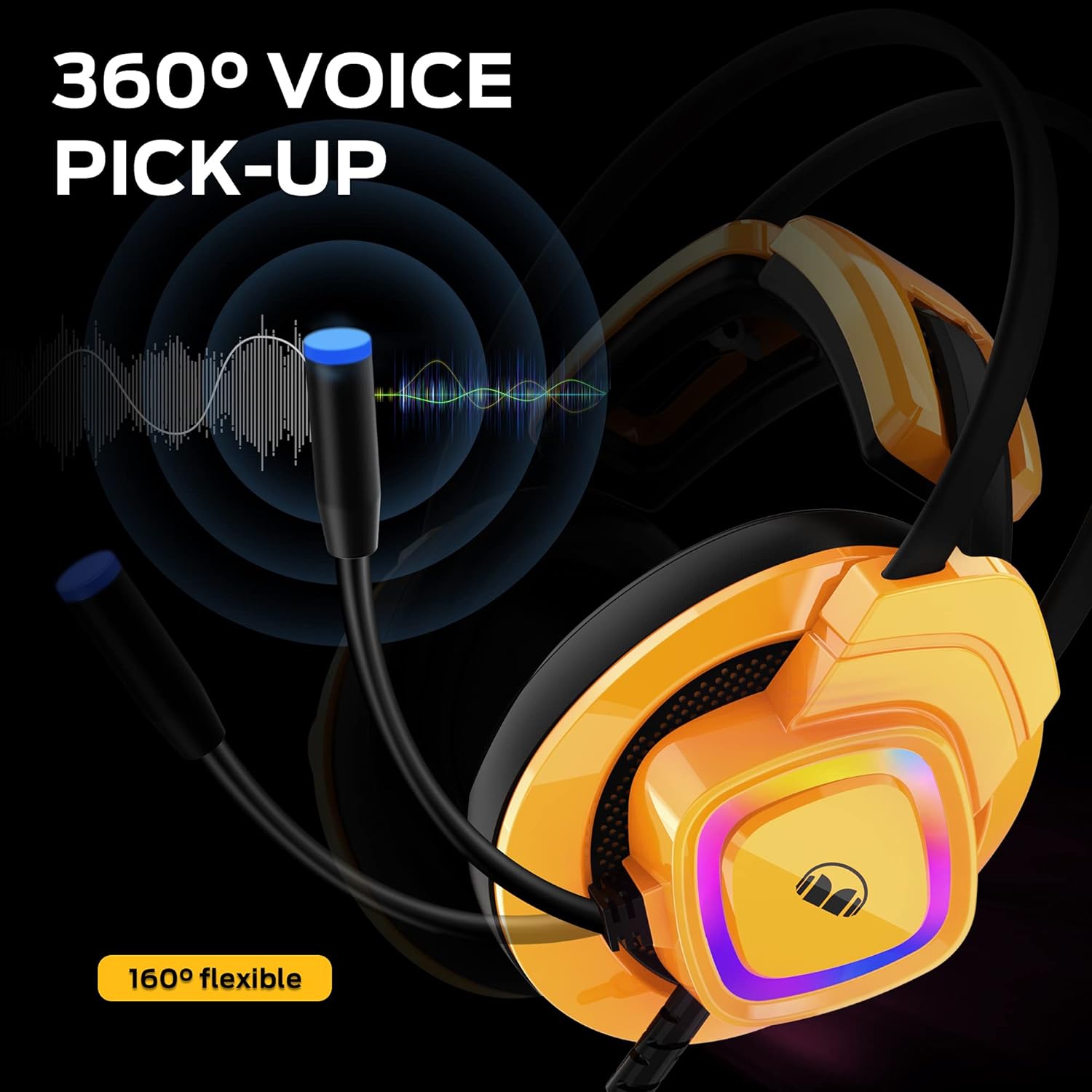
- Ызы-чууну жок кылуучу микрофон: Integrated microphone with a 160-degree flexible gooseneck for clear communication.
- Адаптивдүү асма баш боосу: Automatically adjusts to head size for comfortable, long-duration wear.
- Soft Memory Foam Ear Cushions: Designed to reduce external noise and provide comfort.
- RGB LED жарыктандыруу: USB-powered lighting on earcups for an immersive gaming atmosphere.
- Көп платформа шайкештиги: Compatible with PC, PS4, PS5, Xbox One X, and other devices with a 3.5mm audio jack.
- Ыңгайлуу башкаруу каражаттары: Easily accessible rotary volume control on the cable.

2.1-сүрөт: Детальдуу view of ear cushion, memory foam, and volume control.

Figure 2.2: Illustration of the 50mm magnetic neodymium driver components.
2.3-сүрөт: Гарнитуранын көргөзмөсүasing its vibrant RGB LED lighting.
3. Орнотуу нускамалары
3.1 Гарнитураны туташтыруу
The Monster Gaming Headset connects via a 3.5mm audio jack for audio and microphone functions, and a USB connector for the RGB LED lighting. Ensure your device has the necessary ports.
- For PC/Laptop (Windows/macOS): Plug the 3.5mm jack into your computer's audio output/input port. Plug the USB connector into an available USB port for LED lighting.
- For PS4/PS5/Xbox One/Nintendo Switch: Plug the 3.5mm jack directly into the controller or console's audio port. For Xbox One, an adapter (not included) may be required for older controllers. The USB connection for LED lighting is optional and depends on console USB port availability.
- For Smart Phones/Tablets: Plug the 3.5mm jack into your device's headphone jack. USB for LED lighting is generally not supported on mobile devices.

Figure 3.1: Headset compatibility with different gaming platforms and devices.
3.2 Initial Audio Configuration
After connecting, you may need to adjust audio settings on your device:
- Windows: Go to Sound Settings > Playback and Recording tabs to select the headset as the default device.
- PlayStation/Xbox: Navigate to Audio Devices in the system settings to ensure the headset is recognized and selected for audio output and microphone input.
4. Гарнитураны иштетүү
4.1 Үндү башкаруу
The headset features an inline rotary volume control. Rotate the wheel up to increase volume and down to decrease volume.
4.2 Микрофонду колдонуу
The flexible gooseneck microphone can be adjusted to your preferred position for optimal voice pickup. Ensure the microphone is positioned close to your mouth for clear communication.

Figure 4.1: The flexible microphone and its 360-degree voice pickup range.
4.3 RGB LED жарыктандыруу
The RGB LED lights on the earcups are powered via the USB connection. They will illuminate automatically when the USB is plugged into a powered port. There are no user-adjustable settings for the lighting patterns on the headset itself.
5. Техникалык тейлөө
Proper care will extend the life of your Monster Gaming Headset:
- Тазалоо: Use a soft, dry cloth to clean the earcups and headband. Do not use harsh chemicals or abrasive cleaners.
- Сактагыч: Гарнитураны күн нурунан жана экстремалдык температурадан алыс салкын, кургак жерде сактаңыз.
- Кабельге кам көрүү: Кабелдин кескин ийилип же кыйшайып кетишинен алыс болуңуз. Гарнитураны сууруу үчүн кабелди тартпаңыз; ар дайым сайгычын кармап туруңуз.
- Микрофон: Handle the flexible microphone gently. Avoid excessive bending or twisting.
6. Кыйынчылыктарды
| Көйгөй | Мүмкүн себеп | Чечим |
|---|---|---|
| Гарнитурадан аудио жок | Headset not properly connected; Incorrect audio output selected; Volume too low. | Ensure 3.5mm jack is fully inserted. Check device's sound settings to select headset as output. Increase volume using inline control and device settings. |
| Микрофон иштебей жатат | Микрофондун үнү өчүрүлгөн; Туура эмес киргизүү түзмөгү тандалып алынган; Микрофон туура эмес коюлган. | Check if the microphone mute switch (if present on cable) is off. In device's sound settings, select headset microphone as input. Adjust microphone position closer to mouth. |
| RGB LED lights not on | USB not connected; USB port not providing power. | Ensure USB connector is firmly plugged into a powered USB port. Try a different USB port. |
| Үндүн бурмаланышы же статикалык | Loose connection; Interference; Volume too high. | Reconnect the 3.5mm jack. Move away from other electronic devices causing interference. Reduce volume. |
7. Техникалык шарттар
- Модель аты: MH72101
- Байланыш технологиясы: Wired (3.5mm audio jack + USB for LED)
- Наушник уячасы: 3.5 мм Джек
- Айдоочунун көлөмү: 50мм неодим
- Микрофон: Noise-Cancelling, 160-degree flexible
- Өзгөчөлүктөр: Noise Cancellation, Surround Sound, Volume Control, RGB LED Light
- Шайкеш түзмөктөр: PS4, PS5, Xbox One, PCs
- Материал: Metal (frame components), Memory Foam (ear cushions)
- Элемент Салмагы: 1.32 фунт
- Пакеттин өлчөмдөрү: 9.65 x 9.25 x 4.13 дюйм
- Камтылган компоненттер: Интегралдык кабели бар гарнитура
8. Кепилдик жана колдоо
For warranty information and technical support, please refer to the official Monster product website or contact Monster customer service directly. Keep your purchase receipt as proof of purchase for any warranty claims.
Кошумча жардам алуу үчүн, баш багыңыз Amazonдагы Monster дүкөнү.
Ask a question about this manual
Ask about setup, troubleshooting, compatibility, parts, safety, or missing instructions. Manuals+ will review the question and use this page’s manual context to help answer it.