
1. Кош келиңиз
Thank you for choosing the ASHATA FG-100 DDS Function Generator. This device is designed for generating various waveforms with high precision and stability, making it suitable for a wide range of electronic testing and calibration applications. Please read this manual thoroughly before operation to ensure proper use and to maximize the lifespan of your device.
2. Продукциянын өзгөчөлүктөрү
- Generates main output waveforms including sine, square, triangle, and sawtooth.
- Features a filter (toggle on/off) for sine and pulse outputs.
- High precision and stable frequency, ideal for oscilloscope scan time calibration.
- Square wave output suitable for oscilloscope attenuators and probe pulse adjustment.
- Compact size, multi-functional, simple operation, and portable design.
3. Пакеттин мазмуну
- 1 x ASHATA FG-100 DDS Function Generator
- 1 x USB кабели
- 1 x Instruction Manual
4. Коопсуздук чаралары
- Always use the specified power supply (DC 3.5-10V, DC 5V adapter or 3.7V recommended).
- Аппаратты нымдуулукка же экстремалдык температурага дуушар кылбаңыз.
- Аппаратты түшүрүүдөн же катуу таасирлерден сактаныңыз.
- Аппаратты ажыратууга же өзгөртүүгө аракет кылбаңыз, анткени бул кепилдикти жокко чыгарат жана зыян келтириши мүмкүн.
- Балдар жетпеген жерде сактаңыз.
5. Орнотуу колдонмосу
5.1 Кубатты туташтыруу
Connect the provided USB cable to the DC 5V input port on the side of the function generator and to a suitable USB power source (e.g., a computer USB port, a USB wall adapter).

Figure 1: ASHATA FG-100 DDS Function Generator connected via USB cable.
5.2 Баштапкы күйгүзүү
Once power is connected, the device will automatically power on, and the LCD display will illuminate, showing the current waveform function and frequency.
6. Иштөө нускамалары
6.1 Interface Overview
The front panel of the FG-100 features an LCD display, several buttons for control, and an amplitude adjustment knob. The output is provided via a BNC connector.
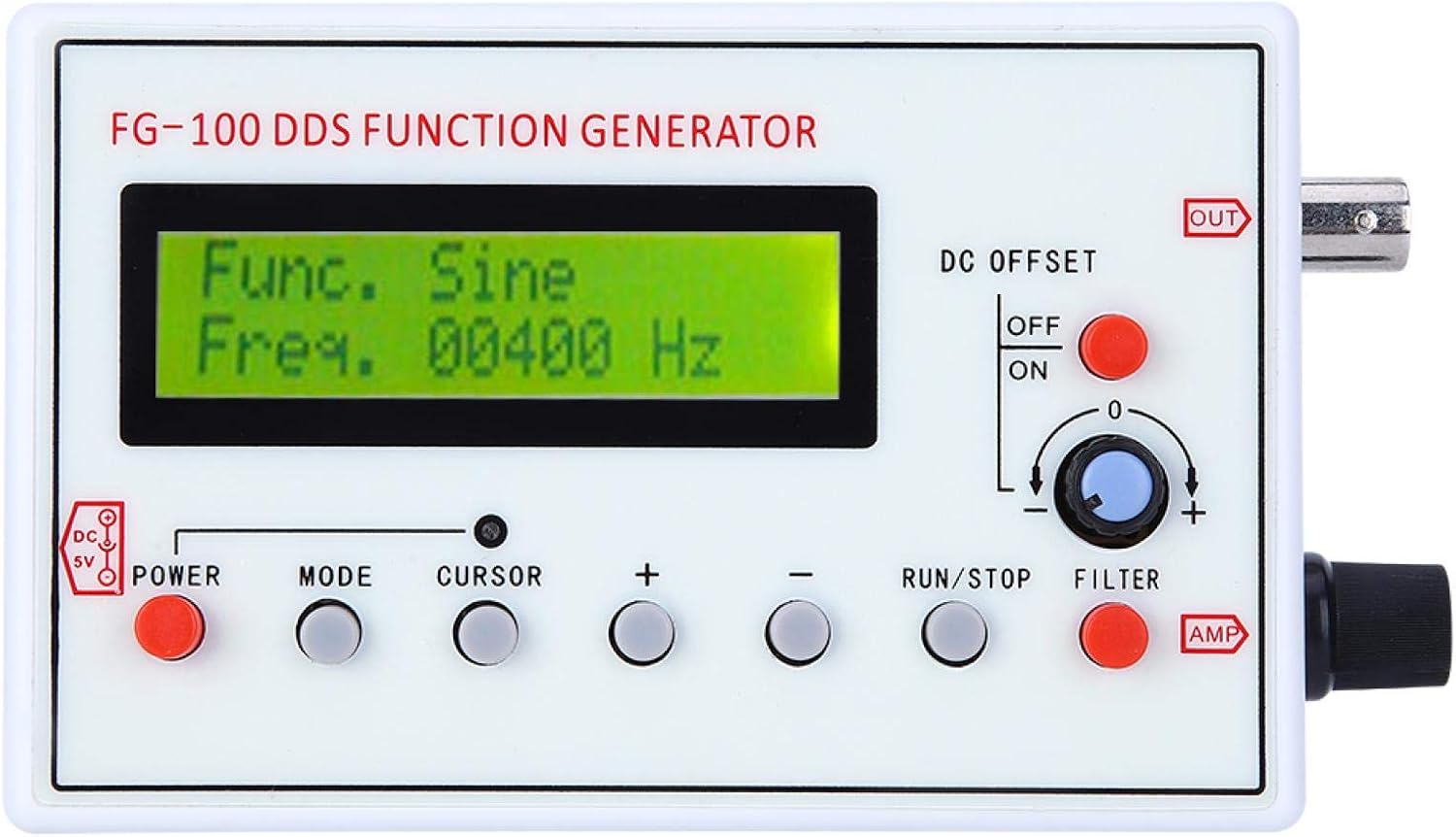
Figure 2: Front panel controls and display of the FG-100.
6.2 Selecting Waveforms
басыңыз РЕЖИМ button to cycle through the available waveform types: Sine, Square, Triangle, Forward Sawtooth, Reverse Sawtooth, Pulse, and ECG. The selected waveform will be displayed on the LCD.
6.3 Жыштыкты жөндөө
колдонуу КУРСОР button to select the digit you wish to adjust. Then, use the + жана - buttons to increase or decrease the frequency value. The frequency range for sine waves is 1Hz to 500kHz (amplitude flat up to 200kHz), and for other waveforms, it is 1Hz to 20kHz for optimal phase noise and distortion.
6.4 Тууралоо Amplitude and DC Offset
- Ampлитуда (AMP): айлантыңыз AMP knob on the right side of the device to adjust the output waveform amplitude. The maximum output amplitude is ±10V (peak-to-peak).
- DC Offset: колдонуу DC OFFSET switch (ON/OFF) and the associated knob to apply or adjust a DC bias to the waveform. The maximum DC offset is ±10V.
6.5 Using the Filter
басыңыз ФИЛЬТР button to toggle the internal filter on or off. This filter is designed for sine and pulse waveforms.
6.6 Outputting Waveforms
басыңыз RUN/STOP button to start or stop the waveform output. When running, the waveform will be generated at the OUT BNC туташтыргычы.
6.7 Иштөөнү көрсөтүү
Video 1: Demonstration of waveform selection, frequency adjustment, and output control on a similar DDS Function Generator (FG-200).
7. Техникалык шарттар
| Спецификация | Нарк |
|---|---|
| Элемент түрү | Милдети генератор |
| Материал | ABS |
| Frequency Range (Sine) | 1Hz~500kHz (Magnitude flat up to 200kHz) |
| Frequency Range (Other Waveforms) | 1Hz~20kHz (with good phase noise and small distortion) |
| Резолюция | 1Hz |
| Чыгаруу толкун формалары | Sine, Square, Triangle, Forward Sawtooth, Reverse Sawtooth, Pulse, ECG |
| Sine Distortion | 1% (frequency = 1kHz) |
| Чыгуу Ampжарыктык | Maximum ±10V (P-P) |
| Чыгуу импедансы | 50 Ом |
| DC Offset | Maximum ±10V (can be turned off) |
| Ички чыпка | For sine or pulse, can be turned on/off |
| Электр камсыздоо | DC 3.5-10V (DC 5V adapter or 3.7V recommended) |
| Элемент Салмагы | 240 г |
| Өндүрүүчү | АШАТА |
| Модель номери | RRCc16w9sb5kxiua361 |
| Келип чыккан өлкө | Кытай |
8. Кароо жана тейлөө
- Тазалоо: Аппараттын сыртын тазалоо үчүн жумшак, кургак чүпүрөктү колдонуңуз. Абразивдүү тазалагычтарды же эриткичтерди колдонбоңуз.
- Сактагыч: Store the function generator in a cool, dry place away from direct sunlight and extreme temperatures.
- Колдонуу: Handle the device with care to avoid damage to the display or connectors.
9. Көйгөйлөрдү чечүү боюнча колдонмо
| Көйгөй | Мүмкүн себеп | Чечим |
|---|---|---|
| Түзмөк күйбөйт. | Электр кубаты жок, USB кабели бузулган же кубат булагында көйгөй бар. | Ensure USB cable is securely connected. Try a different USB port or power adapter. Verify power source is active. |
| No waveform output. | Output stopped, incorrect settings, or faulty connection. | Press the RUN/STOP button to start output. Check frequency and amplitude settings. Ensure output cable is correctly connected to the BNC port. |
| Settings are not saved after power off. | This model does not feature memory retention for settings. | Settings must be re-entered after each power cycle. |
| Inaccurate frequency output. | Calibration needed or external interference. | Use an external frequency counter or oscilloscope to verify and adjust settings if necessary. Ensure proper grounding. |
10. Кепилдик жана Кардарларды колдоо
ASHATA products are designed for reliability and performance. For warranty information, technical support, or service inquiries, please refer to the contact information provided with your purchase or visit the official ASHATA webсайт. Сатып алуу квитанциясын кепилдик дооматтары үчүн сатып алуунун далили катары сактаңыз.


