
BANIGIPA A-G2 Black
BANIGIPA Open Ear Headphones User Manual
Model: A-G2 Black
Introduction
Thank you for choosing the BANIGIPA Open Ear Headphones. These air conduction headphones are designed to provide a comfortable listening experience while keeping you aware of your surroundings. With advanced Bluetooth 5.4 technology and a noise-canceling boom microphone, they are ideal for various activities including office work, sports, and daily use.
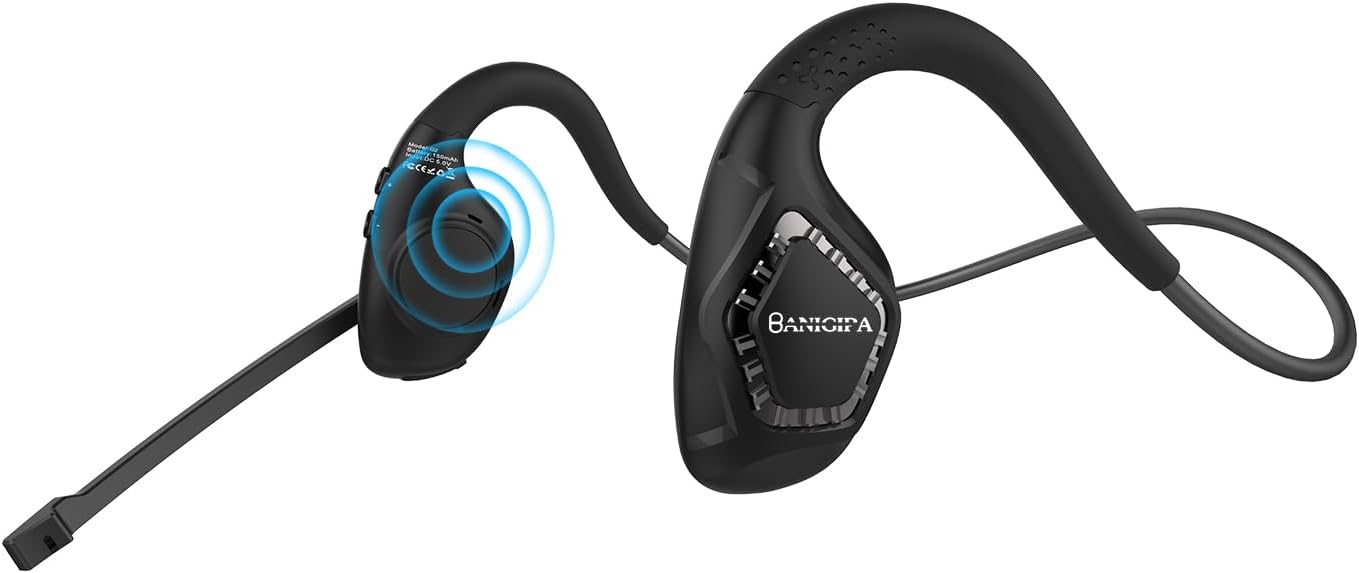
Image: The BANIGIPA A-G2 Black Open Ear Headphones, showcasing their design with the boom microphone.
Кутуда эмне бар?
- 1 x G2 аба өткөргүч гарнитура
- 1 x USB заряддоо кабели
- 1 x User Manual

Image: A visual representation of the items included in the product packaging: the G2 headset, a USB charging cable, and the user manual.
Негизги өзгөчөлүктөрү
- Open-Ear Air Conduction Design: Sound is conducted through the air, avoiding discomfort from in-ear or over-ear headphones. This design keeps the ear canal healthy and clean, and ensures situational awareness by allowing you to hear your surroundings.
- Жаңыртылган Bluetooth 5.4: Features the latest Bluetooth 5.4 technology for stable and fast connections up to 10m/33ft. Supports dual audio decoding (AAC and SBC) for enhanced sound quality.
- 270° Rotatable Boom Microphone: Equipped with a noise-canceling boom microphone that uses a single-mark algorithm for noise reduction, filtering out up to 95% of background noise. The flexible boom can be rotated 270° to optimize voice pickup for clear calls.
- Батареянын узак иштөө мөөнөтү: Built-in 165mAh rechargeable lithium-ion battery provides up to 10 hours of uninterrupted music/calls and 150 hours of standby time. Fully charges in approximately 1.5 hours via Type-C USB.
- Жеңил жана Ыңгайлуу: Weighing only 28g, these headphones are designed for long-term wear without ear pain. Made with skin-friendly, soft silicone and high-resilience titanium alloy memory for 360° bending without deformation.

Image: Illustrates the comfort of open-ear headphones compared to traditional headphones, highlighting health and safety benefits.

Image: A graphic depicting the advanced Bluetooth 5.4 chip, emphasizing fast and stable connection capabilities.

Image: A man wearing the headset in an office setting, illustrating the effectiveness of the DSP noise-canceling microphone for HD calling.

Image: A visual guide demonstrating the 270° rotatable boom microphone and its mute function.

Image: An infographic detailing the durable and long battery life, showing 165mAh capacity, 2 hours charging time, 10 hours working time, and USB-C charging port.

Image: A man wearing the headphones while working on a laptop, illustrating the light and comfortable design for all-day wear.
Жайгашуу
Гарнитураны заряддоо
Before first use, fully charge your BANIGIPA G2 headphones. Connect the included USB charging cable to the Type-C port on the headset and to a compatible USB power source. A full charge takes approximately 1.5 hours.
Bluetooth Жупташтыруу
- Гарнитура өчүрүлгөнүн текшериңиз.
- Press and hold the multi-function button until the LED indicator flashes blue and red, indicating pairing mode.
- On your device (phone, laptop, tablet), enable Bluetooth and search for available devices.
- Select "BANIGIPA G2" from the list. Once connected, the LED indicator will turn solid blue or off, depending on the model.
The headset supports simultaneous connection to two devices. To connect a second device, ensure the first device is connected, then put the headset back into pairing mode and connect to the second device. The headset will intelligently switch between devices.

Image: Shows the headphones simultaneously connected to a smartphone and a laptop, demonstrating multi-device compatibility.
Гарнитураны тагынуу
- Place the headphones on your head, ensuring the ear hooks rest comfortably over your ears.
- Adjust the ear hang to a comfortable and secure position.
- Rotate the boom microphone up to 270° to the most suitable position for clear voice pickup.

Image: A three-step diagram illustrating how to properly wear the headphones, adjust the ear hang, and position the microphone.
Иштөө нускамалары
The BANIGIPA G2 headphones feature multi-function buttons for easy control of your audio and calls.

Image: A detailed diagram showing the location and function of each button on the headset, including power, volume, track control, call management, mute, and voice assistant activation.
- Күйгүзүү/өчүрүү: Көп функциялуу баскычты басып, кармап туруңуз.
- Музыканы ойнотуу/тындыруу: Көп функциялуу баскычты бир жолу басуу.
- Кийинки ыр: Press the 'Volume +' button.
- Мурунку ыр: Press the 'Volume -' button.
- Көлөмү: Press and hold the 'Volume +' button.
- Үнүн азайтуу: Press and hold the 'Volume -' button.
- Чалууга жооп берүү/түп коюу: Кирүүчү чалуу учурунда көп функциялуу баскычты бир жолу басыңыз.
- Чакырууну четке кагуу: Кирүүчү чалуу учурунда көп функциялуу баскычты басып, кармап туруңуз.
- Үн Жардамчысын жандыруу: Көп функциялуу баскычты эки жолу басыңыз.
- Музыка/Оюн режимин которуу: Triple press the multi-function button. (Note: Gaming mode has approximately 70ms audio delay.)
- Үнсүз функция: Use the dedicated mute button on the boom microphone.
Техникалык тейлөө
- Тазалоо: Гарнитураны жумшак, кургак чүпүрөк менен сүртүңүз. Катуу химиялык заттарды же абразивдүү материалдарды колдонуудан алыс болуңуз.
- Сактагыч: Наушниктерди салкын, кургак жерде күндүн тике тийген нурунан жана экстремалдык температурадан алыс сактаңыз.
- Батареяга кам көрүү: Батареянын иштөө мөөнөтүн узартуу үчүн, бат-баттан батарейканы толук зарядсыздандырбаңыз. Гарнитураны узак убакыт бою колдонбосо дагы, дайыма заряддап туруңуз.
- Суу каршылык: The headset is waterproof, but avoid prolonged submersion in water. Dry thoroughly if exposed to moisture.
Проблемаларды чечүү
| Көйгөй | Мүмкүн себеп | Чечим |
|---|---|---|
| Гарнитура күйбөйт. | Батарея аз. | Гарнитураны берилген USB кабели менен толук заряддаңыз. |
| Түзмөк менен жупташтыруу мүмкүн эмес. | Гарнитура жупташтыруу режиминде эмес; түзмөктө Bluetooth өчүк; аппарат өтө алыс. | Ensure headset is in pairing mode (flashing blue/red LED). Turn on Bluetooth on your device. Move device closer to headset (within 10m/33ft). Restart both devices. |
| Үн жок же үн сапаты начар. | Volume too low; incorrect audio output selected; interference. | Increase volume on headset and device. Check audio output settings on your device. Move away from sources of strong electromagnetic interference. |
| Микрофон иштебей жатат же түшүнүксүз. | Microphone muted; incorrect microphone input selected; microphone not positioned correctly. | Ensure microphone is not muted. Check microphone input settings on your device. Rotate the boom microphone to be closer to your mouth. |
| Audio delay in gaming mode. | Normal operation for gaming mode. | The headset has an approximate 70ms audio delay in gaming mode, which is typical for this feature. |
| Headset is uncomfortable or causes ear pain. | Туура эмес ылайыктуу. | Adjust the ear hooks and headset position for a comfortable fit. The open-ear design is intended to prevent ear pain from prolonged use. |
Note: This is an air conduction headset, not a bone conduction headset. It is not recommended for people with hearing impairments.
Техникалык шарттар
| Өзгөчөлүк | Деталь |
|---|---|
| Модель аты | G2 Black |
| Байланыш технологиясы | Bluetooth, зымсыз |
| Зымсыз байланыш технологиясы | Bluetooth |
| Bluetooth версиясы | 5.4 |
| Bluetooth диапазону | 10 метр (33ft) |
| Кулак жайгаштыруу | Ачык кулак |
| Форма фактору | Ачык кулак |
| Микрофон | Noise-Canceling Boom Microphone (270° Rotatable) |
| Батарея сыйымдуулугу | 165 мАч литий-ион |
| Батареянын иштөө мөөнөтү | Up to 10 Hours (Music/Calls) |
| Күтүү убактысы | 150 саатка чейин |
| Заряддоо убактысы | Болжол менен 1.5 саат |
| Заряддоо порту | C түрүндөгү USB |
| Элемент Салмагы | 28 грамм (0.988 унция) |
| Материал | Пластик, силикон |
| Сууга туруктуулук деңгээли | Суу өткөрбөйт |
| Шайкеш түзмөктөр | iOS and Android Cellphones, Laptops, Tablets, PC, Desktops |
| Audio Latency (Gaming Mode) | 70 Миллисекунд |
| Камтылган компоненттер | 1 X G2 Air Conduction Headset, 1 X USB Charging Cable, User Manual |
Кепилдик жана колдоо
For product support, troubleshooting assistance, or warranty inquiries, please contact BANIGIPA customer service through the retailer's platform or visit the official BANIGIPA store page on Amazon. Please refer to your purchase receipt for specific warranty terms and conditions.
Ask a question about this manual
Ask about setup, troubleshooting, compatibility, parts, safety, or missing instructions. Manuals+ will review the question and use this page’s manual context to help answer it.