
1. Продукт бүтүп калдыview
The Monster N-Lite 200 AirLinks are lightweight, in-ear wireless earbuds designed for comfort and high-quality stereo sound. They feature touch controls, deep bass, a built-in microphone for noise reduction during calls, and an IPX5 waterproof rating, making them suitable for sports and daily use. The earbuds come with a portable charging case that supports both USB-C and wireless charging.

Image: Monster N-Lite 200 AirLinks earbuds and their charging case, showcasing алардын компакттуу дизайны.
2. Кутуда эмне бар
- Monster N-Lite 200 AirLinks Earbuds (Left and Right)
- Портативдик кубаттоочу куту
- USB-C заряддоо кабели
- 3 Pairs of Ear Tips (Small, Medium, Large - Medium size pre-installed)
- Колдонуучунун Колдонмосу (бул документ)
3. Орнотуу
3.1. Fitting the Ear Tips
For optimal sound quality and comfort, select the ear tips that best fit your ears. The Monster N-Lite 200 AirLinks come with three sizes: Small (S), Medium (M), and Large (L). The medium size is pre-installed.
- Gently remove the pre-installed ear tips by pulling them off the earbud nozzle.
- Select a different size ear tip and align it with the earbud nozzle.
- Push the ear tip onto the nozzle until it is securely attached.
- Test the fit by inserting the earbuds into your ears. A good fit should feel snug and create a seal that blocks out most ambient noise.

Image: Illustration showing the three sizes of ear tips (S, M, L) and a person fitting an earbud for comfortable wear.
3.2. Баштапкы жупташтыруу
The Monster N-Lite 200 AirLinks feature one-step pairing for convenience.
- Ensure your mobile device's Bluetooth is turned on.
- Заряддоо кутусун ачып, эки кулакчынды алып салыңыз. Алар автоматтык түрдө жупташтыруу режимине кирет.
- On your mobile device, go to Bluetooth settings and select "Monster N-Lite 200 AirLinks" from the list of available devices.
- Once connected, you will hear an audible "Connected" prompt from the earbuds.

Image: A hand holding the open earbud case next to a smartphone displaying a successful Bluetooth connection to "Monster N-Lite 200 AirLinks".
Алгачкы жупташтыруудан кийин кулакчындар кубаттоочу кутудан чыгарылганда акыркы жупташтырылган түзмөккө автоматтык түрдө туташат.
4. Иштөө нускамалары
The Monster N-Lite 200 AirLinks feature high-sensitivity touch controls on each earbud for easy management of calls and music playback.

Image: A visual representation of the earbud's touch-sensitive area and the various functions it controls, including play/pause, skip tracks, volume, and voice assistant activation.
4.1. Touch Control Functions
| Акция | Функция |
|---|---|
| Tap (either earbud) | Чалууга жооп берүү / аяктоо |
| Short Press (either earbud) | Музыканы ойнотуу/тындыруу |
| Double-tap (Left earbud) | Үндү азайтуу |
| Double-tap (Right earbud) | Үнүн жогорулатуу |
| Long Press for 2 seconds (Left earbud) | Мурунку ыр |
| Long Press for 2 seconds (Right earbud) | Кийинки ыр |
| Кулакчындын кайсынысын болбосун үч жолу таптоо | Үн Жардамчысын жандырыңыз (Siri, Google Жардамчы) |
4.2. Mono/Stereo Mode
The earbuds support both stereo and mono modes. You can use both earbuds together for a stereo experience or use a single earbud (left or right) independently for mono audio, which is useful for calls or when you need to be aware of your surroundings.

Image: Depicts various usage scenarios including sharing earbuds, using one for calls, and both for stereo music, highlighting the versatility of mono and stereo modes.
5. Заряддоо
The Monster N-Lite 200 AirLinks charging case supports both USB-C wired charging and wireless charging.
5.1. Кулакчындарды заряддоо
- Кулакчындарды заряддоо кутусуна салыңыз. Алардын тиешелүү уячаларына туура отурганын текшериңиз.
- Корпустагы индикатор кубаттоо абалын көрсөтөт.
- A single charge provides over 4.5 hours of playtime.
5.2. Charging the Case
- USB-C заряддоо: Connect the provided USB-C cable to the charging port on the case and the other end to a USB power source (e.g., wall adapter, computer USB port).
- Зымсыз кубаттоо: Place the charging case on a compatible wireless charging pad. Ensure the case is centered on the pad for efficient charging.
- The charging case provides a total of 21 hours of playtime for the earbuds.
- Fast charging allows for quick power replenishment.
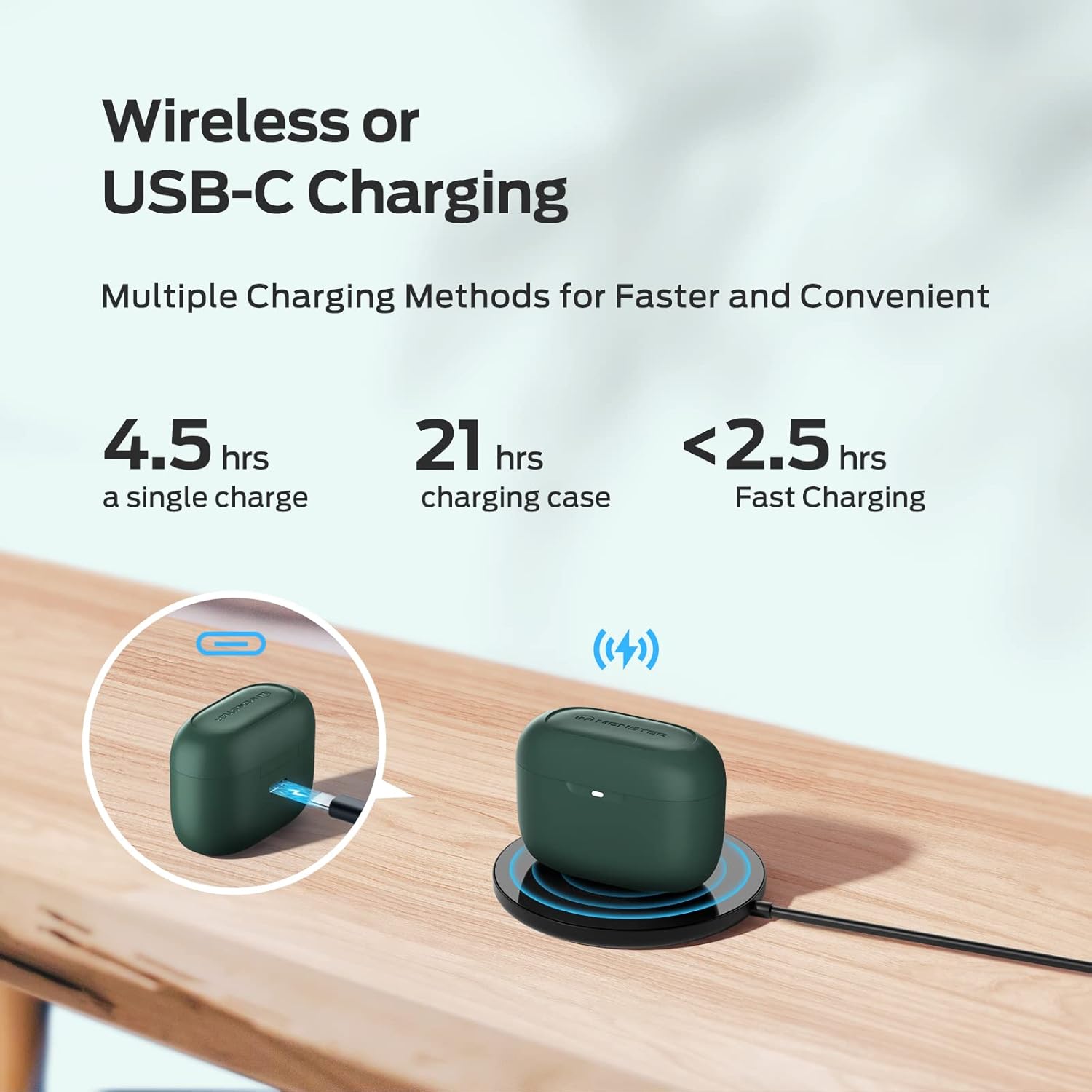
Image: Demonstrates the two charging methods for the earbud case: wired USB-C charging and wireless charging on a pad, along with battery life indicators.
6. Техникалык тейлөө
Proper maintenance ensures the longevity and optimal performance of your Monster N-Lite 200 AirLinks earbuds.
6.1. Тазалоо
- Кулакчындарды жана заряддоо кутусун жумшак, кургак, түксүз чүпүрөк менен дайыма тазалап туруңуз.
- Зарыл болсо, кулактын учун алып салып, жумшак самын жана суу менен өзүнчө тазалаңыз. Кайрадан орнотуудан мурун алардын толугу менен кургаганын текшериңиз.
- Gently clean the mesh and charging contacts on the earbuds and inside the case using a dry cotton swab. Avoid using sharp objects.
6.2. Сууга туруктуулук (IPX5)
The earbuds are rated IPX5 waterproof, meaning they are resistant to splashes and sweat. This makes them suitable for workouts and outdoor activities. However, they are not designed for submersion in water or for use during swimming.

Image: An illustration showing water splashing on the earbuds, signifying their IPX5 waterproof capability.
6.3. Сактоо
Колдонулбаганда, кулакчындарды коргоо жана кубаттоо үчүн кубаттоочу кутучага сактаңыз. Корпусту салкын, кургак жерде, өтө температурадан алыс сактаңыз.
7. Кыйынчылыктарды
If you encounter issues with your Monster N-Lite 200 AirLinks earbuds, try the following troubleshooting steps:
| Көйгөй | Чечим |
|---|---|
| Кулакчындар жупташтырылбай жатат/туташтырылбай жатат. |
|
| Үн жок же үнү төмөн. |
|
| Кулакчындар заряддалбай жатат. |
|
| Чалуу сапаты начар. |
|
Эгер көйгөй чечилбесе, кошумча жардам алуу үчүн кардарларды колдоо бөлүмүнө кайрылыңыз.
8. Техникалык шарттар
| Өзгөчөлүк | Деталь |
|---|---|
| Модель аты | N-Lite 200 AirLinks |
| Модель номери | MH12003 |
| Бренд | Monster |
| Байланыш технологиясы | Bluetooth 5.0 |
| Аудио драйвер түрү | 6mm Composite Diaphragm Drivers |
| Ойнотуу убактысы (Бир кубаттоо) | 4.5 XNUMX сааттан ашык |
| Жалпы ойноо убактысы (заряддоо кутусу менен) | 21 саатка чейин |
| Заряддоо интерфейси | USB-C, зымсыз кубаттоо |
| Башкаруу түрү | Touch Control |
| Сууга туруктуулук деңгээли | IPX5 (Splash and Sweatproof) |
| Салмагы | 5.9 унция (предметтин салмагы) |
| Түс | Green (as per product data, though video shows pink) |
9. Расмий продукт Video
Watch this official video from the seller for a closer look at the Monster N-Lite 200 AirLinks earbuds, including their design and features.
Video: A demonstration of the Monster N-Lite 200 AirLinks earbuds, showing the charging case, earbuds, and how to change ear tips. Note: The video shows a pink version of the earbuds.
10. Кепилдик жана колдоо
For warranty information and customer support, please refer to the product packaging or contact the manufacturer directly. Keep your proof of purchase for any warranty claims.
Өндүрүүчү: Monster