
1. Орнотуу
1.1 Кутудан чыгаруу жана Пакеттин мазмуну
Таңгактан бардык буюмдарды этияттык менен алып салыңыз. Төмөнкү компоненттердин бар экенин текшериңиз:
- Pinell Supersound 301 Internet Radio
- Кубаттуу адаптер
- Батареялар менен алыстан башкаруу
- User Manual

1.1-сүрөт: The Pinell Supersound 301 product packaging, showing the radio and its branding.
1.2 Кубатты туташтыруу
Connect the supplied power adapter to the DC IN port on the rear of the radio. Plug the other end of the adapter into a suitable wall outlet. The radio will enter standby mode or power on automatically.
1.3 Антеннаны туташтыруу
For optimal DAB+ and FM radio reception, extend the telescopic antenna located on the rear of the unit. Adjust its position for the best signal quality.

1.2-сүрөт: The Pinell Supersound 301 with its telescopic antenna fully extended for improved radio reception.
1.4 Баштапкы орнотуу жана Wi-Fi туташуусу
Upon first power-on, the radio will guide you through an initial setup wizard. This typically includes:
- Тил тандоо: Use the 'scroll' knob to select your preferred language and press to confirm.
- Убакытты / датаны коюу: Set the current time and date. This can often be synchronized automatically via the internet.
- Wi-Fi тармагын орнотуу: The radio will scan for available Wi-Fi networks. Select your network from the list, then use the 'scroll' knob to enter the password. Press to confirm. A successful connection is required for Internet Radio and Spotify Connect functionalities.

1.3-сүрөт: The Wi-Fi logo, indicating wireless network connectivity for the radio.
2. Иштөө нускамалары
2.1 Негизги башкаруу каражаттары
The Pinell Supersound 301 features intuitive controls on its front panel and a remote control for convenient operation.
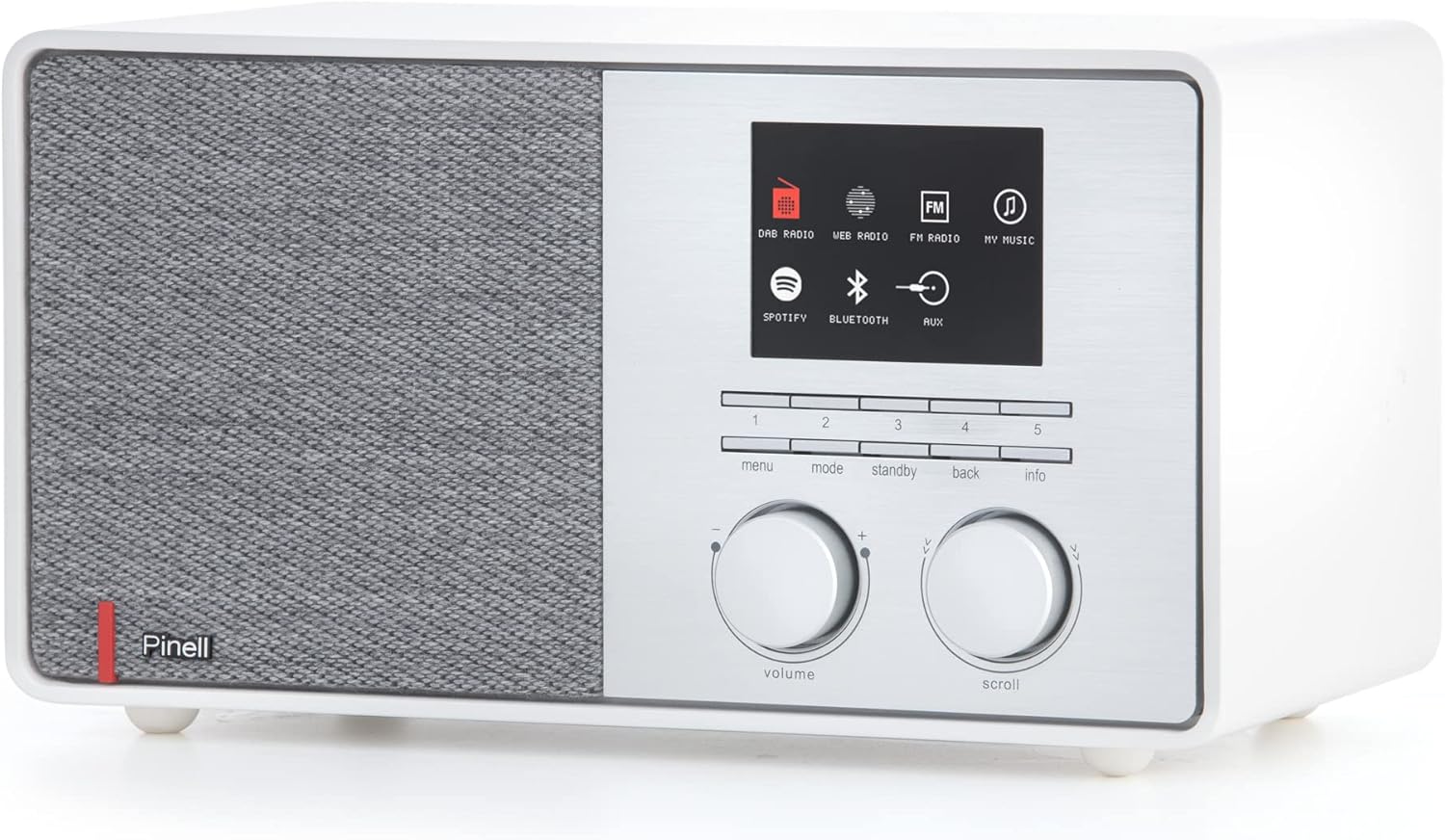
2.1-сүрөт: Front panel of the Pinell Supersound 301, showing the display, control knobs, and buttons.
- Үн баскычы: Rotate to adjust the audio output level. Press to mute/unmute.
- Scroll Knob: Rotate to navigate through menus and lists. Press to select an option or confirm an entry.
- Меню баскычы: Орнотуулар жана параметрлер үчүн негизги менюга кириңиз.
- Режим баскычы: Switch between different audio sources (Internet Radio, DAB+, FM, Bluetooth, AUX, Spotify Connect).
- Күтүү баскычы: Power the unit on or off (to standby mode).
- Артка баскычы: Мурунку менюга же экранга кайтуу.
- Маалымат баскычы: Display additional information about the current track or station.
- Алдын ала коюлган баскычтар (1-5): Сакталган сүйүктүү станцияларыңызга тез жетиңиз.
2.2 Алыстан башкарууну колдонуу
The included remote control provides full functionality from a distance.
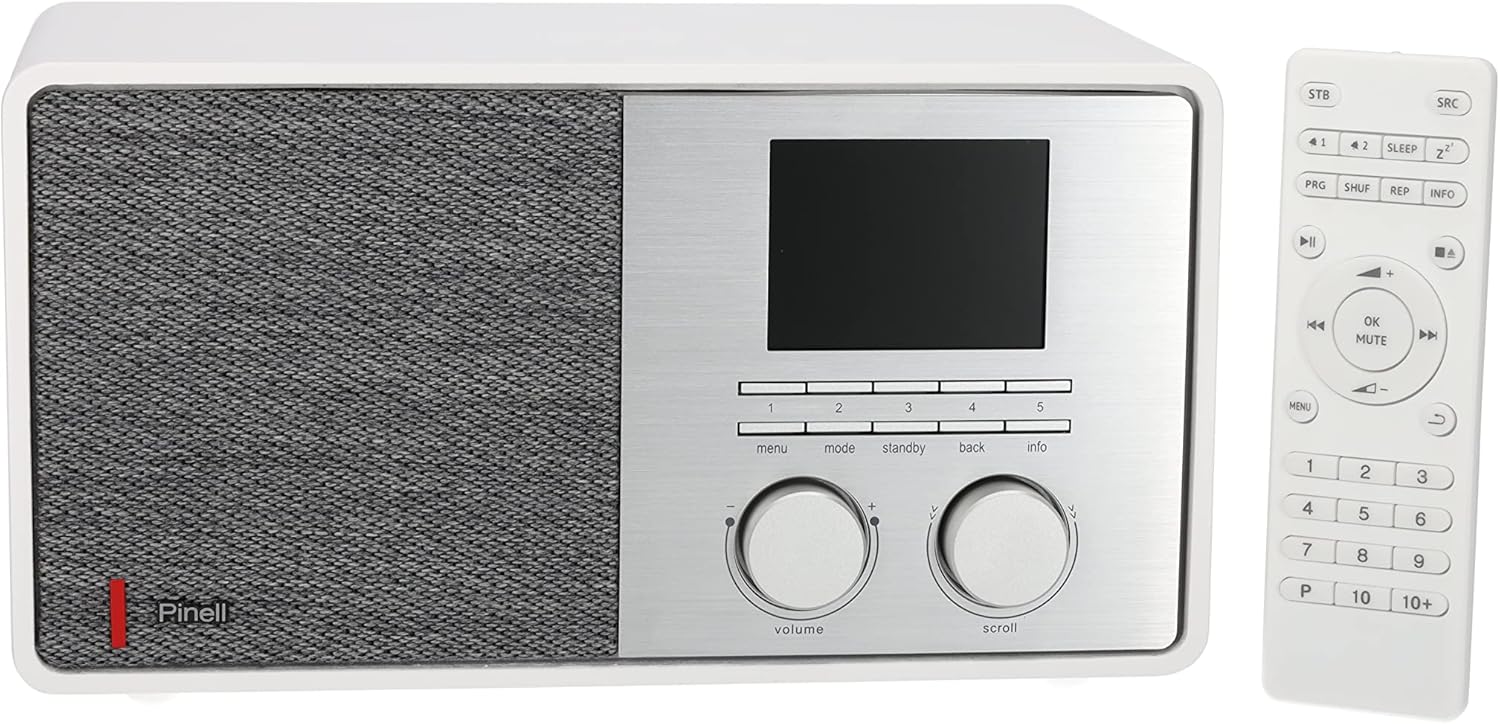
2.2-сүрөт: The Pinell Supersound 301 radio shown alongside its dedicated remote control.
Refer to the remote control layout for specific button functions, which mirror most of the front panel controls and add numerical input for presets and direct access.
2.3 Интернет радиосу
Дүйнө жүзү боюнча миңдеген интернет радиостанцияларына кириңиз.
- басыңыз Mode button until "Internet Radio" is selected.
- колдонуу Жылдыруу knob to browse stations by location, genre, or search.
- басыңыз Жылдыруу knob to select a station and begin playback.
- Станцияны алдын ала коюлган жөндөөлөр катары сактоо үчүн, алардын бирин басып кармап туруңуз Алдын ала коюлган баскычтар (1-5) until the display confirms it's saved.
2.4 DAB+ жана FM радиосу
Enjoy digital and analog terrestrial radio broadcasts.

2.3-сүрөт: The DAB+ logo, representing Digital Audio Broadcasting Plus technology.
- басыңыз Mode button to select "DAB+" or "FM".
- For DAB+, the radio will automatically scan for available stations upon first use. For FM, use the Жылдыруу knob to tune manually or press and hold to auto-scan.
- колдонуу Жылдыруу knob to navigate through the list of available stations.
- Станцияны алдын ала коюлган жөндөөлөр катары сактоо үчүн, алардын бирин басып кармап туруңуз Алдын ала коюлган баскычтар (1-5).
2.5 Bluetooth байланышы
Bluetooth иштетилген түзмөктөрүңүздөн аудиону зымсыз агылтыңыз.
- басыңыз Mode button to select "Bluetooth". The radio will enter pairing mode, indicated on the display.
- Тышкы түзмөгүңүздө (мисалы, смартфондо) Bluetooth'ду күйгүзүп, жеткиликтүү түзмөктөрдү издеңиз.
- Select "Pinell Supersound 301" from the list to pair. Once connected, you can play audio from your device through the radio.
2.6 Spotify Connect
Control your Spotify music directly from the Spotify app on your smartphone or tablet.

2.4-сүрөт: The Spotify Connect logo, indicating compatibility with Spotify's streaming service.
- Ensure your radio is connected to the same Wi-Fi network as your device running the Spotify app.
- Түзмөгүңүздөгү Spotify колдонмосун ачып, ыр ойнотуңуз.
- Tap the "Devices Available" icon (usually a speaker or computer icon) at the bottom of the screen.
- Select "Pinell Supersound 301" from the list of available devices. Your music will now play through the radio, controlled by the Spotify app.
2.7 AUX киргизүү
3.5 мм аудио кабелин колдонуу менен тышкы аудио түзмөктөрдү туташтырыңыз.
- 3.5 мм аудио кабелдин бир учун радионун арткы жагындагы AUX IN портуна туташтырыңыз.
- Экинчи учун тышкы аспабыңыздын гарнитура уячасына же аудио чыгышына туташтырыңыз.
- басыңыз Mode button to select "AUX". Audio from your external device will now play through the radio.
2.8 Гарнитуранын чыгышы
For private listening, connect headphones to the headphone jack on the rear of the unit. This will mute the main speaker output.
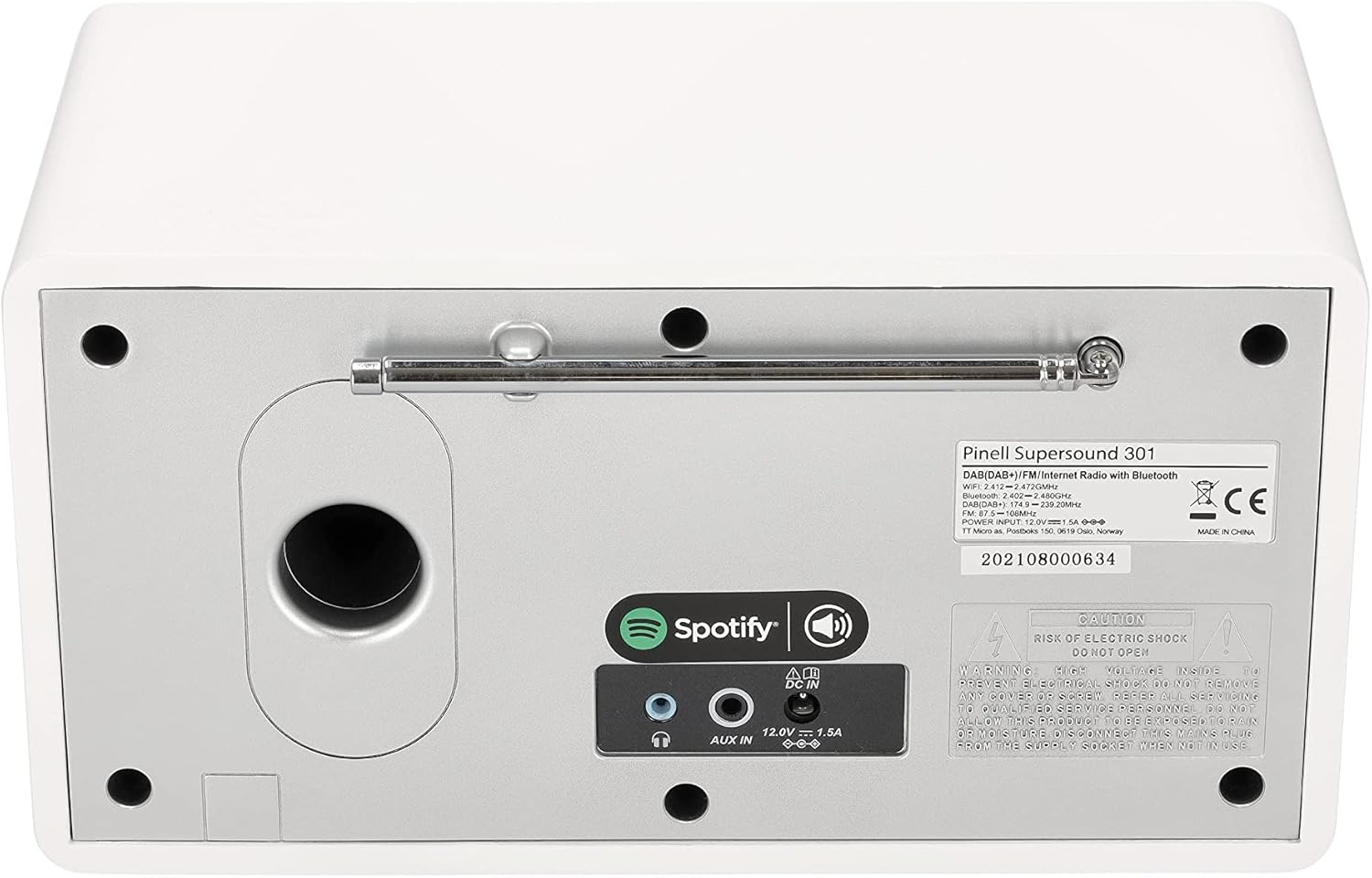
2.5-сүрөт: The rear panel of the Pinell Supersound 301, highlighting the AUX IN and headphone output ports.
3. Техникалык тейлөө
3.1 Тазалоо боюнча нускамалар
Радиоңуздун көрүнүшүн жана функционалдуулугун сактоо үчүн:
- Тазалоодон мурун ар дайым кубат адаптерин ажыратыңыз.
- Сырткы беттерди сүртүү үчүн жумшак, кургак чүпүрөктү колдонуңуз.
- өжөр белгилери үчүн, жеңил гampкездемени суу менен сүртүңүз. Абразивдүү тазалоочу каражаттарды, эриткичтерди же химиялык чачыраткычтарды колдонуудан алыс болуңуз, анткени алар каптамага зыян келтириши мүмкүн.
- Суюктуктардын агрегатка киришине жол бербеңиз.
3.2 Жалпы кам көрүү
- Avoid placing the radio in direct sunlight, near heat sources, or in areas with high humidity.
- Агрегаттын айланасында жетиштүү желдетүүнү камсыз кылыңыз.
- Protect the unit from strong impacts or vibrations.
4. Кыйынчылыктарды
If you encounter issues with your Pinell Supersound 301, refer to the following common problems and solutions:
| Көйгөй | Мүмкүн себеп | Чечим |
|---|---|---|
| Күч жок | Кубат адаптери туташкан эмес же туура эмес розетка. | Кубат адаптери радиого жана иштеп жаткан розеткага бекем туташтырылганын текшериңиз. Башка розетканы колдонуп көрүңүз. |
| Үн жок | Volume too low, muted, or incorrect source selected. | Increase the volume. Check if the radio is muted. Ensure the correct audio source (Internet Radio, DAB+, FM, Bluetooth, AUX) is selected. If headphones are connected, disconnect them. |
| Wi-Fi туташуу маселелери | Туура эмес сырсөз, алсыз сигнал же роутер көйгөйү. | Re-enter the Wi-Fi password carefully. Move the radio closer to the Wi-Fi router. Restart your router. |
| Радио кабыл алуу начар (DAB+/FM) | Антенна узартылган эмес же сигналдын начар аймагы. | Fully extend and adjust the telescopic antenna. Try repositioning the radio. Perform a new station scan. |
| Bluetooth жупташуу катасы | Device not in pairing mode, or too far away. | Ensure the radio is in Bluetooth pairing mode. Make sure your external device's Bluetooth is enabled and it's searching. Keep devices within close range. |
| Spotify Connect not working | Radio and device on different networks, or Spotify app issue. | Verify both the radio and your control device are connected to the same Wi-Fi network. Restart the Spotify app. |
4.1 Заводдук абалга кайтаруу
If problems persist, a factory reset may resolve them. This will erase all saved settings and presets.
- Негизгиге өтүңүз Меню.
- Тандоо Системалык орнотуулар (же окшош).
- Тандоо Заводдук абалга кайтаруу жана тандооңузду ырастаңыз.
- The radio will restart, and you will need to go through the initial setup process again.
5. Техникалык шарттар
| Өзгөчөлүк | Деталь |
|---|---|
| Бренд | Pinell |
| Модель аты | Супер үн 301 |
| Модель номери | BP004 |
| Түс | Ак |
| Байланыш технологиясы | Wi-Fi, Bluetooth 4.0, AUX |
| Өзгөчөлүктөр | Internet Radio, Spotify Connect, DAB+, FM Tuner |
| Аудио чыгаруу күчү | 7 W (1-inch tweeter) |
| Колдоого алынган радио тилкелери | DAB+, FM |
| Power Source | Электр зымдары (кубат адаптери) |
| Шайкеш түзмөктөр | Наушник |
| Продукциянын өлчөмдөрү | 25L x 14.5W x 13.8H сантиметр |
| Компоненттер камтылган | Internet Radio, Power Adapter, Remote Control with Batteries, User Manual |
| Программалык камсыздоонун жаңыртууларына кепилдик берилет | Маалымат жеткиликтүү эмес |
| Запастык бөлүктөрдүн болушу | Маалымат жеткиликтүү эмес |
6. Кепилдик маалыматы
The Pinell Supersound 301 comes with a standard manufacturer's warranty. Please refer to the warranty card included in your product packaging or your purchase documentation for specific terms, conditions, and duration of the warranty.
Сатып алганыңыздын далилин (дүмүрчөк же эсеп-дүмүрчөк) сактаңыз, анткени ал бардык кепилдик дооматтары үчүн талап кылынат.
7. Кардарларды колдоо кызматы
For further assistance, technical support, or service inquiries regarding your Pinell Supersound 301, please contact:
- Pinell Official Webсайт: Visit the official Pinell webКөп берилүүчү суроолор, колдоо ресурстары жана байланыш маалыматы үчүн сайт.
- Чекене колдоо: Contact the retailer from whom you purchased the product for local support and service options.