
1. Киришүү
Thank you for choosing the Powerwerks PWR10 Powered Speaker Cabinet. This manual provides essential information for the safe and efficient operation of your new speaker. The PWR10 is a high-performance active speaker designed for various audio applications, featuring robust power output, versatile input options, and integrated digital signal processing (DSP).
Сураныч, аппаратты иштетүүдөн мурун бул колдонмону кылдат окуп чыгыңыз жана аны келечекте маалымат үчүн сактап коюңуз.
2. Коопсуздук маалыматы
Электр шок, өрт же жаракат алуу коркунучун азайтуу үчүн, ар дайым төмөнкү коопсуздук чараларын аткарыңыз:
- Кубат булагы: Агрегатты ушул колдонмодо же аппаратта сүрөттөлгөн түрдөгү кубат булагына гана туташтырыңыз.
- Негиздөө: Ensure the power cord is properly grounded to prevent electric shock.
- Вентиляция: Вентиляция тешиктерин жаап албаңыз. Агрегаттын айланасында адекваттуу аба агымын камсыз кылыңыз.
- Суу жана ным: Агрегатты жамгырга же нымдуулукка дуушар кылбаңыз. Агрегаттын үстүнө суюктуктар толтурулган нерселерди койбоңуз.
- Жылуулук: Түзмөктү радиаторлор, жылыткычтар, мештер же башка жылуулук чыгаруучу шаймандар сыяктуу жылуулук булактарынан алыс кармаңыз.
- Тейлөө: Бул продуктту өзүңүз тейлөөгө аракет кылбаңыз. Бардык тейлөөнү квалификациялуу тейлөө кызматкерлерине тапшырыңыз.
- Тазалоо: Тазалоодон мурун түзмөктү розеткадан сууруп алыңыз. Тазалоо үчүн кургак чүпүрөктү колдонуңуз.
3. Пакеттин мазмуну
The Powerwerks PWR10 package includes the following items:
- Powerwerks PWR10 Powered Speaker Cabinet
- Электр кабели
- Колдонуучунун Колдонмосу (бул документ)
4. Продукциянын өзгөчөлүктөрү
The Powerwerks PWR10 Powered Speaker Cabinet offers a range of features designed for optimal audio performance and versatility:
- Жогорку кубаттуулугу: 600 watts of Class D ampжашоо.
- Эки тараптуу динамик системасы: Features one 10-inch low-frequency driver and one high-frequency compression driver.
- Бир нече аудио киргизүүлөр: Two channels with XLR / Line combo inputs for microphones or line-level devices.
- Integrated DSP: Four selectable EQ presets: Main, Monitor, DJ, and Speech.
- Bluetooth байланышы: Шайкеш түзмөктөрдөн үзгүлтүксүз зымсыз аудио агымы.
- True Stereo Linking: Connect wirelessly to another Powerwerks PWR series speaker for stereo sound.
- XLR Thru Output: Allows for system expansion by connecting to other powered speakers.
- Портативдик дизайн: Durable wooden cabinet with integrated handles for easy transport.
- Стандарттык устун орнотуу: Compatible with standard speaker poles for elevated placement.

Сүрөт 1: Алдыңкы view of the Powerwerks PWR10 Powered Speaker Cabinet, showcasing its protective grille and Powerwerks logo.
5. Башкаруу элементтери жана байланыштар
Familiarize yourself with the control panel located on the rear of the PWR10 speaker. This section details each control and connection point.

Сүрөт 2: Детальдуу view of the rear control panel of the Powerwerks PWR10, showing inputs, outputs, and control knobs.
5.1. Input Section
- INPUT 1 (XLR / Line Combo): This input accepts both XLR (microphone level) and 1/4-inch TRS/TS (line level) connectors. Use for microphones, mixers, or other audio sources.
- INPUT 2 (XLR / Line Combo): Similar to Input 1, this input also accepts XLR and 1/4-inch TRS/TS connectors for additional audio sources.
- 1 ЖАНА 2 УТУШ: Rotary controls to adjust the input sensitivity for Input 1 and Input 2 respectively. Adjust these to achieve an optimal signal level without distortion.
5.2. Bluetooth Section
- LINK Button: Used for wirelessly linking two PWR series speakers for True Stereo operation.
- PAIR баскычы: Initiates Bluetooth pairing mode to connect with a Bluetooth audio source (e.g., smartphone, tablet).
- Bluetooth Indicator LED: Illuminates when a Bluetooth device is connected.
5.3. Output and DSP Section
- DSP EQ PRESETS: A rotary selector to choose between four optimized sound modes:
- НЕГИЗГИ: General purpose setting for front-of-house sound.
- МОНИТОР: s үчүн оптималдаштырылганtage мониторинг колдонмолору.
- DJ: Enhanced bass and treble for music playback.
- СӨЗ: Optimized for vocal clarity in spoken word applications.
- МАСТЕР КӨЛӨМҮ: Динамиктин жалпы чыгаруу деңгээлин башкарат.
- OUTPUT (XLR Thru): An XLR output that sends a mix of the input signals to another powered speaker or audio device for system expansion.
- POWER LED: Түзмөк качан күйүп турганын көрсөтөт.
- LIMIT LED: Illuminates when the internal limiter is active, indicating that the signal is approaching distortion. Reduce input gain or master volume if this LED frequently lights up.
5.4. Power Section
- AC КИРҮҮ: Берилген кубат шнурын бул жерге туташтырыңыз.
- КҮЧ КҮЧТӨРҮ: Динамикти күйгүзөт же өчүрөт.
6. Орнотуу
Туура орнотуу оптималдуу аткарууну жана коопсуздукту камсыз кылат.
6.1. Жайгаштыруу
- Полдун жайгашуусу: Динамикти туруктуу, жалпак бетке коюңуз.
- Уюлду орнотуу: The PWR10 features a standard pole mount receptacle on the bottom. Insert the speaker onto a sturdy speaker pole stand. Ensure the stand is stable and capable of supporting the speaker's weight.
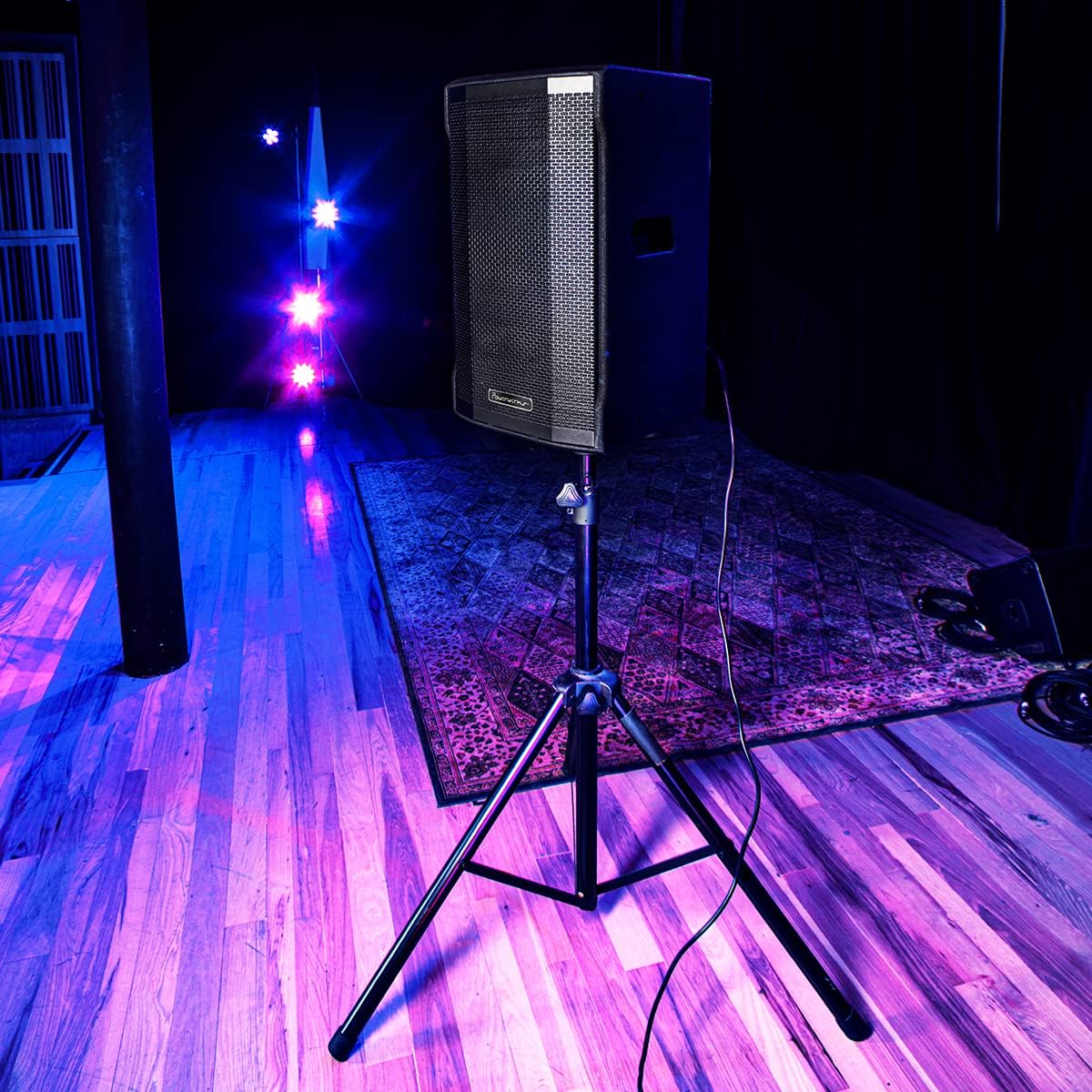
Image 3: The Powerwerks PWR10 speaker positioned on a stand, illustrating a typical setup for live sound applications.
6.2. Power Connection
- Арткы панелдеги POWER которгучу OFF абалында экенин текшериңиз.
- Connect the supplied power cord to the AC INLET on the speaker.
- Электр шнурунун экинчи учун жерге туташтырылган электр розеткасына сайыңыз.
6.3. Алгачкы текшерүүлөр
- Before powering on, ensure all gain controls are set to their minimum (fully counter-clockwise) position.
- Бардык аудио кабельдер коопсуз туташтырылганын текшериңиз.
7. Иштөө нускамалары
7.1. Күйгүзүү / Өчүрүү
- To power on, flip the POWER switch to the ON position. The POWER LED will illuminate.
- To power off, flip the POWER switch to the OFF position.
7.2. Аудио булактарын туташтыруу
- Connect your microphone or line-level device (e.g., mixer, instrument pre-amp) to INPUT 1 or INPUT 2 using an appropriate XLR or 1/4-inch cable.
- Slowly increase the corresponding GAIN control for the connected input until the desired volume is achieved without the LIMIT LED flashing excessively.
- Adjust the MASTER VOLUME to control the overall output level.
7.3. Bluetooth Жупташтыруу
- Press the PAIR button on the rear panel. The Bluetooth indicator LED will flash, indicating it is in pairing mode.
- On your Bluetooth-enabled device (smartphone, tablet), search for available Bluetooth devices.
- Select "Powerwerks PWR10" from the list.
- Once connected, the Bluetooth indicator LED will glow solid. You can now stream audio wirelessly to the speaker.
7.4. Using DSP Presets
Rotate the DSP EQ PRESETS knob to select the desired sound profile:
- НЕГИЗГИ: Standard flat response for general use.
- МОНИТОР: s үчүн ылайыкташтырылганtage monitoring, often with reduced bass to prevent muddiness.
- DJ: Boosted bass and treble for impactful music playback.
- СӨЗ: Optimized for vocal clarity, often with a mid-range boost.
7.5. True Stereo Linking (with another PWR series speaker)
- Ensure both PWR series speakers are powered on and within Bluetooth range.
- On the first speaker (which will act as the master), pair your Bluetooth audio source as described in section 7.3.
- On the master speaker, press the LINK button. The Bluetooth indicator LED will flash.
- On the second speaker (slave), press its LINK button. The Bluetooth indicator LED will flash.
- Once linked, both speakers' Bluetooth indicator LEDs will glow solid, and audio will play in stereo.
8. Техникалык тейлөө
Regular maintenance helps prolong the life of your speaker.
- Тазалоо: Disconnect the power cord before cleaning. Use a soft, dry cloth to wipe down the cabinet. Do not use abrasive cleaners, solvents, or waxes.
- Сактагыч: When not in use for extended periods, store the speaker in a dry, dust-free environment.
- Текшерүү: Periodically check the power cord and audio cables for any signs of damage.
9. Кыйынчылыктарды
If you encounter issues with your PWR10 speaker, refer to the following common problems and solutions:
- Кубат жок:
- Кубат шнуру динамикке да, иштеп жаткан электр розеткасына да бекем туташтырылганын текшериңиз.
- Check the POWER switch is in the ON position.
- Башка аспапка туташтыруу менен электр розеткасынын иштешин текшериңиз.
- Үн жок:
- Check that the MASTER VOLUME is turned up.
- Ensure the GAIN controls for the active inputs are adjusted appropriately.
- Verify audio cables are securely connected and not damaged.
- Эгер Bluetooth колдонуп жатсаңыз, түзмөк жупташып турганын жана аудио агымы жүрүп жатканын текшериңиз.
- Башка аудио булагы же кабель менен сынап көрүңүз.
- Бурмаланган үн:
- Reduce the GAIN controls for the inputs.
- МАСТЕР ҮНҮН азайтыңыз.
- If the LIMIT LED is frequently lit, reduce the input signal level.
- Аудио булагын бурмалоо үчүн текшериңиз.
- Bluetooth туташпай жатат:
- Ensure the speaker is in PAIRING mode (Bluetooth LED flashing).
- Түзмөгүңүздө Bluetooth иштетилгенин текшериңиз.
- Түзмөгүңүздү динамикке жакыныраак жылдырыңыз.
- Түзмөктү жупташып, кайра жупташып көрүңүз.
- Учурда башка түзмөктөр Bluetooth аркылуу динамикке туташып турбаганын текшериңиз.
10. Техникалык шарттар
Detailed technical specifications for the Powerwerks PWR10 Powered Speaker Cabinet:

Image 4: Diagram illustrating the dimensions of the Powerwerks PWR10 speaker.
| Модель аты | Powerwerks 600 Watt 1 x 10" Speaker |
| Динамик түрү | 2-Channel Active Speaker, Component |
| Вуфердин диаметри | 10 дюйм |
| Ватtage | 600 Ватт (чоку) |
| Байланыш технологиясы | Bluetooth, XLR, 1/4-inch Line |
| Аудио чыгаруу режими | Stereo (via True Stereo Linking) |
| DSP EQ алдын ала орнотуулары | Main, Monitor, DJ, Speech |
| Продукциянын өлчөмдөрү (D x W x Y) | 28.3" x 15" x 15.6" |
| Элемент Салмагы | 42.9 фунт (19.5 килограмм) |
| Power Source | Электр зымдары |
| Монтаж түрү | Жерге орнотулуу, устунга орнотуу |
| Түс | Кара |
| UPC | 701963063117 |
11. Кепилдик жана колдоо
The Powerwerks PWR10 Powered Speaker Cabinet comes with a limited warranty. Please refer to the warranty card included with your product or contact Powerwerks customer support for specific details regarding coverage and duration.
For technical assistance, troubleshooting beyond this manual, or warranty claims, please contact Powerwerks customer support through their official webсайт же сатып алуу документтери менен камсыз байланыш маалыматы.