
1. Киришүү
Сатып алганыңыз үчүн рахматasing the Blaupunkt PB10DB Bluetooth Karaoke Speaker. This manual provides essential information for the safe and efficient operation of your device. Please read it thoroughly before use and keep it for future reference. The PB10DB is a portable party speaker designed for high-quality audio playback and karaoke, featuring Bluetooth connectivity, USB, and AUX inputs.
2. Коопсуздук маалыматы
Коопсуз иштөөнү камсыз кылуу жана зыян келтирбөө үчүн төмөнкү сактык чараларын сактаңыз:
- Аппаратты экстремалдык температурага, түз күндүн нуруна же жогорку нымдуулукка дуушар кылбаңыз.
- Keep the speaker away from water and other liquids. The product is indicated as waterproof, but avoid submerging it.
- Do not attempt to disassemble or modify the speaker. Repairs should only be performed by qualified personnel.
- Белгиленген кубаттоо аксессуарларын гана колдонуңуз.
- Колдонуу учурунда динамиктин айланасында туура желдетүүнү камсыз кылыңыз.
- Угуунун начарлашына жол бербөө үчүн, узак убакыт бою өтө катуу үн менен угуудан алыс болуңуз.
3. Пакеттин мазмуну
Пакетте бардык буюмдар бар экенин текшериңиз:
- Blaupunkt PB10DB Bluetooth Karaoke Speaker
- Кубат адаптери/заряддоо кабели
- Колдонуучунун Колдонмосу (бул документ)
- Microphone (if included in your specific package)
4. Продукт бүтүп калдыview
Familiarize yourself with the various parts of your Blaupunkt PB10DB speaker.
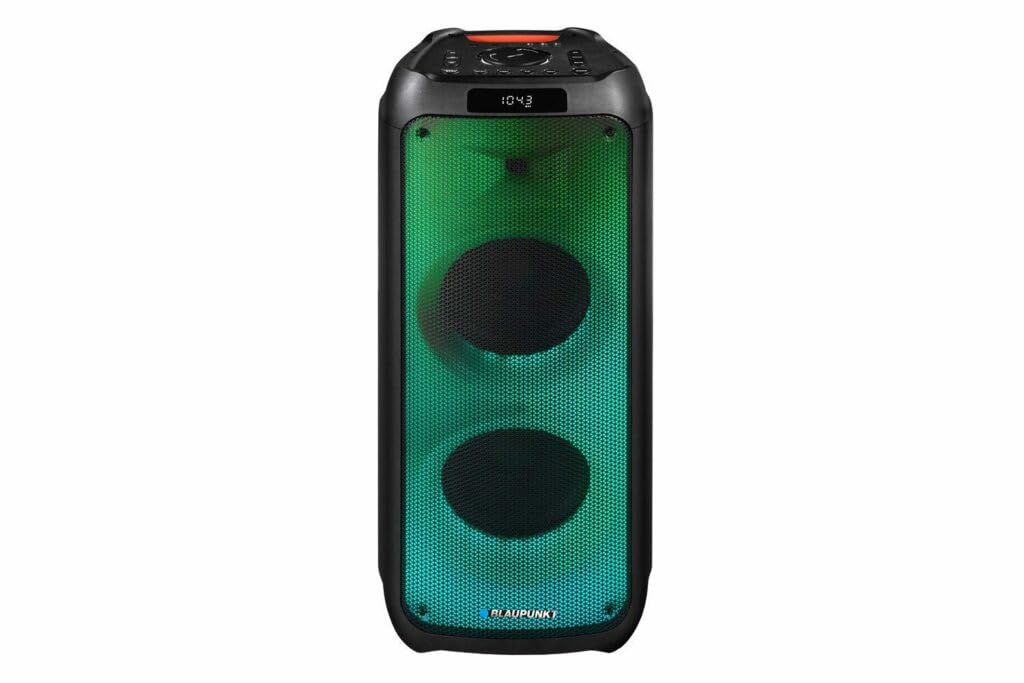
1-сүрөт: Фронт view of the Blaupunkt PB10DB speaker, showcasing the dual speaker grilles and dynamic LED lighting. The top panel features a display and control buttons.

2-сүрөт: Бурчтуу view of the Blaupunkt PB10DB speaker, highlighting its portable design and the side profile.
Controls and Ports (Typical Layout)
- Кубат баскычы: Динамикти күйгүзөт/өчүрөт.
- Режим баскычы: Switches between Bluetooth, USB, AUX, and FM radio modes.
- Үндү көзөмөлдөө: Негизги үндү тууралайт.
- Ойнотуу/тындыруу баскычы: Медианы ойнотууну көзөмөлдөйт.
- Мурунку/Кийинки трек баскычтары: Тректер аркылуу багыт алат.
- Микрофон киргизүү (MIC IN): For connecting a wired microphone for karaoke.
- USB порт: For playing music from a USB drive or charging external devices.
- AUX киргизүү (3.5 мм): For connecting external audio devices via an audio cable.
- Заряддоо порту: For connecting the power adapter to charge the speaker.
5. Орнотуу
5.1 Динамикти заряддоо
- Connect the provided power adapter to the charging port on the speaker.
- Адаптерди ылайыктуу розеткага сайыңыз.
- Динамик зарядталып жатканын көрсөтүү үчүн заряддоо индикатору күйөт (түсү ар кандай болушу мүмкүн).
- Once fully charged, the indicator light may change color or turn off. Disconnect the charger.
A full charge typically takes several hours and provides approximately 8 hours of playback time.
5.2 Күйгүзүү/өчүрүү
- Күйгүзүү үчүн: Press and hold the Power button for a few seconds until the display lights up and you hear an audible prompt.
- Өчүрүү үчүн: Press and hold the Power button again for a few seconds until the display turns off and you hear an audible prompt.
6. Иштөө нускамалары
6.1 Bluetooth жупташтыруу
- Ensure the speaker is powered on and in Bluetooth mode. If not, press the Mode button until "Bluetooth" or a similar indicator appears on the display. The speaker will enter pairing mode, indicated by a flashing Bluetooth icon or LED.
- Мобилдик түзмөгүңүздө (смартфон, планшет ж.б.) Bluetooth иштетип, жеткиликтүү түзмөктөрдү издеңиз.
- Select "Blaupunkt PB10DB" from the list of found devices.
- Once paired, the speaker will emit an audible confirmation, and the Bluetooth indicator will stop flashing.
- Эми сиз түзмөгүңүздөн аудиону динамик аркылуу ойной аласыз.
Динамик күйгүзүлгөндө автоматтык түрдө акыркы жупташтырылган түзмөккө кайра туташуу аракетин көрөт.
6.2 Караоке функциясы
- Connect a wired microphone (not always included) to the MIC IN port on the speaker.
- Ensure the microphone is switched on (if it has a power switch).
- Play your desired karaoke track via Bluetooth, USB, or AUX.
- Adjust the microphone volume and echo effects (if available on the speaker) using the dedicated controls.
6.3 USB ойнотуу
- MP3 аудиосу бар USB флэш-дискти салыңыз fileUSB портуна киргизиңиз.
- Press the Mode button to switch to USB mode. The speaker will automatically begin playing music from the USB drive.
- Ойноону көзөмөлдөө үчүн Ойнотуу/Тыным жана Мурунку/Кийинки трек баскычтарын колдонуңуз.
6.4 AUX киргизүү
- 3.5 мм аудио кабелдин бир учун (кошулмада жок) динамиктеги AUX IN портуна туташтырыңыз.
- Connect the other end of the cable to the headphone jack or audio output of your external audio device.
- AUX режимине өтүү үчүн Mode баскычын басыңыз.
- Control playback and volume from your external audio device.
7. Техникалык тейлөө
7.1 Тазалоо
- Тазалоодон мурун ар дайым динамикти өчүрүп, кубат булагынан ажыратыңыз.
- Динамиктин сыртын сүртүү үчүн жумшак, кургак чүпүрөктү колдонуңуз.
- Абразивдүү тазалоочу каражаттарды, момдорду же эриткичтерди колдонбоңуз, анткени алар каптамага зыян келтириши мүмкүн.
7.2 Сактоо
- Динамикти түз күн нурунан жана өтө температурадан алыс салкын, кургак жерде сактаңыз.
- Эгер батарейканы узак убакытка сактасаңыз, анын иштөө мөөнөтүн сактоо үчүн аны мезгил-мезгили менен (мисалы, ар бир 3 ай сайын) кубаттап туруңуз.
8. Кыйынчылыктарды
| Көйгөй | Мүмкүн себеп | Чечим |
|---|---|---|
| Динамик күйбөйт. | Батарея түгөнүп калды. | Charge the speaker using the provided power adapter. |
| Динамиктен үн жок. | Үн өтө төмөн же үнсүз. Туура эмес киргизүү режими. | Increase volume. Press the Mode button to select the correct input (Bluetooth, USB, AUX). |
| Bluetooth жупташуусу болбой жатат. | Динамик жупташтыруу режиминде эмес. Түзмөк өтө алыс. Интерференция. | Динамик Bluetooth жупташтыруу режиминде экенин текшериңиз. Түзмөктү динамикке жакындатыңыз. Башка Bluetooth түзмөктөрүн өчүрүңүз. |
| Микрофон иштебей жатат. | Microphone not connected properly or switched off. Microphone volume too low. | Check microphone connection. Ensure microphone is powered on. Adjust microphone volume. |
| USB ойнотуу иштебей жатат. | USB диск туура эмес форматталган же колдоого алынбайт file түрлөрү. | Ensure USB drive is formatted to FAT32 and contains MP3 fileс. Башка USB дискти колдонуп көрүңүз. |
9. Техникалык шарттар
| Модель аты: | PB10DB |
| Бренд: | BLAUPUNKT |
| Байланыш технологиясы: | Көмөкчү, Bluetooth, USB |
| Динамиктин максималдуу чыгаруу күчү: | 1000 Ватт |
| Аудио чыгаруу режими: | Стерео |
| Монтаж түрү: | Стол орнотуу |
| Материал: | Металл жана пластик |
| Динамик түрү: | Tweeter |
| Өзгөчө өзгөчөлүгү: | Музыка |
| Сунушталган колдонуулар: | For music player |
| Түсү: | Көк |
| Суу өткөрбөйт: | Туура |
| Башкаруу ыкмасы: | тийүү |
| Tweeter диаметри: | 4 сантиметр |
| Батареянын орточо иштөө мөөнөтү: | 8 саат |
| Шайкеш түзмөктөр: | Ноутбук, смартфон |
| Кубат булагы: | Батарея менен иштейт |
| Элемент Салмагы: | 105 грамм |
| Продукциянын өлчөмдөрү (L x W x Y): | 24 x 69 x 2.5 см |
10. Кепилдик жана колдоо
Blaupunkt products are designed and manufactured to the highest quality standards. For detailed warranty information, please refer to the warranty card included with your product or visit the official Blaupunkt webсайт.
For technical support, troubleshooting assistance, or service inquiries, please contact Blaupunkt customer support through their official channels.
- Официалдуу Webсайт: www.blaupunkt.com
- Кардарларды тейлөө: Refer to your regional Blaupunkt webбайланыш маалыматы үчүн сайт.