
1. Киришүү
The ATUVOS Air Tracker Tag is a compact Bluetooth device designed to help you locate your personal belongings using the Apple Find My network. This manual provides essential information for setup, operation, and maintenance of your tracker tags.
2. Продукт бүтүп калдыview
The ATUVOS Air Tracker Tag (Model AT2301) is a small, square-shaped device with a built-in button and a keyhole for easy attachment. It is designed to be discreet and durable, with an IP67 waterproof rating.

Figure 1: Three ATUVOS Air Tracker Tags. Булар tags are compact and designed for easy attachment to various items.
3. Орнотуу
The ATUVOS Air Tracker Tags are compatible exclusively with iOS devices via the Apple Find My app. Android devices are not supported.
- Bluetooth иштетүү: iOS түзмөгүңүздө Bluetooth иштетилгенин текшериңиз.
- Менин колдонмомду табуу: Launch the 'Find My' application on your iOS device.
- Элемент кошуу: Navigate to the 'Items' tab and tap the "+" icon, then select "Add Other Item".
- Жупташтыруу: Press and hold the button on your ATUVOS Air Tracker Tag for 30 seconds until you hear a beep. Your device will detect the tag.
- Туташуу: Follow the on-screen prompts to connect the tag, name it, and assign an emoji.
- Ырастоо: Agree to link the item to your Apple ID and complete the setup.

Figure 2: Visual guide for pairing your ATUVOS Air Tracker Tag Apple Find My колдонмосу менен.
Video 1: Demonstrates the pairing and reset operation for the ATUVOS Air Tracker Tag.
4. Иштөө нускамалары
Locating Nearby Items
When your ATUVOS Air Tracker Tag is within Bluetooth range (up to 200 ft), you can use the Find My app or Siri to make it emit a loud beeping sound (up to 100dB) to help you pinpoint its exact location.

Figure 3: Using the Find My app to play a sound and locate a nearby ATUVOS tag.
Locating Far Away Items (Lost Mode)
If your item is out of Bluetooth range, the Apple Find My network, composed of millions of Apple devices worldwide, can help locate it. When another Apple device comes within range of your lost tag, its location will be anonymously and securely relayed to your Find My app.

Figure 4: The Find My app providing directions to a lost ATUVOS tag located by the Apple Find My network.
Left Behind Remind
Enable the "Left Behind Remind" feature in the Find My app to receive instant notifications if your ATUVOS Air Tracker Tag disconnects from your iOS device's Bluetooth connection. This helps prevent leaving your belongings behind.

Figure 5: An iPhone showing a notification for an ATUVOS tag left behind.
Жоголгон режим
If your item is lost, you can enable "Lost Mode" in the Find My app. This allows you to display contact information (phone number or email) to anyone who finds your tag. When a finder scans the tag with an NFC-enabled smartphone, they will see your contact details and can reach out to you. The Find My network will also notify you when your item's location becomes available.

Figure 6: The Find My app interface for enabling Lost Mode and setting contact information.
Item Sharing (iOS 17+)
With iOS 17 or later, you can share your ATUVOS Air Tracker Tag with up to 5 other individuals in the Find My app. This allows them to view the item's location on a map. Borrowers will not receive tracking notifications when the item moves with them.
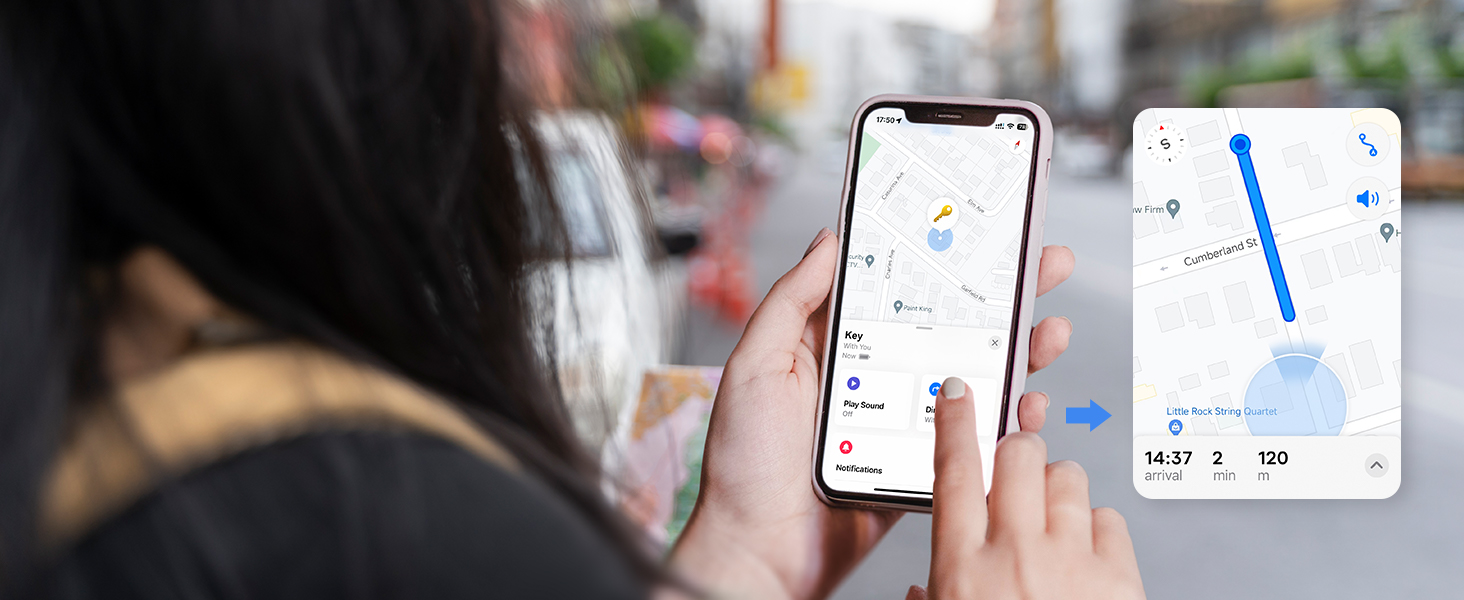
Figure 7: Sharing an ATUVOS tag with others using the Find My app on iOS 17.
5. Батареяны алмаштыруу
The ATUVOS Air Tracker Tag uses a replaceable CR2032 coin cell battery, which typically lasts for approximately one year. The Find My app will notify you when the battery level is low.
- ачыңыз Tag: Gently press the product with your index finger and turn your thumb in the direction of unlocking to open the cover.
- Эски батареяны алып салуу: Эски CR2032 батарейкасын этияттык менен алып салыңыз.
- Жаңы батареяны салыңыз: Place a new CR2032 battery into the compartment with the positive (+) side facing up.
- жабуу Tag: Align the cover and twist it shut until it clicks securely.

Figure 8: Step-by-step guide for replacing the CR2032 battery in your ATUVOS tag.
Video 2: Instructions on how to replace the battery of an ATUVOS Tag.
6. Техникалык тейлөө
To ensure optimal performance and longevity of your ATUVOS Air Tracker Tag, бул тейлөө көрсөтмөлөрүн аткарыңыз:
- Тазалыкты сактоо: сүртүңүз tag with a soft, dry cloth to remove dust and dirt. Avoid harsh chemicals.
- Суу каршылык: The tag is IP67 waterproof, meaning it can withstand splashes, rain, and brief submersion. However, avoid prolonged submersion or exposure to high-pressure water.
- Батареяны текшерүү: Monitor battery levels via the Find My app and replace the CR2032 battery annually or when prompted.
7. Кыйынчылыктарды
Жупташуу катасы
If you experience issues pairing your ATUVOS Air Tracker Tag, it may be due to interference from too many Bluetooth devices in the vicinity. Move to an area with fewer Bluetooth devices and attempt the pairing process again.
баштапкы абалга келтирүү Tag
To reset your ATUVOS Air Tracker Tag, long press and hold the button. You will hear 6 short beeps, followed by a long beep. Continue holding until you hear the long beep, then release. The tag is now reset and ready for re-pairing.
8. Техникалык шарттар
| Өзгөчөлүк | Деталь |
|---|---|
| Модель номери | AT2301 |
| Продукциянын өлчөмдөрү | 1.37"L x 1.37"W x 0.39"Mh |
| Элемент Салмагы | 2.29 унция |
| Батарея түрү | CR2032 Литий Металл (кошулган) |
| Батареянын иштөө мөөнөтү | Approximately 1 year (replaceable) |
| Байланыш | Bluetooth |
| Суу өткөрбөйт рейтинги | IP67 |
| Beeping Sound Level | 100дБ чейин |
| Bluetooth диапазону | 200 фут / 60м чейин |
| Материал | Пластик |
9. Коопсуздук маалыматы
The ATUVOS Air Tracker Tags are designed with privacy in mind. All communication on the Apple Find My network is anonymous and encrypted. Location data and history are not stored on the tags.
10. Кардарларды колдоо кызматы
For any questions regarding the use of your ATUVOS Air Tracker Tags, please contact our 24-hour customer service. We are committed to providing assistance and resolving any issues you may encounter.