
1. Киришүү
Сатып алганыңыз үчүн рахматasing the GOWENIC Mini MP3 Player. This compact and portable digital music player is designed to provide high-fidelity lossless sound, making it ideal for various activities such as running, business, and travel. Please read this manual carefully to ensure proper use and to maximize your enjoyment of the device.
Пакеттин мазмуну
- GOWENIC Mini MP3 Player
- USB заряддоо кабели
- User Manual
- Note: Memory card and headphones are not included.
2. Коопсуздук маалыматы
- Аппаратты экстремалдык температурага, түз күндүн нуруна же жогорку нымдуулукка дуушар кылбаңыз.
- Аппаратты түшүрүүдөн же катуу таасирлерден сактаныңыз.
- Аппаратты суудан жана башка суюктуктардан алыс кармаңыз.
- Түзмөктү өз алдынча бөлүктөргө бөлүүгө же оңдоого аракет кылбаңыз. Көйгөйлөр жаралса, кардарларды колдоо кызматына кайрылыңыз.
- Заряддоо үчүн берилген USB кабелин гана колдонуңуз.
- Угуу жөндөмүнө зыян келтирбөө үчүн орточо үн деңгээлинде угуңуз.
3. Продукт бүтүп калдыview
Familiarize yourself with the components and controls of your MP3 player.

Сүрөт 3.1: Side view of the GOWENIC Mini MP3 Player, showing the headphone jack at the top, the micro USB charging/data port, and the microSD card slot on the side.
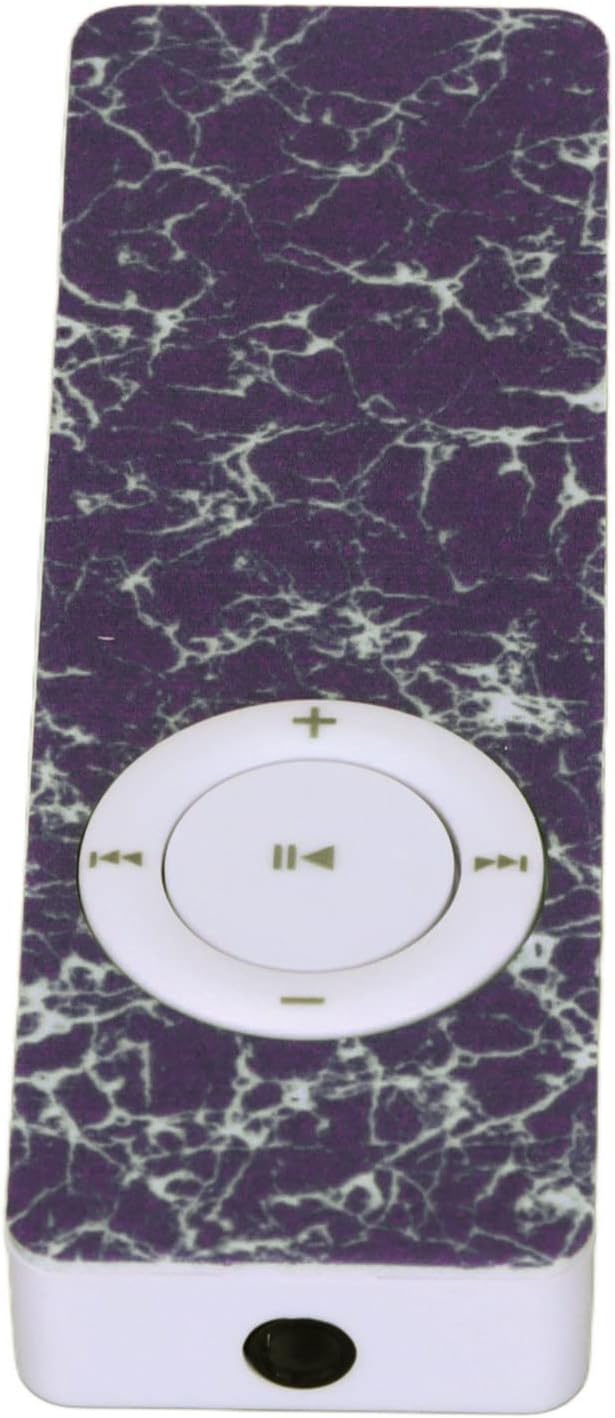
Сүрөт 3.2: Жогорку view of the GOWENIC Mini MP3 Player, highlighting the 3.5mm headphone jack.

Сүрөт 3.3: Төмөнкү view of the GOWENIC Mini MP3 Player, showing the microSD card slot and the micro USB port.
Башкаруу каражаттары:

Сүрөт 3.4: Фронт view of the GOWENIC Mini MP3 Player, displaying the central circular control pad.
- Central Button (Play/Pause): Музыканы ойнотуу же тындыруу үчүн басыңыз.
- Left/Right Buttons (Previous/Next Track): Press to skip to the previous or next song.
- Up/Down Buttons (Volume +/-): Үндү көбөйтүү же азайтуу үчүн басыңыз.
- Кубат которгучу: Located on the side (not visible in all images, but implied by typical MP3 player design). Slide to turn the device on or off.
4. Орнотуу
4.1 Аппаратты заряддоо
- Connect the small end of the USB charging cable to the micro USB port on the MP3 player.
- USB кабелинин чоңураак учун USB кубат адаптерине (кошулмада жок) же компьютердин USB портуна туташтырыңыз.
- The device will begin charging. A full charge typically takes a few hours.
- Толук заряддалгандан кийин кабелди ажыратыңыз.
4.2 Эстутум картасын салуу
The GOWENIC Mini MP3 Player supports microSD cards up to 64GB (not included).
- Locate the microSD card slot on the side/bottom of the player (refer to Image 3.3).
- microSD картаны алтын түстүү контакттары ылдый каратып, ордуна чыкылдаганча акырын салыңыз.
- To remove the card, push it in slightly until it springs out.
4.3 Музыканы өткөрүп берүү Files
- Ensure a microSD card is inserted into the MP3 player.
- MP3 ойноткучту USB кабели аркылуу компьютериңизге туташтырыңыз.
- The computer should recognize the MP3 player as a removable disk.
- Open the removable disk folder.
- Каалаган музыкаңызды сүйрөп барып таштаңыз files (e.g., MP3, WAV, FLAC) into the player's storage.
- Бир жолу files are transferred, safely eject the removable disk from your computer before disconnecting the USB cable.
5. Иштөө нускамалары
5.1 Күйгүзүү/өчүрүү
- Күйгүзүү үчүн: Кубат өчүргүчтү "ON" абалына жылдырыңыз.
- Өчүрүү үчүн: Slide the power switch to the "OFF" position.
5.2 Негизги музыканы ойнотуу
- Ensure headphones are connected to the 3.5mm audio jack.
- Түзмөктү күйгүзүңүз.
- басыңыз Борбордук баскыч музыка ойноп баштоо.
- басыңыз Борбордук баскыч кайра ойнотууну тындыруу үчүн.
- колдонуу Сол/Оң баскычтары тректердин ортосунда багыт алуу үчүн.
- Үнүн колдонуп, үнүн жөндөңүз Өйдө / ылдый баскычтар.

Сүрөт 5.1: The GOWENIC Mini MP3 Player in use, surrounded by musical notes, illustrating its primary function.
6. Техникалык тейлөө
- Тазалоо: Use a soft, dry cloth to wipe the device. Do not use liquid cleaners or aerosols.
- Сактагыч: Store the MP3 player in a cool, dry place when not in use. Avoid extreme temperatures.
- Батареяга кам көрүү: Батареянын иштөө мөөнөтүн узартуу үчүн, бат-баттан батарейканы толук зарядсыздандырбаңыз. Аппаратты дайыма колдонууда болбосо да, үзгүлтүксүз заряддаңыз.
7. Кыйынчылыктарды
| Көйгөй | Мүмкүн себеп | Чечим |
|---|---|---|
| Түзмөк күйбөй жатат. | Батарея түгөндү. Кубат өчүргүч өчүк. | Charge the device. Ensure the power switch is in the "ON" position. |
| Үн жок. | Headphones not connected properly. Volume is too low. Corrupt music file. | Ensure headphones are fully plugged in. Increase volume. Try playing a different music file. |
| Компьютер түзмөктү тааныбайт. | USB туташуусу бошоп калды. Драйвер көйгөйү. | Reconnect the USB cable. Try a different USB port or computer. Ensure the device is powered on. |
| Музыка fileойнобой жатат. | Колдоого алынбайт file format. No memory card inserted. | камсыз кылуу files are in a supported format (e.g., MP3, WAV, FLAC). Insert a formatted microSD card with music. |
8. Техникалык шарттар
- Модел: GOWENICuzhgqv83iw3060-12
- Материал: ABS
- Батарея: Built-in 180 mAh Polymer Lithium Battery
- Эстутум картасын колдоо: 64 ГБ чейин microSD картасы (кошулбайт)
- Байланыш: Auxiliary (3.5mm headphone jack), USB (for data transfer and charging)
- Экрандын өлчөмү: 1.44 дюйм
- Үн сапаты: Hi-Fi Lossless Decoding
9. Кепилдик жана колдоо
For warranty information or technical support, please refer to the retailer's policy or contact GOWENIC customer service through their official channels. Keep your purchase receipt for warranty claims.