Продукт бүттүview
Experience everything that TV has to offer with this 42-inch LED smart TV from RCA. The built-in Roku app lets you control the TV directly through your smartphone for great control and ease of use. You can also cast photos, videos, music and more directly from your compatible mobile device right onto the television, letting you share the best of entertainment with everyone in the room.
Негизги өзгөчөлүктөрү
- Акылдуу платформа: Roku TV
- Чечим: 1080p толук HD
- Жаңыртуу ылдамдыгы: 60Hz
- Аспект катышы: 16:9
- Жооп убактысы: 8ms
- Байланыш: 2x HDMI, VGA, RF, YPbPr, AV Audio/Video, Coaxial, PC Audio
Эмне камтылган
- RCA 42" Smart LED TV
- Телевизор (2 даана)
Орнотуу колдонмосу
1. Стендди бекитүү
Carefully place the TV screen-down on a soft, clean surface to prevent scratches. Align the stand pieces with the screw holes on the bottom of the TV. Secure the stands using the provided screws. Ensure the stand is firmly attached before placing the TV upright.
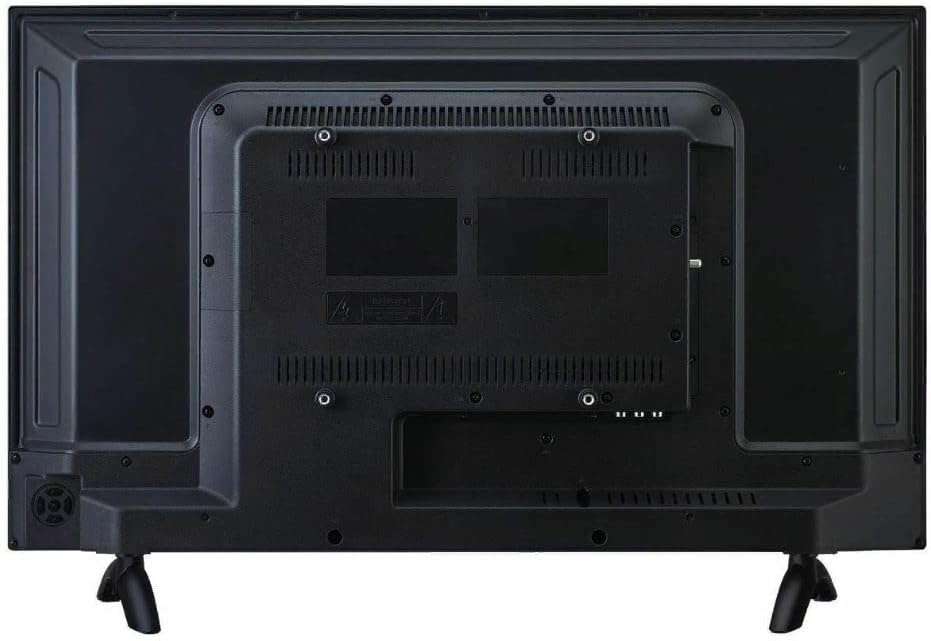
1-сүрөт: Арткы view of the TV, illustrating the stand attachment points and various input ports.
2. Перифериялык түзүлүштөрдү туташтыруу
Connect your external devices such as cable boxes, Blu-ray players, or gaming consoles to the appropriate input ports on the back of the TV. The TV features 2 HDMI ports, VGA, RF, YPbPr, AV Audio/Video, Coaxial, and PC Audio inputs.
3. Күйгүзүү жана баштапкы орнотуу
Plug the power cord into the TV and then into a wall outlet. Press the power button on the TV or the remote control. Follow the on-screen instructions to complete the initial setup, including network connection for Smart TV features and channel scanning.
Иштөө нускамалары
Navigating the Roku TV Interface
The RCA Smart LED TV uses the Roku TV platform for easy access to streaming services and inputs. Use the remote control's directional pad to navigate through the home screen menu. Select options by pressing the OK button.

2-сүрөт: The Roku TV home screen, showing navigation options and streaming channel icons.
Using Streaming Channels
From the home screen, select your desired streaming channel (e.g., Netflix, Hulu). Ensure your TV is connected to the internet. You may need to log in to your accounts for each service.
Мазмунду чыгаруу
The built-in Roku app allows casting of photos, videos, and music from compatible mobile devices directly to the TV. Ensure your mobile device and TV are on the same Wi-Fi network. Use the casting feature within your mobile app to select the RCA Roku TV as the playback device.
Техникалык тейлөө жана кам көрүү
Экранды тазалоо
Телевизордун экранын тазалоо үчүн аны жумшак, кургак, мамыксыз чүпүрөк менен акырын сүртүңүз. Эгерде өжөр тактар болсо, аны бир аз сүртүңүз.ampкездемени суу же электроника үчүн атайын иштелип чыккан экран тазалоочу эритме менен сүртүңүз. Катуу химиялык заттарды, абразивдүү тазалоочу каражаттарды колдонуудан же экранга түз чачуудан алыс болуңуз.
Жалпы кам көрүү
- Телевизорду күн нурунан жана жылуулук булактарынан алыс кармаңыз.
- Ашыкча ысып кетүүдөн сактануу үчүн телевизордун айланасын туура желдетүүнү камсыз кылыңыз.
- Телевизордун артындагы желдеткич тешиктерди жаппаңыз.
- Чагылган бороондо же ал узак убакыт бою колдонулбай турганда телевизорду розеткадан сууруп алыңыз.
Проблемаларды чечүү
Күч жок
- Электр шнурунун сыналгыга да, розеткага да бекем сайылганын текшериңиз.
- Розетка иштеп жатканын башка түзмөктү сайып текшериңиз.
- Жөн гана пульттун эмес, сыналгыдагы кубат баскычын басып көрүңүз.
Сүрөт жок / Сүрөттүн сапаты начар
- Туура киргизүү булагынын тандалганын текшериңиз (мисалы, HDMI 1, AV).
- Сыналгы менен тышкы түзмөктөрдүн ортосундагы бардык кабелдик байланыштарды текшериңиз.
- Сыналгынын менюсунда сүрөт жөндөөлөрүн (жарыктык, контраст, түс) тууралаңыз.
- If using an antenna, check antenna connection and try rescanning channels.
Үн жок / Үн сапаты начар
- Телевизордун жана туташкан тышкы аудио түзмөктөрдүн үнүн жогорулатыңыз.
- Аудио кабелдик байланыштарды текшериңиз.
- Телевизордун үнү өчүрүлбөгөнүн текшериңиз.
- Эгер тышкы динамиктерди колдонсоңуз, алардын күйгүзүлгөнүн жана туура туташтырылганын текшериңиз.
Пульт иштебейт
- Пульттагы батарейкаларды алмаштырыңыз.
- Пульт менен сыналгынын IR сенсорунун ортосунда эч кандай тоскоолдуктар жок экенин текшериңиз.
- Пультту түз сыналгыга багыттаңыз.
Техникалык мүнөздөмөлөр
| Өзгөчөлүк | Спецификация |
|---|---|
| Модель номери | RTR4262-CA |
| Screen Size | 42 дюйм (диагоналы 107 см) |
| Дисплей технологиясы | LED |
| Резолюция | 1080p толук HD |
| Жаңыртуу ылдамдыгы | 60 Гц |
| Аспект катышы | 16:9 |
| Жооп убактысы | 8ms |
| Акылдуу платформа | Roku TV |
| Байланыш | 2x HDMI, VGA, RF, YPbPr, AV Audio/Video, Coaxial, PC Audio |
| Продукт өлчөмдөрү (W x D x H) | 37.64 x 7.2 x 23.23 дюйм |
| Элемент Салмагы | 13.7 фунт |
| Динамик түрү | Камтылган |
| Биринчи жеткиликтүү күн | 11-май, 2022-жыл |
Кепилдик жана колдоо
For warranty information and technical support, please refer to the documentation included with your purchase or visit the official RCA support webсайт. Кепилдик дооматтар үчүн сатып алганыңыздын далилин сактаңыз.
Онлайн колдоо: Amazonдагы RCA дүкөнүнө барыңыз