
Introduction
The Gdrasuya10 8-Channel Digital Kitchen Timer is designed for precise time management in busy kitchen environments, both commercial and home. This device allows for simultaneous tracking of up to eight different cooking tasks, ensuring optimal results and improved efficiency. Its robust stainless steel construction and user-friendly interface make it a reliable tool for any culinary setting.
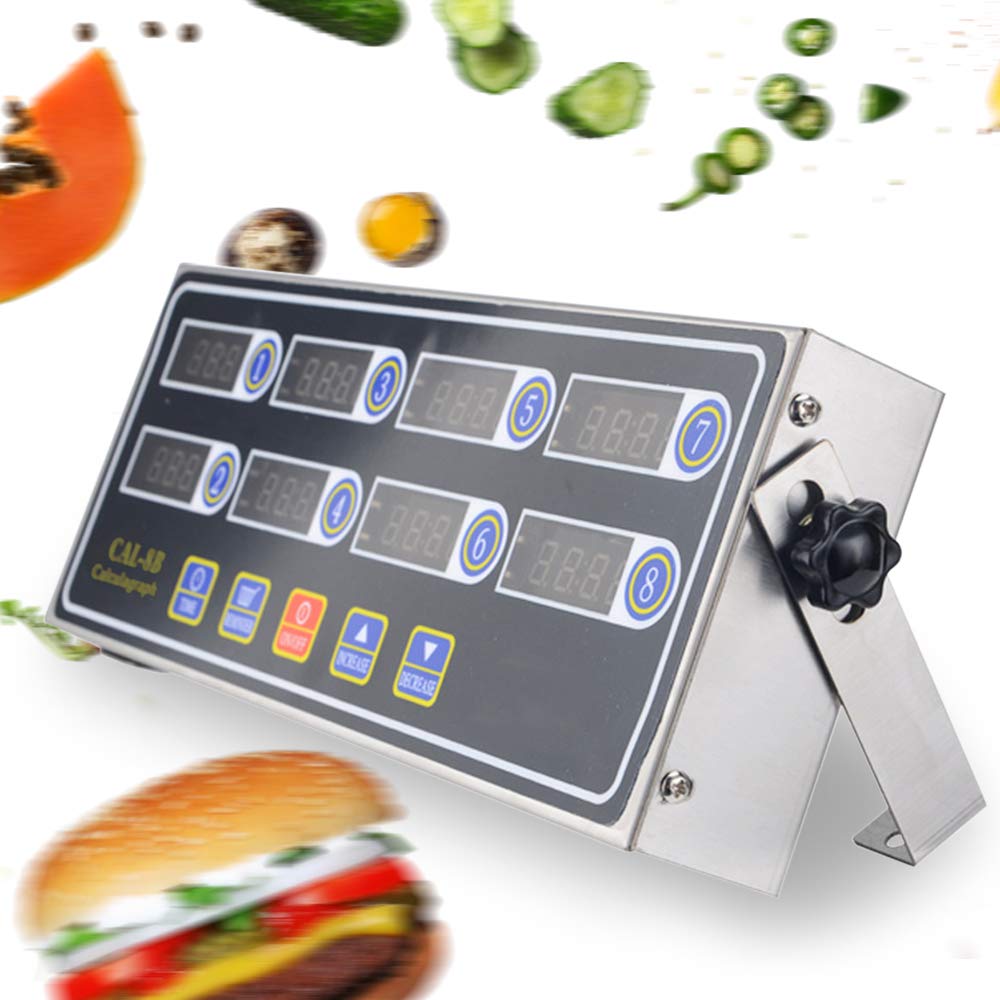
Image: The Gdrasuya10 8-Channel Digital Kitchen Timer, highlighting its 110V compatibility and multi-channel display.
Жайгашуу
Кутудан чыгаруу жана алгачкы текшерүү
Upon receiving your Gdrasuya10 8-Channel Digital Kitchen Timer, carefully unpack all components. The package should include:
- 1 x 8-Channel Digital Timer Unit
- 1 х Инструкция (бул документ)
- 2 x Timer Fixing Iron Pieces (for mounting)
- 1 x Power Cord (AC110V 60Hz)
Inspect the unit for any signs of damage during transit. If any components are missing or damaged, please contact customer support.
Күйгүзүлүүдө
Connect the provided power cord to the timer unit and then plug it into a standard AC110V 60Hz power outlet. The timer will emit an initial sound, and the display will illuminate.
Placement and Mounting Options
The timer can be placed on a countertop using its integrated stand or mounted to a wall using the included fixing iron pieces. The stand allows for adjustable viewбурчтар.

Сүрөт: Арткы view of the timer showing the power input and mounting points.

Image: The two included metal fixing iron pieces for secure mounting.
Видео: Бүттүview of the 8-channel kitchen timer, demonstrating its features and setup options.
Иштөө нускамалары
The Gdrasuya10 timer features a user-friendly interface with dedicated buttons for each function.

Сүрөт: деталдуу view of the timer's display and control buttons.
Артка саноо таймерин орнотуу
- Press the corresponding channel button (1-8) to select the desired timer. The display for that channel will begin to flash.
- колдонуу КӨБӨЙТҮҮ (▲) жана АЗАЙТУУ (▼) buttons to set the desired time. Hold the buttons for faster adjustment.
- Press the selected channel button again to confirm the time and start the countdown.
- To pause or stop a timer, press its corresponding channel button.
Ойготкучтун үнүн тууралоо
The timer features an adjustable alarm volume. Use the dedicated volume control knob, typically located on the side of the unit, to increase or decrease the sound level. The alarm is designed to be loud enough for busy environments.
Switching Time Modes (Minute:Second or Hour:Minute)
To switch between Minute:Second (M:S) and Hour:Minute (H:M) display modes, first press the КҮЙГҮЗҮҮ/ӨЧҮРҮҮ button. Then, long-press the TIME button until the display mode changes. Press the АЗАЙТУУ орнотууну сактоо үчүн баскыч.
Видео: Кыскача алдын ала маалыматview demonstrating how to adjust the volume and set a countdown on the timer.
Setting Multiple Reminders (3-Stage)
Each channel includes a 3-stage reminder function. This is useful for tasks requiring intermediate steps, such as turning fried food or adjusting temperature during cooking. While a timer is running, press the ЭСКЕРТҮҮ button to set a reminder. The timer will beep at preset intervals before the main countdown ends.
Video: Demonstration of setting multiple timers and reminders on the BIZOEPRO 8-Channel Commercial Kitchen Cooking Timer.
Using Custom Labels
The timer may come with customizable labels (e.g., 'Fried Chicken', 'Pork Chops', 'Shrimp') that can be affixed next to each channel. This helps in quickly identifying which timer corresponds to which cooking task, especially when managing multiple items simultaneously.
Техникалык тейлөө
Тазалоо
The timer features a stainless steel body and waterproof button design, making it easy to clean. Use a soft, damp cloth to wipe down the surface. Avoid abrasive cleaners or harsh chemicals that could damage the finish or electronic components. Ensure the unit is unplugged before cleaning.
Видео: Кыскача алдын ала маалыматview demonstrating the timer's water resistance and ease of cleaning.
Проблемаларды чечүү
- Кубат жок/Дисплей өчүк: Ensure the power cord is securely plugged into both the timer and a working electrical outlet. Check the power source.
- Alarm Too Quiet/Loud: Adjust the volume using the dedicated control knob on the side of the unit.
- Timer Not Starting: Verify that the time has been set for the desired channel and that the channel button has been pressed to initiate the countdown.
- Так эмес убакыт: If you suspect timing inaccuracies, ensure the unit is operating within its specified voltage and frequency. If issues persist, contact customer support.
Техникалык шарттар
| Өзгөчөлүк | Деталь |
|---|---|
| Продукт өлчөмү | 30 x 10 x 3.5 см (11.81 x 3.94 x 1.38 дюйм) |
| Салмагы | 700 г (1.54 фунт) |
| Түс | Кара+Күмүш |
| Материал | Дат баспас болоттон жасалган алкак |
| Киргизүү көлөмүtage | AC110V 60Hz |
| Энергияны керектөө | 2~10 Вт |
| Каналдардын саны | 8 Көз карандысыз каналдар |
| Ойготкучтун өзгөчөлүктөрү | High decibel buzzer, adjustable volume, 3-stage эскертүү |
| Убакыт режимдери | Hours/Minutes mode or Minutes/Seconds mode |

Image: The timer with its physical dimensions clearly indicated.
Кепилдик жана колдоо
For technical assistance, troubleshooting, or inquiries regarding product warranty, please contact Gdrasuya10 customer service through the retailer where the product was purchased. Please have your model number (OT-MLLCR-3384-US-1) and purchase date available when contacting support.