
1. Киришүү
Thank you for choosing the AISPEECH AIMIC-M4 Bluetooth Conference Speakerphone. This device is designed to provide crystal-clear audio for your conference calls, whether you're in the office, at home, or on the go. Featuring AI-powered noise reduction, omnidirectional voice pickup, and multiple connectivity options, the AIMIC-M4 ensures seamless communication. Please read this manual carefully to understand how to set up and operate your speakerphone effectively.
2. Кутуда эмне бар
- AISPEECH AIMIC-M4 Conference Speakerphone
- USB-C заряддоо кабели
- User Manual
- Коргоочу куту

Image: The AISPEECH AIMIC-M4 speakerphone and its included protective carrying case.
3. Продукциянын өзгөчөлүктөрү
- AI-Powered Noise Reduction: Distinguishes human voices from background noise for crystal-clear audio.
- Оптимизацияланган үн сапаты: Advanced digital signal processing for clear voice and music.
- Omnidirectional Voice Pickup: Four microphones capture sound from up to 16 feet away.
- Толук дуплекстүү байланыш: Allows simultaneous speaking without audio interruption.
- Оңой туташуу: Plug-and-play via USB, easy pairing with Bluetooth or NFC.
- Кеңири шайкештик: Works with popular conferencing platforms like Zoom, Skype, Teams, and WebМис.
- Батареянын узак иштөө мөөнөтү: Бир заряд менен 10 саатка чейин иштөө мөөнөтү.
- Touchable Mute Button: Discreet mute function with a red indicator light.

Image: The speakerphone's 360-degree omnidirectional voice pickup and full-duplex communication capabilities.

Image: The patented intelligent noise reduction algorithm at work, minimizing environmental distractions.
4. Башкаруу каражаттары жана көрсөткүчтөр
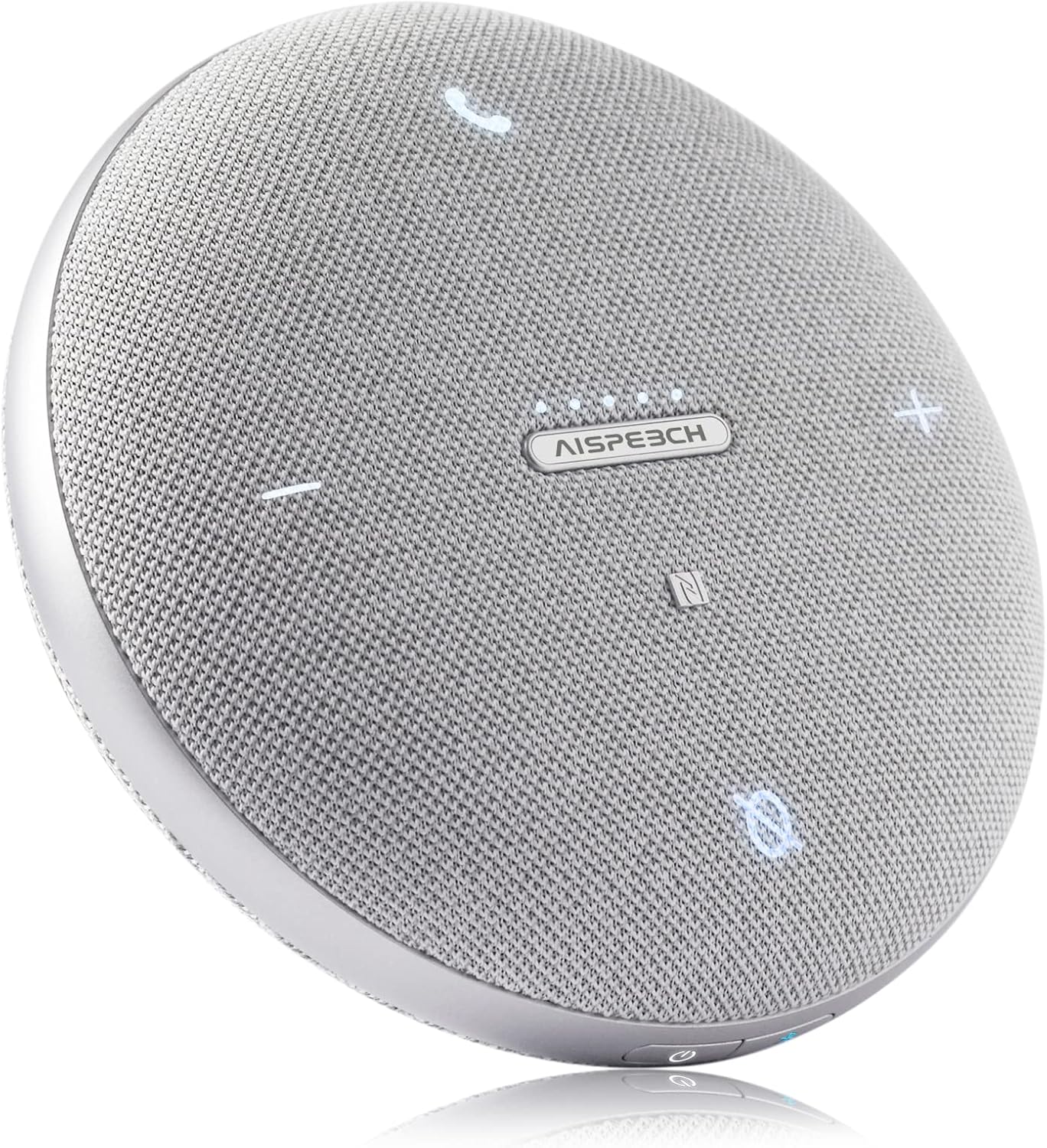
Сүрөт: Жогорку view of the speakerphone highlighting its touch controls.
Жогорку панелдин башкаруу элементтери:
- Чакыруу баскычы (Телефон сүрөтчөсү): Press to answer an incoming call or end an ongoing call.
- Үндү азайтуу (-) баскычы: Динамиктин үнүн азайтат.
- Үнүн жогорулатуу (+) баскычы: Динамиктин үнүн жогорулатат.
- Mute Button (Microphone Icon): Toggles microphone mute on/off. A red indicator light will illuminate when muted.
- NFC аймагы: Tap an NFC-enabled device here for quick pairing.
- Status/Battery Indicator Lights: Five small lights indicate battery level and connection status.
Каптал панелдин башкаруу элементтери:
- Кубат баскычы: Түзмөктү күйгүзүү/өчүрүү үчүн басып туруңуз.
- Bluetooth баскычы: Bluetooth жупташтыруу режимине кирүү үчүн басып туруңуз.
- USB Type-C порту: For charging and wired USB connection to a computer.
5. Орнотуу
5.1 Charging the Speakerphone
Before first use, fully charge the speakerphone. Connect the included USB-C cable to the speakerphone's USB Type-C port and the other end to a USB power adapter (not included) or a computer's USB port. The indicator lights will show charging progress and turn solid when fully charged.
5.2 Күйгүзүү/өчүрүү
- Күйгүзүү: Press and hold the Power button on the side until the indicator lights illuminate.
- Өчүрүү: Press and hold the Power button on the side until the indicator lights turn off.
6. Иштөө нускамалары
6.1 Түзмөгүңүзгө туташуу

Image: The speakerphone offers versatile connectivity options including USB, Bluetooth, and NFC, compatible with various conferencing platforms.
USB Connection (Plug & Play)
Connect the speakerphone to your computer using the provided USB-C cable. The device will be automatically recognized by your operating system (Windows, macOS, Linux) and ready for use without needing additional drivers. Select the AIMIC-M4 as your audio input and output device in your conferencing application settings.
Bluetooth туташуу
- Динамиктин күйүп турганын текшериңиз.
- Press and hold the Bluetooth button on the side of the speakerphone until the indicator lights flash blue, indicating pairing mode.
- Түзмөгүңүздө (смартфон, планшет, компьютер) Bluetooth жөндөөлөрүнө өтүп, жеткиликтүү түзмөктөрдү издеңиз.
- Select "AIMIC-M4" from the list of found devices.
- Once connected, the indicator lights will turn solid blue.
NFC туташуусу
If your smartphone or tablet supports NFC, simply tap your device to the NFC area on the top of the speakerphone to initiate pairing. Follow the on-screen prompts to complete the connection.
6.2 Чалууларды башкаруу
- Чакырууга жооп берүү: When an incoming call rings, press the Call button (phone icon) on the top panel.
- Чакырууну аяктоо: During a call, press the Call button (phone icon) to end the conversation.
6.3 Үндү катуулатууну жана үнсүз режимди жөндөө
- Үндү тууралоо: Use the Volume Up (+) and Volume Down (-) buttons on the top panel to control the speaker output volume.
- Микрофондун үнүн басуу: Press the Mute button (microphone icon) to mute or unmute the microphone. The button will light up red when muted.
7. Техникалык тейлөө
- Тазалоо: Use a soft, dry cloth to clean the speakerphone. Do not use liquid cleaners or aerosols.
- Сактагыч: Store the device in a cool, dry place, away from direct sunlight and extreme temperatures. Use the provided carrying case for protection during travel.
- Батареяга кам көрүү: Батареянын иштөө мөөнөтүн узартуу үчүн, бат-баттан батарейканы толук зарядсыздандырбаңыз. Аппаратты узак убакыт бою колдонбосо дагы, үзгүлтүксүз заряддаңыз.
8. Кыйынчылыктарды
| Көйгөй | Мүмкүн себеп | Чечим |
|---|---|---|
| Кубат жок/Түзмөк күйбөйт | Low battery; Device off | Charge the speakerphone; Press and hold the Power button to turn on. |
| Bluetooth аркылуу туташуу мүмкүн эмес | Speakerphone not in pairing mode; Device Bluetooth off; Out of range | Press and hold Bluetooth button until lights flash; Ensure Bluetooth is enabled on your device; Move device closer to speakerphone (within 10 meters). |
| Үн жок же үн сапаты начар | Volume too low; Incorrect audio output selected; Muted microphone | Increase volume using (+) button; Select "AIMIC-M4" as audio output in your computer/app settings; Ensure microphone is not muted (red light off). |
| Микрофон үн чыгарбай жатат | Microphone muted; Incorrect audio input selected | Press Mute button to unmute; Select "AIMIC-M4" as audio input in your computer/app settings. |
| Connectivity issues with conferencing platforms (e.g., MS Teams) | Software conflict; System audio settings | Ensure the speakerphone is selected as the default communication device in your platform's audio settings. Try restarting the application or your computer. Disable system sounds in Windows 10/11 settings if experiencing constant audio interruptions. |
9. Техникалык шарттар
- Модель аты: AIMIC-M4
- Бренд: AISPEECH
- Байланыш технологиясы: Bluetooth, NFC, USB
- Зымсыз байланыш технологиясы: Bluetooth 5.1
- Bluetooth диапазону: 10 метр (33 фут)
- Microphone Pickup Range: 5 метрге чейин (16 фут)
- Динамик түрү: Компьютердин динамиктери
- Аудио чыгаруу режими: Стерео
- Ызы-чуунун катышы: 80 дБ
- Кубат булагы: Батарея менен иштейт
- Батареянын иштөө мөөнөтү: 10 саатка чейин
- Батарея түрү: 1 литий-иондук батарейка (кошулган)
- Башкаруу ыкмасы: тийүү
- Түсү: Боз
- Продукциянын өлчөмдөрү: 4.4 x 4.4 x 1.38 дюйм
- Элемент Салмагы: 8.3 унция
- Өзгөчө өзгөчөлүгү: AI Noise Reduction, Omnidirectional Voice Pickup, Mute Function, Full-Duplex Communication
- Сунушталган колдонуулар: Видеоконференция
- Суу өткөрбөйт: Жок
10. Кепилдик жана колдоо
The AISPEECH AIMIC-M4 Conference Speakerphone comes with a Limited Warranty. Please refer to the warranty card included in your product packaging for specific terms and conditions. For technical support, troubleshooting assistance, or warranty claims, please contact AISPEECH customer service through the retailer where you purchased the product or visit the official AISPEECH webбайланыш маалыматы үчүн сайт.
Эскертүү: Продукциянын мүнөздөмөлөрү жана функциялары алдын ала эскертүүсүз өзгөртүлүшү мүмкүн.