
1. Киришүү
This manual provides essential information for the safe and effective use of your Huawei Watch Fit 2 Smartwatch. Please read this manual thoroughly before using the device and retain it for future reference.
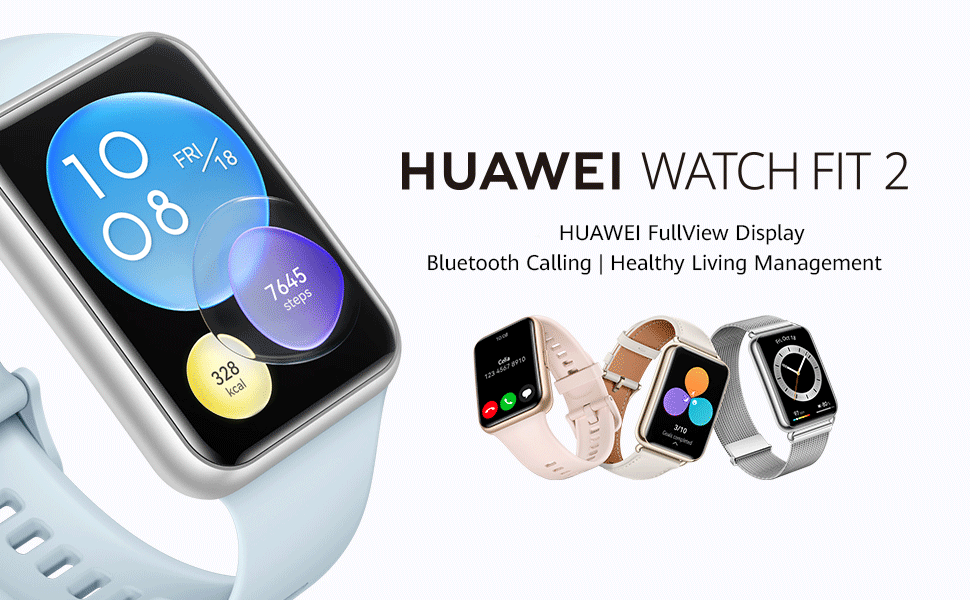
Image: Huawei Watch Fit 2 Smartwatch, showcasing анын саркеч дизайны жана жандуу дисплей.
2. Кутуда эмне бар
Продукттун таңгагында бардык элементтер бар экенин текшериңиз:
- Көрүү x 1
- Charging Cradle (including the charging cable) x 1
- X 1
- Safety Information x 1
- Кепилдик картасы x 1
3. Орнотуу
3.1. Саатты заряддоо
Before initial use, fully charge your Huawei Watch Fit 2. Connect the charging cradle to a power source and place the watch onto the cradle, ensuring the magnetic contacts align. The watch display will indicate charging status.

Image: The Huawei Watch Fit 2 being charged on its magnetic cradle.
3.2. Телефонуңуз менен жупташтыруу
- жүктөп алып, орнотуңуз Huawei Health колдонмосу on your smartphone (compatible with Android and iOS devices).
- Open the Huawei Health App and navigate to the device pairing section.
- Turn on your Huawei Watch Fit 2.
- Select your watch from the list of available devices in the app and follow the on-screen instructions to complete the pairing process.
3.3. Саат тагынуу
Wear the watch comfortably on your wrist, ensuring the sensors on the back are in contact with your skin. Adjust the strap for a snug fit to ensure accurate heart rate and SpO2 monitoring.

Сүрөт: Арткы view of the Huawei Watch Fit 2, highlighting the sensor array for health tracking.
4. Саатыңызды иштетүү
4.1. Дисплей жана навигация
The Huawei Watch Fit 2 features a 1.74-inch FullView AMOLED touchscreen display. Swipe up, down, left, or right to navigate through menus, notifications, and widgets. Press the side button to return to the home screen or access the app list.

Image: The watch display showing a grid of application icons.
4.2. Bluetooth чалуу
With Bluetooth calling support, you can answer or reject calls directly from your wrist when connected to your smartphone. The watch also supports quick message replies and importing contacts.

Image: A user interacting with the watch to manage an incoming Bluetooth call.
4.3. Музыканы ойнотуу
The watch supports independent music playback. You can store music directly on the watch and listen via connected Bluetooth headphones, allowing you to enjoy music without carrying your phone.

Image: The watch screen showing music playback interface with controls.
4.4. Үн жардамчысы
Utilize the integrated voice assistant for quick commands, setting reminders, checking weather, and more. Simply activate the voice assistant and speak your request.

Image: The watch display indicating the voice assistant is active and listening.
4.5. Remote Camera Shutter
Control your smartphone's camera remotely using your watch. This feature is useful for group photos or capturing shots from a distance.

Image: A user taking a photo with their smartphone using the watch as a remote shutter.
4.6. Workout Modes and Health Tracking
The watch offers 97 workout modes and comprehensive health management features, including:
- Accurate heart rate monitoring
- HUAWEI TruSleep 2.0 sleep tracking
- SpO2 (blood oxygen saturation) monitoring
- Стресске көз салуу
- Quick-Workout Animations and voice-guided warm-up stretches for 7 common workouts.

Image: The watch screen showing active workout tracking with heart rate and calorie data.
5. Техникалык тейлөө
5.1. Сууга туруктуулук
The Huawei Watch Fit 2 has an IP67 water resistance rating, making it suitable for daily use and light water activities. Avoid prolonged submersion or use in hot water, saunas, or steam rooms, as this may compromise the water resistance.
5.2. Тазалоо жана кам көрүү
- Сааттын экранын жана боосун жумшак, d менен үзгүлтүксүз тазалап туруңузamp кездеме.
- Заряддоодон мурун сааттын артындагы заряддоо контакттары таза жана кургак экенин текшериңиз.
- Саатты өтө жогорку температурага же катуу химиялык заттарга дуушар кылбаңыз.
6. Кыйынчылыктарды
6.1. Байланыш маселелери
- Смартфонуңузда Bluetooth иштетилгенин жана сааттын диапазонунда экенин текшериңиз.
- Саатыңызды да, смартфонуңузду да өчүрүп күйгүзүңүз.
- If issues persist, unpair and re-pair the watch via the Huawei Health App.
6.2. Ден соолук боюнча так эмес маалыматтар
- Ensure the watch is worn snugly on your wrist, with the sensors in proper contact with your skin.
- Clean the sensor area regularly to remove dirt or sweat buildup.
- Update the Huawei Health App and watch firmware to the latest versions.
6.3. Батареянын иштөө мөөнөтү кыска
- Экрандын жарыктыгын жана күйүп турган убактысын азайтыңыз.
- Disable unnecessary notifications or background app refreshes.
- Зарыл болбосо, жүрөктүн кагышын үзгүлтүксүз көзөмөлдөөнү же GPS колдонууну чектеңиз.
7. Техникалык шарттар
| Өзгөчөлүк | Деталь |
|---|---|
| Модель аты | Huawei Watch Fit 2 |
| Дисплей | 1.74 дюймдук AMOLED, 454 x 454 чечилиште |
| Операция системасы | Android |
| Эстутум сактоо сыйымдуулугу | 32 ГБ |
| Байланыш технологиясы | Bluetooth, USB |
| Өзгөчөлүктөр | GPS, Heart Rate Monitor, Notifications, Sleep Monitor, Touchscreen, Voice Assistant |
| Band Материал түрү | Силикон |
| Сууга туруктуулук деңгээли | IP67, 1 Metre Depth |
| Батареянын орточо иштөө мөөнөтү | 10 күн (типтүү колдонуу) |
| Элементтин өлчөмдөрү | 46 x 34 x 11 Миллиметр |
| Элемент Салмагы | 26 грамм |
| Шайкеш телефон моделдери | Android Devices, iOS Devices |
8. Кепилдик жана колдоо
8.1. Кепилдик маалыматы
The Huawei Watch Fit 2 comes with a 1 жылдык өндүрүүчү кепилдик. Толук шарттар жана эрежелер менен таанышуу үчүн тиркелген Кепилдик картасын караңыз.
8.2. Кардарларды колдоо кызматы
For further assistance, technical support, or warranty claims, please contact Huawei customer service or visit the official Huawei support webсайт.
Importer Contact Information:
Rajendera Trading Corporation, 8 C FLOOR 2ND PLOT 192 KITAB MAHAL DADABHAI NAWROJI ROAD NEW EXCELSIOR CINEMA, FORT MUMBAI-4000051. MAHARASHTRA.
Байланыш: +91 22 66159295
Email Id: accounts@rtcindia.net.
Өндүрүүчүнүн Байланыш маалыматы:
Goertek Inc NO. 268 DONGFANG ROAD HIGH-TECH INDUSTRIAL DEVELOPMENT DISTRICT WEIFANG SHANDONG CHINA SHANDONG,China-261031
9. Продукт бүтүп калдыview Video
Видео: Бүттүview of the Huawei Watch Fit 2, showcasing its design, key features, and various functionalities.