
OMOTON WK003
OMOTON 2.4GHz Wireless AZERTY Keyboard Instruction Manual
Модел: WK003
Бренд: Омотон
1. Киришүү
Thank you for choosing the OMOTON 2.4GHz Wireless AZERTY Keyboard. This ultra-slim, silent keyboard is designed for comfortable and efficient typing across various Windows operating systems. This manual provides detailed instructions for setting up, operating, maintaining, and troubleshooting your new keyboard to ensure optimal performance.
2. Пакеттин мазмуну
Please check the package contents carefully. If any items are missing or damaged, please contact OMOTON customer support.
- 1 x OMOTON 2.4GHz Wireless AZERTY Keyboard
- 1 USB Receiver х
- 1 x User Manual
3. Орнотуу колдонмосу
Follow these steps to set up your OMOTON wireless keyboard:
- Батареяны орнотуу: Open the battery compartment on the back of the keyboard. Insert two AAA batteries (not included), ensuring correct polarity. Close the compartment.
- USB кабылдагычты салыңыз: Locate the USB receiver, which is magnetically stored in the battery compartment. Plug the USB receiver into an available USB port on your computer.

Image: Battery compartment with USB receiver and AAA batteries.
- Күйгүзүү: Slide the ON/OFF switch located on the top right side of the keyboard to the "ON" position.
- Туташуу: Your computer should automatically detect and install the necessary drivers for the keyboard. No additional software is required.

Image: Plug & Play setup with USB receiver.
Баскычтоп азыр колдонууга даяр.
4. Иштөө нускамалары
4.1 Негизги терүү
Simply begin typing. The keyboard features a standard AZERTY layout for familiar use.
4.2 Fn Lock Function
The keyboard includes a convenient Fn Lock function. By default, the F1-F12 keys perform their standard function. To access the multimedia shortcuts directly without pressing the Fn key, activate the Fn Lock.
- Activate/Deactivate Fn Lock: Басыңыз Fn + Échap simultaneously. When activated, the multimedia functions (e.g., volume control, home page) will be directly accessible by pressing F1-F12. When deactivated, F1-F12 will perform their standard functions, and multimedia actions will require pressing Fn + Fx.

Image: Fn Lock function and multimedia keys.
4.3 Мультимедиа жарлыктары
The keyboard provides 12 multimedia shortcuts for quick access to common functions. These can be used directly when Fn Lock is active, or by pressing Fn in combination with the respective F-key when Fn Lock is inactive.
| ачкыч | Функция |
|---|---|
| F1 | Үнсүз |
| F2 | Үндү төмөндөтүү |
| F3 | Үндү көтөрүү |
| F4 | Мурунку трек |
| F5 | Ойнотуу/Тыныгуу |
| F6 | Кийинки трек |
| F7 | Brightness Down (System Dependent) |
| F8 | Brightness Up (System Dependent) |
| F9 | издөө |
| F10 | Башкы бет |
| F11 | Көчүрүү |
| F12 | Паста |
4.4 Шайкештик
This keyboard is compatible with Windows 11, 10, 8, 7, XP, and Vista, making it suitable for a wide range of desktop and laptop computers.
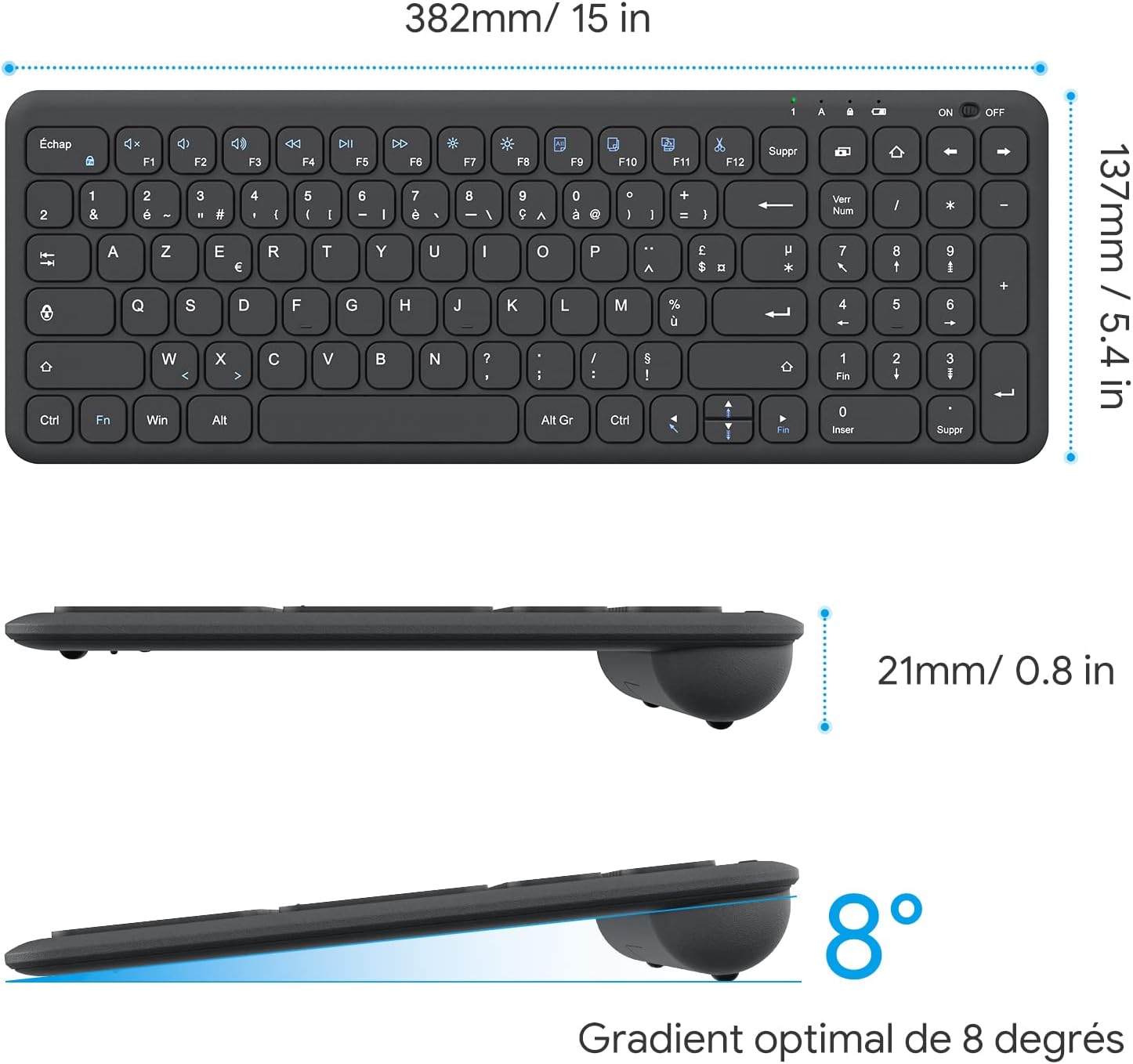
Image: Keyboard compatibility with Windows systems.
5. Техникалык тейлөө
5.1 Батареяны алмаштыруу
When the keyboard's performance degrades or the indicator light flashes, it's time to replace the batteries. Open the battery compartment on the back and replace the two AAA batteries with new ones, observing polarity.
5.2 Тазалоо
Клавиатураңызды тазалоо үчүн, анын бетин жумшак, нымдуу чүпүрөк менен акырын сүртүңүзamp cloth. Avoid using harsh chemicals or abrasive materials. Ensure the keyboard is turned off before cleaning.
5.3 USB Receiver Storage
For convenience and to prevent loss, the USB receiver can be magnetically stored inside the keyboard's battery compartment when not in use or during transport.
6. Кыйынчылыктарды
Эгер клавиатураңызда көйгөйлөргө туш болсоңуз, төмөнкү жалпы чечимдерди караңыз:
- Баскычтоп жооп бербей жатат:
- Баскычтоптун күйүп турганын текшериңиз.
- Батареялар туура орнотулганын жана заряды жетиштүү экендигин текшериңиз. Керек болсо алмаштырыңыз.
- USB кабыл алгыч компьютериңиздеги иштеп жаткан USB портуна бекем сайылганын текшериңиз. Башка USB портун колдонуп көрүңүз.
- Компьютериңизди өчүрүп күйгүзүңүз.
- Lagging or intermittent input:
- Ensure the keyboard is within the effective operating range (up to 10 meters) of the USB receiver.
- Reduce potential interference by moving the keyboard closer to the receiver or away from other wireless devices (e.g., Wi-Fi routers, cordless phones).
- Check battery level. Low batteries can affect wireless performance.
- Айрым баскычтар иштебей жатат:
- Gently clean around the affected key to remove any debris.
- If the issue persists, contact OMOTON customer support for further assistance.
7. Техникалык шарттар
Detailed technical specifications for the OMOTON Wireless AZERTY Keyboard:
| Өзгөчөлүк | Деталь |
|---|---|
| Бренд | ОМОТОН |
| Модел | WK003 |
| Байланыш технологиясы | 2.4 ГГц зымсыз (USB кабыл алуучу) |
| Баскычтоптун жайгашуусу | AZERTY |
| Шайкеш түзмөктөр | PC, Desktop, Laptop |
| Шайкеш операциялык системалар | Windows 11/10/8/7/XP/Vista |
| Өзгөчөлүктөр | 12 Multimedia Shortcuts, Fn Lock, Silent Keys, Ultra-Slim Design, Magnetic USB Receiver Storage |
| Түс | Кара |
| Power Source | 2 x AAA Батареялар (киргизилген эмес) |
| Өлчөмдөрү (L x W x Y) | 38.1 x 13.7 x 2 см (15 x 5.4 x 0.8 дюйм) |
| Ачкычтардын саны | 99 |
| Ачкычтын которуштуруу түрү | Tactile (Scissor-mechanism) |
| Optimal Gradient | 8 градус |

Image: Keyboard dimensions and ergonomic design.

Image: Scissor-mechanism key design.
8. Кепилдик маалыматы
OMOTON products typically come with a manufacturer's warranty. Please refer to the warranty card included with your product or visit the official OMOTON webКепилдиктин толук шарттары жана эрежелери үчүн сайтка кириңиз. Кепилдик боюнча дооматтар үчүн сатып алуунун далили катары сатып алуу квитанцияңызды сактап коюңуз.
9. Кардарларды колдоо кызматы
If you have any questions, require technical assistance, or experience issues not covered in this manual, please do not hesitate to contact OMOTON customer support. You can usually find contact information on the OMOTON official webсайты же продуктуну сатып алган сатуучу аркылуу.
Ask a question about this manual
Ask about setup, troubleshooting, compatibility, parts, safety, or missing instructions. Manuals+ will review the question and use this page’s manual context to help answer it.