
1. Киришүү
Thank you for choosing the NUBWO USB C Headset, Model HW02. This headset is designed for clear communication and comfortable use in various environments, including office, home, and call centers. It features a noise-cancelling microphone, in-line controls, and broad compatibility with USB-C enabled devices. This manual provides essential information for setting up, operating, maintaining, and troubleshooting your headset to ensure optimal performance.
2. Пакеттин мазмуну
Пакетиңизде бардык буюмдар бар экенин текшериңиз:
- NUBWO USB C Headset (Model HW02)
- USB-C Cable (integrated with in-line control)
- Колдонуучунун Колдонмосу (бул документ)
3. Орнотуу нускамалары
Follow these steps to set up your NUBWO USB C Headset:
- Гарнитураны туташтыруу: Plug the USB-C connector of the headset directly into an available USB-C port on your laptop, phone, or computer. The headset is plug-and-play, requiring no additional drivers for most operating systems (Windows 7/8/10, Android, iOS).

Image: NUBWO USB C Headset connected to a laptop, illustrating its wide compatibility with PC, laptop, tablet, and smartphone devices running Android, iOS, Windows 7, Windows 8, and Windows 10.
- Ыңгайлуулук үчүн тууралоо: Adjust the headband to fit comfortably on your head. The headset features an adjustable headband and breathable ear muffs for extended wear.

Image: Diagram highlighting the comfortable design elements of the headset, including a 180-degree rotatable microphone, breathable earmuffs, and an adjustable headband for personalized fit.
- Микрофонду жайгаштырыңыз: Rotate the microphone boom to position it optimally near your mouth for clear voice capture. The microphone is 180-degree rotatable.
Демонстрациялык видеону орнотуу
Видео: деталдуу кайраview of the NUBWO USB C Headset, demonstrating its lightweight design, in-line controls, and overall comfort for various uses. This video is provided by a seller and offers practical insights into the product's features.
4. Иштөө нускамалары
The NUBWO HW02 headset features convenient in-line controls for easy management of audio and microphone functions:
- Үндү көзөмөлдөө: Use the '+' and '-' buttons on the in-line control unit to adjust the speaker volume.
- Микрофондун үнүн өчүрүү: Press the microphone icon button to mute or unmute the microphone. A red indicator light will typically show when the microphone is muted.
- Динамиктин үнүн басуу: Press the speaker icon button to mute or unmute the headset speakers. A red indicator light will typically show when the speakers are muted.
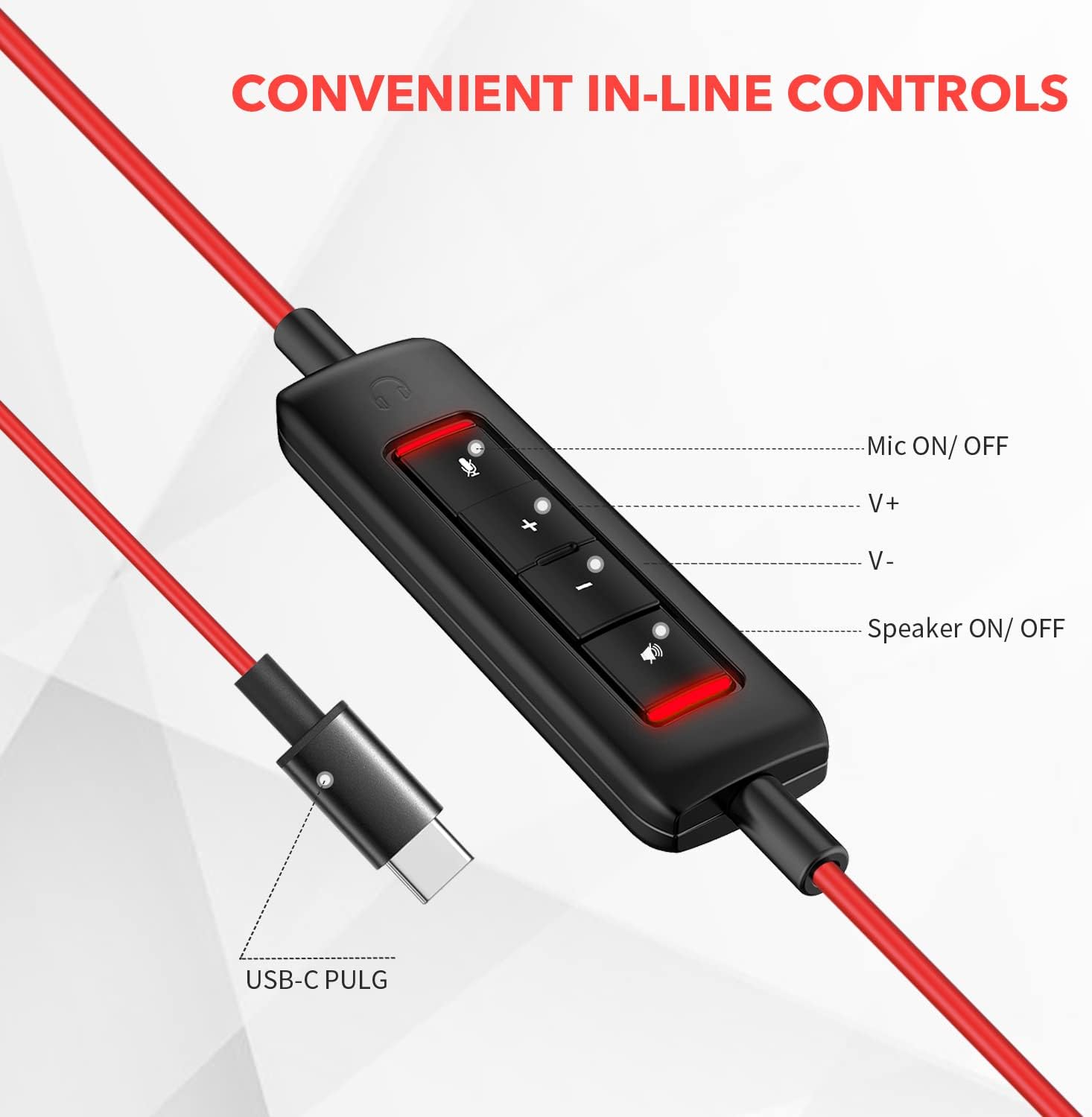
Сүрөт: Жакын план view of the in-line control unit, detailing the buttons for microphone mute/unmute, volume up, volume down, and speaker mute/unmute. The USB-C plug is also shown.
5. Техникалык тейлөө
To ensure the longevity and optimal performance of your NUBWO USB C Headset, follow these maintenance guidelines:
- Тазалоо: Use a soft, dry cloth to wipe down the headset and cable. Avoid using harsh chemicals or abrasive materials.
- Сактагыч: When not in use, store the headset in a clean, dry place, preferably in the provided velvet bag, to protect it from dust and damage.
- Кабельге кам көрүү: Ички зымдын бузулушуна жол бербөө үчүн кабелди курч ийилүүдөн же ашыкча тартуудан качыңыз.
- Экологиялык шарттар: Гарнитураны өтө жогорку температурага, нымдуулукка же түз күн нуруна дуушар кылбаңыз. Гарнитура суу өткөрбөйт.
6. Кыйынчылыктарды
If you encounter issues with your NUBWO USB C Headset, refer to the following common solutions:
- Гарнитурадан үн жок:
- Ensure the USB-C connector is fully inserted into the device's port.
- Check the in-line control unit to ensure the speaker is not muted (red indicator light off).
- Increase the volume using the '+' button on the in-line control and your device's system volume settings.
- Компьютериңиздин үн жөндөөлөрүндө гарнитуранын демейки аудио чыгаруу түзмөгү катары тандалганын текшериңиз.
- Микрофон иштебейт:
- Ensure the microphone is not muted on the in-line control unit (red indicator light off).
- Check that the microphone boom is correctly positioned.
- Verify that the headset microphone is selected as the default input device in your device's sound settings or communication application settings.
- Программалык камсыздоого тиешелүү көйгөйлөрдү жокко чыгаруу үчүн микрофонду башка тиркеме же түзмөк менен сынап көрүңүз.
- Начар аудио сапаты:
- Туташуунун бекем жана таштандылардан таза экенине ынаныңыз.
- Avoid using the headset in environments with high electromagnetic interference.
- Adjust the audio settings on your device.
7. Техникалык шарттар
| Өзгөчөлүк | Спецификация |
|---|---|
| Бренд | NUBWO |
| Модель номери | HW02 |
| Байланыш технологиясы | Зымдуу (USB-C) |
| Кулак жайгаштыруу | On Ear |
| Импеданс | 32 Ом |
| Жыштык диапазону | 20 Гц - 20 000 Гц |
| Башкаруу түрү | Volume Control, Microphone Mute, Speaker Mute (in-line) |
| Noise Control | Активдүү ызы-чууну жокко чыгаруу (микрофон) |
| Элемент Салмагы | 0.17 килограмм |
| Материал | Пластик |
| Кошумча функциялар | Adjustable Headband, Lightweight, Microphone Included |
| Шайкеш түзмөктөр | Laptops, Phones, Computers (with USB-C) |
8. Кепилдик маалыматы
The NUBWO USB C Headset (Model HW02) comes with a 2 жылдык Өндүрүүчүнүн Кепилдиги. For details regarding warranty claims and coverage, please refer to the official NUBWO webсайтка же кардарларды колдоо менен байланышыңыз.
Additionally, products purchased through Amazon may be eligible for a 30-day refund/replacement return policy, subject to Amazon's terms and conditions.
9. Колдоо
For further assistance, technical support, or inquiries regarding your NUBWO USB C Headset, please visit the official NUBWO webсайтка же кардарларды тейлөө бөлүмүнө кайрылыңыз. Байланыш маалыматын адатта продукт таңгагынан же бренддин расмий онлайн катышуусунан тапса болот.