
Introduction
This manual provides instructions for the YATWIN F18 Bluetooth 5.3 Wireless Earbuds. Please read this guide carefully before using the product to ensure proper operation and to maintain the device's longevity. The earbuds feature Active Noise Cancellation (ANC), Environmental Noise Cancellation (ENC), Bluetooth 5.3 connectivity, and an IPX7 waterproof rating.
Продукт бүттүview
The YATWIN F18 earbuds are designed for comfort and performance, featuring a compact in-ear design and a portable charging case.

Image: YATWIN F18 Earbuds and Charging Case. The image displays the blue earbuds and their matching charging case.
Each earbud is equipped with multiple microphones for clear calls and noise reduction, along with touch-sensitive areas for control.
Кулакчындарды жана кутуну кубаттоо
Биринчи жолу колдонуудан мурун, кулакчындардын жана кубаттоочу кутучанын толук заряддалганын текшериңиз.
- Кулакчындарды заряддоо кутусуна салыңыз. Алардын туура отурганын текшериңиз.
- Connect the charging case to a power source using the provided USB-C cable. The charging case supports both USB-C wired charging and wireless charging.
- The LED indicator on the charging case will show the charging status. A full charge typically takes a few hours.

Image: YATWIN F18 charging case connected via USB-C cable and placed on a wireless charging pad. This illustrates the dual charging capabilities.
The earbuds provide up to 8 hours of listening time on a single charge, with the charging case extending total playback to 32 hours.
Орнотуу жана жупташтыруу
Follow these steps to set up and pair your YATWIN F18 earbuds with your device:
- Алгачкы даярдоо: Remove any protective film from the charging contacts on the earbuds. Place the earbuds back into the charging case, close the lid, and charge for at least ten minutes.
- Күйгүзүү: Заряддоо кутучасын ачыңыз. Кулакчындар автоматтык түрдө күйүп, жупташтыруу режимине өтөт.
- Bluetooth иштетүү: On your smartphone or tablet, go to the Bluetooth settings.
- Туташуу: In the list of available devices, select "YATWIN Flybuds F18" to establish a connection.
- Once paired, the earbuds will automatically connect to your device when the charging case is opened.

Image: A diagram illustrating the setup process (removing film, charging, and Bluetooth pairing) and touch controls for the YATWIN F18 earbuds.
Operating Instructions (Touch Controls)
The YATWIN F18 earbuds feature touch controls for managing music, calls, and noise cancellation modes.
| Акция | Сол кулакчын | Оң кулак |
|---|---|---|
| Музыканы ойнотуу | ||
| Ойнотуу/Тыныгуу | Эки жолу таптаңыз | Эки жолу таптаңыз |
| Кийинки трек | Үч жолу таптаңыз | |
| Мурунку трек | Үч жолу таптаңыз | |
| Үндү көтөрүү | Single Tap | |
| Үндү төмөндөтүү | Single Tap | |
| Телефон чалуулар | ||
| Чалууга жооп берүү/аяктоо | Эки жолу таптаңыз | Эки жолу таптаңыз |
| Чакырууну четке кагуу | 2сек басып кармап туруңуз | 2сек басып кармап туруңуз |
| Noise Control | ||
| ANC/Айкындуулук/Кадимки режимди которуштуруу | 2сек басып кармап туруңуз | 2сек басып кармап туруңуз |
| Үн жардамчысы | ||
| Activate Voice Assistant (Siri, Google Assistant, Alexa) | Үч жолу таптаңыз | Үч жолу таптаңыз |
Active Noise Cancellation (ANC) and Environmental Noise Cancellation (ENC)
The YATWIN F18 earbuds feature intelligent noise reduction technology to enhance your listening and calling experience.
- Активдүү ызы-чууну жокко чыгаруу (ANC): Hybrid ANC technology actively blocks up to 40 dB of ambient noise, allowing you to focus on your audio.
- Экологиялык чууну жокко чыгаруу (ENC): The intelligent ENC system, combined with three microphones per earbud, suppresses environmental noise during calls, ensuring clear voice transmission.
- Ачыктык режими: This mode allows you to hear your surroundings without removing the earbuds, useful for awareness in busy environments.
Switch between ANC, Transparency, and Normal modes by pressing and holding the touch area on either earbud for 2 seconds.

Image: Graphic illustrating the YATWIN F18 earbud's ability to reduce ambient noise by up to 40 dB using hybrid composite digital noise reduction.
Үн сапаты
The earbuds are engineered with 10mm diaphragms and polymer composite diaphragms to deliver rich instrumental harmonies, clear vocals, and powerful bass. PEEK + UP high fidelity dynamic drivers further enhance the bass performance for an immersive audio experience.
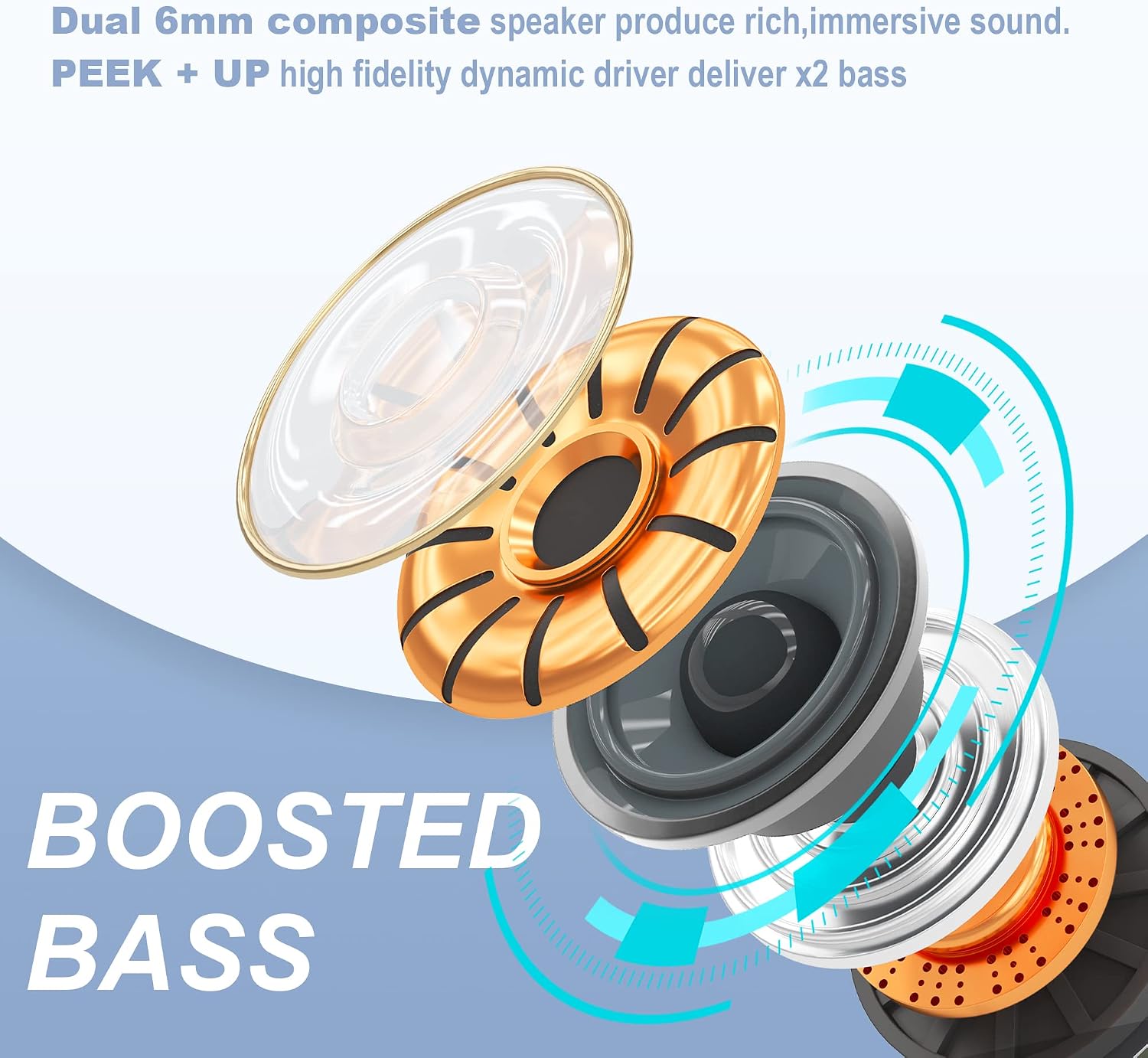
Сүрөт: жарылды view diagram of an earbud speaker, highlighting the 10mm diaphragm and composite materials for enhanced bass.
Сууга туруктуулук (IPX7)
The YATWIN F18 earbuds feature an IPX7 waterproof rating, making them resistant to splashes and suitable for various weather conditions and sports activities. This rating means the earbuds can withstand immersion in water up to 1 meter for 30 minutes.
Note: The charging case is not waterproof. Do not expose the charging case to water.

Image: YATWIN F18 earbuds shown with water splashes, indicating their IPX7 waterproof capability.
Техникалык тейлөө
Туура тейлөө кулакчындардын узак мөөнөттүү иштешин жана жакшы иштешин камсыз кылат.
- Тазалоо: Кулакчындарды, айрыкча кулакчындардын учтарын жана кубаттоочу контакттарды жумшак, кургак, мамыксыз чүпүрөк менен үзгүлтүксүз тазалап туруңуз. Абразивдүү тазалоочу каражаттарды же эриткичтерди колдонбоңуз.
- Сактагыч: Колдонулбай турган учурда, кулакчындарды чаңдан жана бузулуудан коргоо үчүн кубаттоочу кутучасында сактаңыз. Кутучаны салкын, кургак жерде сактаңыз.
- Экстремалдуу шарттарды болтурбоо: Do not expose the earbuds or charging case to extreme temperatures, humidity, or direct sunlight for extended periods.
Проблемаларды чечүү
If you encounter issues with your YATWIN F18 earbuds, refer to the following common solutions:
- Кулакчындар жупташкан жок: Ensure both earbuds are in the charging case and fully charged. Remove them from the case to initiate pairing mode. On your device, forget the "YATWIN Flybuds F18" connection and attempt to pair again.
- Бир гана кулакчын иштейт: Эки кулакчынды тең кубаттоочу кутуга кайра салып, капкагын жаап, кайра ачыңыз. Бул көп учурда эки кулакчындын ортосундагы байланышты баштапкы абалга келтирет.
- Үн жок: Түзмөгүңүздөгү жана кулакчындардын үнүнүн деңгээлин текшериңиз. Кулакчындар түзмөгүңүзгө туура туташтырылганын текшериңиз.
- Заряддоо маселелери: Verify that the charging cable is securely connected to both the case and the power source. If using wireless charging, ensure the case is correctly positioned on the charging pad. Clean the charging contacts on the earbuds and inside the case.
- Чалуу сапаты начар: Ensure the microphones are not obstructed. Try switching between ANC/Transparency/Normal modes to see if it improves clarity.
Эгер маселе чечилбесе, кошумча жардам алуу үчүн кардарларды колдоо бөлүмүнө кайрылыңыз.
Техникалык шарттар
| Өзгөчөлүк | Деталь |
|---|---|
| Модель номери | F18 |
| Bluetooth версиясы | 5.3 |
| Noise Cancellation | Hybrid ANC (up to 40 dB), ENC for calls |
| Микрофондор | 3 кулакчын үчүн |
| Айдоочунун өлчөмү | 10мм |
| Наушниктин батареясынын иштөө мөөнөтү | 8 саатка чейин |
| Батареянын жалпы иштөө мөөнөтү (корпус менен) | 32 саатка чейин |
| Заряддоо интерфейси | USB-C, зымсыз кубаттоо |
| Суу каршылык | IPX7 (наушнактар гана) |
| Башкаруу ыкмасы | тийүү |
| Шайкеш түзмөктөр | All Bluetooth-enabled devices (iOS, Android, etc.) |
Коопсуздук маалыматы
Сураныч, төмөнкү коопсуздук эрежелерин сактаңыз:
- Продукцияны ажыратпаңыз же өзгөртпөңүз.
- Кулакчындарды жана кубаттоочу кутучаны өтө жогорку температурадан, түз күн нурунан жана ачык оттон алыс кармаңыз.
- Угуунун бузулушун алдын алуу үчүн кулакчындарды узак убакыт бою өтө катуу үн менен колдонуудан алыс болуңуз.
- Кулакчындарды айланадагы үндөрдү уга албаганыңыз кооптуу болушу мүмкүн болгон учурларда (мисалы, унаа айдоо, велосипед тебүү, жол тыгынында жөө басуу) колдонбоңуз.
- Балдар жана үй жаныбарлары жетпеген жерде сактаңыз.
Кепилдик жана колдоо
YATWIN provides customer service and email support. The product is covered by an 18-month support period. For any issues or inquiries, please contact YATWIN customer support through the retailer's platform or the official YATWIN webсайт.