
1. Продукт бүтүп калдыview
The Nutale AirPro Key Finder Tag (Model F11XD) is a Bluetooth-enabled item locator designed to help you find misplaced items such as keys, wallets, backpacks, and tablets. It integrates seamlessly with the Apple Find My app, leveraging the global Find My network for location tracking. This device is compatible exclusively with iOS devices.

Figure 1: Nutale AirPro Key Finder Tag features and Find My App integration.
2. Орнотуу нускамалары
2.1. Important iOS System Requirement
To ensure proper functionality and binding of the Nutale AirPro Key Finder Tag, your iOS device must be running iOS 18.0.1 же андан кийинкиси. Please update your device's operating system if necessary before proceeding with the setup.

Figure 2: iOS system version requirement for tag байлоо.
2.2. Аппаратты күйгүзүү
- Locate the button on your Nutale AirPro Key Finder Tag.
- баскычын болжол менен басып, кармап туруңуз 5 секунд.
- The device will emit a beep sound and a light will flash, indicating it has powered on and is ready for pairing.
2.3. Pairing with the Apple Find My App
Follow these steps to pair your Nutale AirPro Key Finder Tag with your iOS device using the Find My app:
- ачыңыз Менин колдонмомду табуу iPhone же iPadыңызда.
- дегенге өтүңүз Items өтмөк.
- басыңыз + icon (Add Item).
- Тандоо Башка колдоого алынган нерсе варианттардан.
- The app will search for nearby devices. Once your Nutale AirPro Tag is detected (e.g., "NUTALE-F11X"), tap Туташуу.
- Экрандагы көрсөтмөлөрдү аткарыңыз Name your item and choose an emoji to represent it.
- Аппаратты Apple IDңизге байланыштырууга макул болуңуз.
- таптаңыз Бүтүрүү жупташтыруу процессин аяктоо үчүн.
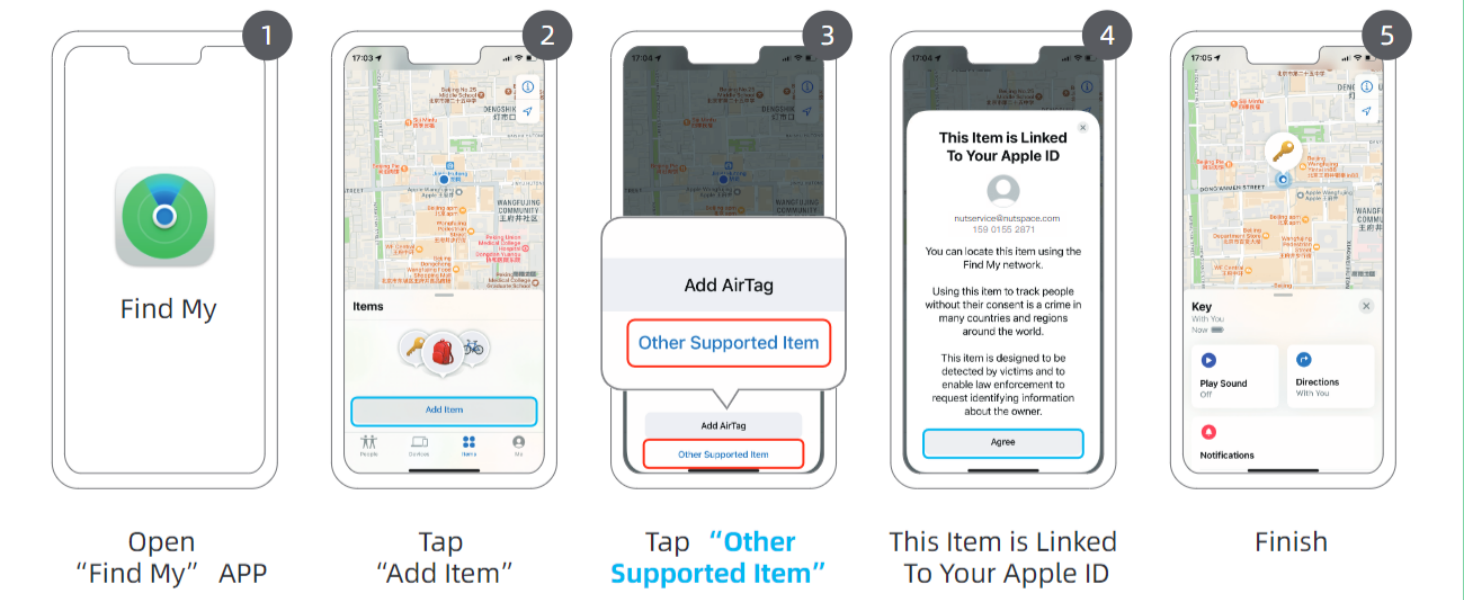
Figure 3: Visual guide for connecting your Nutale AirPro Tag Find My колдонмосуна.
3. Иштөө нускамалары
3.1. Буюмуңуздун жайгашкан жерин аныктоо
The Nutale AirPro Key Finder Tag utilizes the Apple Find My network to help you locate your items. This network consists of millions of Apple devices worldwide that can anonymously detect your tag and report its location to you.
- Long-Distance Locating: If your item is far away, the Find My app will display its last known location on a map, updated by the Find My network. You will receive notifications if your item is detected by other Apple devices.
- Nearby Locating (Play Sound): When your item is within Bluetooth range (approximately 20 to 50 meters), you can use the Find My app to play a sound on your Nutale AirPro Tag to pinpoint its exact location.

Figure 4: Global positioning and sound features via Find My App and Siri.
3.2. Siri колдонуу
You can also ask Siri to help you find your item. Simply say, "Hey Siri, find my [item name]" (e.g., "Hey Siri, find my keys"), and your Nutale AirPro Tag үн ойнойт.
3.3. Эскертмелерди калтыруу
The Find My app can alert you if you leave your Nutale AirPro Tag behind at an unfamiliar location. You can customize these notifications within the app settings.
3.4. Lost Mode
If your item is lost, you can enable Lost Mode in the Find My app. This allows you to display a message and contact information to anyone who finds your tag. When someone finds your tag and scans it with an NFC-enabled smartphone, they will see your message and contact details.
Video 1: Official demonstration of Nutale AirPro Key Finder Tag setup and functionality with iOS Find My App.
4. Техникалык тейлөө
4.1. Батарея маалыматы
- The Nutale AirPro Key Finder Tag а колдонот CR2032 монеталуу батарея.
- The battery life is approximately 10 ай нормалдуу пайдалануу шарттарында.
- продукт пакети камтыйт 4 CR2032 батарейкасы (one pre-installed, three spares).
4.2. Батареяны алмаштыруу
Батареяны алмаштыруу үчүн:
- Арткы жагындагы батарея бөлүкчөсүн табыңыз tag.
- Gently pry open the battery cover.
- Эски CR2032 батареясын алып салыңыз.
- Жаңы CR2032 батареясын оң (+) тарабын өйдө каратып салыңыз.
- Батареянын капкагын коопсуз жабыңыз.

Figure 5: Independent battery compartment for easy replacement.
5. Кыйынчылыктарды
- Түзмөк жупташкан жок: Ensure your iOS device is updated to iOS 18.0.1 or later. Make sure Bluetooth is enabled on your device. Press and hold the tagжупташтыруу режиминде экенин текшерүү үчүн ' баскычын 5 секунд сигнал чыкканга чейин басып туруңуз.
- Үн жок tag: экендигин текшериңиз tag's battery needs replacement. Ensure the tag iOS түзмөгүңүздүн Bluetooth диапазонунда.
- Так эмес жайгашкан жер: Location accuracy depends on the density of Apple devices in the Find My network. In areas with fewer Apple devices, location updates may be less frequent or precise.
- Баскыч жооп бербейт: Apply firm pressure to the button. If the issue persists, try replacing the battery.
6. Техникалык шарттар
| Өзгөчөлүк | Деталь |
|---|---|
| Модель номери | F11XD |
| Өлчөмдөр | Узундугу 1.67" x Туурасы 1.67" x Т 0.31" (4.24 см x 4.24 см x 0.79 см) |
| Элемент Салмагы | 3.2 унция (90.7 грамм) |
| Материал | Акрилонитрил бутадиен стирол (ABS), Пластмасса |
| Батарея түрү | CR2032 (камтылган) |
| Батареялардын саны | 4 (1 pre-installed, 3 spares) |
| Батареянын иштөө мөөнөтү | Болжол менен 10 ай |
| Шайкештик | iOS devices only (iPhone, iPad) with Find My app |
7. Кепилдик жана колдоо
7.1. Продукцияга кепилдик
The Nutale AirPro Key Finder Tag менен келет 1 жылдык кепилдик сатып алынган күндөн тартып. Бул кепилдик өндүрүштүк кемчиликтерди жана нормалдуу колдонуудагы бузулууларды камтыйт. Кепилдик дооматтары үчүн сатып алганыңыздын далилин сактап коюңуз.
7.2. Техникалык колдоо
Nutale offers lifetime technical support for the AirPro Key Finder Tag. If you encounter any issues or have questions regarding the product, please contact our customer care team. Contact information can typically be found on the product packaging or the official Nutale webсайт.