
1. Киришүү
This user manual provides essential information for the safe and efficient operation of your JIGUUN 1500W Pure Sine Wave Power Inverter. Please read this manual thoroughly before installation and use. Retain this manual for future reference.
2. Продукт бүтүп калдыview
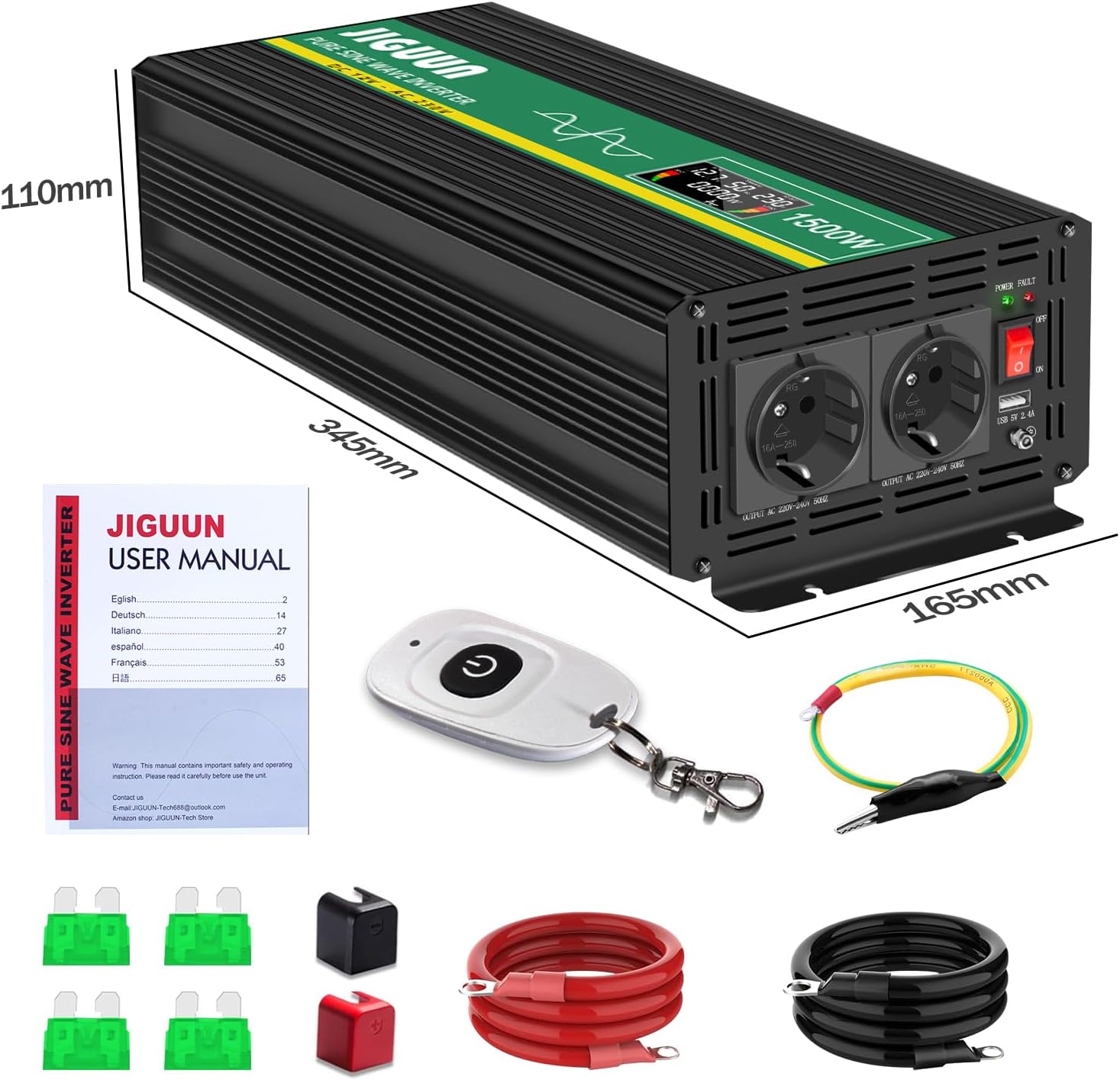
2.1 Пакеттин мазмуну
- 1 x JIGUUN 1500W Pure Sine Wave Inverter
- 1 x User Manual
- 1 x Set of Battery Cables (1 Red, 1 Black)
- 1 x зымсыз алыстан башкаруу
- Additional Fuses
2.2 Негизги өзгөчөлүктөрү
- Таза синус толкунунун чыгышы: Provides stable and clean power, suitable for sensitive electronics.
- Жогорку кубаттуулугу: 1500W continuous power, 3000W peak power.
- Зымсыз алыстан башкаруу: алыстан ыңгайлуу иштөөгө мүмкүндүк берет.
- Акылдуу LCD дисплей: Shows real-time input voltage, чыгаруу көлөмүtage, output power, and battery level.
- Комплекстүү коргоо: Includes overload, overvoltage, undervolvoltage, short circuit, and overheat protection.
- Натыйжалуу муздатуу: Integrated silent high-speed fan activates automatically above 45°C.
- Туруктуу курулуш: Made from high-quality aluminum alloy for resistance to bending, heat, and corrosion.
2.3 Компонентти идентификациялоо
Refer to the diagram below for identification of the inverter's components.
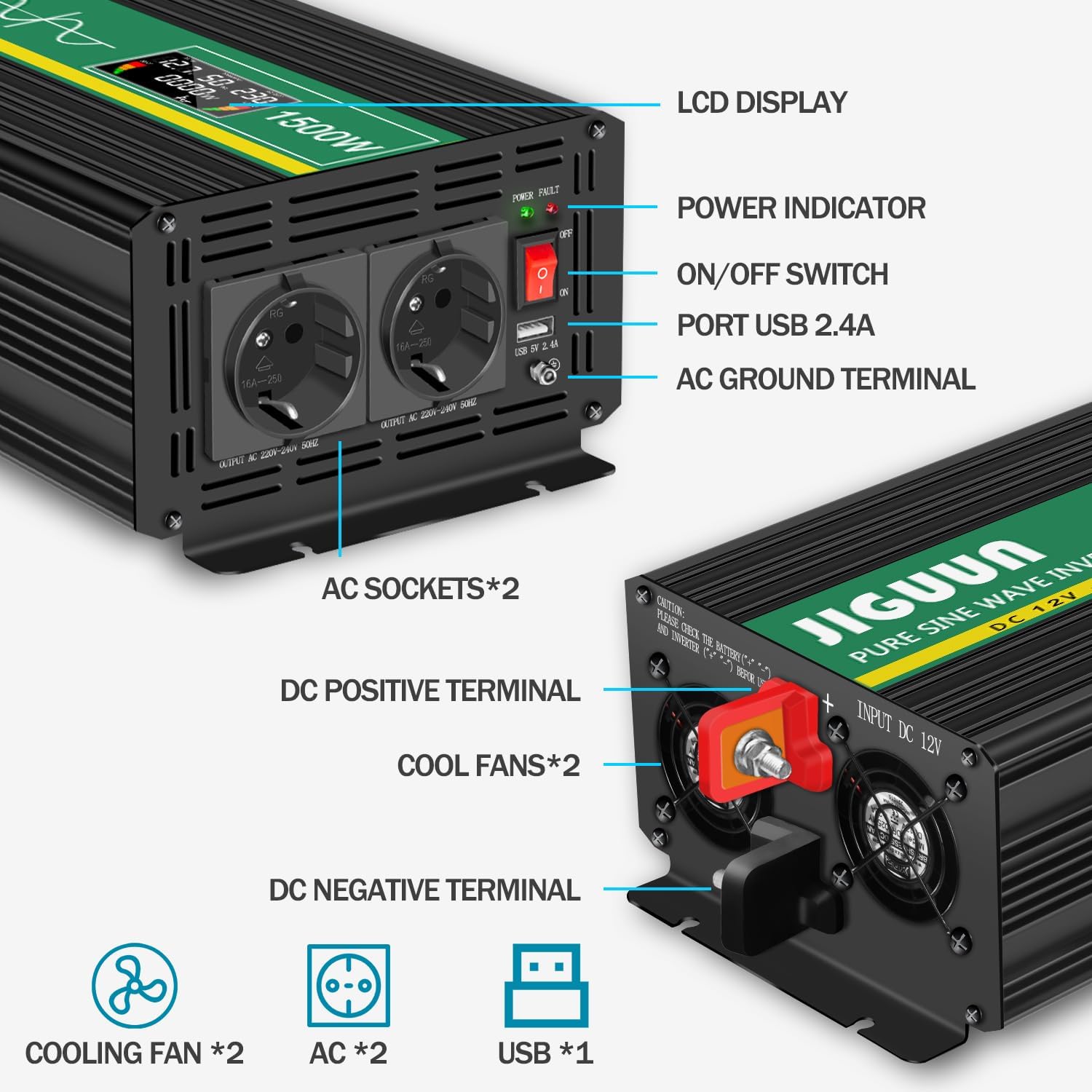
- LCD дисплей: Shows operational status and values.
- Күч көрсөткүчү: Illuminates when the inverter is active.
- ON/OFF которуу: Controls the inverter's power.
- USB 2.4A Port: USB менен иштеген түзмөктөрдү кубаттоо үчүн.
- AC Ground Terminal: Коопсуз жерге туташтыруу үчүн.
- AC Sockets (x2): For connecting 220V/230V AC appliances.
- DC Positive Terminal: Connects to the positive (+) terminal of the 12V battery.
- DC Negative Terminal: Connects to the negative (-) terminal of the 12V battery.
- Муздатуучу желдеткичтер (x2): Dissipate heat during operation.
3. Коопсуздук нускамалары
Инвертордун же туташкан түзмөктөрдүн жаракат алышын жана бузулушун алдын алуу үчүн төмөнкү коопсуздук чараларын сактаңыз:
- Ensure the inverter is connected to a 12V DC power source only.
- Do not connect the inverter to an AC power source.
- Ар кандай AC жүктөрүн туташтыруудан мурун, ар дайым инверторду батарейкага туташтырыңыз.
- Ашыкча ысып кетүүнүн алдын алуу үчүн инвертордун айланасында туура желдетүүнү камсыз кылыңыз.
- Инверторду сууга, жамгырга же ашыкча нымдуулукка дуушар кылбаңыз.
- Инверторду тез күйүүчү түтүн же газдар бар чөйрөдө иштетүүдөн алыс болуңуз.
- Иштеп жатканда балдарды инвертордон алыс кармаңыз.
- Always disconnect the battery before performing any maintenance or troubleshooting.
- Ensure the total power consumption of connected devices does not exceed 1500W continuously.
- Properly ground the inverter using the AC ground terminal.
4. Орнотуу
4.1 Орнотуу
Place the inverter in a dry, well-ventilated area, away from direct sunlight, heat sources, and moisture. Ensure there is sufficient space around the cooling fans for proper airflow.
4.2 Батареяны туташтыруу
- Ensure the inverter's ON/OFF switch is in the 'OFF' position.
- Connect the red battery cable to the inverter's DC Positive Terminal (+).
- Connect the other end of the red battery cable to the positive (+) terminal of your 12V battery.
- Connect the black battery cable to the inverter's DC Negative Terminal (-).
- Connect the other end of the black battery cable to the negative (-) terminal of your 12V battery.
- Бошоң байланыштарды жана учкундарды болтурбоо үчүн бардык туташуулардын бекем жана коопсуз экенин текшериңиз.
4.3 Жерге туташтыруу
For safety, connect the inverter's AC Ground Terminal to a reliable earth ground. This can be the chassis of a vehicle or a dedicated grounding rod, depending on your application.

5. Иштөө нускамалары
5.1 Күйгүзүү/өчүрүү
- After ensuring all connections are secure, press the ON/OFF switch on the inverter to the 'ON' position. The LCD display will illuminate, and the power indicator will light up.
- To turn off the inverter, press the ON/OFF switch to the 'OFF' position.
5.2 Using AC Outlets and USB Port
- Plug your 220V/230V AC appliances into the AC sockets on the inverter.
- Connect your USB-powered devices to the USB 2.4A port for charging.
- Ensure the total power draw of all connected devices does not exceed the inverter's continuous power rating of 1500W.

5.3 ЖК дисплей окуулары
Акылдуу ЖК дисплей реалдуу убакытта маалымат берет:
- DC IN: Displays the input DC voltage батареядан.
- Жыштыгы: Shows the output AC frequency (typically 50Hz).
- AC OUT: Чыгуучу AC көлөмүн көрсөтөтtage (адатта 220V/230V).
- LOAD (W): Indicates the current power consumption of connected devices in Watts.
- БАТ: Battery level bar graph.
- ЖҮК: Output load level bar graph.

5.4 Зымсыз Алыстан башкаруу
The wireless remote control allows you to turn the inverter ON or OFF from a distance, which is useful when the inverter is installed in an inaccessible location.

6. Техникалык тейлөө
6.1 Тазалоо
Regularly clean the exterior of the inverter with a dry cloth. Ensure the cooling vents are free from dust and debris to maintain optimal airflow.
6.2 Желдетүүчүнүн иштеши
The internal cooling fan operates automatically when the inverter's internal temperature exceeds 45°C. This is normal operation. If the fan runs continuously at high speed without significant load, check for obstructions or excessive ambient temperature.
6.3 Сактагычты алмаштыруу
The inverter contains internal replaceable fuses for protection. If the inverter stops functioning and troubleshooting steps do not resolve the issue, the fuses may need replacement. Consult a qualified technician or contact JIGUUN customer support for assistance with fuse replacement.
7. Кыйынчылыктарды
If you encounter issues with your JIGUUN inverter, refer to the table below for common problems and solutions.
| Көйгөй | Мүмкүн себеп | Чечим |
|---|---|---|
| Кубат чыгылбайт / Инвертор күйбөйт | Батарея байланыштары бош Батареянын көлөмү азtage Күйгүзүүчү Инвертордун которгучу ӨЧҮК | Батарея кабелдерин текшерип, бекемдеңиз Батарейканы толтуруңуз же алмаштырыңыз Check and replace fuses (if applicable, by qualified personnel) Ensure ON/OFF switch is in 'ON' position |
| Overload alarm / Inverter shuts down | Туташтырылган жүктөм 1500 Вттан ашат High surge current from appliance | Reduce the total load by disconnecting some appliances Ensure appliance starting current is within inverter's peak capacity (3000W) |
| Overheat alarm / Inverter shuts down | Начар желдетүү Бөгөттөлгөн муздатуу желдеткич Ашыкча айлана-чөйрөнүн температурасы | Ensure adequate airflow around the inverter Clean cooling vents and fan Move inverter to a cooler environment |
| Төмөн үнtage alarm / Inverter shuts down | Батарея көлөмүtage өтө төмөн | Recharge the battery immediately |
| Пульт иштебей жатат | Пульттун батареясы өлүп калды диапазондон тышкары | Алыстан башкаруунун батареясын алмаштырыңыз Move closer to the inverter |
8. Техникалык шарттар
| Өзгөчөлүк | Спецификация |
|---|---|
| Модел | 1500W12V |
| Үзгүлтүксүз күч | 1500 Ватт |
| Чоку күч | 3000 Ватт |
| Киргизүү DC Voltage | 12 вольт DC |
| Чыгуу AC Voltage | 220-230 Вольт AC |
| Чыгуу жыштыгы | 50 Гц |
| Output Waveform | Таза синус толкуну |
| AC розеткалары | 2 x EU Standard Sockets |
| USB чыгышы | 1 x 5V 2.4A Port |
| Өлчөмдөрү (L x W x Y) | 34.5 см х 16.5 см х 11 см |
| Салмагы | 4.1 кг |
| Сунушталган Колдонуулар | Emergency situations, camping, road trips, RVs, boats |
9. Кепилдик жана колдоо
9.1 Кепилдик маалыматы
JIGUUN offers a one-year free replacement warranty for this product. This warranty covers manufacturing defects and malfunctions under normal use conditions.
9.2 Кардарларды колдоо
If you have any questions regarding the JIGUUN 1500W Pure Sine Wave Power Inverter, its operation, or require technical assistance, please do not hesitate to contact the JIGUUN customer support team. They are available to resolve any issues you may encounter.
Contact information can typically be found on the product packaging or the official JIGUUN webсайт.