
1. Киришүү
Thank you for choosing the BLACK+DECKER BD40K27A-JP Cordless Push Driver. This compact and versatile tool is designed for efficient screw tightening and assembly tasks. Featuring a unique push-activated mechanism and integrated LED lighting, it offers convenience and precision for various applications. Please read this manual thoroughly before use to ensure safe and optimal operation.

Image 1.1: The BLACK+DECKER BD40K27A-JP Cordless Push Driver, showcasing анын эргономикалык дизайны.
2. Коопсуздук маалыматы
Өрт, электр тогуна урунуу жана жеке жаракат алуу коркунучун азайтуу үчүн электр шаймандарын колдонууда ар дайым негизги коопсуздук чараларын сактаңыз.
- Бардык нускамаларды окуңуз: Куралдын иштеши жана коопсуздук эрежелери менен таанышыңыз.
- Жумуш аймагын таза кармаңыз: Башаламан жерлер кырсыкка чакырат.
- Кооптуу чөйрөлөрдөн качыңыз: г-да электр куралдарын колдонбоңузamp же нымдуу жерлерде, же аларды жамгырга дуушар кылуу.
- Балдарды алыс кармаңыз: Бардык зыяратчылар жумуш аймагынан коопсуз аралыкта кармалышы керек.
- Туура кийинүү: Do not wear loose clothing or jewelry. Wear protective hair covering to contain long hair.
- Коопсуздук көз айнектерин колдонуңуз: Ар дайым коопсуздук көз айнек тагынгыла.
- Secure work: Колдонуу clampлар же иш жүзүндө иш алып баруу үчүн.
- аша чаап албаңыз: Ар дайым туура бутту жана тең салмактуулукту сактаңыз.
- Disconnect tools: Unplug tools when not in use, before servicing, or when changing accessories.
- Кокусунан баштоодон качыңыз: Ensure the switch is in the off position before plugging in.
- Сунушталган аксессуарларды колдонуңуз: Consult the manual for recommended accessories.
- Этияттык менен куралдарды сактоо: Мыкты жана коопсуз иштөө үчүн куралдарды курч жана таза кармаңыз.
- Бузулган бөлүктөрүн текшериңиз: Андан ары колдонуудан мурун, бузулган коргоочу же башка бөлүк туура иштей тургандыгын жана өзүнүн функциясын аткара тургандыгын аныктоо үчүн кылдаттык менен текшерилиши керек.
- Do not operate power tools near flammable liquids or gases.
3. Пакеттин мазмуну
Төмөндө тизмеленген нерселердин баары пакетиңизге камтылганын текшериңиз:
- BLACK+DECKER BD40K27A-JP Cordless Push Driver
- Lithium-Ion Battery (integrated)
- USB заряддоо кабели
- Aluminum Storage Case
- 26 Types of Screwdriver Bits
- Instruction Manual
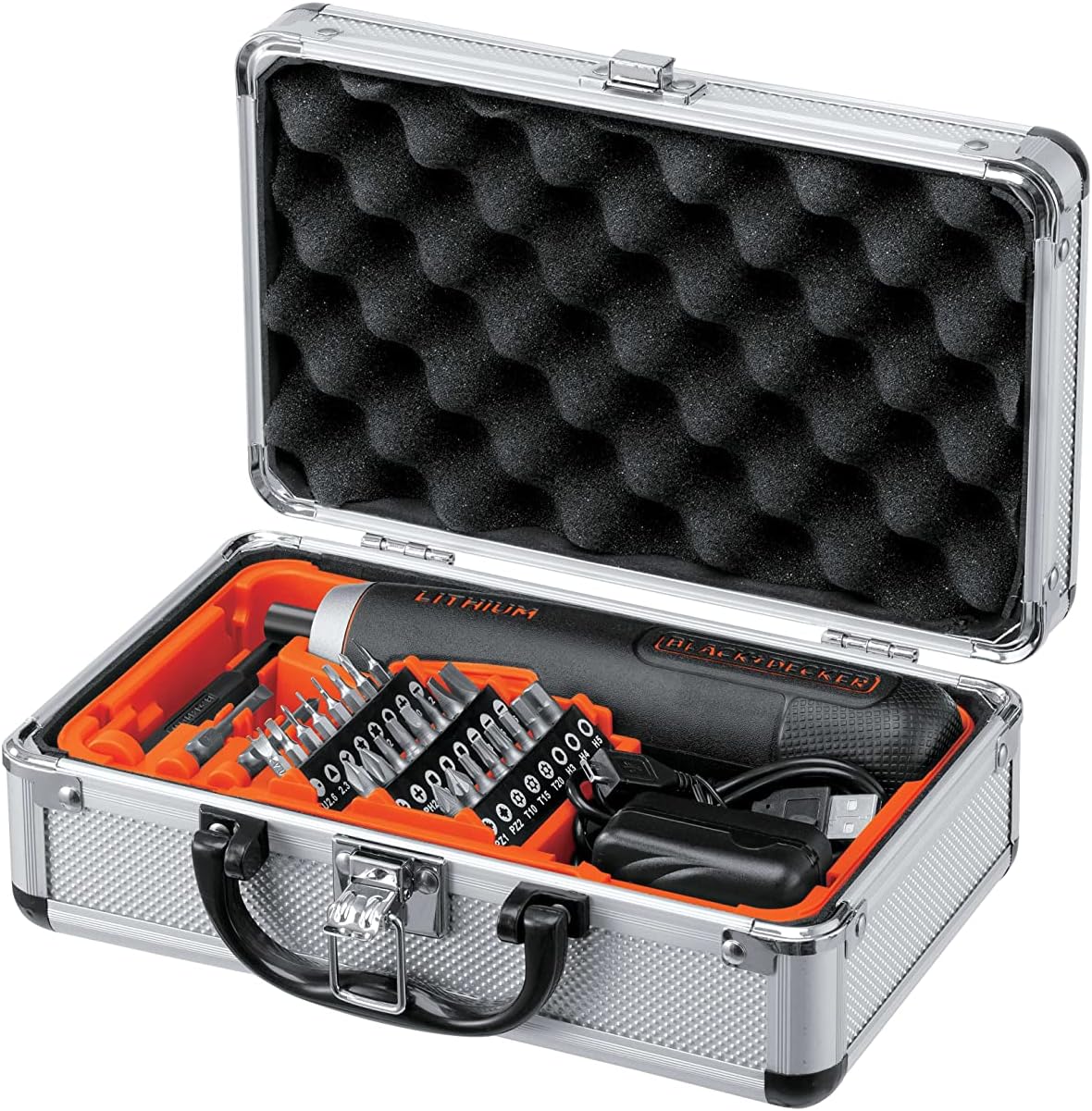
Image 3.1: The BD40K27A-JP Cordless Push Driver kit, including the driver, charging cable, and 26 bits, neatly organized in its aluminum storage case.
4. Продукциянын өзгөчөлүктөрү
The BD40K27A-JP Cordless Push Driver is engineered with several features to enhance usability and performance:
- Compact and Straight Design: Allows for easy handling and access in tight spaces.
- Push-Activated Mechanism: Automatically rotates when the bit is pressed into the screw, eliminating the need for a traditional trigger switch.
- Интегралдык литий-иондук батарейка: Ишенимдүү зымсыз кубат менен камсыз кылат.
- 5-Position Adjustable Clutch: Allows for precise torque control to prevent overtightening or damaging fasteners.
- LED иш жарык: Күңүрт жарык шарттарда көрүнүүнү жакшыртуу үчүн жумуш аймагын жарыктандырат.
- Батарея деңгээлинин көрсөткүчү: Калган батарея зарядын көрсөтөт.

Сүрөт 4.1: Деталь view of the driver's battery level indicator and forward/reverse switch.

Image 4.2: The driver's integrated LED work light illuminating a dark area.
5. Орнотуу
5.1 Батареяны заряддоо
The BD40K27A-JP comes with an integrated Lithium-Ion battery. Before first use, fully charge the battery.
- Locate the USB charging port on the driver.
- Connect the provided USB charging cable to the driver's port.
- USB кабелинин экинчи учун туура келген USB кубат адаптерине (кошумча эмес) же компьютердин USB портуна туташтырыңыз.
- The battery indicator lights will show charging progress. All lights will illuminate steadily when fully charged.
- Заряддоо аяктагандан кийин заряддагычты ажыратыңыз.
Эскертүү: Do not store the tool with a completely discharged battery for extended periods, as this can damage the battery.
5.2 Биттерди киргизүү жана өзгөртүү
The driver uses standard 1/4-inch hex shank bits.
- Ensure the driver is in the OFF position (center position of the forward/reverse switch).
- Push the desired screwdriver bit firmly into the bit holder until it clicks into place.
- Бир аз алып салуу үчүн, аны бит кармагычтан түз чыгарыңыз.
5.3 Adjusting the Clutch
The BD40K27A-JP features a 5-position adjustable clutch to control the torque output. This helps prevent overtightening screws or stripping screw heads.
- Rotate the clutch collar located near the bit holder to select the desired torque setting.
- Lower numbers (1-2) are for smaller screws and softer materials, requiring less torque.
- Higher numbers (3-5) are for larger screws and harder materials, requiring more torque.
- Experiment with different settings on scrap material to find the appropriate torque for your task.
6. Иштөө нускамалары
6.1 Алдыга/Артка айлантуу
The forward/reverse switch is located on the side of the driver.
- Slide the switch forward (towards the bit) for forward rotation (tightening screws).
- Slide the switch backward (away from the bit) for reverse rotation (loosening screws).
- Position the switch in the center for the OFF/lock position.
6.2 Using the Push-Activated Mechanism
This driver operates without a traditional trigger. Rotation is activated by applying pressure.
- Ensure the forward/reverse switch is set to the desired direction (forward for tightening, reverse for loosening).
- Place the screwdriver bit onto the screw head.
- Apply firm, steady pressure to the back of the driver, pushing it into the screw. The driver will automatically begin to rotate.
- Release pressure to stop rotation.

Image 6.1: Demonstrating the push-activated mechanism for driving a screw into wood.
6.3 LED иш жарыгын колдонуу
The integrated LED light automatically illuminates when the driver is activated by pressure, providing visibility in dark work areas.
7. Техникалык тейлөө
7.1 Тазалоо
- Ашыкча ысып кетүүнүн алдын алуу үчүн аспаптын желдетүү тешиктерин таза кармаңыз.
- жумшак колдонуу, damp куралдын сыртын тазалоо үчүн кездеме. Катуу химиялык заттарды же абразивдүү тазалагычтарды колдонбоңуз.
- Куралды эч качан сууга же башка суюктукка салбаңыз.
7.2 Батареяга кам көрүү жана сактоо
- Куралды салкын, кургак жерде, түз күндүн нурунан жана экстремалдык температурадан алыс сактаңыз.
- Узак мөөнөттүү сактоо үчүн, батареяны болжол менен 50% сыйымдуулугуна чейин заряддаңыз.
- Recharge the battery every 3-6 months during long storage periods to maintain battery health.
- Do not store the tool with a completely discharged battery.
8. Кыйынчылыктарды
| Көйгөй | Мүмкүн себеп | Чечим |
|---|---|---|
| Айдоочу күйбөйт. | Батарея заряды түгөнгөн. Forward/reverse switch is in the center (OFF) position. |
Батареяны заряддаңыз. Slide the switch to forward or reverse. |
| Insufficient power/torque. | Батарея аз. Clutch setting is too low. |
Батареяны кайра заряддаңыз. Adjust the clutch to a higher setting. |
| Бурама башынан бит тайып кетет. | Incorrect bit type/size. Жетишсиз басым колдонулган. Clutch setting too high (stripping screw). |
Use the correct bit for the screw. Apply firm, steady pressure. Adjust clutch to a lower setting. |
9. Техникалык шарттар
| Модель номери | BD40K27A-JP |
| Тtage | 3.6 вольт |
| Батарея түрү | Lithium-Ion (integrated) |
| Муфта орнотуулары | 5 Positions |
| Бит кармагыч | 1/4 дюймдук Hex |
| Продукциянын өлчөмдөрү (L x W x Y) | 18.5 x 4 x 4 см |
| Элемент Салмагы | 280 г |
| Өндүрүүчү | BLACK+DECKER |
10. Кепилдик жана колдоо
Кепилдик маалыматы жана кардарларды колдоо үчүн продуктуңузга камтылган кепилдик картасын караңыз же расмий BLACK+DECKERге баш багыңыз webсайт. Сатып алуу квитанциясын кепилдик дооматтары үчүн сатып алуунун далили катары сактаңыз.
For technical assistance or service inquiries, please contact BLACK+DECKER customer service through their official channels.