1. Продукт бүтүп калдыview
This manual provides instructions for the SZHKHXD replacement remote control designed for various GREE AC Air Conditioner models. This remote offers essential functions for controlling your air conditioning unit.

Сүрөт 1: Алдыңкы view of the SZHKHXD remote control, showing the LCD screen and various function buttons.

2-сүрөт: Артка view of the SZHKHXD remote control, displaying battery type information and a QC Pass sticker.
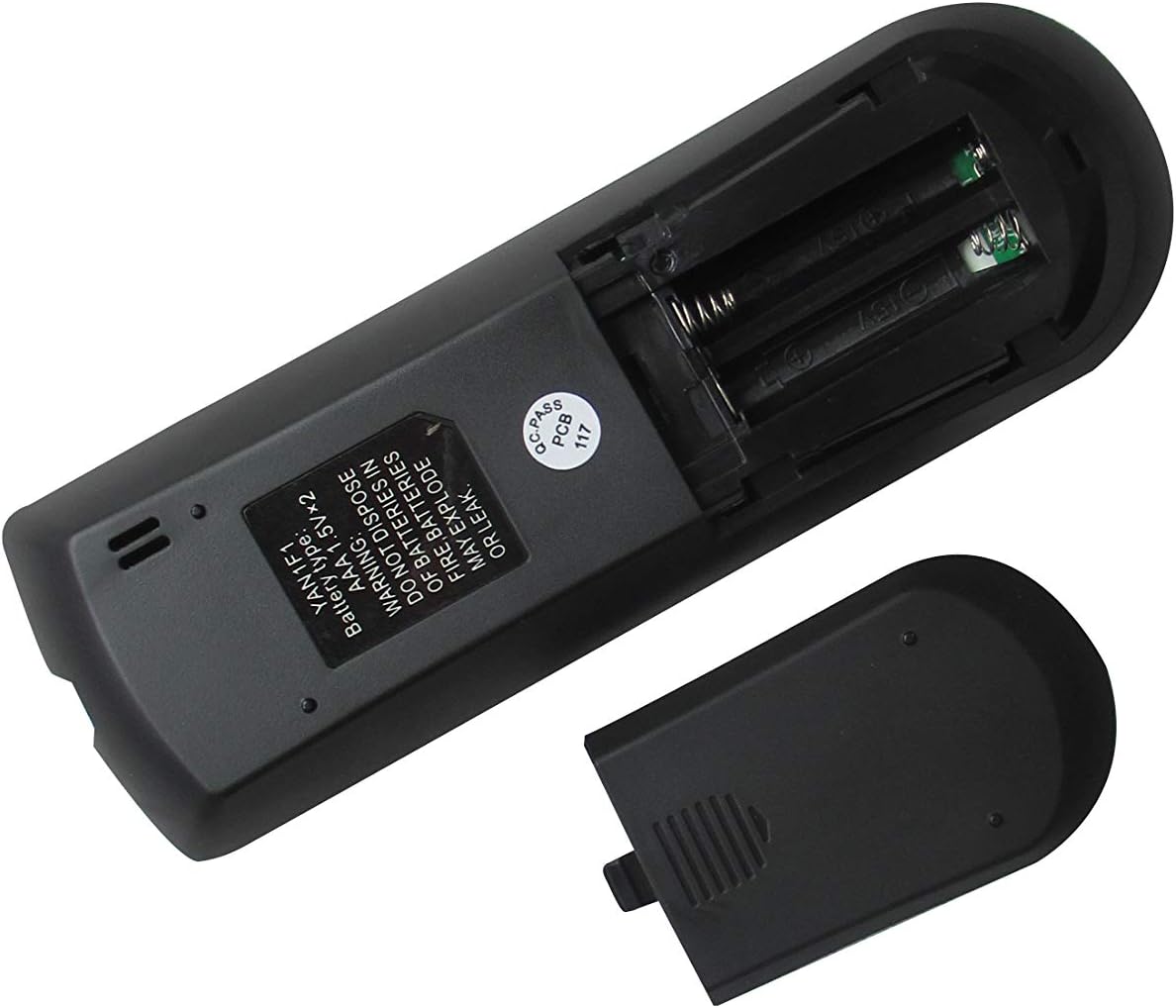
Figure 3: The remote control with its battery compartment open, revealing slots for two AAA batteries.

4-сүрөт: Артка view of the remote control with the battery cover securely in place.
Шайкеш моделдер:
- GREE GWH12QC-K3DNA5G
- GREE GWH12QC-K3DNB2G
- GREE GWH09QB-K3DNA1G
- GREE GWH09QB-K3DNA5G
- GREE GWH09QB-K3DNB2G
- GREE GWH09QB-K3DNB4G
- GREE GWH09QB-K3DNB6G
- GREE GWH12QC-K3DNA1G
- GREE GWH12QC-K3DNA2G
2. Орнотуу
Батарея орнотуу
The remote control requires two (2) AAA 1.5V batteries (not included). Follow these steps to install them:
- Пульттун артындагы батарея отсегин табыңыз.
- Slide the battery cover downwards to open it (refer to Figure 3).
- Оң (+) жана терс (-) терминалдары бөлүмдүн ичиндеги белгилер менен туура дал келишин камсыз кылып, эки AAA батарейкасын салыңыз.
- Slide the battery cover back into place until it clicks securely (refer to Figure 4).
Warning: Do not dispose of batteries in fire. Batteries may explode or leak if mishandled.
3. Иштөө нускамалары
Familiarize yourself with the buttons on your remote control to operate your GREE AC unit effectively.
Баскыч функциялары:
| баскыч | Функция |
|---|---|
| РЕЖИМ | Иш режимдери (мисалы, муздак, жылытуу, желдеткич, кургак, авто) аркылуу өтөт. |
| Күч (⏻) | Кондиционер блогун күйгүзөт же өчүрөт. |
| КҮЙӨРМАН | Желдеткичтин ылдамдыгын тууралайт (мисалы, Төмөн, Орто, Жогорку, Авто). |
| САЛКЫН | Activates or deactivates the vertical louver swing function. |
| Өйдө жебе (▲) | Increases temperature setting or navigates menu options. |
| Төмөн жебе (▼) | Decreases temperature setting or navigates menu options. |
| TURBO | Температуранын тез өзгөрүшү үчүн тез муздатууну же жылытууну иштетет. |
| УЙКУ | Engages sleep mode, which adjusts temperature and fan speed for comfortable sleep. |
| ТЕМП | Displays or cycles through temperature settings. |
| СААТ | Учурдагы убакытты орнотот же көрсөтөт. |
| МЕН СЕЗИП ЖАТАМ | Activates the iFeel function, which senses the temperature at the remote's location. |
| ЖАРЫК | Ички блоктогу дисплей жарыгын күйгүзөт же өчүрөт. |
| ТАЙМЕР КҮЙГӨН | Sets a timer for the AC unit to turn on automatically. |
| ӨЧҮРҮҮ ТАЙМЕРИ | Sets a timer for the AC unit to turn off automatically. |
Негизги операция:
- Күйгүзүү/өчүрүү: Кызыл Кубат баскычын басыңыз (⏻) аппаратты күйгүзүү же өчүрүү.
- Режимди тандоо: басыңыз РЕЖИМ button repeatedly to cycle through available operating modes (e.g., Cool, Heat, Fan, Dry, Auto). The selected mode will typically be displayed on the remote's LCD screen.
- Температураны жөндөө: Use the Up (▲) and Down (▼) arrow buttons to set your desired temperature.
- Желдетүүчү ылдамдыгын жөндөө: басыңыз КҮЙӨРМАН button to cycle through different fan speeds (e.g., Auto, Low, Medium, High).
4. Техникалык тейлөө
Алыстан башкарууну тазалоо:
- Алыстан башкаруу пультунун бетин жумшак, кургак чүпүрөк менен сүртүңүз.
- Do not use liquid cleaners, abrasive cleaners, or chemical sprays, as these may damage the remote.
Батареяны алмаштыруу:
- Replace batteries when the remote's display becomes dim or the remote no longer responds to commands.
- Always replace both batteries at the same time with new AAA 1.5V batteries.
- Ensure correct polarity (+/-) when inserting new batteries.
- Эгерде пульт көпкө чейин колдонулбаса, агып кетүүнүн алдын алуу үчүн батарейкаларды алып салыңыз.
5. Кыйынчылыктарды
Эгер сиз алыстан башкаруучу менен көйгөйлөргө туш болсоңуз, төмөнкү жалпы көйгөйлөрдү жана чечимдерди караңыз:
- Пульт жооп бербей жатат:
- Батареялар туура полярдуулук менен туура салынганын текшериңиз.
- Эски батарейкаларды жаңысына алмаштырыңыз.
- Ensure there are no obstructions between the remote control and the AC unit's receiver.
- Confirm you are within the effective operating range of the AC unit.
- Display shows Celsius instead of Fahrenheit (or vice-versa):
- Some replacement remotes may default to Celsius. To switch, try pressing and holding the ТЕМП button for 3-5 seconds. If this does not work, try holding the РЕЖИМ button or a combination of ТЕМП and an arrow key. Refer to your specific AC unit's manual for remote control temperature unit conversion if this remote does not have a direct function for it.
- Айрым функциялар иштебейт:
- This is a replacement remote. While designed to be compatible, some advanced or specific functions present on your original remote may not be supported by this universal replacement. Refer to the "Special Feature" note in the product specifications.
6. Техникалык шарттар
| Өзгөчөлүк | Деталь |
|---|---|
| Продукциянын өлчөмдөрү | 6.3 x 3.15 x 1.18 дюйм |
| Элемент Салмагы | 3.52 унция |
| Батареялар талап кылынат | 2 AAA батарейка (киргизилген эмес) |
| Байланыш технологиясы | Инфракызыл |
| Шайкеш түзмөктөр | AC Air Conditioner (Specific GREE models listed in Product Overview) |
| Колдоого алынган түзмөктөрдүн максималдуу саны | 1 |
| Өндүрүүчү | СЖКХХД |
| Келип чыккан өлкө | Кытай |
| Special Feature Note | Replacement item may not work with all functions as original. |
7. Кепилдик жана колдоо
This product is manufactured by SZHKHXD. For specific warranty information or technical support, please contact the seller directly through the platform where the purchase was made. As this is a replacement remote, specific warranty details are typically handled by the seller rather than the original equipment manufacturer (GREE).
Please note that the product description indicates "Selling without batteries or instruction, No configuration." This manual serves as the primary instruction guide for basic operation and troubleshooting.


