
1. Продукт бүтүп калдыview
The STUDIOFINIX HOS-501BTB-EU is a 5.25-inch indoor/outdoor Bluetooth speaker system designed for versatile audio applications. This system includes four speakers and a Bluetooth amplifier, offering a total maximum output of 600 watts. Its weather-resistant construction makes it suitable for various environments, including patios, decks, and indoor spaces.

A pair of black STUDIOFINIX 5.25-inch indoor/outdoor Bluetooth speakers, showcasing their design and grille.
2. Кутуда эмне бар
Пакетте бардык компоненттер бар экенин текшериңиз:
- STUDIOFINIX Outdoor Speakers (x4)
- Ampкөтөргүч (x1)
- Кубат адаптери (x1)
- Кубат менен камсыздоо (x1)
- Динамик кабелдери (x4)

An image detailing the contents of the product box, including four speakers, amplifier, power adapter, and speaker cables.
3. Техникалык шарттар
| Өзгөчөлүк | Спецификация |
|---|---|
| Динамик түрү | Stereo Sound, 2-way full range |
| Вуфердин диаметри | 5.25 Inches (Aluminum Injection Cone) |
| Tweeter | 1.0-inch Superior Dome |
| Динамиктин максималдуу чыгаруу күчү | 600 Watts (150 Watts Each Speaker) |
| Байланыш технологиясы | Bluetooth 5.0, Wired |
| Bluetooth диапазону | 40 футка чейин (көрүү сызыгы) |
| Өзгөчө өзгөчөлүк | Water Resistant (All Weather) |
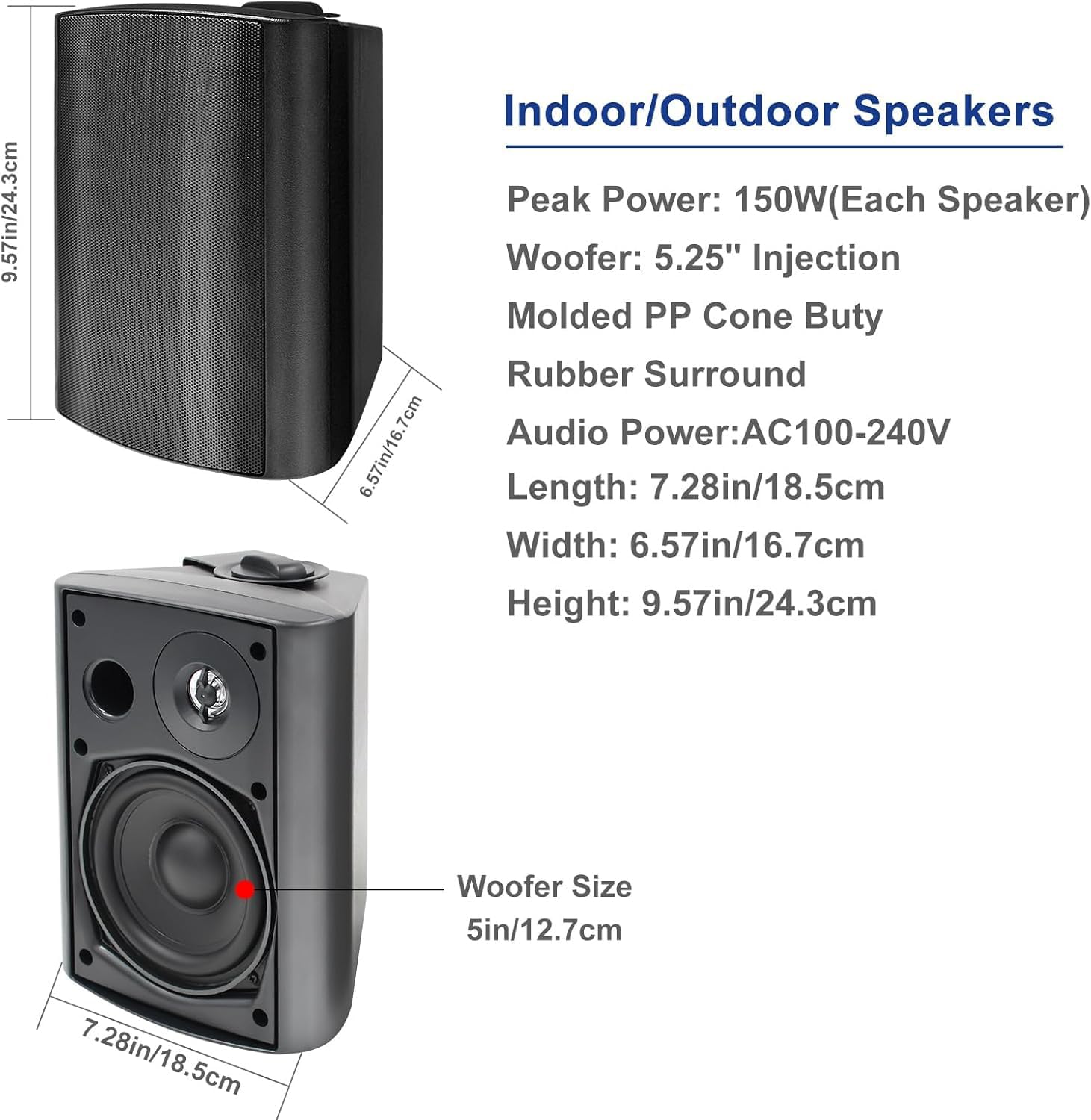
| Продукциянын өлчөмдөрү (L x W x Y) | 9.57" x 7.28" x 6.57" (24.3см x 18.5см x 16.7см) |
| Item Weight (Each Speaker) | Болжол менен 9.75 фунт |
| Монтаж түрү | Wall Mount (Versatile Swivel Brackets) |
| Материал | Алюминий, Металл, Пластик |
| Киргизүү көлөмүtage | 12 вольт |

An image showing the precise measurements of the STUDIOFINIX 5.25-inch speaker in both inches and centimeters.
4. Орнотуу нускамалары
4.1. Wiring and Bluetooth Pairing
Follow these steps to connect your speakers and pair them via Bluetooth:
- Connect Speaker Cables to Speakers: For each speaker, connect the red wire to the positive (+) terminal and the black wire to the negative (-) terminal. Ensure a secure connection.
- Connect Speaker Cables to Ampөмүр берүүчү: Connect the other end of the speaker cables to the corresponding terminals on the ampөмүрлүү. The amplifier supports 4 channels (L1+, L1-, L2+, L2-, R1+, R1-, R2+, R2-). Use a screwdriver to secure the wires in the ampөмүр терминалдары.
- Кубат булагына сайыңыз: Кубат адаптерин amplifier and then plug it into a power outlet. The amplifier's blue light will blink, indicating it is in pairing mode. A constant blue light means it is connected.
- Pair Bluetooth & Play Music: On your mobile device, search for the amplifier's Bluetooth name (e.g., "STUDIOFINIX") and connect. Once connected, you can begin playing music.
This video provides a step-by-step guide on unboxing, wiring, and pairing the STUDIOFINIX HOS-501BTB-EU 5.25-inch indoor/outdoor Bluetooth speaker system, along with instructions for speaker installation.

A detailed diagram illustrating the buttons and functions of the STUDIOFINIX Bluetooth amplifier, including power, mode, volume, and track controls.
4.2. Динамик орнотуу
The speakers come with versatile swivel brackets for easy mounting:
- Remove the Bracket: Turn the knob on the side of the speaker counter-clockwise to loosen and remove the mounting bracket.
- Кронштейнди оңдоо: Secure the bracket to your desired wall or surface using appropriate nails or screws (not included). Ensure the bracket is firmly attached.
- Спикерди тиркеңиз: Place the speaker onto the fixed bracket and tighten the knob clockwise until the speaker is securely held in place.
- Adjust Speaker Angle: Loosen the knobs slightly to rotate the speaker for optimal sound direction, then re-tighten to fix the position. The bracket allows for up to a 120-degree range of motion, and the front face can rotate up to 90 degrees.
A STUDIOFINIX speaker mounted with its versatile swivel bracket, allowing for flexible positioning.
5. Иштөө нускамалары
5.1. Ampкөтөргүч Controls
The amplifier features several controls for managing your audio experience:
- PWR (кубат): Press and hold for 3 seconds to power on/off. Short press to play/pause.
- РЕЖИМ: Short press to switch between Bluetooth, USB, AUX, and MIC modes.
- VOL- / TWS: Press and hold for 3 seconds to turn on/off TWS (True Wireless Stereo) mode. Short press to decrease volume.
- VOL+ / MONO: Press and hold for 3 seconds to turn on/off Mono Mode. Short press to increase volume.
- Мурунку трек: Short press to go to the previous song. Press and hold for 3 seconds to fast rewind.
- Кийинки трек: Short press to go to the next song. Press and hold for 3 seconds to fast forward.
5.2. Bluetooth туташуусу
After initial pairing, the amplifier should automatically connect to the last paired device when powered on. If not, ensure Bluetooth is enabled on your device and select the ampжеткиликтүү түзмөктөрдүн тизмесинен көтөргүч.
6. Техникалык тейлөө
To ensure the longevity and optimal performance of your STUDIOFINIX speakers, follow these maintenance guidelines:
- Тазалоо: Use a soft, dry cloth to clean the speaker grilles and cabinet. For stubborn dirt, a slightly damp cloth can be used, but ensure no water enters the speaker components.
- Аба ырайын коргоо: While designed for all-weather use, prolonged exposure to extreme weather conditions (e.g., heavy rain, direct sunlight, snow) can affect performance and lifespan. Consider covering the speakers or bringing them indoors during severe weather.
- Кабелдик текшерүү: Periodically check all speaker cables and power connections for any signs of wear, fraying, or damage. Replace damaged cables immediately to prevent electrical hazards or performance issues.
- Монтаждоо коопсуздугу: Regularly inspect the mounting brackets and screws to ensure they remain tight and secure. Re-tighten if necessary to prevent speakers from falling.
7. Кыйынчылыктарды
If you encounter any issues with your speaker system, refer to the following common troubleshooting steps:
- Үн жок:
- камсыз кылуу amplifier is powered on and the blue indicator light is solid (connected).
- Check all speaker cable connections at both the speakers and the amplifier. Ensure red is connected to positive and black to negative.
- Verify the audio source (e.g., phone, tablet) is playing and its volume is turned up.
- Үнүн жогорулатуу amplifier using the VOL+ button.
- Confirm the correct input mode (Bluetooth, AUX, USB) is selected on the ampөмүрлүү.
- Bluetooth жупташтыруу маселелери:
- камсыз кылуу amplifier is in Bluetooth mode (blue light blinking).
- Түзмөгүңүздөгү Bluetooth'ду өчүрүп, кайра иштетиңиз.
- Аспабыңызды жакыныраак жылдырыңыз amplifier (within 40 feet line of sight).
- If previously paired, try forgetting the device from your phone's Bluetooth settings and re-pairing.
- Көлөмү төмөн же бурмаланган үн:
- Check the volume levels on both your audio source and the ampөмүрлүү.
- Ensure speaker cables are securely connected and not frayed or damaged.
- If using the MIC input, ensure the microphone is functioning correctly and its volume is adjusted.
- Avoid placing the speakers in enclosed spaces that might muffle the sound.
- Only Two Speakers Playing (in a 4-speaker setup):
- The amplifier is designed to output two stereo channels (Left and Right). Each channel can power two speakers wired in parallel. Ensure all four speakers are correctly wired to the amplifier's L1/L2 and R1/R2 terminals.
- Verify that the TWS (True Wireless Stereo) mode is correctly configured if attempting to link multiple amplifiers wirelessly (this system typically uses one amplifier for four wired speakers).
8. Кепилдик жана колдоо
STUDIOFINIX provides a one-year warranty for this product. For any questions or assistance, please contact customer service. We are committed to providing premium customer service within 24 hours.
Көбүрөөк колдоо үчүн, кириңиз STUDIOFINIX Store on Amazon.