
1. Киришүү
Thank you for choosing the ICON Morpheus GX 66 Wired Gaming Mouse. This manual provides essential information for setting up, operating, and maintaining your new gaming mouse. Please read this guide thoroughly to ensure optimal performance and longevity of your device.
The ICON Morpheus GX 66 is a high-performance wired gaming mouse featuring customizable LED lighting and a precise 7200 DPI optical sensor, designed for an optimal gaming experience. It offers a modern style and ambidextrous design, compatible with Windows 7, Windows XP, and Linux operating systems.
2. Продукциянын өзгөчөлүктөрү
- Жогорку тактык сенсор: Equipped with a 7200 DPI optical sensor for accurate tracking and responsiveness.
- Ыңгайлаштырылган LED жарыктандыруу: Dynamic LED illumination enhances your gaming setup.
- 7 Программалануучу баскычтар: Offers extensive customization for various gaming commands.
- Зымдуу туташуу: Туруктуу жана кечигүүсүз байланышты камсыз кылат.
- Эки тараптуу дизайн: Сол жана оң кол менен иштеген колдонуучулар үчүн ыңгайлуу.
- Туруктуу курулуш: Designed for long-lasting use in intense gaming sessions.
- Кеңири шайкештик: Supports Windows 7, Windows XP, and Linux operating systems.

3. Орнотуу
- Чычканды таңгактан чыгаруу: Carefully remove the ICON Morpheus GX 66 mouse from its packaging.
- Компьютерге туташуу: Locate an available USB port on your computer. Plug the USB connector of the mouse firmly into the USB port.
- Драйверди орнотуу: The mouse is plug-and-play. Your operating system (Windows 7, Windows XP, or Linux) should automatically detect and install the necessary drivers. This process may take a few moments.
- Сыноо функциясы: Once installed, move the mouse and click the buttons to ensure it is working correctly.
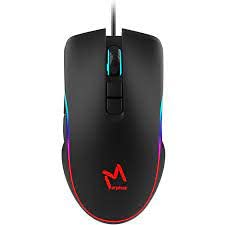
4. Иштөө нускамалары
4.1 Негизги функциялар
- Сол чыкылдатуу: Primary action, selection, activation.
- Оң чыкылдатуу: Context menu, secondary actions.
- Жылдыруу дөңгөлөгү: Scroll up/down, middle click for specific functions.
4.2 DPI жөндөө
The mouse features a dedicated DPI button (often located behind the scroll wheel) to cycle through different sensitivity levels. Press this button to adjust the DPI (Dots Per Inch) to your preferred setting for various tasks or games. The LED lighting may change color to indicate the current DPI level.
4.3 LED жарыктандыруу
The ICON Morpheus GX 66 features dynamic LED lighting. The lighting patterns and colors are typically pre-programmed and may change based on the selected DPI setting or cycle automatically. There are no user-configurable software controls for the LED lighting on this model.

5. Техникалык тейлөө
- Тазалоо: Чычкандын бетин сүртүү үчүн жумшак, кургак чүпүрөктү колдонуңуз. өжөр кир үчүн, бир аз гampчүпүрөктү суу менен. Катуу химиялык заттарды же абразивдүү материалдарды колдонуудан алыс болуңуз.
- Сенсор тазалоо: Кээде оптикалык сенсордун айланасында чаң же таштандылар топтолушу мүмкүн. Чычкандын астыңкы жагындагы сенсор аймагын акырын тазалоо үчүн пахта таякчасын же кысылган абаны колдонуңуз.
- Кабельге кам көрүү: Avoid sharp bends or excessive pulling on the mouse cable to prevent damage. Store the cable neatly when not in use.
- Сактагыч: Узак мөөнөткө колдонулбаганда чычканды күн нурунан жана экстремалдык температурадан алыс, таза, кургак чөйрөдө сактаңыз.

6. Кыйынчылыктарды
- Чычкан жооп бербейт:
- USB кабелинин компьютердин USB портуна бекем сайылганын текшериңиз.
- Чычканды башка USB портуна сайып көрүңүз.
- Компьютериңизди өчүрүп күйгүзүңүз.
- Курсордун туруксуз кыймылы:
- Чычкандын астындагы оптикалык сенсорду тазалаңыз.
- Чычканды таза, чагылдырылбаган жана бирдей бетке колдонуп жатканыңызды текшериңиз. Айнек же өтө чагылдыруучу беттерден качыңыз.
- LED Lighting Not Working:
- USB байланышын текшериңиз.
- The LED lighting is typically powered directly via USB. If the mouse functions but LEDs do not, contact support.
- Баскычтар иштебейт:
- Чычкан туура туташтырылганын текшериңиз.
- Test the mouse on another computer to rule out software issues.
7. Техникалык шарттар
| Өндүрүүчү | ICON |
| Модел | Morpheus GX 66 |
| ASIN | B0B5PLWQXC |
| Өзгөчөлүктөр | LED жарыктандыруу |
| Кыймылды аныктоо технологиясы | Оптикалык |
| DPI | 7200 |
| Колдун багыты | Эки тараптуу |
| Сунушталган Колдонуулар | Оюндар |
| Операциялык системанын шайкештиги | Linux, Windows 7, Windows XP |
| Стиль | Заманбап |
| Аяктоо түрү | Мт |
| Power Source | Электр зымдары (USB) |
| Түс | Көп түстүү |
8. Кепилдик жана колдоо
The ICON Morpheus GX 66 Wired Gaming Mouse comes with a standard manufacturer's warranty. For specific warranty terms and conditions, please refer to the warranty card included with your product or visit the official ICON webсайт.
For technical support, troubleshooting assistance, or to inquire about replacement parts, please contact ICON customer service through their official support channels. Keep your purchase receipt and product model information (GX 66) handy when contacting support.