
FoMaKo BN302
FoMaKo NDI PTZ Camera System BN302 Instruction Manual
Model: BN302 (Includes 2x KN30A Cameras + 1x KC608 Controller)
1. Киришүү
This manual provides detailed instructions for the setup, operation, and maintenance of your FoMaKo NDI PTZ Camera System BN302. This system is designed for professional video production and live streaming applications, featuring advanced NDI capabilities, AI auto-tracking, and a comprehensive control interface.
The BN302 system includes:
- Two (2) FoMaKo KN30A NDI PTZ Cameras
- One (1) FoMaKo KC608 Pro PTZ Controller Keyboard
2. Продукт компоненттери бүттүview

Image 2.1: The FoMaKo NDI PTZ Camera System BN302, showing two KN30A cameras and the KC608 Pro controller.
2.1 FoMaKo KN30A NDI PTZ Camera
The KN30A camera features 30x optical zoom, NDI 6 & NDI HX3 certification, and advanced AI auto-tracking. It supports multiple video outputs including 3G-SDI, HDMI, IP, and USB3.0, making it versatile for various production environments.

Image 2.2: Rear panel of the KN30A camera, illustrating the various input/output ports.
2.2 FoMaKo KC608 Pro PTZ Controller Keyboard
The KC608 Pro is a dedicated PTZ controller designed for precise and intuitive control of multiple cameras. It features a joystick for pan, tilt, and zoom, along with dedicated buttons for presets, exposure, and tracking functions.
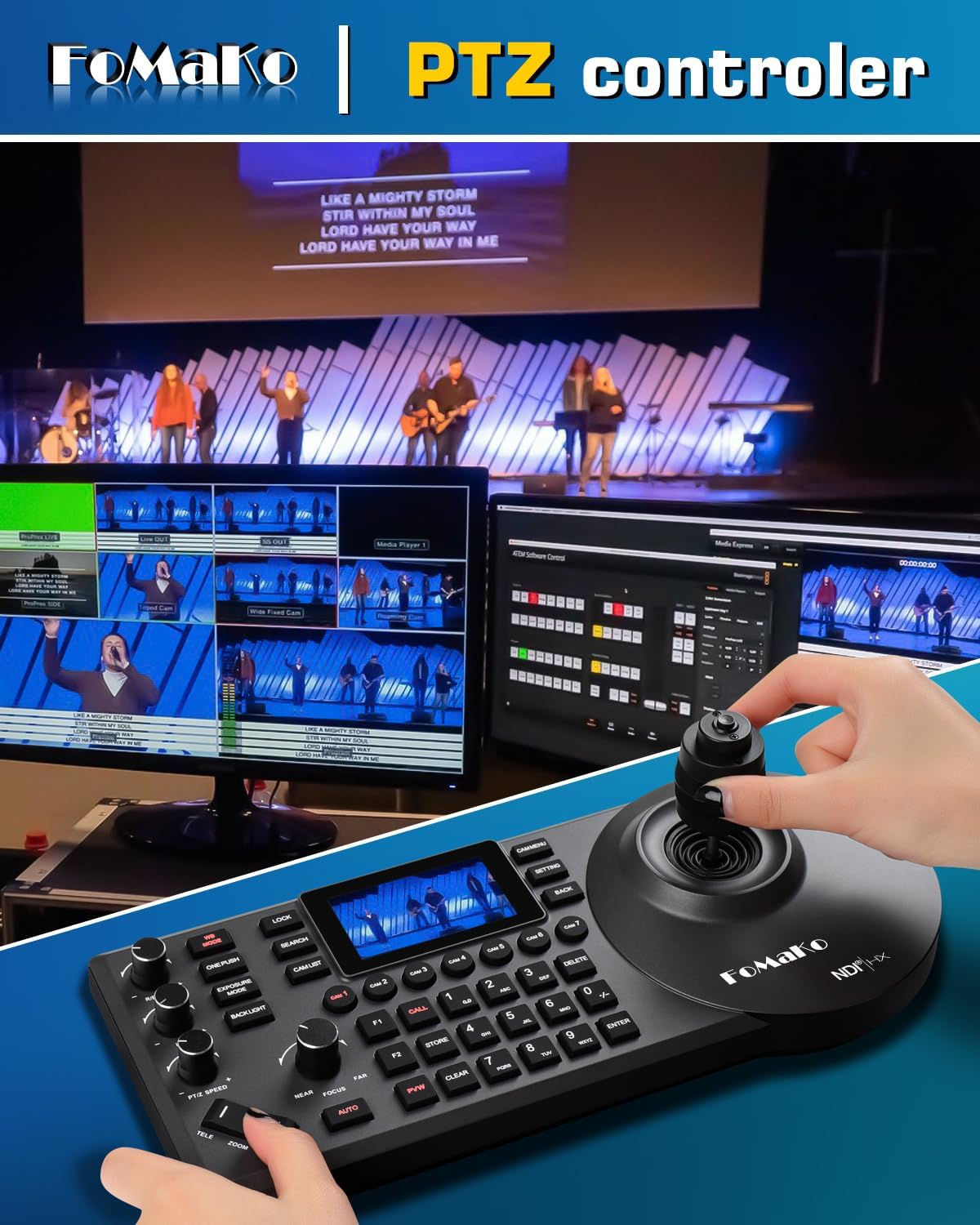
Image 2.3: The KC608 Pro PTZ Controller Keyboard, demonstrating its use for camera control.
3. Негизги өзгөчөлүктөрү
- Official NDI 6 & NDI HX3 Certification: Ensures stable, high-quality video transmission over IP networks, even with limited bandwidth. Compatible with vMix, OBS, Propresenter, StreamYards, Streamlabs, Wirecast, Zoom, and other live streaming software.
- Өркүндөтүлгөн AI автокөзөмөлү (3-муун): Offers customizable tracking modes, sensitivity, figure size, and target switching. Activate tracking with F2 on the remote and switch targets with F4.
- 30X оптикалык чоңойтуу: Provides clear, high-definition 1080p video with a 58.1-degree field of view. Fast auto-focus maintains image clarity during movement and zooming.
- Бир нече видео чечимдери: Supports 1080P60/50, 1080P30/25, 720P60/50, 720P30/25.
- Efficient Video Encoding: H.264/H.265 encoding ensures smooth and clear motion video under various bandwidth conditions.
- Ар тараптуу байланыш: Includes 3G-SDI, HDMI, IP, NDI, and USB3.0 outputs.
- Power over Ethernet (PoE) колдоосу: Бир Ethernet кабели аркылуу кубат жана маалыматтарды берүү менен орнотууну жеңилдетет.
- Gear Transmission Structure: Enhances precision for preset positioning and increases durability compared to belt-driven systems.
- Extensive Control Options: Supports RS232/RS485, TCP/IP, RTSP, RTMP, VISCA OVER IP, VISCA, SRT, network protocols, 360-degree IR remote control, FoMaKo PTZ controller, and webpage control.
4. Орнотуу колдонмосу
4.1 Таңгактан чыгаруу жана текшерүү
- Бардык компоненттерди таңгактан кылдаттык менен чыгарыңыз.
- Verify that all items listed in the product bundle are present.
- Inspect each camera and the controller for any signs of physical damage.
4.2 Физикалык байланыш
Туташтыруудан мурун, бардык түзмөктөр өчүрүлгөндүгүн текшериңиз.

Сүрөт 4.1: Мисample diagram of a multi-camera live streaming setup using FoMaKo NDI PTZ cameras and controller.
Camera Connections (KN30A)
- Күч: Connect the provided power adapter to the DC12V port or use a PoE-enabled network switch for Power over Ethernet.
- Network (IP/NDI): Connect an Ethernet cable from the camera's LAN port to your network switch or router. If using PoE, this also provides power.
- HDMI чыгышы: Connect an HDMI cable from the camera's HDMI port to a display, video switcher, or capture device.
- 3G-SDI чыгаруу: Connect a 3G-SDI cable from the camera's 3G-SDI port to a compatible video switcher or capture device.
- USB3.0 чыгышы: Connect a USB3.0 cable to a computer for use as a webcam or for direct capture.
- Control (RS232/RS485): For serial control, connect to a compatible control device using RS232 or RS485 ports.
Controller Connections (KC608 Pro)
- Күч: Connect the provided power adapter to the controller.
- Тармак: Connect an Ethernet cable from the controller's LAN port to the same network as your cameras for IP control.
4.3 Баштапкы тармак конфигурациясы
For IP control and NDI functionality, ensure your cameras and controller are on the same network. Cameras typically come with a default IP address (e.g., 192.168.1.77). You can change the IP address through the camera's web interface or the controller's menu.

Сүрөт 4.2: Мисample of network settings accessible via the camera's menu or web интерфейс.
5. Иштетүү үчүн колдонмо
5.1 Күйгүзүү/өчүрүү
After all connections are made, power on the cameras and the controller. The power indicator on the camera will illuminate.
5.2 PTZ Control
Using the KC608 Pro Controller
The KC608 Pro controller provides tactile control over camera movements:
- Джойстик: Use the joystick to pan (left/right), tilt (up/down), and zoom (twist).
- Ылдамдыкты жөндөө: Adjust PTZ speed and preset speed using dedicated knobs or buttons on the controller.
- Камераны тандоо: Use the camera selection buttons (e.g., CAM1, CAM2) to choose which camera to control.
IR алыстан башкарууну колдонуу
The included IR remote control allows basic PTZ functions and preset recall.

Image 5.1: The IR remote control for basic camera functions.
Web Interface Control
Камерага кирүү web анын IP дарегин киргизүү менен интерфейс web browser. This interface provides comprehensive control over all camera settings, including PTZ, image parameters, and network configuration.
5.3 AI Auto-Tracking
The Gen 3 AI auto-tracking feature allows the camera to automatically follow a designated subject.

Image 5.2: The AI auto-tracking feature in action, highlighting a tracked subject.
- Жандандыруу: Press the F2 button on the remote control or use the controller/web interface to enable auto-tracking.
- Target Switching: Press F4 on the remote control to switch between detected tracking targets.
- Ыңгайлаштыруу: Adjust tracking modes, sensitivity, figure size, AI-Track speed, and other parameters via the web interface or controller menu.
5.4 Preset Configuration
The camera supports up to 255 presets (10 via IR remote control) for quick recall of specific camera positions and zoom levels.
- Алдын ала сакталган нерселерди сактоо: Камераны каалаган жерге коюңуз view, then use the controller or remote to store the preset to a specific number.
- Алдын ала орнотууларды эстөө: Select the desired preset number on the controller or remote to move the camera to the stored position.
6. Байланыш параметрлери
The KN30A camera offers a variety of connectivity options to integrate into diverse production workflows:
- NDI/IP: Primary output for high-quality, low-latency video over standard Ethernet networks. Supports NDI 6 and NDI HX3.
- HDMI: Direct video output for monitors, switchers, or capture cards.
- 3G-SDI: Professional video output for long cable runs and broadcast-grade equipment.
- USB3.0: Connects directly to a computer for use as a high-quality webcam or for software-based streaming.
- RS232/RS485: Serial control ports for integration with third-party control systems.
- Аудио линия: 3.5mm audio input for embedding external audio into the video stream.
7. Техникалык тейлөө
- Тазалоо: Use a soft, dry cloth to clean the camera body and controller. For the lens, use a specialized lens cleaning cloth and solution. Avoid abrasive cleaners.
- Программалык камсыздоонун жаңыртуулары: Periodically check the FoMaKo official website for available firmware updates to ensure optimal performance and access to new features. Follow the provided instructions carefully during the update process.
- Сактагыч: When not in use for extended periods, store the equipment in a dry, dust-free environment.
8. Кыйынчылыктарды
8.1 Видео чыгышы жок
- Күчтү текшерүү: Ensure the camera is powered on and the power indicator light is illuminated.
- Кабелдик байланыштар: Verify that all video cables (HDMI, SDI, Ethernet for NDI/IP) are securely connected to both the camera and the receiving device.
- Киргизүүнү тандоо: Confirm that your receiving device (monitor, switcher, computer) is set to the correct input source.
- Network Configuration (NDI/IP): Ensure the camera and receiving device are on the same network subnet and that NDI discovery is functioning.
8.2 PTZ башкаруу маселелери
- Controller Power: Ensure the KC608 Pro controller is powered on.
- Тармак туташуусу: Verify the controller's network cable is connected and that it can communicate with the cameras (check IP settings).
- Камераны тандоо: Make sure the correct camera is selected on the controller.
- Башкаруу протоколу: Confirm that the camera and controller are configured to use compatible control protocols (e.g., VISCA over IP).
8.3 Auto-Tracking Malfunction
- Жарыктандыруу шарттары: Ensure adequate and consistent lighting in the tracking area. Extreme backlighting or low light can affect performance.
- Tracking Settings: Review the AI auto-tracking settings via the web interface or controller. Adjust sensitivity and tracking modes as needed.
- Тоскоолдуктар: Ensure there are no objects obstructing the camera's view теманын.
9. Техникалык шарттар
| Өзгөчөлүк | Спецификация |
|---|---|
| Бренд | FoMaKo |
| Модель номери | BN302 (Kit) / KN30A (Camera) |
| Оптикалык масштаб | 30X |
| Видео тартуунун резолюциясы | 1080p (1080P60/50, 1080P30/25, 720P60/50, 720P30/25) |
| Фото сенсор технологиясы | CMOS |
| Байланыш технологиясы | NDI, LAN, HDMI, 3G-SDI, USB3.0 |
| Видеону коддоо | H.264/H.265 |
| Өзгөчөлүктөр | AI Tracking, NDI 6 & NDI HX3 Certified, PoE Support |
| View Angle (FOV) | 58.1 градус |
| Control Interface | RS232/RS485, TCP/IP, VISCA OVER IP, VISCA, IR Remote, Webбет |
| Алдын ала орнотуулар | Up to 255 (10 via remote) |
| Продукциянын өлчөмдөрү | 6.93 x 5.63 x 6.3 inches (Camera) |
| Элемент Салмагы | 18.48 фунт (жалпы комплект) |
10. Кепилдик жана колдоо
FoMaKo provides a 3-Year Limited Warranty for this product. This warranty covers manufacturing defects and ensures reliable operation under normal use conditions.
- 30 күндүк акчаны кайтарып берүү кепилдиги: Тобокелчиликсиз сатып алуу.
- Акысыз онлайн тренинг: Resources available to assist with initial setup and operation.
- 24/7 эксперттик жардам: Customer support responses typically within 24 hours. Please include your Order ID when contacting support. Remote assistance for setup is available if necessary.
- Өмүр бою Кардарларды техникалык колдоо: Продукциянын иштөө мөөнөтү үчүн үзгүлтүксүз техникалык жардам.
For support, please refer to the contact information provided with your purchase or visit the official FoMaKo webсайт.
11. Колдонуу сценарийлери
The FoMaKo NDI PTZ Camera System BN302 is suitable for a wide range of professional AV and live streaming applications, including but not limited to:
- Church worship live services
- Educational institutions (classrooms, lecture halls)
- Түз берүү жана берүү
- Студия продукциялары
- University events
- Factory live monitoring
- Sports clubs / eSports events
- Training classrooms
- Large conferences and theaters
- Concerts and live performances

Image 11.1: Visual representation of diverse environments where the FoMaKo PTZ camera system can be effectively utilized.
Ask a question about this manual
Ask about setup, troubleshooting, compatibility, parts, safety, or missing instructions. Manuals+ will review the question and use this page’s manual context to help answer it.