
TEIMO G1
TEIMO Bluetooth Headset User Manual
Модел: G1
1. Продукт бүтүп калдыview
The TEIMO G1 Bluetooth Headset is designed for hands-free communication and audio playback, offering extended playtime and comfortable wear. It features Bluetooth V5.1 for stable connectivity and a portable charging case for on-the-go power.

Figure 1.1: TEIMO G1 Bluetooth Headset and Charging Case.
2. Пакеттин мазмуну
Сураныч, кутудан чыгарганда пакеттин мазмунун текшерип, бардык буюмдар бар экенин текшериңиз:
- 1 x TEIMO G1 Bluetooth Headset
- 1 x 400mAh заряддоо кутусу
- 1 x Type-C заряддоо кабели
- 3 x Eartips (S, M, L sizes)
- 1 x User Manual

Figure 2.1: Included accessories with the TEIMO G1 headset.
3. Продукциянын диаграммасы
Familiarize yourself with the components of your TEIMO G1 Bluetooth Headset:
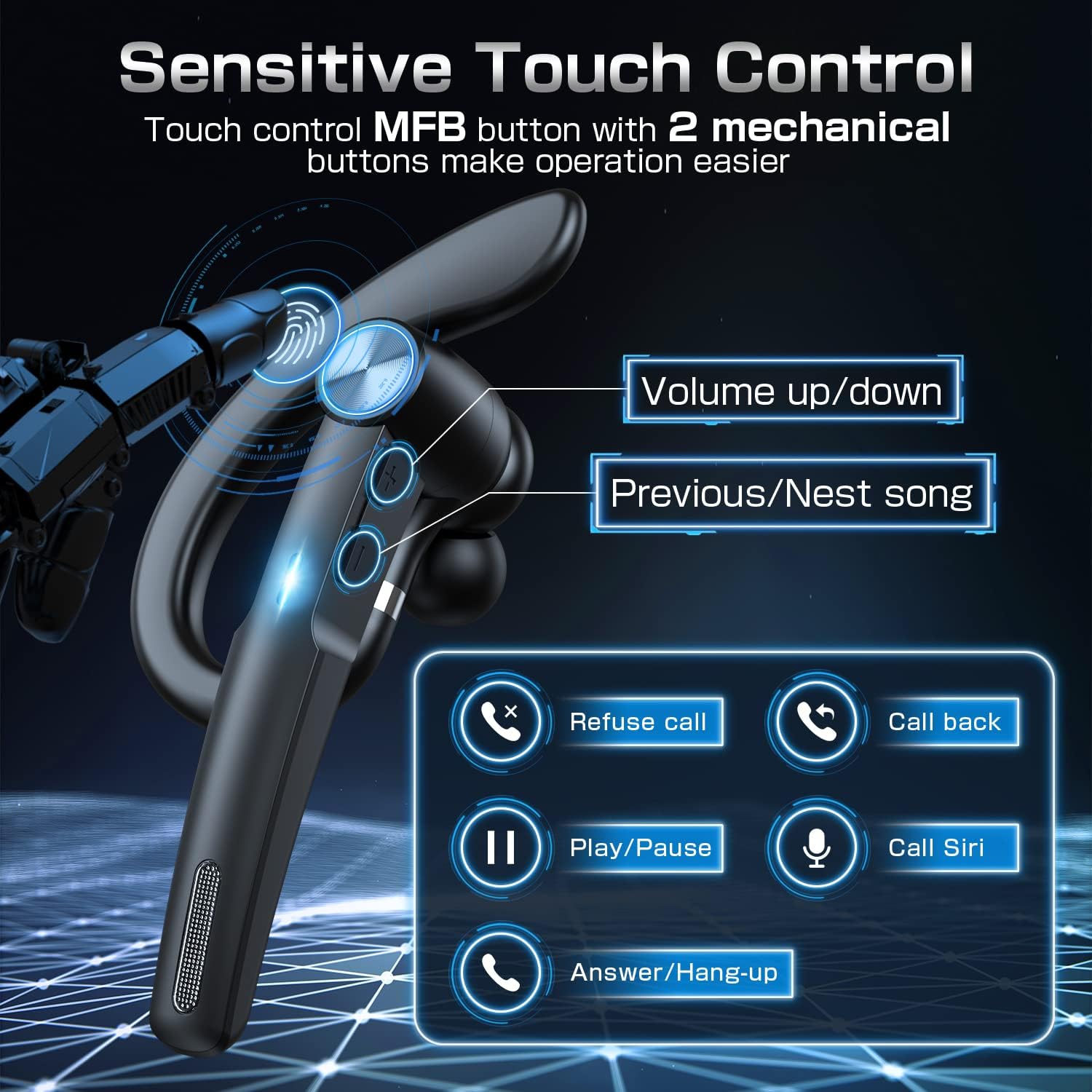
Figure 3.1: Headset controls including volume, track navigation, call management, and voice assistant activation.

Figure 3.2: ашыкview of key features: Bluetooth V5.1, digital power display on case, and sensitive touch controls.
4. Орнотуу
4.1 Гарнитураны жана кутуну заряддоо
Before first use, fully charge both the headset and the charging case.
- Place the headset into the charging case. Ensure the charging contacts align.
- Connect the Type-C charging cable to the charging case and a USB power source.
- The digital display on the case will show the charging progress. A full charge is indicated by "100".
- Charging time for the headset is approximately 1.5 hours. The charging case also takes about 1.5 hours to fully charge.

Figure 4.1: Type-C charging port on the charging case.

Figure 4.2: The 400mAh charging case provides up to 55 hours of total playtime.
4.2 Түзмөк менен жупташтыруу
The TEIMO G1 headset uses Bluetooth V5.1 for quick and stable pairing.
- Күйгүзүү: Take the headset out of the charging case. It will automatically power on and enter pairing mode.
- Bluetooth иштетүү: Смартфонуңузда же планшетиңизде Bluetooth'ду күйгүзүңүз.
- Издөө Түзмөк: Look for "G1" in the list of available Bluetooth devices.
- Туташуу: Select "G1" to connect. Once connected, the headset will indicate successful pairing.
- Кош түзмөктү жупташтыруу: The headset supports connecting to two devices simultaneously. After pairing with the first device, disable Bluetooth on that device. Pair the headset with the second device. Then, re-enable Bluetooth on the first device, and the headset should automatically connect to both.

Figure 4.3: The G1 headset can be paired with two devices concurrently, such as a smartphone and a tablet.
5. Иштөө нускамалары
The TEIMO G1 features sensitive touch controls for easy operation.
- Күйгүзүү/өчүрүү: The headset powers on automatically when removed from the case and powers off when placed back in.
- Ойнотуу/тындыруу: Single tap the MFB (Multi-Function Button) to play or pause music.
- Кийинки/Мурунку ыр: Double tap the MFB for the next song, triple tap for the previous song.
- Үндү көзөмөлдөө: Use the dedicated volume up/down buttons on the headset.
- Чалууга жооп берүү/түп коюу: Single tap the MFB to answer an incoming call, single tap again to hang up.
- Чалуудан баш тартуу: Press and hold the MFB for 2 seconds to refuse an incoming call.
- Кайра чалуу: Double tap the MFB to redial the last number.
- Үн жардамчысын (Siri) жандыруу: Press and hold the MFB for 2 seconds to activate your device's voice assistant.

Figure 5.1: Detailed functions of the sensitive touch control button.
6. Comfortable Wearing
The TEIMO G1 is designed for ergonomic comfort and can be worn on either ear.
- Adjustable Earpiece: The earpiece can be rotated 180 degrees to fit comfortably on either the left or right ear. The ear hook can also be rotated 360 degrees, and the earbud angle can be adjusted by 45 degrees for optimal fit.
- Наушниктер: Three sizes of eartips (Small, Medium, Large) are provided to ensure a secure and comfortable fit for different ear canal sizes. Choose the size that provides the best seal and comfort.
- Жеңил дизайн: The headset's lightweight design minimizes discomfort during extended use.

Figure 6.1: The headset's ergonomic design ensures a comfortable and secure fit for both ears, with adjustable components and multiple eartip sizes.

Figure 6.2: The headset offers 180-degree rotation for the main body, 360-degree rotation for the ear hook, and 45-degree adjustment for the earbud angle.
7. Техникалык тейлөө
To ensure the longevity and optimal performance of your TEIMO G1 headset, follow these maintenance guidelines:
- Тазалоо: Regularly wipe the headset and charging case with a soft, dry cloth. Avoid using harsh chemicals or abrasive materials.
- Сактагыч: When not in use, store the headset in its charging case to protect it from dust and damage. Store in a cool, dry place away from direct sunlight and extreme temperatures.
- Суудан качуу: While designed for daily use, avoid submerging the headset or charging case in water.
- Заряддоо: Берилген Type-C кубаттоо кабелин же тастыкталган эквивалентти гана колдонуңуз.
8. Кыйынчылыктарды
If you encounter issues with your TEIMO G1 headset, refer to the following common solutions:
| Көйгөй | Мүмкүн чечим |
|---|---|
| Гарнитура күйбөйт. | Ensure the headset is charged. Place it in the charging case and check the battery indicator. |
| Түзмөк менен жупташтыруу мүмкүн эмес. |
|
| Үн жок же үнү төмөн. |
|
| Чалуу сапаты начар. |
|
9. Техникалык шарттар
| Өзгөчөлүк | Деталь |
|---|---|
| Модель аты | G1 |
| Бренд | TEIMO |
| Байланыш технологиясы | Зымсыз (Bluetooth) |
| Bluetooth версиясы | 5.1 |
| Bluetooth диапазону | 10 метр (33 фут) |
| Батареянын иштөө мөөнөтү (бардыгы куту менен) | 55 саатка чейин |
| Talking Time | 12 саат (ар бир заряд үчүн) |
| Музыка убактысы | 10 саат (ар бир заряд үчүн) |
| Заряддоо убактысы (гарнитура) | 1.5 саат |
| Заряддоо убактысы (капка) | 1.5 саат |
| Заряддоо корпусунун батареясынын сыйымдуулугу | 400mAh |
| Башкаруу ыкмасы | тийүү |
| Кулак жайгаштыруу | Кулакта |
| Форма фактору | Кулакта |
| Материал | Пластик |
| Элемент Салмагы | 5.6 унция |
| Пакеттин өлчөмдөрү | 5.91 x 3.62 x 1.26 дюйм |
10. Расмий продукт Videos
Watch the official product video for a visual guide on the TEIMO G1 Bluetooth Headset.
Видео 10.1: Аткаминер бүттүview of the TEIMO G1 Wireless Headset with Charging Case, demonstrating its features and components.
11. Кепилдик жана колдоо
For warranty information or technical support, please refer to the contact details provided on the product packaging or the official TEIMO webсайт. Кепилдик дооматтары үчүн сатып алуу дүмүрчөгүңүздү сактаңыз.
Ask a question about this manual
Ask about setup, troubleshooting, compatibility, parts, safety, or missing instructions. Manuals+ will review the question and use this page’s manual context to help answer it.