
1. Киришүү
Thank you for choosing the LAMAX Sounder2 Max Portable Stereo Speaker. This manual provides essential information to help you set up, operate, and maintain your device. Please read these instructions carefully before use and retain them for future reference.
The LAMAX Sounder2 Max delivers powerful 50W stereo sound with a robust design, offering up to 20 hours of playback on a single charge. Its IP67 rating ensures water and dust resistance, making it suitable for various environments.

Image 1.1: The LAMAX Sounder2 Max speaker, highlighting its 360-degree sound capability.
2. Коопсуздук маалыматы
To ensure safe and proper operation, please observe the following guidelines:
- Динамикти экстремалдык температурага же түз күн нуруна узак убакытка калтырбаңыз.
- Спикерди түшүрүүдөн же катуу таасирлерге дуушар кылуудан качыңыз.
- Динамикти өз алдынча бөлүктөргө бөлүүгө, оңдоого же өзгөртүүгө аракет кылбаңыз. Ыйгарым укуктуу тейлөө кызматкерлерине кайрылыңыз.
- Динамикти медициналык шаймандардан алыс кармаңыз, анткени ал алардын иштешине тоскоол болушу мүмкүн.
- Dispose of the battery and speaker according to local regulations. Do not dispose of batteries in fire.
- Ensure all ports are securely closed when exposing the speaker to water to maintain its IP67 rating.
3. Продукт бүтүп калдыview жана Controls
Familiarize yourself with the various parts and controls of your LAMAX Sounder2 Max speaker.
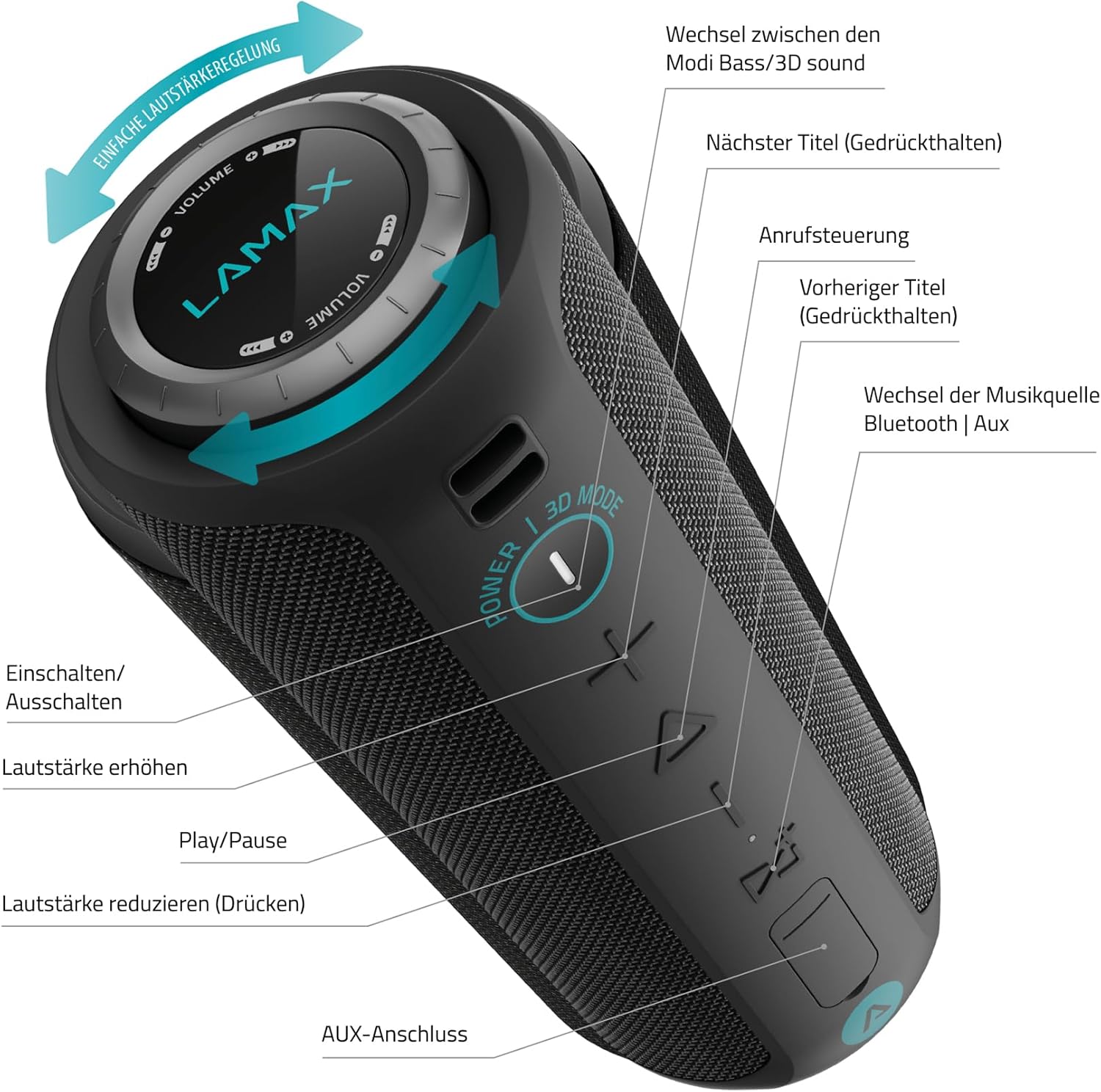
Image 3.1: Detailed diagram of the speaker's control panel.
- Кубат баскычы: Press and hold to Power On/Off. Press to switch between Bass/3D sound modes.
- Үндү катуулатуу баскычы (+): Үнүн көбөйтүү үчүн басыңыз.
- Ойнотуу/Тындыруу баскычы (Үч бурчтук): Press to Play/Pause music. Press to answer/end calls.
- Үндү азайтуу баскычы (-): Үндү азайтуу үчүн басыңыз.
- Source Button (M): Press to switch between Bluetooth and AUX music sources.
- Next Track Button (Right Arrow): Press and hold for the next track.
- Previous Track Button (Left Arrow): Press and hold for the previous track.
- Rotating Volume Ring: Үнүн жогорулатуу үчүн сааттын жебеси боюнча, үнүн азайтуу үчүн сааттын жебесине каршы буруңуз.
- AUX порту: Зымдуу аудио туташуу үчүн.
- Заряддоо порту (USB-C): Динамикти заряддоо үчүн.
- Микро SD карта слоту: For playing music directly from a Micro SD card (if applicable, not explicitly mentioned in specs but common).

Image 3.2: Demonstrating the rotating volume ring for easy adjustment.
4. Орнотуу
4.1 Динамикти заряддоо
Before first use, fully charge the speaker. Connect the provided USB-C cable to the speaker's charging port and the other end to a USB power adapter (not included) or a computer's USB port. The LED indicator will show charging status and turn off when fully charged.
4.2 Күйгүзүү/өчүрүү
- Күйгүзүү үчүн: Үн чыккан сигнал чыгып, LED индикатору күйгөнгө чейин Кубат баскычын болжол менен 3 секунд басып туруңуз.
- Өчүрүү үчүн: Үн чыккан сигнал чыгып, LED индикатору өчкөнгө чейин Кубат баскычын болжол менен 3 секунд басып туруңуз.
4.3 Bluetooth жупташтыруу
- Динамик күйгүзүлгөнүн жана Bluetooth жупташтыруу режиминде экенин текшериңиз (LED индикатору күйөт).
- Мобилдик түзмөгүңүздө Bluetooth иштетип, жеткиликтүү түзмөктөрдү издеңиз.
- Select "LAMAX Sounder2 Max" from the list of devices.
- Once paired, you will hear a confirmation sound, and the LED indicator will remain solid.
4.4 Көмөкчү (AUX) туташуу
To connect a device via AUX cable:
- 3.5 мм аудио кабелинин бир учун (киргизилген эмес) динамиктеги AUX портуна туташтырыңыз.
- Экинчи учун түзмөгүңүздүн аудио чыгышына туташтырыңыз.
- The speaker will automatically switch to AUX mode, or you may need to press the Source (M) button to select AUX input.
5. Иштөө нускамалары
5.1 Музыканы ойнотуу
- Ойнотуу/тындыруу: Press the Play/Pause button (Triangle).
- Үндү тууралоо: Rotate the volume ring or press the '+' / '-' buttons.
- Кийинки трек: Press and hold the Next Track button (Right Arrow).
- Мурунку трек: Press and hold the Previous Track button (Left Arrow).
5.2 Чалууларды башкаруу
Bluetooth аркылуу туташканда, сиз телефон чалууларын башкара аласыз:
- Чакырууга жооп берүү: Press the Play/Pause button (Triangle).
- Чакырууну аяктоо: Press the Play/Pause button (Triangle) during a call.
- Чакырууну четке кагуу: Press and hold the Play/Pause button (Triangle).
5.3 Үн режимдери
The speaker features different sound modes for an enhanced listening experience:
- Которуу режими: Press the Power button (not hold) to cycle between Bass mode and 3D sound mode.
5.4 Чыныгы зымсыз стерео (TWS) жупташтыруу
If you have two LAMAX Sounder2 Max speakers, you can pair them for a true wireless stereo experience:
- Эки динамик тең күйгүзүлгөнүн жана эч кандай Bluetooth түзмөгүнө туташкан эмес экенин текшериңиз.
- On one speaker (this will be the primary speaker), press and hold the Play/Pause button for approximately 3 seconds until you hear a TWS pairing prompt.
- Эки динамик автоматтык түрдө бири-бирин издеп, туташат. Туташтырылгандан кийин, сиз ырастоо үнүн угасыз.
- Эми мобилдик түзмөгүңүздү 4.3-бөлүмдө сүрөттөлгөндөй Bluetooth аркылуу негизги динамикке туташтырыңыз. Эки динамик тең аудиону стерео режиминде ойнотот.
6. Техникалык тейлөө
6.1 Тазалоо
Динамикти жумшак менен сүртүңүз, гamp кездеме. Абразивдүү тазалоочу каражаттарды, спиртти же химиялык эриткичтерди колдонбоңуз, анткени алар бетке зыян келтириши мүмкүн.
6.2 Сактоо
Динамикти көпкө чейин колдонбогондо, салкын, кургак жерде сактаңыз. Батареянын иштөө мөөнөтүн сактоо үчүн аны жок дегенде үч айда бир жолу кубаттоо сунушталат.
6.3 Сууга туруктуулук (IP67)
The LAMAX Sounder2 Max is rated IP67, meaning it is dust-tight and protected against immersion in water up to 1 meter for up to 30 minutes. To maintain this rating, ensure the charging port and AUX port covers are securely closed before exposing the speaker to water or dust.
7. Кыйынчылыктарды
| Көйгөй | Мүмкүн себеп | Чечим |
|---|---|---|
| Динамик күйбөйт. | Батарея түгөнүп калды. | Динамикти USB-C кабели аркылуу заряддаңыз. |
| Bluetooth аркылуу жупташтыруу мүмкүн эмес. | Динамик жупташтыруу режиминде эмес же түзмөктөн өтө алыс. | Ensure speaker is in pairing mode (flashing LED). Move speaker closer to your device (within 18m). Restart both devices. |
| Үн жок. | Volume is too low or muted; incorrect source selected. | Increase volume on both speaker and connected device. Press the Source (M) button to select the correct input (Bluetooth/AUX). |
| Үндүн бузулушу. | Үн өтө жогору; аз батарея; кийлигишүү. | Reduce volume. Charge the speaker. Move away from other electronic devices. |
| TWS жупташтыруу ишке ашпай калды. | Speakers are too far apart or already connected to another device. | Ensure both speakers are within close proximity and not connected to any other Bluetooth device. Try re-initiating TWS pairing. |
8. Техникалык шарттар
- Модель аты: Үн берүүчү2 Макс
- Модель номери: LMXSO2MAX
- Бренд: Ламакс
- Продукт түрү: Портативдик стерео спикер
- Түсү: Кара
- Rated RMS Power: 50 Вт
- Динамиктин максималдуу чыгаруу күчү: 50 Ватт
- Жыштык диапазону: 80 - 20000 Гц
- Айдоочунун диаметри: 5.2 cm (2 speakers)
- Байланыш технологиясы: Wired and Wireless (Bluetooth, Auxiliary, USB)
- Bluetooth версиясы: 5.0
- Bluetooth диапазону: 18 м
- Кубат булагы: Battery Powered (Integrated Lithium-ion battery)
- Батарея сыйымдуулугу: 8000 мАч
- Батареянын иштөө мөөнөтү: 20 саатка чейин
- Заряддоо убактысы: 3 саат
- International Protection (IP) Code: IP67 (Суу өткөрбөйт жана чаң өткөрбөйт)
- Өзгөчөлүктөр: High-res audio, Integrated microphone, Portable
- Аудио чыгаруу режими: Стерео
- Монтаж түрү: Стол үстү
- Продукциянын өлчөмдөрү (L x W x Y): 10 x 12 x 15 см (3.94 x 4.72 x 5.91 дюйм)
- Элемент Салмагы: 1.2 килограмм (2.65 фунт)

Image 8.1: Key features of the LAMAX Sounder2 Max speaker.
9. Кепилдик жана колдоо
LAMAX products are covered by a standard manufacturer's warranty. For detailed warranty terms and conditions, please refer to the official LAMAX webсайтка кайрылыңыз же жергиликтүү дистрибьютериңиз менен байланышыңыз.
For technical support, troubleshooting assistance, or service inquiries, please visit the official LAMAX support page or contact their customer service department. Keep your purchase receipt as proof of purchase for warranty claims.