
FLAMMA FX200
FLAMMA FX200 көп эффекттүү гитара процессорунун колдонуучу колдонмосу
Модели: FX200
1. Киришүү
This manual provides detailed instructions for the operation and maintenance of your FLAMMA FX200 Multi Effects Guitar Processor. Please read this manual thoroughly to ensure proper usage and to maximize the potential of your device.
The FLAMMA FX200 is a versatile multi-effects processor designed for guitarists, featuring a 5-inch LCD touch screen, extensive input/output options, and a wide array of effects, amplifier models, and cabinet simulations.
2. Коопсуздук чаралары
- Аппаратты жамгырга, нымдуулукка же экстремалдык температурага дуушар кылбаңыз.
- Аппаратты жылуулук булактарынын жанына же тике күн нуруна коюудан алыс болуңуз.
- Белгиленген кубат адаптерин гана колдонуңуз.
- Агрегатты ажыратууга же өзгөртүүгө аракет кылбаңыз. Бардык тейлөөлөрдү квалификациялуу кызматкерлерге тапшырыңыз.
- Балдар жетпеген жерде сактаңыз.
3. Пакеттин мазмуну
Пакетте бардык буюмдар бар экенин текшериңиз:
- FLAMMA FX200 Multi Effects Guitar Processor
- Кубаттуу адаптер
- USB-C Cable
- Колдонуучунун Колдонмосу (бул документ)

Figure 3.1: Contents of the FLAMMA FX200 package.
4. Түзмөк бүттүview
4.1 алдыңкы панели
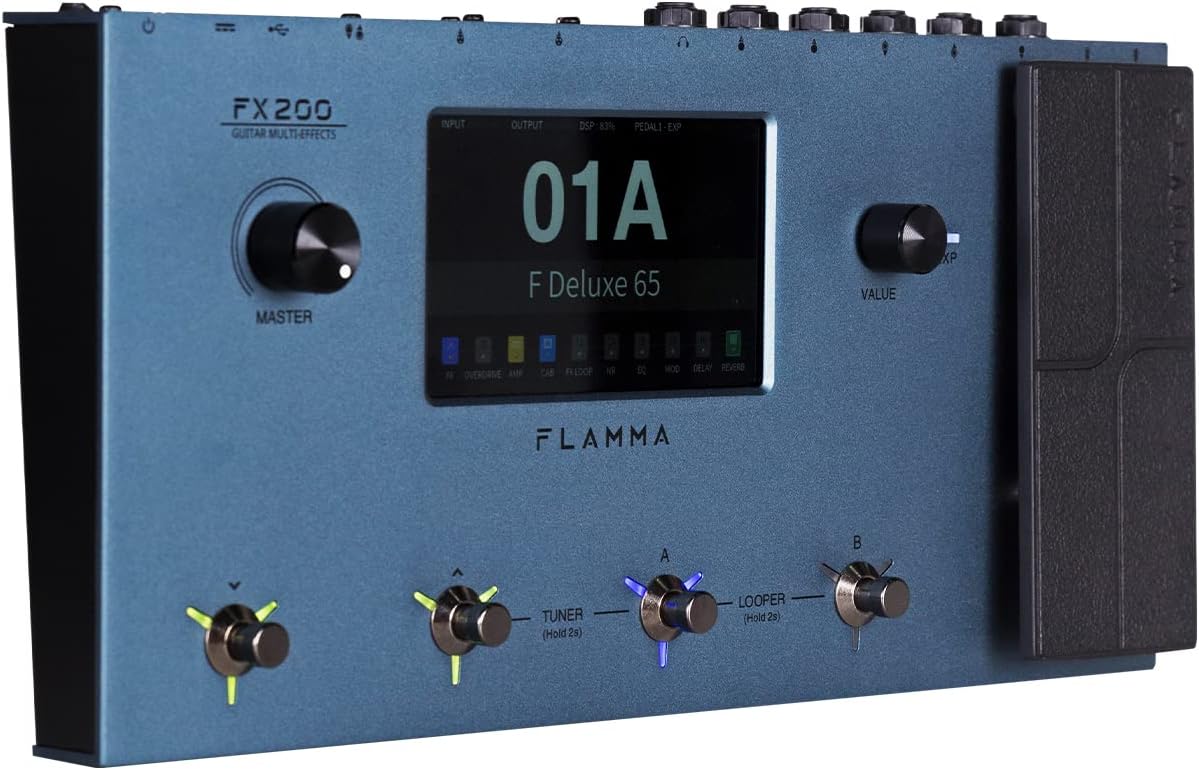
Figure 4.1: Front Panel Layout of the FX200.
- Башкы баскыч: Жалпы чыгаруу көлөмүн тууралайт.
- LCD сенсордук экран: 5-inch display for navigation, parameter editing, and preset management.
- Баалуулук баскычы: Used for data entry and parameter adjustments.
- Footswitches (A, B, C, D): Control presets, effects, looper, and tuner functions.
- Экспресс Педалы: Assignable for real-time control of various effects parameters.
4.2 Rear Panel (I/O)

Figure 4.2: Rear Panel Input/Output Connections.
- AUX IN: Тышкы аудио түзмөктөр үчүн 3.5 мм стерео киргизүү.
- EXP2: External expression pedal input.
- КИРҮҮ: 1/4-inch mono input for guitar.
- SEND/RETURN: Stereo FX Loop for integrating external effects pedals.
- ЧЫГУУ (С/МОНО, Оң): 1/4-inch stereo outputs to ampкөтөргүч же аралаштыргыч.
- ТЕЛЕФОНДОР: 3.5 мм стерео гарнитуранын чыгышы.
- GND/LIFT: Ground lift switch to eliminate hum.
- XLR OUT (L, R): Balanced XLR stereo outputs for direct connection to PA systems or audio interfaces.
- MIDI КИРИ/ЧЫГЫ: 5-pin MIDI connectors for external MIDI control.
- USB DC IN: USB-C port for power and connection to a computer.
- Кубат которгучу: Аппаратты күйгүзөт/өчүрөт.
5. Орнотуу
5.1 Баштапкы кубаттуулук
- Connect the provided power adapter to the USB DC IN port on the rear panel.
- Кубат адаптерин ылайыктуу AC розеткага сайыңыз.
- Flip the Power Switch to the ON position. The unit will power on and display the startup screen.
5.2 Гитараңызды туташтыруу жана Ampөмүрлүү
- гитараны туташтырыңыз INPUT стандарттуу 1/4 дюймдук аспап кабелин колдонуу менен джек.
- туташтыруу ЧЫГУУ L/MONO гитараңды черт amplifier's input using a 1/4-inch instrument cable. For stereo output, connect the ЧЫГУУ Р бир секундага чейин ampкөтөргүч же аралаштыргыч киргизүү.
- Alternatively, for direct recording or PA system connection, use XLR cables from the XLR OUT L жана XLR OUT R ports to your audio interface or mixer.
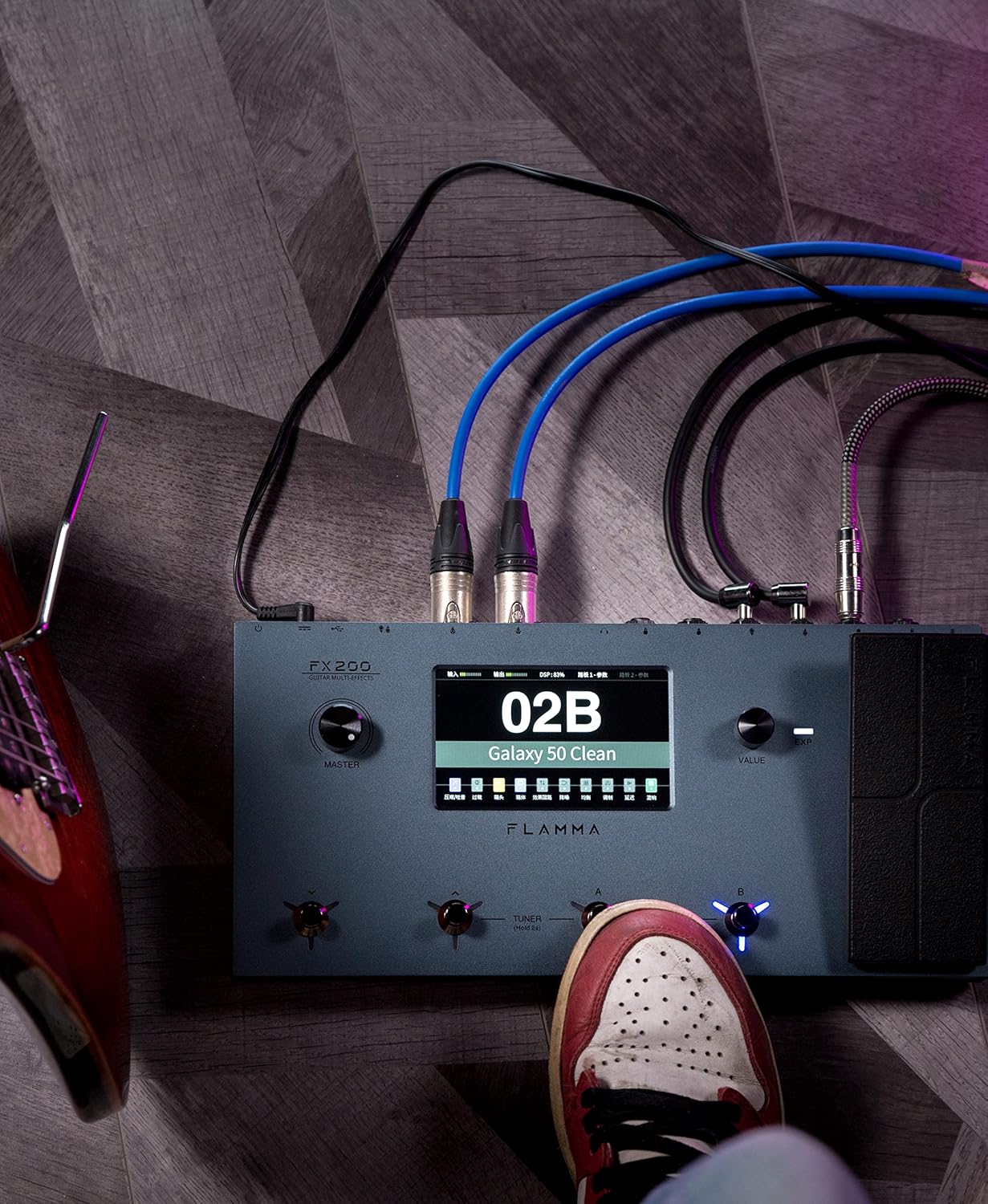
Figure 5.1: Typical connection setup for the FX200.
5.3 Компьютерге туташуу
The FX200 can be connected to a computer for editing presets, firmware updates, and USB audio recording.
- Download the specialized editing software from the official FLAMMA webсайт.
- Connect the FX200 to your computer using the provided USB-C cable.
- Launch the editing software. The software will detect the FX200, allowing you to manage presets, effects, and perform firmware updates.

Figure 5.2: FX200 connected to a computer for software editing.
6. Иштөө нускамалары
6.1 Сенсордук экранда навигация
The 5-inch LCD touch screen is the primary interface for controlling the FX200. Tap icons and parameters to select them, and use the Value Knob to adjust values.

6.1-сүрөт: Сенсордук экран интерфейси менен өз ара аракеттенүү.
6.2 Алдын ала коюлган башкаруу
The FX200 features 200 editable user preset slots. Presets can be selected using the footswitches or by navigating the touch screen.
- Алдын ала орнотууларды тандоо: In Play mode, press footswitches A or B to cycle through presets within a bank. Press footswitches C or D to change banks.
- Алдын ала орнотууларды түзөтүү: Tap on an effect module icon on the touch screen to access its parameters. Adjust settings using the Value Knob.
- Алдын ала орнотууларды сактоо: After editing, tap the 'Save' icon on the touch screen and follow the prompts to store your changes to a user preset slot.
6.3 Effect Modules and Chain
The FX200 includes 10 effect modules with over 160 different effect types, 58 preamp models, and 30 cabinet simulations. The effects chain can be customized.
- Module Order: Drag and drop effect module icons on the touch screen to change their order in the signal chain.
- Activating/Deactivating Modules: Tap an effect module icon to toggle it on or off within a preset.
- Third-Party IRs: The unit supports third-party impulse response files (up to 1024 sampling points) with 50 empty slots for custom cabinet simulations. Use the editing software to load IRs.

Figure 6.2: Customizable effects chain on the FX200.
6.4 Лопер жана барабан
The FX200 includes an integrated 52-second looper and 80 drum machine variations with 10 metronome styles.
- Лупер: Access the looper function via a dedicated footswitch or the touch screen. Record, overdub, play, and stop loops.
- Барабан машинасы: Select drum patterns and metronome styles from the touch screen interface. Adjust tempo and volume.
6.5 USB Audio Recording
The FX200 supports USB audio recording, allowing you to record directly to your computer.
- Connect the FX200 to your computer via USB-C.
- Select the FX200 as your audio input device in your Digital Audio Workstation (DAW) software.
- Adjust input levels on both the FX200 and your DAW for optimal recording.
7. Техникалык тейлөө
- Тазалоо: Агрегатты тазалоо үчүн жумшак, кургак чүпүрөктү колдонуңуз. Абразивдүү тазалагычтарды же эриткичтерди колдонбоңуз.
- Сактагыч: Эгерде аппарат көпкө колдонулбаса, аны кургак, салкын жерде, күн нуру түз тийбеген жерде сактаңыз.
- Программалык камсыздоонун жаңыртуулары: Regularly check the FLAMMA website for firmware updates to ensure optimal performance and access to new features. Updates are performed via the USB-C connection and editing software.
8. Кыйынчылыктарды
| Көйгөй | Мүмкүн себеп | Чечим |
|---|---|---|
| Күч жок | Кубат адаптери туташкан эмес же бузук; Кубат өчүк. | Ensure power adapter is securely connected and plugged into a working outlet. Check power switch. |
| Үн чыгышы жок | Incorrect cable connections; Master volume too low; Amplifier off; Effect module bypassed. | Verify all audio cables are correctly connected. Increase Master volume. Check amplifier power. Ensure desired effect modules are active. |
| Күңүрт же ызы-чуу | Ground loop; Faulty cables; Interference. | Engage the GND/LIFT switch. Try different cables. Ensure power supply is stable and away from other electronics. |
| Сенсордук экран жооп бербейт | Убактылуу программалык ката. | Restart the unit by cycling the power switch. If the issue persists, contact customer support. |
| Компьютерге туташуу мүмкүн эмес | USB-C cable issue; Driver not installed; Software not running. | Ensure USB-C cable is functional. Install necessary drivers. Launch the FLAMMA editing software. |
9. Техникалык шарттар
| Өзгөчөлүк | Деталь |
|---|---|
| Дисплей | 5 дюймдук LCD сенсордук экран |
| Эффект модулдары | 10 modules, 160+ effect types |
| Preamp Моделдер | 58 |
| Cabinet Simulations | 30 (IR-based, 1024pts), 50 user IR slots |
| Колдонуучунун алдын ала орнотуулары | 200 editable slots |
| Looper | 52 секунд |
| Барабан машинасы | 80 variations, 10 metronome styles |
| Байланыш | AUX IN, EXP2, INPUT, SEND/RETURN, OUTPUT (L/MONO, R), PHONES, XLR OUT (L, R), MIDI IN/OUT, USB-C |
| USB Audio Recording | Колдоого алынган |
| Өлчөмдөрү (L x W x Y) | 13.5 x 6.6 x 2 дюйм (34.3 x 16.8 x 5.1 см) |
| Салмагы | 3.9 фунт (1.77 кг) |
| Электр камсыздоо | 9V DC (via USB-C) |
| Дене материалы | Металл |
10. Кепилдик жана колдоо
FLAMMA products are covered by a limited warranty. For detailed warranty information, product registration, and technical support, please visit the official FLAMMA webсайтка же кардарларды тейлөөгө кайрылыңыз.
Official FLAMMA Webсайт: www.flamma.com
For any issues not covered in this manual, please refer to the online resources or contact FLAMMA customer support directly.
Ask a question about this manual
Ask about setup, troubleshooting, compatibility, parts, safety, or missing instructions. Manuals+ will review the question and use this page’s manual context to help answer it.