
Introduction
This manual provides comprehensive instructions for the Allimity BN59-01199F replacement remote control. It is designed to be compatible with various Samsung LED LCD Smart TVs, offering a direct replacement for several original Samsung remote models. This guide covers initial setup, basic operation, maintenance, and troubleshooting to ensure optimal performance.
Жайгашуу
Батарея орнотуу
The Allimity BN59-01199F remote control requires two (2) AAA alkaline batteries for operation. No programming is required; simply insert the batteries, and the remote will be ready to use with your compatible Samsung TV.
- Пульттун артындагы батарея отсегин табыңыз.
- Батарея бөлүмүнүн капкагын ылдый жылдырыңыз же ачуу үчүн кулпуну басып, көтөрүңүз.
- Insert two (2) new AAA alkaline batteries, ensuring the positive (+) and negative (-) terminals match the diagrams inside the compartment.
- Батарея бөлүкчөсүнүн капкагын ордуна коюңуз, аны бекем чыккыча ордуна жылдырыңыз.
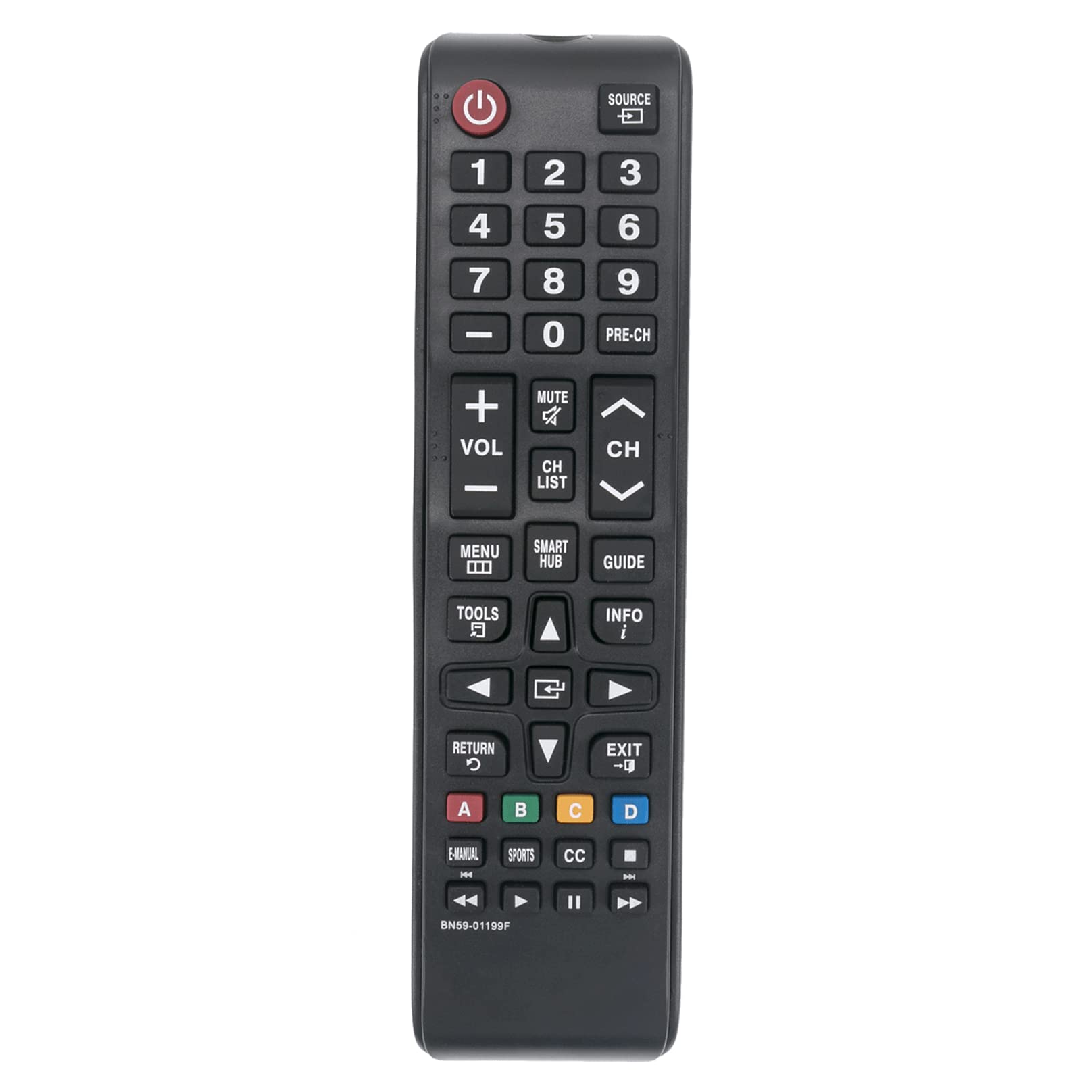
Сүрөт 1: Алдыңкы view of the Allimity BN59-01199F remote control. The battery compartment is located on the back.
Иштөө нускамалары
This remote control is designed for intuitive use with compatible Samsung LED LCD Smart TVs. Below are the functions of the primary buttons.

Figure 2: Detailed layout of the Allimity BN59-01199F remote control buttons.
Баскыч функциялары
- Күч (⏻): Телевизорду күйгүзөт же өчүрөт.
- Булак: Selects the input source (e.g., HDMI 1, AV, TV).
- Сан баскычтары (0-9): Directly selects TV channels or enters numerical input.
- PRE-CH: Мурунку каналга кайтат.
- Көлөмү (+/-): Adjusts the TV volume up or down.
- Үнсүз: Телевизордун үнүн өчүрөт же өчүрөт.
- Канал (CH) ▲/▼): Changes TV channels up or down.
- CH LIST: Каналдардын тизмесин көрсөтөт.
- МЕНЮ: Телевизордун негизги менюсун ачат.
- SMART HUB: Accesses the Samsung Smart Hub for apps and streaming services.
- GUIDE: Электрондук программалык көрсөтмөнү көрсөтөт.
- КУРАЛДАР: Accesses quick settings or context-sensitive options.
- INFO: Учурдагы программа же киргизүү жөнүндө маалыматты көрсөтөт.
- Directional Pad (▲◀▼▶) & Enter: Менюларды багыттоо жана тандоолорду ырастоо.
- КАЙТУУ (↺): Мурунку экранга же менюга кайтарат.
- ЧЫГУУ: Учурдагы менюдан же колдонмодон чыгат.
- Түстүү баскычтар (A, B, C, D): Functions vary depending on the TV menu or application.
- E-MANUAL: Телевизордун электрондук колдонмосуна кирет.
- СПОРТ: Dedicated button for sports mode or content.
- CC: Activates or deactivates closed captions.
- Media Control Buttons (⏮, ▶, ⏸, ⏭): Control media playback (rewind, play, pause, fast forward).
Техникалык тейлөө
Тазалоо
To maintain the remote control's appearance and functionality, clean it regularly. Use a soft, dry cloth to wipe the surface. For stubborn dirt, slightly dampкездемени суу же жумшак, абразивдүү эмес тазалоочу каражат менен сүртүңүз. Катуу химиялык заттарды, эриткичтерди же абразивдүү материалдарды колдонуудан алыс болуңуз, анткени алар пульттун сырткы көрүнүшүнө же ички компоненттерине зыян келтириши мүмкүн.
Батареяны алмаштыруу
Replace batteries when the remote control's response becomes sluggish or stops working. Always replace both batteries at the same time with new AAA alkaline batteries. Do not mix old and new batteries, or different types of batteries, as this can lead to leakage or malfunction. Dispose of used batteries according to local regulations.
Сактагыч
If the remote control will not be used for an extended period, remove the batteries to prevent potential leakage and damage. Store the remote in a cool, dry place away from direct sunlight and extreme temperatures.
Проблемаларды чечүү
If you encounter issues with your remote control, refer to the table below for common problems and their solutions.
| Көйгөй | Мүмкүн себеп | Чечим |
|---|---|---|
| Пульт иштебей жатат. | Өлүк же туура эмес салынган батарейкалар. | Батареяларды жаңы AAA щелочтуу батареялары менен алмаштырыңыз, туура полярдуулукту камсыз кылыңыз. |
| Алыстан башкаруу пульту азайды. | Пульт менен телевизордун ортосундагы батареялардын алсыздыгы же тоскоолдук. | Replace batteries. Ensure there are no objects blocking the line of sight between the remote's IR emitter and the TV's IR receiver. |
| Айрым баскычтар жооп бербей жатат. | Баскычтын астындагы кир же таштандылар, же ички бузулуу. | Clean the remote surface. If the issue persists, the remote may require replacement. |
| Алыстан башкаруу айрым функциялар үчүн иштейт, ал эми башкалары үчүн иштебейт. | Compatibility issue with a specific TV model or function. | Verify your TV model is listed as compatible. Some advanced Smart TV functions might require the original Smart Remote. |
Техникалык шарттар
- Бренд: БИРЛИК
- Модель аты: BN59-01199F
- Байланыш технологиясы: Инфракызыл (IR)
- Power Source: 2 x 1.5V AAA Alkaline Batteries (not included)
- Максималдуу диапазон: Approximately 30 Feet (9 meters)
- Шайкеш түзмөктөр: Samsung LED LCD HDTV Smart TVs (various models, refer to product description for full list)
- Өзгөчө өзгөчөлүк: No Programming Required
- Элемент Салмагы: Approximately 2 Ounces (56 grams)
- Өлчөмдөрү (L x W x Y): 5" x 1" x 0.5" (12.7 cm x 2.54 cm x 1.27 cm)
Кепилдик жана колдоо
This Allimity remote control is designed for reliability and performance. For specific warranty details, please refer to the purchase documentation or contact your retailer. If you experience any issues that cannot be resolved using the troubleshooting guide, please contact the seller or manufacturer for assistance. Provide your product model number (BN59-01199F) and details of the issue for efficient support.
Note: The manufacturer reserves the right to make changes to product specifications without prior notice.