
1. Киришүү
This manual provides essential information for the safe and efficient use of the TRU COMPONENTS TC-9927144 Read/Write Module. Please read these instructions carefully before installation and operation, and retain them for future reference.
The TRU COMPONENTS TC-9927144 is a durable and robust electronic module designed for read and write operations in various applications. Its compact design and specific operating voltage make it suitable for integration into diverse electronic systems.
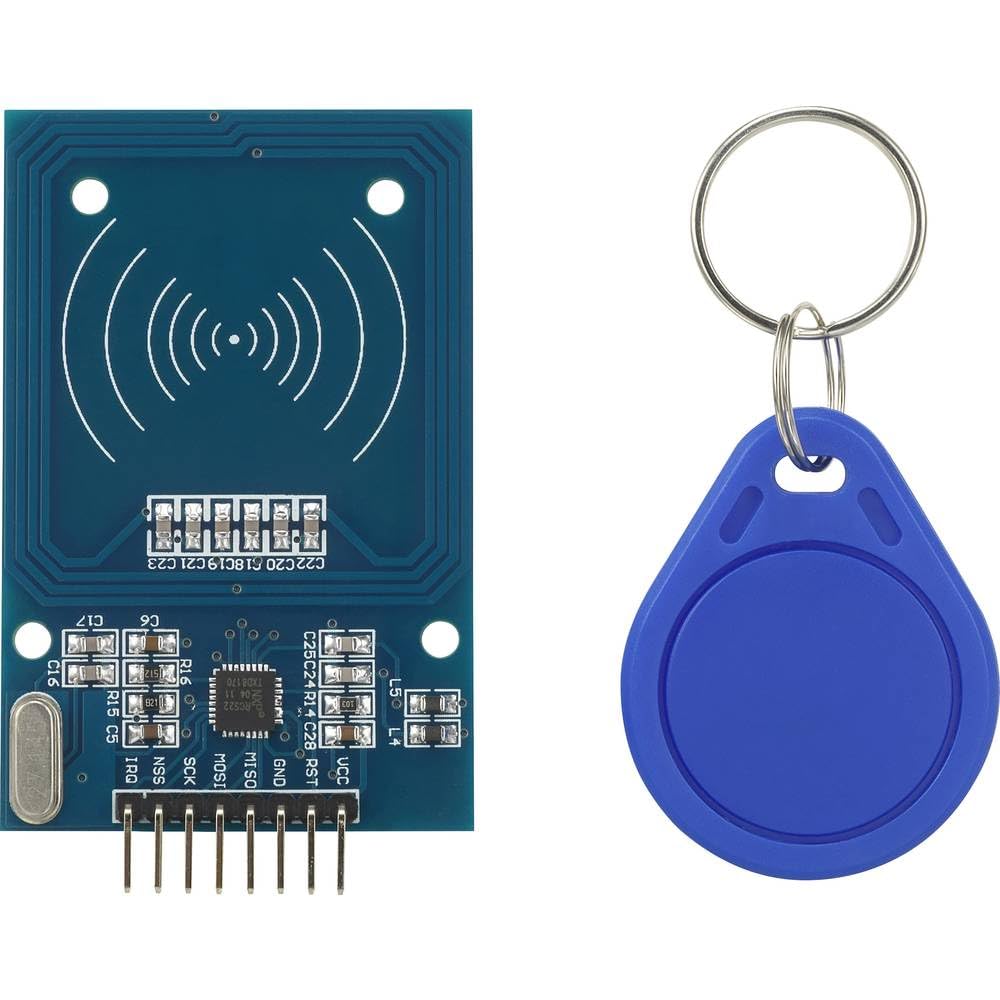
Image 1.1: TRU COMPONENTS TC-9927144 Read/Write Module. This image displays the compact form factor of the electronic module, highlighting its main components and connection points.
2. Коопсуздук маалыматы
Always observe the following safety precautions to prevent damage to the module or injury to personnel:
- электр менен жабдууну камсыз кылуу voltage модулдун көрсөтүлгөн иштөө көлөмүнө дал келетtage (3.3 VDC). Incorrect voltage туруктуу зыян келтириши мүмкүн.
- Модулду экстремалдык температурага, нымдуулукка же коррозиялуу чөйрөгө тийгизбеңиз.
- Handle the module with care to avoid electrostatic discharge (ESD) damage. Use appropriate ESD protection measures.
- Do not attempt to modify or repair the module. Refer all servicing to qualified personnel.
- Disconnect power before making any connections or disconnections to the module.
3. Продукт бүтүп калдыview
The TC-9927144 is a versatile read/write module constructed from durable plastic. Its primary function is to facilitate data transfer operations within an electronic system. The module is designed for easy integration and reliable performance.
Негизги өзгөчөлүктөрү:
- Компакттуу жана бекем дизайн.
- Операциялык томtage: 3.3 VDC.
- Suitable for various read/write applications.
4. Орнотуу
Follow these general steps for setting up the TC-9927144 module:
- Пакеттен чыгаруу: Carefully remove the module from its packaging. Inspect for any visible damage.
- Кубат менен камсыздоого туташуу: Connect the module to a stable 3.3 VDC power supply. Ensure correct polarity.
- Маалымат интерфейсинин туташуусу: Connect the module's data interface pins to your host system (e.g., microcontroller, computer) according to your application's wiring diagram. Refer to your system's documentation for specific pin assignments.
- Монтаждоо: Secure the module in its intended location using appropriate mounting hardware, if applicable. Ensure it is protected from physical stress and environmental factors.
- Баштапкы кубаттоо: After all connections are secure, apply power to the module and the host system. Observe for any unusual behavior or indicator lights.
5. Иштөө нускамалары
The operation of the TC-9927144 module is typically controlled by a host system (e.g., a microcontroller or computer) through its data interface. Specific operating procedures will depend on your application and the communication protocol used.
- Программалык камсыздоону көзөмөлдөө: Develop or integrate software routines on your host system to send commands and receive data from the module.
- Read Operations: To read data, send the appropriate read command to the module. The module will then transmit the requested data back to the host system.
- Write Operations: To write data, send the write command followed by the data to be written. Confirm successful write operations if the protocol allows.
- Статус мониторинги: Monitor any status indicators or feedback from the module to ensure proper operation.
6. Техникалык тейлөө
The TRU COMPONENTS TC-9927144 module is designed for low maintenance. However, periodic checks can help ensure its longevity and reliable performance:
- Тазалоо: Keep the module free from dust and debris. Use a soft, dry cloth for cleaning. Do not use liquid cleaners or solvents.
- Туташуу бүтүндүгү: Бардык электр туташууларынын бекем жана дат баспагандыгын текшерүү үчүн мезгил-мезгили менен текшерип туруңуз.
- Экологиялык шарттар: Ensure the module remains within its specified operating environment (temperature, humidity) to prevent premature failure.
- Программалык камсыздоонун жаңыртуулары: If applicable and provided by the manufacturer, consider applying firmware updates to improve performance or address issues.
7. Кыйынчылыктарды
If you encounter issues with your TC-9927144 module, consider the following troubleshooting steps:
- Кубат жок:
- Verify the power supply is connected correctly and providing the specified 3.3 VDC.
- Check all power cables and connections for continuity and secure fit.
- Байланыш каталары:
- Ensure data interface connections are correct and secure.
- Verify the communication protocol and settings (e.g., baud rate, parity) in your host system's software.
- Башка электрондук шаймандардын кийлигишүүсүн текшериңиз.
- Incorrect Read/Write Operations:
- Review your software logic for sending commands and processing responses.
- Ensure the data being sent or received is in the correct format.
- Модулдун ысып кетиши:
- Модулдун айланасында жетиштүү желдетүүнү камсыз кылыңыз.
- Иштеп жаткан томду текшериңизtage 3.3 В туруктуу ток күчүнөн ашпайт.
If problems persist after attempting these steps, contact TRU Components support or a qualified technician.
8. Техникалык шарттар
| Спецификация | Нарк |
|---|---|
| Өндүрүүчү | TRU COMPONENTS |
| Модель номери | TC-9927144 |
| Продукциянын өлчөмдөрү (L x W x Y) | 15 x 18 x 22 см |
| Материал | Пластик |
| Operating Voltage | 3.3 VDC |
| Пакеттеги нерселердин саны | 1 |
| Өлчөө системасы | Метрик |
| Батареялар камтылган | Жок |
| Батареялар талап кылынат | Жок |
| Запастык тетиктердин болушу | Маалымат жеткиликсиз |
9. Кепилдик жана колдоо
TRU Components products are manufactured to high-quality standards. For specific warranty information, please refer to the documentation provided with your purchase or visit the official TRU Components webсайт. Кепилдик дооматтар үчүн сатып алганыңыздын далилин сактаңыз.
For technical support, troubleshooting assistance beyond this manual, or inquiries regarding spare parts, please contact TRU Components customer service. Contact details can typically be found on the product packaging or the manufacturer's webсайт.