
1. Продукт бүтүп калдыview
The Samsung BD-D5700 is a 3D Blu-ray Disc Player designed to provide high-quality video and audio playback, along with smart connectivity features. This player supports Blu-Ray discs and DVDs, offering a resolution of 1920 x 1080 pixels (1080p video output). It features built-in Wi-Fi for wireless network connectivity, allowing access to Samsung Apps and other Smart TV functionalities.
Негизги өзгөчөлүктөр төмөнкүлөрдү камтыйт:
- Агым мүмкүнчүлүктөрү: Stream content to your TV and other devices.
- Жагымдуу дизайн: Slim profile with a high gloss finish and integrated blue disc lighting effect.
- Камтылган Wi-Fi: Connect to your wireless home network without additional cables.
- Samsung Apps & Smart TV: Easily access various applications and smart features.
- DLNA (AllShare): Connect with other DLNA-compatible devices.
- Ultra Fast Play: Reduces disc load times for quicker movie starts.
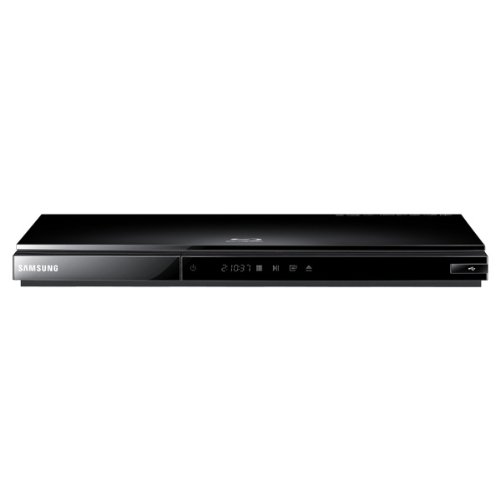
Сүрөт: алдыңкы view of the Samsung BD-D5700 3D Blu-ray Disc Player. This image displays the player's compact, black chassis with a visible disc tray and front panel controls, highlighting its modern and minimalist aesthetic.
2. Орнотуу
2.1 Пакеттен чыгаруу
Carefully remove the Blu-ray player and all accessories from the packaging. Ensure all components are present:
- Samsung BD-D5700 Blu-ray Disc Player
- Алыстан башкаруу
- Электр кабели
- Колдонуучунун Колдонмосу (бул документ)
2.2 Байланыштар
Follow these steps to connect your Blu-ray player to your television and network:
- HDMI туташуу: Connect one end of an HDMI cable (not included) to the HDMI OUT port on the back of the Blu-ray player and the other end to an HDMI IN port on your television. Note the HDMI input number on your TV.
- Кубат туташуу: Connect the power cable to the AC IN port on the back of the Blu-ray player, then plug the other end into a wall outlet.
- Network Connection (Wireless): The BD-D5700 has built-in Wi-Fi. After powering on, navigate to the network settings menu on the player to connect to your home wireless network. Select your network name (SSID) and enter the password.
- Баштапкы орнотуу: Turn on your TV and select the correct HDMI input. Power on the Blu-ray player. Follow the on-screen instructions for initial setup, including language selection and network configuration.
3. Иштөө нускамалары
3.1 Негизги дискти ойнотуу
- Ensure the player is powered on and connected to your TV.
- басыңыз АЧУУ/ЖАБУУ диск салгычты ачуу үчүн алдыңкы панелдеги же алыстан башкаруудагы баскычты басыңыз.
- Place a Blu-ray disc or DVD onto the disc tray with the label facing up.
- басыңыз АЧУУ/ЖАБУУ Лотокту жабуу үчүн баскычты кайра басыңыз. Ойноткуч автоматтык түрдө жүктөлүп, ойнотууну баштайт же диск менюсун көрсөтөт.
- Use the navigation buttons (Up, Down, Left, Right) and ENTER button on the remote control to navigate disc menus.
- басыңыз ОЙНОО button to start playback, ТЫНЫГУУ to temporarily stop, and ТОКТОТ ойнотууну аяктоо үчүн.
3.2 Smart TV Features and Samsung Apps
With built-in Wi-Fi, you can access a variety of online content:
- Башкы экрандан, төмөнкүгө өтүңүз Smart Hub or Samsung колдонмолору icon using the remote control.
- Басыңыз ENTER to access the Smart Hub.
- Browse available applications such as streaming services, news, and entertainment.
- Select an app and press ENTER to launch it. Follow any on-screen prompts for login or setup.
3.3 DLNA (AllShare) Connectivity
The Samsung BD-D5700 supports DLNA (Digital Living Network Alliance) through Samsung AllShare technology, allowing you to share media content with other compatible devices on your home network.
- Ensure both your Blu-ray player and the other DLNA device (e.g., smartphone, PC, NAS) are connected to the same home network.
- Access the AllShare feature from the player's menu.
- Browse and play media files (photos, videos, music) stored on your DLNA-enabled devices directly through the Blu-ray player on your TV.
3.4 Ultra Fast Play
The Ultra Fast Play feature significantly reduces the time it takes for discs to load after insertion. This is an automatic feature designed to enhance your viewing experience by minimizing waiting times.
4. Техникалык тейлөө
4.1 Агрегатты тазалоо
Оптималдуу аткарууну жана көрүнүштү сактоо үчүн:
- Сырткы: Wipe the exterior of the player with a soft, dry cloth. For stubborn marks, lightly dampen the cloth with water and then wipe dry. Avoid using abrasive cleaners, solvents, or chemical sprays.
- Дисктер: Handle discs by their edges. If a disc is dirty, wipe it gently from the center outwards with a soft, lint-free cloth. Do not use harsh chemicals or abrasive materials.
4.2 Микропрограмма жаңыртуулары
Periodically, Samsung may release firmware updates to improve performance, add features, or fix bugs. It is recommended to keep your player's firmware updated.
- Ensure the player is connected to the internet via Wi-Fi.
- дегенге өтүңүз Орнотуулар menu on your player.
- Look for a section like Колдоо or Программалык камсыздоону жаңыртуу.
- Тандоо Онлайн жаңыртуу or Жаңыртууларды текшериңиз and follow the on-screen instructions. Do not power off the player during an update.
5. Кыйынчылыктарды
If you encounter issues with your Samsung BD-D5700, refer to the table below for common problems and solutions.
| Көйгөй | Мүмкүн себеп | Чечим |
|---|---|---|
| Күч жок | Электр кабели ажыратылган; Электр розеткасынын маселеси. | Ensure power cable is securely connected to the player and a working wall outlet. Try a different outlet. |
| Телевизордо сүрөт жок | Incorrect TV input; HDMI cable loose or faulty. | Select the correct HDMI input on your TV. Check HDMI cable connections at both the player and TV. Try a different HDMI cable. |
| Диск ойнобойт | Disc is dirty or scratched; Incorrect disc type; Region code mismatch. | Clean the disc. Ensure the disc is a compatible Blu-ray or DVD. Check the disc's region code against the player's region. |
| Үн жок | TV/receiver volume too low; Audio settings incorrect; HDMI cable issue. | Increase TV/receiver volume. Check audio output settings on the player. Verify HDMI cable connection. |
| Wi-Fi туташуусу ишке ашпай калды | Туура эмес сырсөз; Маршрутизатор маселеси; Сигналдын кийлигишүүсү. | Re-enter Wi-Fi password carefully. Restart your wireless router. Ensure the player is within range of your router. |
6. Техникалык шарттар
Below are the technical specifications for the Samsung BD-D5700 3D Blu-ray Disc Player:
| Өзгөчөлүк | Спецификация |
|---|---|
| Бренд | Samsung |
| Модель аты | BD-D5700 |
| Медиа түрү | Blu-Ray диск, DVD |
| Резолюция | 1920 x 1080 pixels (1080p Video Output) |
| Байланыш технологиясы | Wi-Fi |
| Туташтыргыч түрү | HDMI (1 port) |
| Аудио чыгаруу режими | Стерео, айлана |
| Колдоого алынган аудио формат | Dolby Digital, DTS, PCM, MP3, FLAC |
| Көлөмдүү үн каналынын конфигурациясы | 5.1 |
| Видеону коддоо | H.264/AVC |
| Шайкеш түзмөктөр | Проектор, телевизор |
| Analog Video Format | NTSC |
| File Формат колдоо | MP3, MP4 |
| Элемент Салмагы | 16 унция |
| Өндүрүүчү | Samsung |
| Mfr Part Number | BD-D5700-cr |
| UPC | 656942893196 |
7. Кепилдик жана колдоо
7.1 Кепилдик маалыматы
Бул продукт менен келет 90 күн чектелген кепилдик. Кепилдик дооматтары үчүн сатып алганыңыздын далилин сактап коюңуз. Кепилдик нормалдуу колдонуудагы материалдардагы жана жасалгадагы кемчиликтерди камтыйт.
7.2 Кардарларды колдоо
For technical assistance, troubleshooting beyond this manual, or warranty service, please contact Samsung customer support. Refer to the official Samsung website for the most current contact information, including phone numbers and online support resources.