
1. Киришүү
Thank you for choosing the Hoco GA08 Smart Sports Bracelet. This device is designed to help you monitor your fitness activities and health metrics, providing convenient notifications and smart features directly on your wrist. Please read this manual carefully before using the product to ensure proper operation and to maximize its potential.
2. Пакеттин мазмуну
Сураныч, төмөнкү нерселер үчүн кутучаны белгилеңиз:
- Hoco GA08 Smart Sports Bracelet (main unit and strap)
- USB заряддоо кабели
- User Manual
3. Продукт бүтүп калдыview
Familiarize yourself with the components of your Hoco GA08 Smart Sports Bracelet.

Figure 3.1: Hoco GA08 Smart Sports Bracelet and its retail packaging.
3.1 Main Unit and Strap
The main unit houses the display, sensors, and internal electronics. It is designed to be detachable from the strap for charging and maintenance.
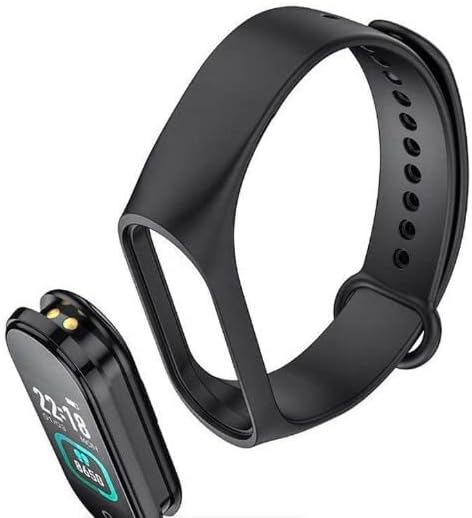
Figure 3.2: The main unit of the Hoco GA08 Smart Sports Bracelet detached from its silicone strap.
3.2 Сенсорлор жана заряддоо контакттары
On the underside of the main unit, you will find the optical sensors for heart rate and blood pressure monitoring, along with the charging contacts.

3.3-сүрөт: Арткы view of the Hoco GA08 Smart Sports Bracelet, highlighting the health sensors and charging pins.
4. Орнотуу
4.1 Аппаратты заряддоо
- Gently detach the main unit from the strap.
- Connect the main unit to the USB charging cable, ensuring the charging contacts align correctly.
- Кабелдин USB учунун стандарттуу USB кубат адаптерине (5V/1A сунушталат) же компьютердин USB портуна сайыңыз.
- The bracelet display will show a charging indicator. A full charge typically takes 1-2 hours.
4.2 Кошумча тиркемени жүктөп алуу
To unlock all features and synchronize data, download the dedicated companion app on your smartphone. Издөө the app name (usually mentioned in the quick start guide or on the product packaging) in your device's app store (Google Play Store for Android or Apple App Store for iOS).
4.3 Смартфонуңуз менен жупташуу
- Смартфонуңуздун Bluetooth иштетилгенин текшериңиз.
- Смартфонуңуздагы өнөктөш колдонмосун ачыңыз.
- Follow the in-app instructions to search for and connect to your Hoco GA08 bracelet. The bracelet's name will typically appear as 'GA08' or 'Hoco GA08'.
- Confirm the pairing request on both your smartphone and the bracelet if prompted.
5. Иштөө нускамалары
The Hoco GA08 Smart Sports Bracelet features a touch-sensitive button or area for navigation. Tap to cycle through functions, or long-press to select/activate.
5.1 Негизги навигация
- таптаңыз: Short press the touch area to switch between different display screens (time, steps, heart rate, etc.) or to navigate within a menu.
- Узак басуу: Press and hold the touch area for a few seconds to enter a function, confirm a selection, or start/stop an activity.
5.2 Ден соолуктун мониторинги
- Жүрөктүн кагышын көзөмөлдөө: Navigate to the heart rate screen. The bracelet will automatically begin measuring your heart rate. Ensure the bracelet is snug on your wrist for accurate readings.
- Кан басымын өлчөө: Navigate to the blood pressure screen. Remain still and relaxed during the measurement.
- Температура дисплейи: Navigate to the temperature screen to view your current body temperature.
5.3 Спорт режимдери
The bracelet supports 6 спорт режими. Navigate to the sports mode section and long-press to select your desired activity. The bracelet will track relevant metrics such as duration, steps, and calories burned during your workout.
5.4 Smart өзгөчөлүктөрү
- Clock, Stopwatch, Alarm, Timer, Calendar: Access these time-keeping functions directly from the bracelet. Alarms and timers can often be set via the companion app.
- Incoming Message and Call Notifications: Once paired with your smartphone, the bracelet will vibrate and display notifications for incoming calls and messages.
- Телефон издөө: Бул функцияны жупташкан смартфонуңузду шыңгыратып, анын жайгашкан жерин аныктоого жардам бериңиз.
- Эскертүү функциясы: Set custom reminders through the app for hydration, movement, or other tasks.
- Аба ырайы дисплей: View current weather conditions after synchronizing with the companion app and your phone's location services.
- Алыстан сүрөткө тартуу: Use the bracelet as a remote shutter button for your smartphone camera. Open the camera in the app, then shake the bracelet or tap its touch area to take a photo.
6. Техникалык тейлөө
- Тазалоо: Regularly clean the bracelet, especially the sensors and charging contacts, with a soft, dry cloth. If necessary, use a slightly damp кездеме жана жумшак самын, андан кийин кылдат кургатуу.
- Химиялык заттардан алыс болуңуз: Do not use harsh chemicals, cleaning solvents, or strong detergents, as these can damage the device.
- Суу каршылык: The bracelet typically has a certain level of water resistance (e.g., IP67). Avoid prolonged submersion or use in hot water/steam. Refer to product specifications for exact water resistance ratings.
- Сактагыч: Store the bracelet in a cool, dry place when not in use.
- Батареяга кам көрүү: Avoid completely draining the battery frequently. Charge the device regularly to maintain battery health.
7. Кыйынчылыктарды
If you encounter issues with your Hoco GA08 Smart Sports Bracelet, try the following solutions:
- Түзмөк күйбөй жатат: Аппараттын толук заряддалганын текшериңиз. Аны заряддагычка кеминде 30 мүнөт туташтырыңыз.
- Смартфон менен жупташуу мүмкүн эмес:
- Телефонуңузда Bluetooth иштетилгенин текшериңиз.
- Make sure the bracelet is charged and within Bluetooth range of your phone.
- Restart both your phone and the bracelet.
- Түзмөктү колдонмо аркылуу жупташып, кайра жупташып көрүңүз.
- Туура эмес ден соолук көрсөткүчтөрү:
- Ensure the bracelet is worn snugly on your wrist, about one finger's width above the wrist bone.
- Keep still during measurements.
- Clean the sensor area on the back of the bracelet.
- Эскертмелер көрүнбөй жатат:
- Check app permissions on your smartphone to ensure the companion app has access to notifications.
- Verify that notification settings are enabled within the companion app.
- Ensure the bracelet is connected via Bluetooth.
8. Техникалык шарттар
| Өзгөчөлүк | Description |
|---|---|
| Бренд аты | Hoco |
| Модел | GA08 |
| Операциялык система (колдонмонун шайкештиги) | Android |
| Өзгөчөлүктөр | Heart Rate Monitor, Blood Pressure Measurement, 6 Sports Modes, Notifications, Remote Camera Control, Weather Display, Temperature Display |
| Элементтин формасы | сүйрү |
| Стиль | Бардык мезгилдерге ылайыктуу |
| Түс | Кара |
| Максаттуу аудитория | Adults (Unisex) |
| Шайкеш түзмөктөр | Смартфон |
| Band Color | Кара |
| Иштин материалдык түрү | чайыр |
9. Коопсуздук маалыматы
- This device is not a medical device and should not be used to diagnose or treat any medical condition. Consult a healthcare professional for medical advice.
- Аппаратты экстремалдык температурадан, түз күндүн нурунан жана ачык оттон алыс кармаңыз.
- Түзмөктү бөлүктөргө бөлүүгө же өзгөртүүгө аракет кылбаңыз. Бул кепилдикти жокко чыгарат жана зыянга же жаракатка алып келиши мүмкүн.
- Балдар жетпеген жерде сактаңыз.
- Эгерде сизде теринин кыжырдануусу же ыңгайсыздык пайда болсо, колдонууну токтотуп, доктурга кайрылыңыз.
10. Кепилдик жана колдоо
For warranty information and customer support, please refer to the warranty card included in your product packaging or visit the official Hoco website. Typically, warranty covers manufacturing defects for a specified period from the date of purchase.
If you require technical assistance or have questions not covered in this manual, please contact Hoco customer service through their official channels.