
1. Киришүү
Thank you for choosing the Yinyoo TRI Star River In-Ear Monitors. These high-fidelity earphones are designed for musicians and audio enthusiasts, featuring advanced driver technology and customizable sound profiles. This manual provides essential information for setup, operation, maintenance, and troubleshooting to ensure optimal performance and longevity of your device.

Image 1.1: Yinyoo TRI Star River In-Ear Monitors.
2. Негизги өзгөчөлүктөрү
- High-Performance Dual Dynamic Drivers: Equipped with a 10mm Beryllium diaphragm and a 6mm Titanium diaphragm for rich details and balanced sound across frequencies.
- Four Switchable Tuning Modes: Precision electronic crossover tuning switches allow users to customize the sound profile алардын каалоосуна.
- Skin-Friendly Resin Housing: Crafted from imported German skin-friendly resin using a one-piece seamless molding process, ensuring comfort and durability.
- Эргономикалык дизайн: Developed using professional big data modeling for a multi-dimensional pressure equalization design, providing comfortable wear and reducing ear pressure.
- High-Quality Detachable Cable: Features a 5N oxygen-free copper plated with silver wire in a four-core litz braided structure, available with 3.5mm or 4.4mm gold-plated plugs.

Сүрөт 2.1: Бүттүview of TRI Star River features.
Driver Technology
The Star River utilizes a 10mm Beryllium dynamic driver for unique timbre and rich details, complemented by a 6mm metal Titanium diaphragm for excellent high-frequency performance.

Image 2.2: 10mm Beryllium Diaphragm.

Image 2.3: 6mm Metal Titanium Diaphragm.
Ergonomic Design and Material
The earphone shells are made from skin-friendly resin, molded seamlessly for a comfortable and secure fit. The design is based on extensive data to ensure pressure equalization and reduce discomfort during extended use.

Image 2.4: Skin-friendly resin housing.

Image 2.5: Ergonomic fit in ear.
3. Орнотуу
3.1 Пакеттин мазмуну
Пакетте бардык буюмдар бар экенин текшериңиз:
- Yinyoo TRI Star River In-Ear Monitors (Left and Right earpieces)
- Detachable 2-pin cable (3.5mm or 4.4mm plug)
- Assorted ear tips
- Tuning switch adjustment tool (card)

Image 3.1: Package contents.
3.2 Кабелди туташтыруу
- Identify the left (L) and right (R) earpieces and cable connectors. The cable connectors are typically marked.
- Align the 2-pin connector on the cable with the receptacle on the earpiece. Ensure correct orientation.
- Gently push the connector straight into the earpiece until it is secure. Do not force it.
- Башка кулакчын үчүн кайталаңыз.

Image 3.2: Detachable 2-pin cable.
3.3 Кулак учтарын тандоо жана орнотуу
Selecting the correct ear tip size is crucial for sound quality and comfort. Experiment with the included ear tips to find the best fit for your ears. A good seal provides optimal bass response and passive noise isolation.
- Алдын ала орнотулган кулак учтарын учтан акырын чыгарып алыңыз.
- Select a new pair of ear tips.
- Push the new ear tip onto the nozzle of the earpiece until it is securely seated.
3.4 Wearing the In-Ear Monitors
The Star River IEMs are designed to be worn with the cable looped over the ear for a secure and comfortable fit.
- Наушникти кулак каналыңызга салыңыз.
- Guide the cable over the top and behind your ear.
- Adjust the earpiece and cable for a snug and comfortable fit.
4. Иштөө нускамалары
4.1 Аудио булагына туташуу
Plug the 3.5mm or 4.4mm jack of the cable into the corresponding audio output port of your device (e.g., smartphone, digital audio player, ampөмүр).
4.2 Using the Tuning Switches
The TRI Star River features dual precision electronic crossover tuning switches, offering four distinct sound modes. These switches are located on the side of each earpiece.
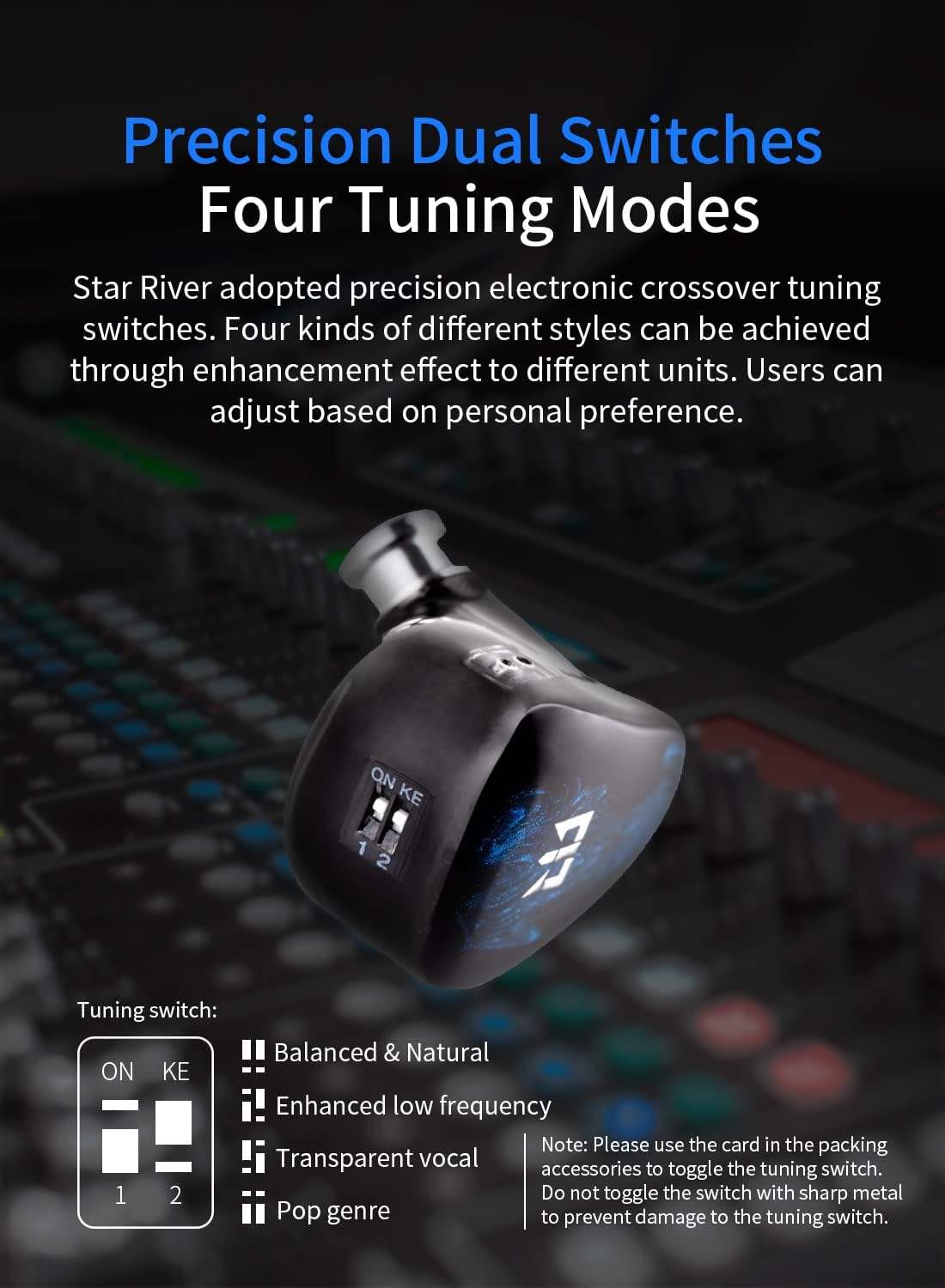
Image 4.1: Tuning switches on the earpiece.
To adjust the tuning switches:
- Use the small adjustment tool (card) included in the packaging. Do not use sharp metal objects to avoid damage.
- Gently toggle the switches (marked '1' and '2') to the desired 'ON' or 'OFF' position to activate a specific tuning mode.
- Ensure both earpieces are set to the same tuning mode for a balanced stereo image.
The four tuning modes are:
- Switches 1 & 2 OFF: Balanced & Natural
- Switch 1 ON, Switch 2 OFF: Enhanced Low Frequency
- Switch 1 OFF, Switch 2 ON: Transparent Vocal
- Switches 1 & 2 ON: Pop Genre
5. Техникалык тейлөө
5.1 Тазалоо
- Кулактын учтарын жумшак, d менен үзгүлтүксүз тазалаңызamp кездеме.
- Use a small brush or cotton swab to gently remove earwax or debris from the earpiece nozzles.
- Wipe the earpiece shells and cable with a dry, soft cloth.
- Тазалоо үчүн катуу химиялык заттарды же абразивдүү материалдарды колдонбоңуз.
5.2 Сактоо
When not in use, store your IEMs in a protective case to prevent damage from dust, moisture, and physical impact. Avoid extreme temperatures.
5.3 Кабельге кам көрүү
Avoid sharply bending or twisting the cable. When detaching the cable, always pull from the connector housing, not the cable itself.
6. Кыйынчылыктарды
- Үн жок:
- Кабелдин кулакчынга да, аудио булагына да бекем туташтырылганын текшериңиз.
- Аудио булагыңыздагы үн деңгээлин текшериңиз.
- Test with another audio source or cable to rule out component failure.
- Sound Imbalance (one side louder/quieter):
- Verify that the ear tips are properly seated and form a good seal in both ears.
- Check for debris in the earpiece nozzles that might be obstructing sound.
- Ensure tuning switches on both earpieces are set identically.
- Үн сапатынын начардыгы / басстын жоктугу:
- This often indicates a poor seal. Try different sized ear tips to achieve a better fit.
- Ensure the cable is fully inserted into the audio source.
- Кабелди ажыратуу:
- Ensure the 2-pin connectors are pushed in firmly. If they frequently disconnect, inspect the pins for damage.
7. Техникалык шарттар
| Бренд | Yinyoo |
| Модел | Star River |
| Импеданс | 32Ω |
| Сезимталдуулук | 110 кГцте 1 дБ |
| Frequency Response | 20 Гц – 20 кГц |
| Айдоочулар | 10mm Beryllium Dynamic Driver, 6mm Titanium Diaphragm |
| Наушник түрү | In-Ear Monitors (IEM) |
| Көңдөй материал | Imported German Resin |
| Интерфейс | 0.78 мм 2-шиштүү |
| Plug Options | 3.5mm / 4.4mm (Gold-plated) |
| Кабель материалы | 5N Oxygen-free Copper Plated with Silver Wire |
| Кабелдин узундугу | 120 см ± 3 см |
| Байланыш | Зымдуу |
| Башкаруу ыкмасы | Remote (via tuning switches) |
| Noise Control | Үн изоляциясы |
8. Кепилдик жана колдоо
The Yinyoo TRI Star River In-Ear Monitors come with a 12 айлык кепилдик сатып алынган күндөн тартып. Бул кепилдик нормалдуу колдонуудагы өндүрүш кемчиликтерин камтыйт.
For warranty claims, technical support, or any product-related inquiries, please contact Yinyoo customer service through your retailer or the official Yinyoo website. Please have your purchase receipt and product model information ready when contacting support.