
1. Киришүү
This manual provides detailed instructions for the installation, operation, and maintenance of your VANTRUE VP01 5-Level Adjustable ACC Hardwire Kit. Please read this manual thoroughly before installation and use to ensure proper functionality and safety. This hardwire kit is designed to provide continuous power to your compatible dash cam for parking mode functionality and includes features to protect your vehicle's battery.
2. Продукт бүтүп калдыview
The VANTRUE VP01 Hardwire Kit is an essential accessory for enabling advanced parking surveillance features on your compatible dash cam. It connects directly to your vehicle's fuse box, providing a stable power supply and intelligent battery protection. Key features include:
- Low Voltage Коргоо: Automatically cuts power to the dash cam when the vehicle battery voltage drops below a user-defined threshold, preventing battery drain.
- Custom Timer Setting: Allows continuous recording or power supply for a set duration after the vehicle is parked.
- ACC Linkage Function: Automatically switches the dash cam to parking mode when the ignition is turned off.
- Wide Voltage Шайкештик: 12V-24V унаа электр системаларын колдойт.
- USB Type-C чыгышы: Compatible with various Type-C dash cams and other devices.
Камтылган компоненттер:
- Vantrue Hardwire Kit (VP01)
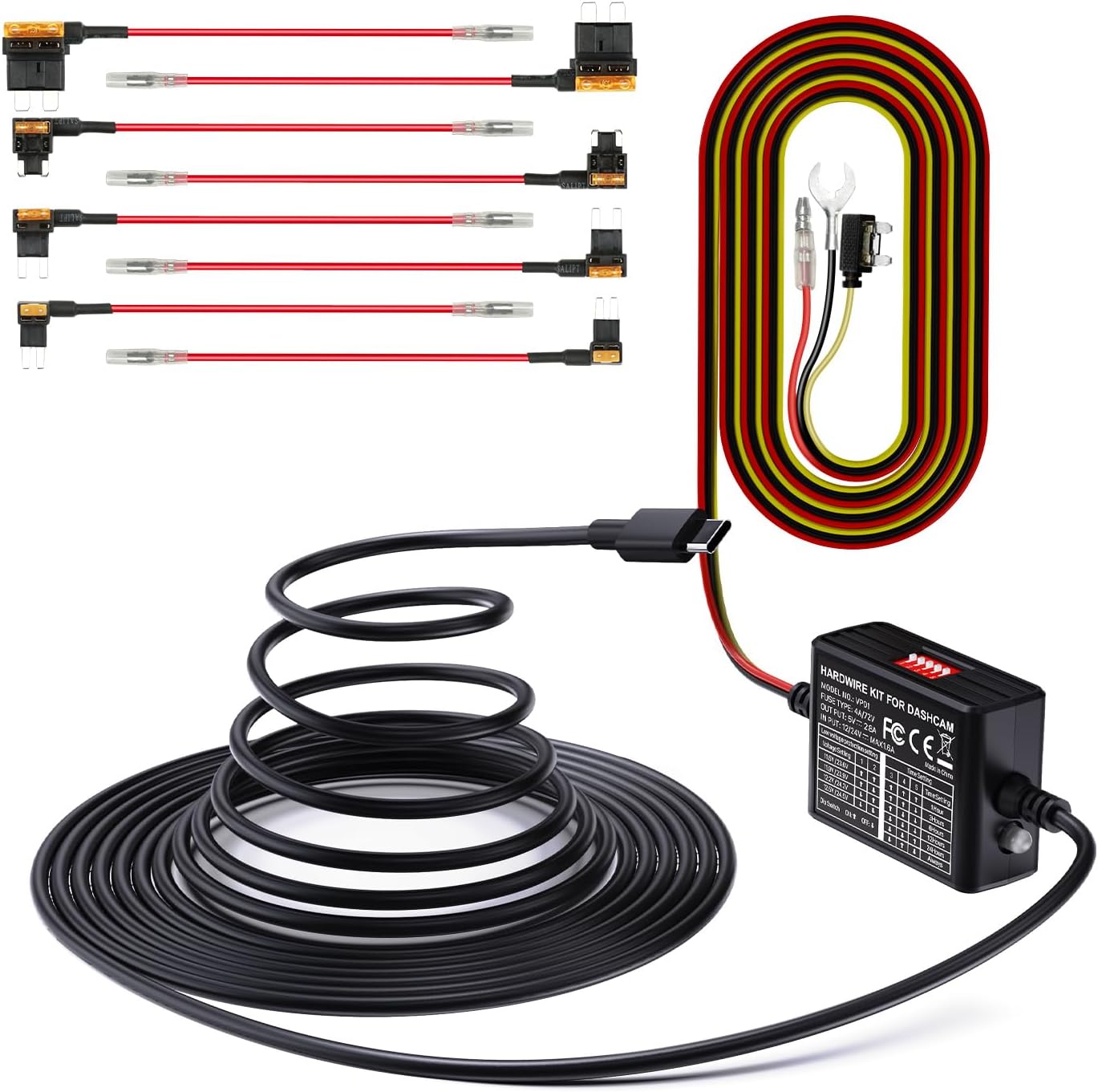
Image 2.1: The VANTRUE VP01 Hardwire Kit, showing its compact design and USB-C connector.
3. Шайкештик
The VANTRUE VP01 Hardwire Kit is designed for broad compatibility with vehicles operating on 12V to 24V electrical systems. It features a USB Type-C output, making it suitable for a wide range of dash cams and other devices that use a Type-C USB connection.
Compatible VANTRUE Dash Cam Models:
- N4 ProS
- E1 Pro
- N5
- N5S
- N4
- N4S
- E2
- S1 Pro(Max)
- N2X
- E360
Note: This kit is specifically designed for the listed Vantrue dash cam models and may not be compatible with other Vantrue dash cams or third-party devices.

Image 3.1: Visual representation of the hardwire kit's compatibility with several VANTRUE dash cam models.
4. Орнотуу боюнча колдонмо
Proper installation is crucial for the optimal performance of your hardwire kit. If you are unsure about any steps, it is recommended to seek professional assistance.
4.1 Зымдарды туташтыруу
The hardwire kit requires connection to three points in your vehicle's fuse box:
- Сары зым: Connect to a constant power source (B+) that provides power even when the ignition is off. This is typically a fuse that is always live.
- Кызыл зым: Connect to an ACC (Accessory) power source that provides power only when the ignition is on. This allows the dash cam to detect when the vehicle is running or parked.
- Кара зым: Connect to any metal part of the vehicle chassis for a ground connection.

Image 4.1: Diagram illustrating the connection points for the yellow (ACC), red (continuous power), and black (ground) wires.
4.2 Сактандыргыч кутучасын туташтыруу
Use the included fuse taps to connect the yellow and red wires to appropriate fuses in your vehicle's fuse box. Ensure the fuse tap is inserted in the correct orientation to maintain circuit protection.

Image 4.2: Step-by-step visual guide for connecting the hardwire kit to the vehicle's fuse box, showing continuous power, ACC power, and ground connections.
5. Иштөө нускамалары
Once installed, the hardwire kit operates automatically with your dash cam. It manages power delivery based on your vehicle's ignition status and the settings configured on the kit.
5.1 Parking Mode Activation
With the ACC linkage function, your dash cam will automatically transition into parking mode when the vehicle's ignition is turned off. This ensures continuous surveillance even when your car is parked.

Image 5.1: Graphic illustrating the 24-hour parking mode, providing continuous surveillance for your vehicle.
6. Орнотуулар Конфигурация
The hardwire kit features dip switches for configuring low voltage protection and timer settings. These switches allow you to customize the kit's behavior to suit your needs and vehicle's battery health.

Image 6.1: Close-up of the hardwire kit's dip switches for adjusting low voltage protection and parking mode timer settings.
6.1 Low Voltage коргоо жөндөөлөрү
This feature prevents your vehicle's battery from draining completely by cutting power to the dash cam when the voltage drops below a selected level. Use the dip switches to set your desired voltage босого:
| Тtage Setting | Дип которуу 1 | Дип которуу 2 |
|---|---|---|
| 11.6V / 23.6V | ON (Up) | ON (Up) |
| 11.9V / 23.9V | OFF (Down) | ON (Up) |
| 12.2V / 24.2V | ON (Up) | OFF (Down) |
| 12.5V / 24.5V | OFF (Down) | OFF (Down) |
Note: The higher voltage values (23.6V, 23.9V, 24.2V, 24.5V) apply to 24V vehicle systems.

Image 6.2: Visual explanation of the low voltage protection system, showing the battery icon and automatic power cut-off.
6.2 Таймер орнотуулары
Configure how long the dash cam remains powered in parking mode after the ignition is off. Use the dip switches to select your desired duration:
| Убакытты орнотуу | Дип которуу 3 | Дип которуу 4 | Дип которуу 5 |
|---|---|---|---|
| 1 саат | ON (Up) | ON (Up) | ON (Up) |
| 3 саат | OFF (Down) | ON (Up) | ON (Up) |
| 6 саат | ON (Up) | OFF (Down) | ON (Up) |
| 12 саат | OFF (Down) | OFF (Down) | ON (Up) |
| 24 саат | ON (Up) | ON (Up) | OFF (Down) |
| Ар дайым | OFF (Down) | OFF (Down) | OFF (Down) |
7. Техникалык тейлөө
To ensure the longevity and reliable performance of your hardwire kit and dash cam, consider the following maintenance tips:
- Байланыштарды үзгүлтүксүз текшерүү: Бардык зымдардын туташууларынын бекем жана бузулбагандыгын текшерүү үчүн мезгил-мезгили менен текшерип туруңуз.
- SD Card башкаруу: For dash cams, regularly format the SD card to prevent data corruption and ensure continuous recording. Replace the SD card if it shows signs of wear or error.
- Аппаратты тазалоо: Keep the hardwire kit and dash cam free from dust and debris. Use a soft, dry cloth for cleaning.
8. Кыйынчылыктарды
Эгер сиздин аппараттык жабдык менен көйгөйлөргө туш болсоңуз, төмөнкү жалпы көйгөйлөрдү жана чечимдерди караңыз:
- Dash Cam Not Powering On in Parking Mode:
- Check the yellow wire connection to ensure it is connected to a constant power fuse.
- Төмөнкү көлөмүн текшериңизtage protection settings. If the vehicle battery voltage is below the set threshold, the kit will cut power.
- Ensure the timer setting is not expired or set to 'Off'.
- Dash Cam Not Switching to Parking Mode:
- Check the red wire connection to ensure it is connected to an ACC power fuse that activates with the ignition.
- Confirm the ACC linkage function is enabled on your dash cam (refer to your dash cam's manual).
- Vehicle Battery Drains Quickly:
- Adjust the low voltage protection setting to a higher voltage (e.g., 12.5V for 12V systems) to cut power sooner.
- Reduce the parking mode timer duration.
- Ensure the fuse adapter is correctly oriented in the fuse box. Incorrect orientation can bypass the protection circuit.
- Dash Cam үчүн күч жок:
- Check all three wire connections (yellow, red, black) for secure contact.
- Inspect the fuses in the fuse box that the hardwire kit is connected to. Replace any blown fuses.
- Ensure the USB Type-C connection to the dash cam is firm.
9. Техникалык шарттар
| Өзгөчөлүк | Спецификация |
|---|---|
| Модел | VP01 |
| Киргизүү көлөмүtage | 12В - 24В |
| Output Voltage | 5V |
| Output Current | 2A |
| Кабелдин узундугу | 14.8 Фут |
| Туташтыргыч түрү | USB Type-C |
| Low Voltage Коргоо | Adjustable (11.6V/11.9V/12.2V/12.5V for 12V; 23.6V/23.9V/24.2V/24.5V for 24V) |
| Таймер орнотуулары | Adjustable (1, 3, 6, 12, 24 hours, or Always) |
| Элементтин өлчөмдөрү (L x W x Y) | 4.33 x 3.03 x 2.4 дюйм |
10. Кепилдик жана колдоо
10.1 Кепилдик маалыматы
The VANTRUE VP01 Hardwire Kit comes with a 12 ай кепилдик сатып алынган күндөн тартып. Бул кепилдик өндүрүштөгү кемчиликтерди камтыйт жана продукттун белгиленген иштешине жооп берерин камсыздайт. Кепилдик дооматтары үчүн сатып алгандыгыңызды тастыктаган документти сактап коюңуз.
10.2 Кардарларды колдоо
For any questions, technical assistance, or warranty inquiries, please contact VANTRUE customer support. Refer to the official VANTRUE webакыркы байланыш маалыматы үчүн сайтка же продуктунун таңгагына кайрылыңыз.