
Andoer e417fe28-cba1-49bd-8acb-ddcd73b41592
Andoer 4K Digital Video Camera User Manual
Model: e417fe28-cba1-49bd-8acb-ddcd73b41592
1. Киришүү
This user manual provides detailed instructions for operating your Andoer 4K Digital Video Camera. Please read this manual thoroughly before using the camera to ensure proper operation and to maximize its performance. Keep this manual for future reference.
1.1 Пакеттин мазмуну
Пакетти ачкандан кийин, төмөндө көрсөтүлгөн нерселердин бардыгы бар экенин жана жакшы абалда экендигин текшериңиз:
- 1 x Andoer 4K Digital Video Camera
- 2 x NP-40 Li-ion Battery (one pre-installed)
- 1 x USB кабели
- 1 x Video кабели
- 1 x Алыстан башкаруу
- 1 x Camera Bag
- 1 x Колдонуучунун колдонмосу (англисче)

Image: The Andoer 4K Digital Video Camera, remote control, and two NP-40 Li-ion batteries, illustrating the main components included in the package.
2. Продукциянын өзгөчөлүктөрү
The Andoer 4K Digital Video Camera is equipped with a range of features designed to enhance your video recording and photography experience:
- 4K Ultra HD видео жаздыруу: Capture stunning videos at 4K/30fps and 2.7K/30fps resolutions.
- 56MP Still Image Capture: Produce high-resolution photos up to 56 megapixels (interpolation).
- 3.0 Inch IPS Touchscreen: A rotatable 270° touchscreen for intuitive control and versatile viewбурчтар.
- 18X Digital Zoom: Bring distant subjects closer without compromising image quality.
- IR Түнкү Көрүнүшү: Record clear and natural footage in low-light or dark environments.
- WiFi байланышы: Easily connect to your smartphone or tablet via the DV-CAM APP for remote control, live view, жана file өткөрүп берүү.
- Face Detection & Anti-Shake: Enhance focus and stability for clearer shots.
- Тышкы микрофонду колдоо: Hot shoe mount for connecting an external microphone for improved audio quality.
- Standard Tripod Mount: 1/4 inch thread for mounting on a tripod or other accessories.

Image: An infographic highlighting the camera's main features including 4K 56MP resolution, 18X Digital Zoom, Face Detection, Night Vision, Dual Outputs, Digital Anti-shake, IPS Touchscreen, WiFi Connection, and Built-in Microphone.
3. Баштоо
3.1 Батареяны орнотуу жана заряддоо
The camera uses NP-40 Li-ion batteries. One battery is typically pre-installed. Ensure batteries are fully charged before first use.
- Камеранын ылдый жагында жайгашкан батарея бөлүкчөсүнүн капкагын ачыңыз.
- Insert the NP-40 battery, ensuring the correct polarity.
- Батарея уясынын капкагын бекем жабыңыз.
- To charge, connect the camera to a power source using the provided USB cable. The charging indicator light will illuminate.
- Индикатор өчкөндө заряддоо аяктады.
3.2 SD картаны орнотуу
The camera supports SD/SDHC cards up to 128GB (Class 6 or above recommended, not included).
- Locate the SD card slot, usually on the side or bottom of the camera.
- Insert the SD card with the metal contacts facing the correct direction (refer to the diagram near the slot). Push until it clicks into place.
- Алып салуу үчүн, картаны кайра акырын түртүп, ал чыгып кеткенге чейин.
4. Негизги операция
4.1 Күйгүзүү/өчүрүү
- Күйгүзүү: Open the LCD screen or press the Power button.
- Өчүрүү: Close the LCD screen or press and hold the Power button.
4.2 Видеону жаздыруу
- Камераны күйгүзүңүз.
- Ensure the camera is in video recording mode (indicated by an icon on the screen). If not, use the Mode button to switch.
- Press the Record button (usually a red circle) to start recording.
- Жазууну токтотуу үчүн Record баскычын кайра басыңыз.
4.3 Сүрөт тартуу
- Камераны күйгүзүңүз.
- Камера фото режиминде экенин текшериңиз.
- ЖК экранды колдонуп кадрыңызды тартыңыз.
- Press the Photo button (often a camera icon or shutter button) to take a picture.
4.4 Чоңойтуу функциясы
Камерада 18X санариптик масштаб бар.
- Use the T (Telephoto) button to zoom in.
- Use the W (Wide) button to zoom out.

Image: A visual demonstration of the 18X digital zoom capability, showing how the camera can magnify distant subjects.
4.5 Ойнотуу
- In standby mode, press the Playback button (often an arrow icon) to enter playback mode.
- Жаздырылган видеолоруңузду жана сүрөттөрүңүздү карап чыгуу үчүн навигация баскычтарын колдонуңуз.
- Press the OK button to play a video or view a photo in full screen.
- Press the Playback button again to exit playback mode.
5. Өркүндөтүлгөн функциялар
5.1 WiFi туташуу
The camera supports WiFi connectivity for remote control and file transfer via the DV-CAM APP.
- Download and install the "DV-CAM" APP on your smartphone or tablet from your device's app store.
- On the camera, navigate to the WiFi settings and enable WiFi. The camera's WiFi network name (SSID) and password will be displayed.
- On your smartphone/tablet, go to WiFi settings and connect to the camera's WiFi network using the provided password.
- Open the DV-CAM APP. You can now view жаша фооtage, control recording, take photos, and download fileтүздөн-түз мобилдик түзмөгүңүзгө.

Image: A visual representation of the camera's WiFi function, showing a smartphone connected to the camera to view жаша фооtage or transfer files.
5.2 IR Night Vision
The IR Night Vision feature allows you to record in low-light conditions.
- To activate IR Night Vision, locate the IR button or setting in the camera menu.
- When activated, the camera will use infrared light to illuminate the scene, capturing clear black and white footagкараңгылыкта.

Image: A side-by-side comparison demonstrating the effectiveness of IR Night Vision, showing a scene in normal light versus the same scene captured in darkness using infrared.
5.3 3.0 Inch IPS Touchscreen
The 3.0-inch IPS touchscreen offers intuitive control and can be rotated 270 degrees for various shooting angles, including self-recording.
- Tap the screen to access menu options or focus.
- Swipe to navigate through playback or menu pages.
- Rotate the screen to face forward for vlogging or self-portraits.
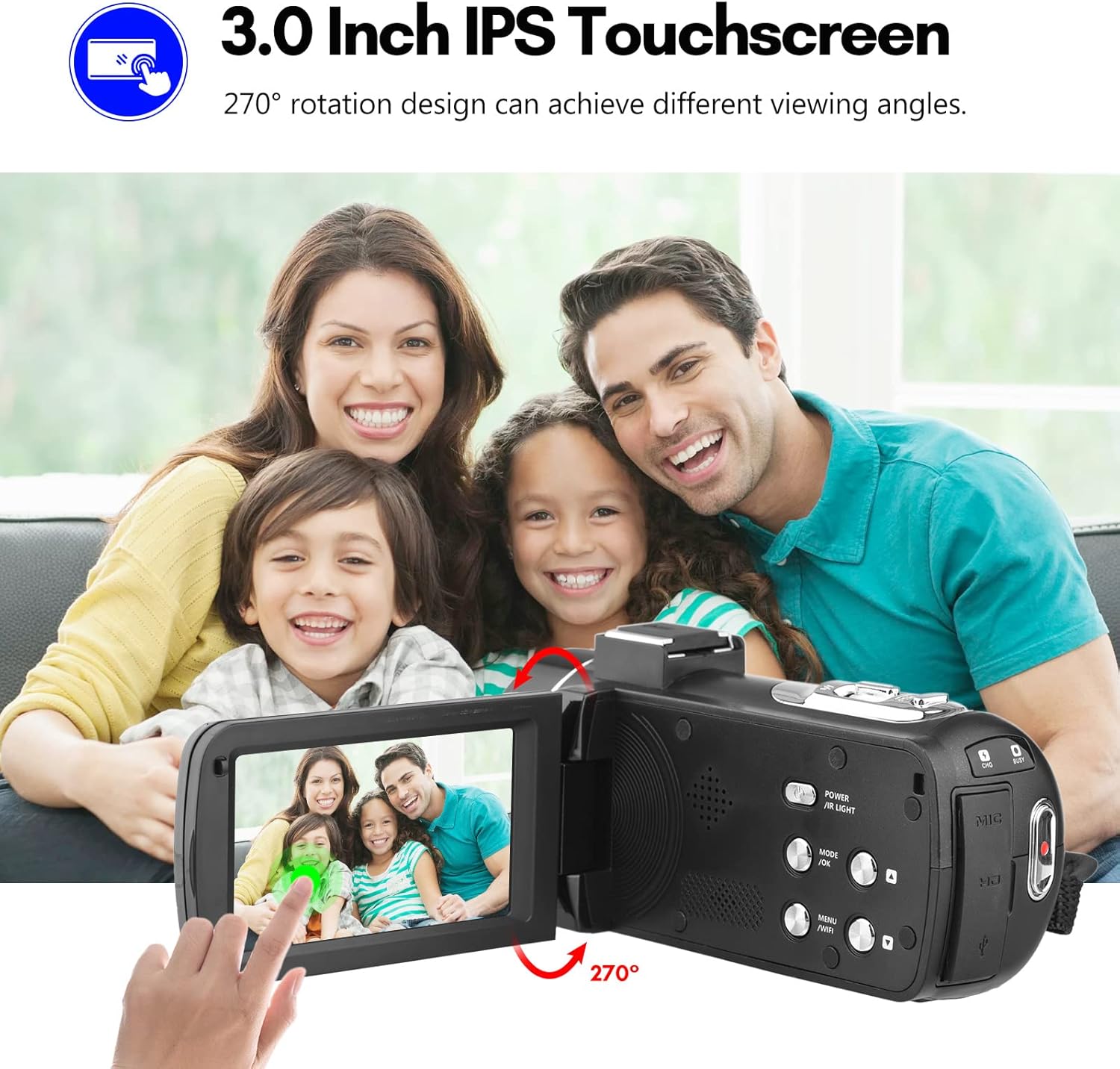
Image: The Andoer camera with its 3.0-inch IPS touchscreen rotated, demonstrating its 270-degree rotation capability for flexible viewing and self-recording.
5.4 Меню орнотуулары
Access the camera's menu to adjust various settings such as video resolution, photo resolution, white balance, exposure, self-timer, and auto power off.
- Орнотуулар менюсуна кирүү үчүн MENU баскычын басыңыз.
- Use the navigation buttons or touchscreen to select options.
- Тандоолорду ырастоо үчүн OK басыңыз.
- Чыгуу үчүн MENU кайра басыңыз.
6. Байланыш
The camera offers multiple connectivity options for viewing and transferring your media.
6.1 Connecting to a TV (HD Multimedia Interface)
- Камера өчүрүлгөнүн текшериңиз.
- Connect one end of the HD multimedia interface cable (not explicitly listed in package contents, but mentioned in description) to the camera's HD port and the other end to an HD input on your TV.
- Turn on the TV and select the correct HD input source.
- Turn on the camera. The camera's display will be mirrored on the TV screen, allowing you to view сүрөттөр жана видеолор.
6.2 Компьютерге туташуу (USB)
- Камера өчүрүлгөнүн текшериңиз.
- Камераны компьютериңизге берилген USB кабели аркылуу туташтырыңыз.
- Turn on the camera. It will typically enter "Mass Storage" or "PC Camera" mode. Select "Mass Storage" to access files.
- The camera will appear as a removable disk drive on your computer, allowing you to transfer files.

Image: An illustration detailing how to connect the Andoer camera to a television via HD multimedia interface and to a computer via USB for viewing and transferring media.
7. Техникалык тейлөө
7.1 Камераны тазалоо
- Камеранын корпусун тазалоо үчүн жумшак, кургак чүпүрөктү колдонуңуз.
- For the lens, use a specialized lens cleaning cloth and lens cleaning solution. Avoid touching the lens with your fingers.
- Do not use strong detergents or solvents, as they may damage the camera's finish.
7.2 Сактоо
- Узак мөөнөткө колдонулбаганда, батареяны камерадан чыгарыңыз.
- Камераны салкын, кургак жерде, түз күндүн нурунан жана экстремалдык температурадан алыс сактаңыз.
- Use the provided camera bag to protect it from dust and scratches.
8. Кыйынчылыктарды
| Көйгөй | Мүмкүн себеп | Чечим |
|---|---|---|
| Камера күйбөйт. | Батарея өлүп калган же туура эмес салынган. | Батареяны заряддаңыз же туура кыстарыңыз. |
| Видео жаздыруу/сүрөткө тартуу мүмкүн эмес. | SD card is full, locked, or not inserted. | Жок кылуу files, unlock the SD card, or insert an SD card. |
| Сүрөт/видео сапаты начар. | Линза кир; жарык жетишсиз; туура эмес жөндөөлөр. | Clean the lens; use IR Night Vision in low light; adjust resolution/exposure settings. |
| WiFi туташуу маселелери. | Incorrect password; APP not installed; distance too far. | Verify password; install DV-CAM APP; move closer to camera. |
9. Техникалык шарттар
| Өзгөчөлүк | Деталь |
|---|---|
| Сүрөт сенсору | CMOS |
| ISO | Авто, 100, 200, 400, 800, 1600 |
| Сактагыч | SD/SDHC Card, max. 128GB (Class 6 or above) |
| Объектив | Fixed, f/2.6, f=7.0mm |
| Фокус аралык | 0.5 м чейин чексиздик |
| Экран | 3.0 Inch IPS Touchscreen (270° rotation) |
| Photo Format & Resolution | JPG, 56M/ 48M/ 30M/ 24M/ 20M/ 16M/ 12M/ 8M/ 5M |
| Video Format & Resolution | MP4, 4K/30fps, 2.7K/30fps, 1080P/60fps, 1080P/30fps, 720P/60fps, 720P/30fps |
| Digital Zoom | 18X |
| IR жарык | <1.0 млн |
| Ак баланс | Auto/ Daylight/ Cloudy/ Tungsten/ Fluorescent |
| Таасир | ± 3.0EV |
| өз алдынча Timer | OFF/2s/ 5s/ 10s |
| Автоматтык түрдө өчүрүү | OFF/ 1min/3min/ 5min/ 10min |
| Микрофон | Built-in, supports external microphone |
| Электр камсыздоо | 1 x NP-40 Li-ion Battery |
| Алыстан башкаруунун батареясы | 2 x AAA Батареялар (киргизилген эмес) |
| Камера Көлөм | 12.6 x 5.8 x 5.9 см / 5 x 2.3 x 2.3 дюйм |
| Камеранын салмагы | 318 г / 11.2 унция |
10. Кепилдик жана колдоо
For warranty information and technical support, please refer to the official Andoer webсайтка же кардарларды тейлөөгө кайрылыңыз. Сатып алганыңыздын далили катары сатып алуу дүмүрчөгүңүздү сактаңыз.
You can visit the official Andoer store on Amazon for more information: Andoer Store
11. Коопсуздук маалыматы
Төмөнкү коопсуздук чараларын сактаңыз, зыян же буюмдун бузулушуна жол бербөө үчүн:
- Камераны экстремалдык температурага, түз күндүн нуруна же жогорку нымдуулукка дуушар кылбаңыз.
- Камераны суудан жана башка суюктуктардан алыс кармаңыз.
- Камераны бөлүктөргө бөлүүгө же өзгөртүүгө аракет кылбаңыз. Оңдоо иштерин ыйгарым укуктуу тейлөө кызматкерлери гана жүргүзүшү керек.
- Keep plastic bags and packaging materials away from babies and children to avoid suffocation hazards.

Image: A multi-language warning label emphasizing the importance of keeping plastic bags away from children to prevent suffocation.
Ask a question about this manual
Ask about setup, troubleshooting, compatibility, parts, safety, or missing instructions. Manuals+ will review the question and use this page’s manual context to help answer it.