
1. Киришүү
This manual provides detailed instructions for the installation, operation, and maintenance of your Fractal Design Define 7 Nano Black Solid Mini ITX PC Case. Please read this manual thoroughly before beginning assembly to ensure proper installation and to maximize the performance and longevity of your system.
The Define 7 Nano is a compact Mini ITX case designed for silent operation and flexible component support, offering a balance of size and functionality for small form factor builds.

1-сүрөт: алдыңкы жагы view of the Fractal Design Define 7 Nano Black Solid Mini ITX PC Case.
2. Коопсуздук маалыматы
Орнотуу жана эксплуатациялоо учурунда төмөнкү коопсуздук чараларын сактаңыз:
- Компоненттерди орнотуудан же алып салуудан мурун ар дайым кубат менен жабдууну розеткадан ажыратыңыз.
- Сезимтал компоненттердин электростатикалык разряддан (ЭСД) жабыркашын алдын алуу үчүн антистатикалык билек боону тагыныңыз.
- Физикалык зыянды болтурбоо үчүн компоненттерди кылдаттык менен иштетиңиз.
- Ашыкча ысып кетүүнүн алдын алуу үчүн PC корпусунун айланасында туура желдетүүнү камсыз кылыңыз.
- Корпусун суюктуктан жана ашыкча нымдуулуктан алыс кармаңыз.
- Do not attempt to modify the case structure, as this may void your warranty and pose safety risks.
3. Пакеттин мазмуну
Пакетте бардык компоненттер бар экенин текшериңиз:
- Fractal Design Define 7 Nano PC Case
- Accessory Box (screws, zip ties, standoffs, cleaning cloth)
- Колдонуучунун Колдонмосу (бул документ)
- Pre-installed fans (Dynamic X2 GP-12/GP-14, quantity may vary)

2-сүрөт: жарылган view showing the various removable components of the Define 7 Nano case.
4. Орнотуу жана Компонентти орнотуу
4.1. Даярдоо
- Ишти таңгактан чыгаруу: Кутучаны таңгагынан этияттык менен чыгарыңыз.
- Каптал панелдерин алып салуу: The side panels are secured with captive thumbscrews. Loosen the thumbscrews and slide the panels backward to remove them.
- Remove Top Panel (Optional): The top panel can be removed for easier access during installation or for enhanced airflow. Press the release button at the rear of the top panel and lift it off.
- Remove Front Panel (Optional): The front panel can be carefully pulled off from the bottom for access to front fan mounts and dust filters.
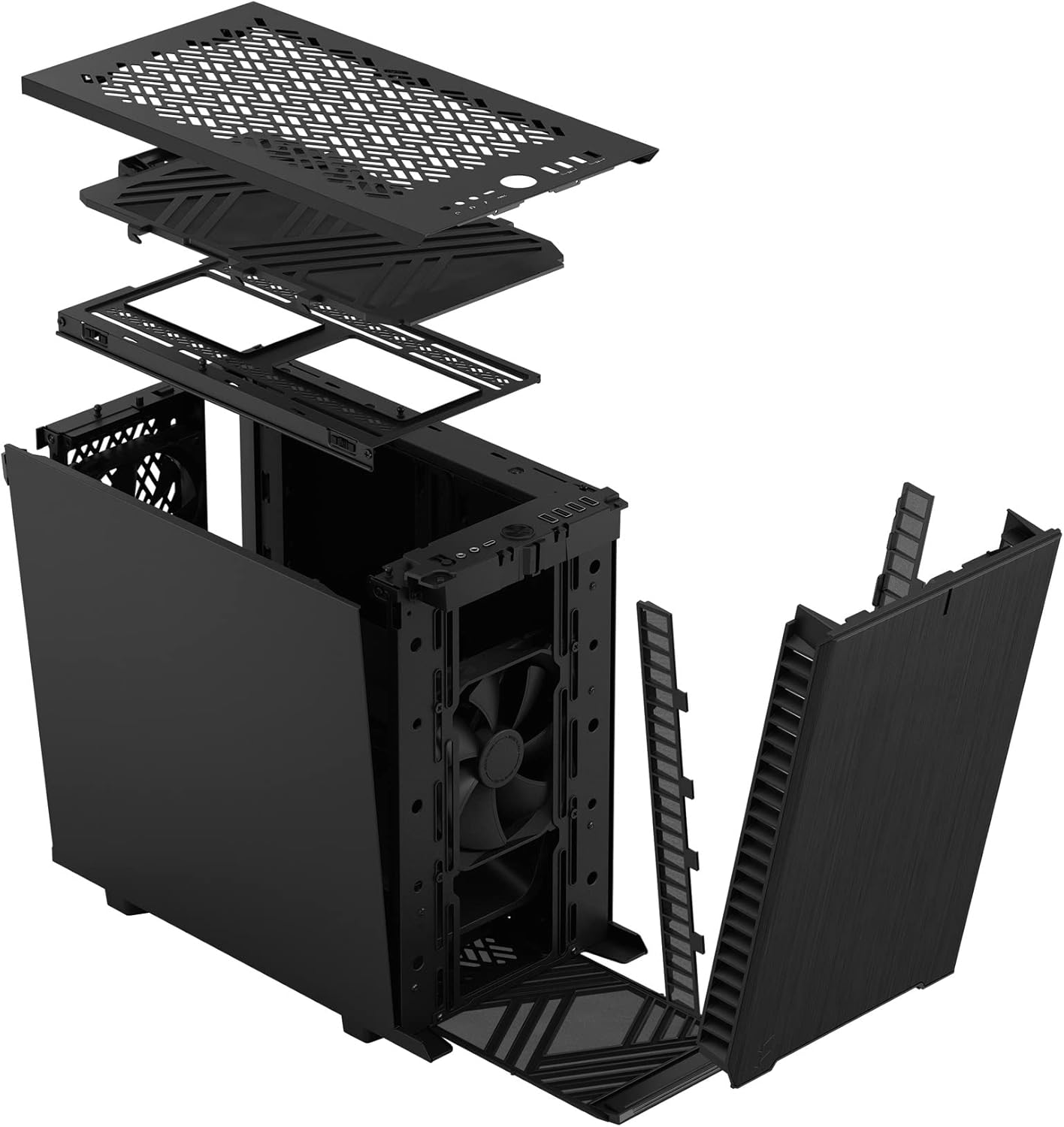
3-сүрөт: жарылган view illustrating the removal process for the front and top panels.
4.2. Motherboard орнотуу
The Define 7 Nano supports Mini ITX motherboards.
- I/O Shield орнотуу: If your motherboard requires an I/O shield, install it into the rear opening of the case before mounting the motherboard.
- Энелик платанын абалы: Align your Mini ITX motherboard with the pre-installed standoffs inside the case.
- Коопсуз Motherboard: Use the provided screws from the accessory box to secure the motherboard to the standoffs.
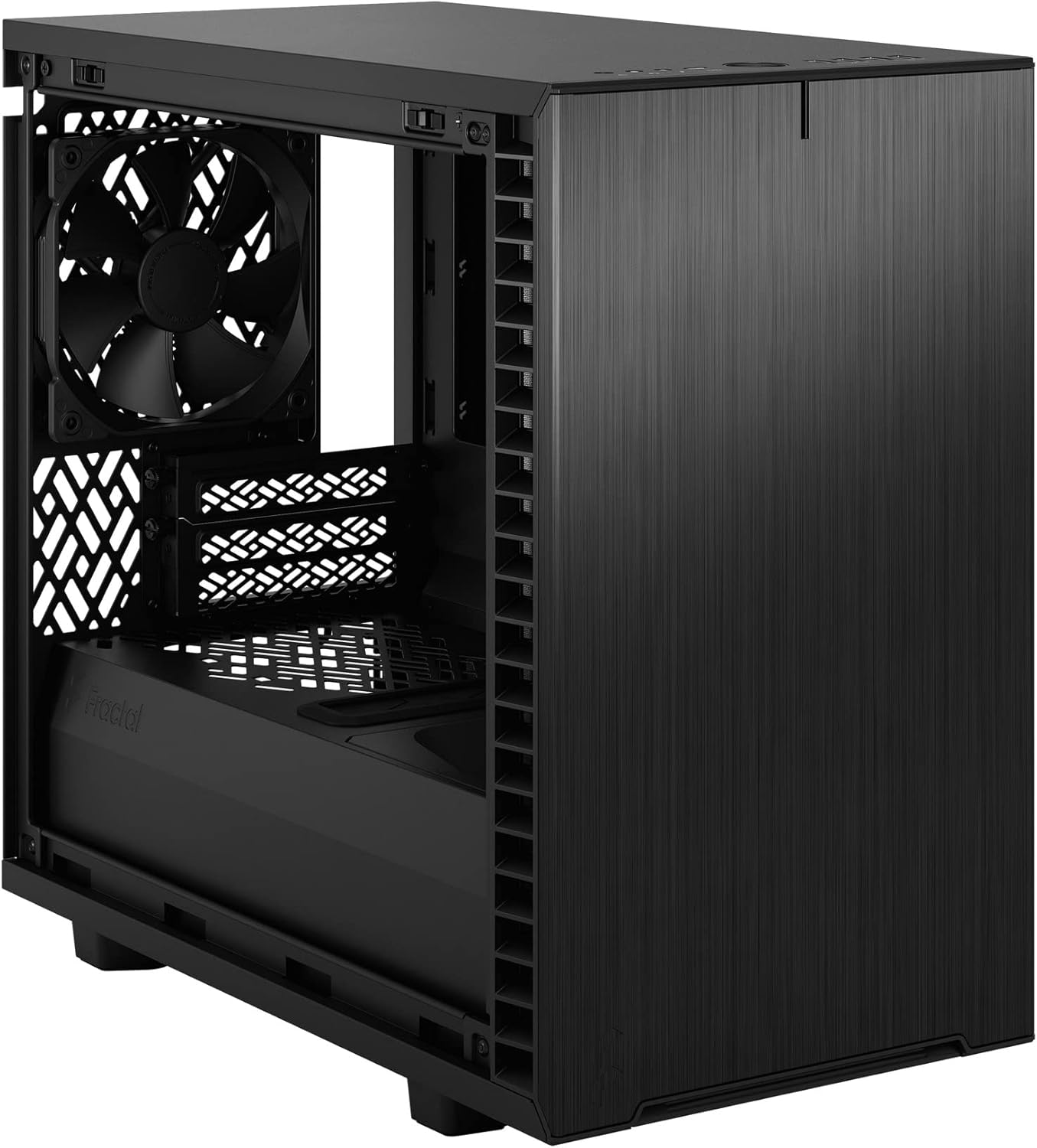
4-сүрөт: Интерьер view of the case, highlighting the motherboard mounting area and fan locations.
4.3. Электр менен камсыздоо блогун (PSU) орнотуу
The Define 7 Nano supports ATX PSUs.
- Mount PSU Bracket: Attach the PSU mounting bracket to your power supply using the screws provided with the PSU.
- Slide PSU into Case: Slide the PSU with the attached bracket into the rear of the case.
- Коопсуз PSU: Secure the PSU bracket to the case using the thumbscrews.
4.4. Сактоочу дискти орнотуу
Иш 2.5" SSD жана 3.5" HDD колдойт.
- 2.5" Drives: Mount 2.5" drives to the dedicated SSD brackets located behind the motherboard tray or on the PSU shroud. Secure with screws.
- 3.5" Drives: Install 3.5" drives into the drive cage located beneath the PSU shroud. Secure with screws.
4.5. Графикалык картаны (GPU) орнотуу
- PCIe уячасынын капкактарын алып салыңыз: Керектүү PCIe уячасынын капкактарын корпустун арткы бөлүгүнөн алып салыңыз.
- GPUну киргизүү: Carefully insert your graphics card into the primary PCIe slot on the motherboard.
- Коопсуз GPU: Secure the graphics card to the case using the thumbscrews or standard screws.
4.6. Муздатуу системасын орнотуу (вентиляторлор/радиаторлор)
The Define 7 Nano offers flexible cooling options.
- Алдыңкы күйөрмандар: Up to two 120/140mm fans or a 240/280mm radiator can be installed at the front.
- Мыкты күйөрмандар: Up to two 120/140mm fans or a 240mm radiator can be installed at the top (requires removing the solid top panel and installing the ventilated top panel).
- Арткы желдеткич: One 120mm fan can be installed at the rear.
- Bottom Fan: One 120mm fan can be installed at the bottom.
Ensure fans are oriented correctly for optimal airflow (intake or exhaust).
4.7. Кабелдик башкаруу
The case features routing channels and Velcro straps behind the motherboard tray for organized cable management.
- Маршруттук кабелдер: Pass power and data cables through the rubber grommets to the back of the motherboard tray.
- Коопсуз кабелдер: Use the pre-installed Velcro straps and included zip ties to bundle and secure cables.

Сүрөт 5: Арткы интерьер view demonstrating the cable management system with Velcro straps.
4.8. Front Panel Connections
Connect the front panel cables to the corresponding headers on your motherboard:
- Power Button (PWR SW)
- Reset Button (RESET SW)
- Power LED (PWR LED)
- HDD Activity LED (HDD LED)
- USB 3.0 аталышы
- USB Type-C Header (if applicable)
- HD аудио темасы
Refer to your motherboard manual for exact header locations.
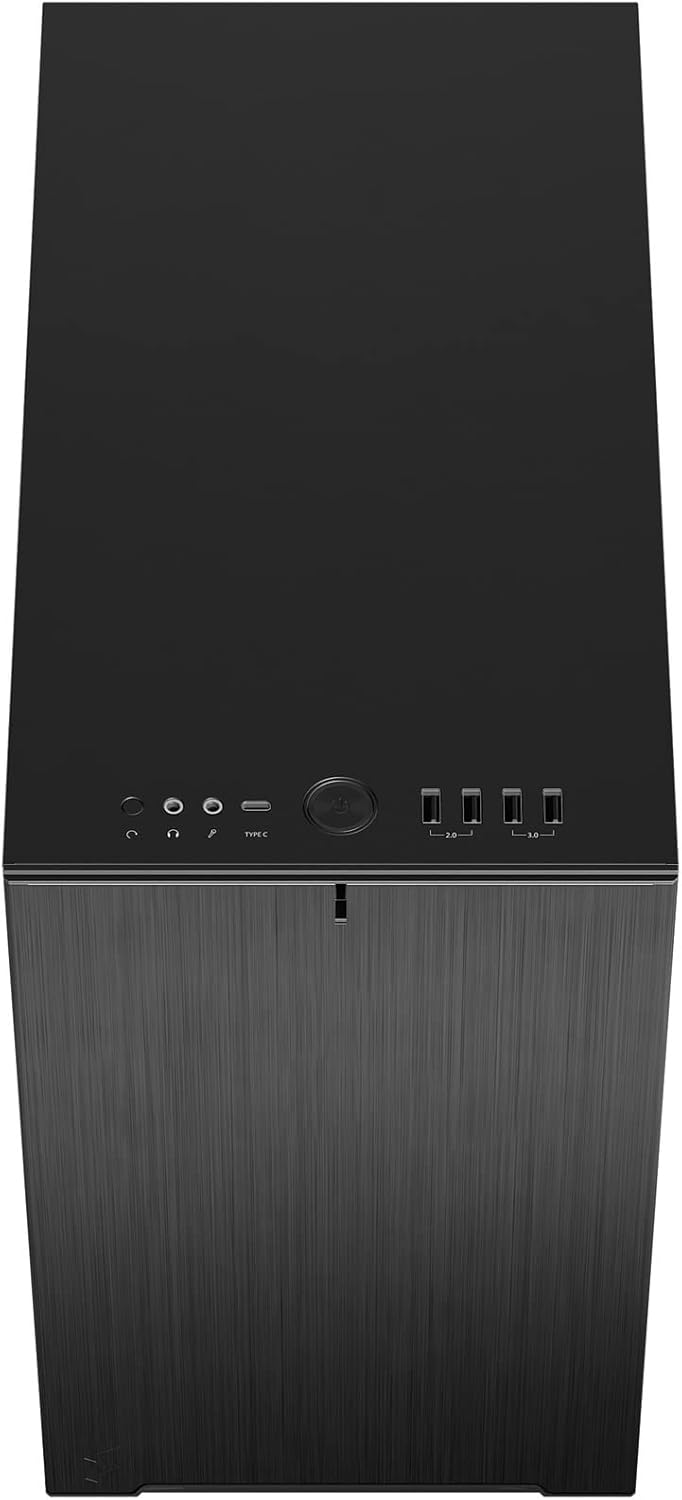
6-сүрөт: үстүнкү алдыңкы view displaying the front I/O panel with USB ports, audio jacks, and power button.
5. Иштөө нускамалары
5.1. Күйгүзүү / Өчүрүү
- Күйгүзүү: Press the power button located on the front I/O panel.
- Өчүрүү: Initiate a shutdown from your operating system. Alternatively, press and hold the power button for 5 seconds for a forced shutdown.
5.2. Using Front Panel Ports
The front I/O panel provides convenient access to:
- USB 3.0 порттору: шайкеш түзмөктөр менен жогорку ылдамдыктагы маалыматтарды берүү үчүн.
- USB Type-C порту: For modern devices requiring a Type-C connection.
- Аудио уячалары: Кулакчындарды жана микрофондорду туташтыруу үчүн.
6. Техникалык тейлөө
Үзгүлтүксүз тейлөө сиздин PC компоненттеринин оптималдуу иштешин жана узак иштөөсүн камсыз кылууга жардам берет.
6.1. Чаң чыпкасын тазалоо
The Define 7 Nano is equipped with easily removable dust filters to prevent dust buildup inside the case.
- Алдыңкы чыпка: Can be accessed by removing the front panel.
- Жогорку чыпка: Located beneath the ventilated top panel (if installed).
- Төмөнкү чыпка: Slides out from the front of the case.
Clean filters regularly (e.g., monthly) by rinsing them with water and allowing them to dry completely, or by using a soft brush or compressed air.
6.2. Жалпы тазалоо
- жумшак колдонуу, damp cloth to wipe down the exterior surfaces of the case.
- Финишке зыян келтирүүчү катаал химиялык заттарды же абразивдүү материалдарды колдонуудан алыс болуңуз.
- For interior cleaning, use compressed air to remove dust from components. Ensure the system is powered off and unplugged.
7. Кыйынчылыктарды
Бул бөлүм сиз кабылышы мүмкүн болгон жалпы көйгөйлөрдү карайт.
7.1. No Power / System Not Starting
- Электр байланыштарын текшерүү: Ensure the PSU is properly connected to the wall outlet and the power switch on the PSU is in the 'ON' position. Verify all internal power cables (24-pin ATX, 8-pin CPU, PCIe, SATA) are securely connected.
- Алдыңкы панелдин аталыштары: Double-check that the power button header (PWR SW) is correctly connected to the motherboard.
- Motherboard/CPU: CPU жана RAM туура орнотулганын текшериңиз.
7.2. Ашыкча ызы-чуу
- Желдетүүчү ызы-чуу: Check if any fan cables are obstructing fan blades. Ensure fans are securely mounted. Consider adjusting fan speeds in your motherboard's BIOS/UEFI or operating system.
- Дирилдөө: Ensure all components (PSU, drives, GPU) are securely fastened to prevent rattling.
7.3. Ашыкча ысып кетүү
- Аба агымы: Verify that fans are oriented correctly (intake/exhaust) and that there is adequate airflow.
- Чаң чыпкалары: Clean dust filters regularly to prevent restricted airflow.
- Термикалык паста: Ensure CPU cooler has proper thermal paste application.
8. Техникалык шарттар
| Өзгөчөлүк | Спецификация |
|---|---|
| Модель аты | Define 7 Nano |
| Модель номери | FD-C-DEF7N-01 |
| Иштин түрү | Мини-Мунара |
| Motherboard шайкештиги | Mini ITX |
| Өлчөмдөрү (L x W x Y) | Болжол менен 18.74 x 11.38 x 17.91 дюйм (Таңгак) |
| Салмагы | Болжол менен 18.37 фунт |
| Материал | Алюминий |
| Түс | Black Solid |
| Алдыңкы I / O порттору | 5x USB 3.0, Audio In/Out, Power Button |
| Drive Bays | 2.5" SSD, 3.5" HDD (specific quantities vary by configuration) |
| Муздатуу ыкмасы | Аба |
| Алдын ала орнотулган күйөрмандар | Dynamic X2 GP-12 (rear), Dynamic X2 GP-14 (front) |
9. Кепилдик жана колдоо
Fractal Design products are manufactured to the highest quality standards and come with a limited warranty. For detailed warranty information, please refer to the official Fractal Design webсайтка же продуктуңузга кошулган кепилдик картасы.
For technical support, troubleshooting assistance, or to inquire about replacement parts, please visit the official Fractal Design support page:
www.fractal-design.com/support/
Please have your product model number (FD-C-DEF7N-01) and proof of purchase ready when contacting support.