
1. Киришүү
This manual provides detailed instructions for the proper use and maintenance of your CAMMHD D1 Body Camera. Please read this manual thoroughly before operating the device to ensure correct functionality and to prevent damage.
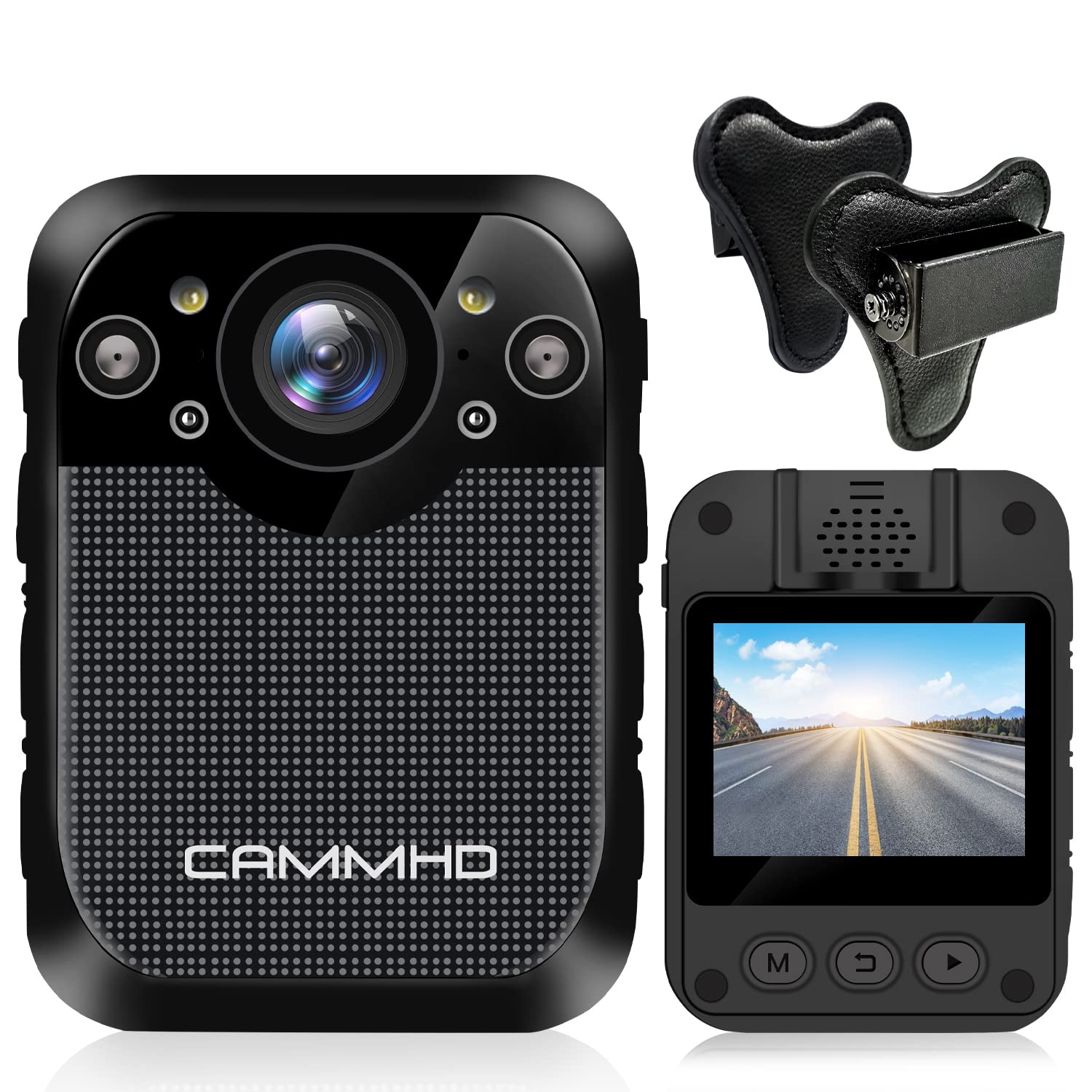
Сүрөт: алдыңкы view of the CAMMHD D1 Body Camera.
2. Пакеттин мазмуну
Төмөндө тизмеленген нерселердин баары пакетиңизге камтылганын текшериңиз. Эгерде кандайдыр бир нерселер жок болсо же бузулса, кардарларды колдоо менен байланышыңыз.
- CAMMHD D1 Body Camera
- Магнит орнотуу
- USB заряддагыч
- USB кабели
- 360° Rotating Shoulder Clip
- User Manual

Image: All components included in the CAMMHD D1 Body Camera package.
3. Продукт бүтүп калдыview
Familiarize yourself with the camera's buttons and ports.

Image: Labeled diagram of the CAMMHD D1 Body Camera's external features and controls.
- Ойготкуч баскычы
- Кызыл жана көк жарк
- Видео баскычы
- Night Vision Indicator
- LED жарык
- USB интерфейси
- Сүрөт баскычы
- Аудио баскычы
- Күйгүзүү/өчүрүү баскычы
4. Орнотуу
4.1 Батареяны заряддоо
Before first use, fully charge the camera's built-in 3000mAh lithium battery. Connect the camera to the USB charger using the provided USB cable. A full charge typically takes approximately 3 hours. The camera can record for up to 8 hours (at 1080p resolution) on a full charge.

Image: Visual representation of the camera's 3000mAh battery, 8-hour recording capability, and 3-hour charging time.
4.2 Камераны орнотуу
The CAMMHD D1 Body Camera comes with a magnet mount and a 360° rotating shoulder clip for secure attachment.
Using the Magnet Mount:
The magnet mount allows for flexible positioning and angle adjustment.
Image: The adjustable 45-degree angle clips for the body camera mount.
Attaching with the Shoulder Clip:
Follow these steps to attach the camera using the shoulder clip:
- Separate the two parts of the clip.
- Insert the body camera into the 'outside' clip.
- Place the 'inside' clip under your clothing.
- Adjust the screw to set the desired recording angle.

Image: Step-by-step instructions for attaching the body camera with the shoulder clip.
5. Иштөө нускамалары
5.1 Күйгүзүү/өчүрүү
- Күйгүзүү: Press and hold the Power On/Off button (9) until the screen illuminates.
- Өчүрүү: Press and hold the Power On/Off button (9) until the device shuts down.
5.2 Видео жаздыруу
The camera supports 1296P HD video resolution with a 160° wide-angle lens.
- Жаздырууну баштоо: Press the Video button (3) once to begin video recording. A red indicator light will typically flash.
- Жаздырууну токтотуу: Жаздырууну токтотуу үчүн Видео баскычын (3) кайрадан басыңыз.

Image: The camera's display indicating 1296P Full HD video recording capability.
5.3 Сүрөткө тартуу
- Сүрөткө тартуу: Press the Photo button (7) once to capture a still image.
5.4 Аудио жаздыруу
- Start Audio Recording: Press the Audio button (8) once to begin audio-only recording.
- Stop Audio Recording: Press the Audio button (8) again to stop audio recording.
5.5 Түнкү көрүнүш
The camera features automatic infrared night vision with 4 infrared lamps, capable of capturing clear footage up to 10 meters (32 feet) in low-light conditions.
- Автоматтык иштетүү: Night vision activates automatically in low light.
- Кол менен активдештирүү: You can also press the Night Vision button (4) to manually toggle infrared night vision.

Image: Demonstration of the camera's automatic infrared night vision capability.
5.6 Цикл жаздыруу
The camera includes 32GB of internal memory. When the memory capacity is reached, the camera automatically overwrites the oldest fileжаздырууну улантуу үчүн s басыңыз.

Image: Explanation of loop recording and the camera's 32GB internal storage.
5.7 Ойнотуу жана File Transfer
- Түзмөктө ойнотуу: Use the camera's 2-inch display and navigation buttons to review видео жана сүрөттөр жазылган.
- Computer Playback/Transfer: Connect the camera to a computer using the USB cable. The camera will appear as a removable disk, allowing you to transfer files.
6. Техникалык тейлөө
- Тазалоо: Use a soft, dry cloth to clean the camera body. For the lens, use a specialized lens cleaning cloth. Do not use harsh chemicals or abrasive materials.
- Сактагыч: Камераны салкын, кургак жерде күндүн тике тийген нурунан жана экстремалдык температурадан алыс сактаңыз.
- Батареяга кам көрүү: Батареянын иштөө мөөнөтүн узартуу үчүн, батареяны тез-тез толук зарядсыздандырбаңыз. Камераны көпкө чейин колдонбосоңуз да, үзгүлтүксүз кубаттап туруңуз.
7. Кыйынчылыктарды
| Көйгөй | Мүмкүн себеп | Чечим |
|---|---|---|
| Камера күйбөйт. | Low battery or faulty battery. | Камераны кеминде 3 саат кубаттаңыз. Эгер көйгөй чечилбесе, колдоо кызматына кайрылыңыз. |
| Cannot record video/photo. | Memory full or recording error. | Ensure loop recording is enabled or transfer files to free up space. Restart the camera. |
| Түнкүсүн видеонун сапаты начар. | Night vision not active or insufficient ambient light for IR. | Ensure night vision is enabled (auto or manual). Ensure no obstructions block the IR lamps. |
| Камера жооп бербей жатат. | Программанын катасы. | Press and hold the Power On/Off button for 10-15 seconds to force a restart. |
8. Техникалык шарттар
| Өзгөчөлүк | Деталь |
|---|---|
| Модел | D1 |
| Видео тартуунун резолюциясы | 1296p, 1080p, 720p |
| Сүрөт пиксел | 34 млн Pixels |
| Wide Angle Lens | 160° |
| Батарея сыйымдуулугу | 3000mAh литий батареясы |
| Жазуу убактысы | Up to 8 hours (1080p) |
| Заряддоо убактысы | Болжол менен 3 саат |
| Ички эс тутум | 32 ГБ (орнотулган) |
| Түнкү көрүү диапазону | 10 м (32 фут) чейин |
| Screen Size | 2 дюйм |
| Сууга туруктуулук деңгээли | Суу өткөрбөйт |
| Өзгөчөлүктөр | Motion Detection, Night Vision, Portable |
| Байланыш технологиясы | Зымсыз |
| Image Stabilization | Динамикалык |
| Фокус түрү | Manual Focus |
9. Кепилдик жана колдоо
For warranty information or technical support, please refer to the contact details provided with your purchase documentation or visit the official CAMMHD webсайт. Кепилдик дооматтары үчүн сатып алганыңыздын далилин сактап коюңуз.