
JIGUUN 647581563908
JIGUUN 2000W Pure Sine Wave Power Inverter User Manual
Модель: 647581563908
1. Киришүү
This manual provides comprehensive instructions for the safe and efficient operation of your JIGUUN 2000W Pure Sine Wave Power Inverter. This device converts 12V DC power from a battery into 110V/120V AC power, suitable for various household appliances, tools, and electronics. It is designed for use in vehicles, RVs, camping, home backup, and emergency situations.
The inverter features a continuous output of 2000W and a peak output of 4000W, offering clean and stable power comparable to grid electricity. Please read this manual thoroughly before installation and use to ensure proper function and safety.
2. Коопсуздук маалыматы
ЭСКЕРТҮҮ: Бул коопсуздук көрсөтмөлөрүн аткарбоо электр тогуна урунууга, өрткө, оор жаракат алууга же өлүмгө алып келиши мүмкүн.
- Электр коопсуздугу: Always connect the inverter to a 12V DC power source. Ensure correct polarity (red to positive, black to negative) to prevent short circuits and damage.
- Жүктөө жөндөмдүүлүгү: Do not connect equipment with a rated power higher than 2000W to avoid damaging the inverter. Be aware that inductive loads (e.g., microwave ovens, refrigerators) may have a starting power 4-6 times their working power.
- Вентиляция: Ensure adequate ventilation around the inverter. Do not block cooling fans or vents. The cooling fan activates when the internal temperature exceeds 45°C.
- Курчап турган чөйрө: Do not expose the inverter to direct sunlight, water, moisture, or flammable materials. Operate in a dry, well-ventilated area.
- Батарея туташуу: It is recommended to use a 12V 240AH or above battery for power supply. Incorrect voltage бирдигин бузат.
- Унаа колдонуу: Do not keep the inverter on when your RV, truck, or car engine is not running for extended periods, as this can drain the vehicle's battery.
- Solar Integration: This inverter cannot be directly connected to solar panels. It requires a solar charge controller and battery in a solar installation.
- Негиздөө: AC жерге туташтыруучу терминал туура туташтырылганын текшериңиз.
3. Пакеттин мазмуну
Пакетте бардык буюмдар бар экенин текшериңиз:
- 1x JIGUUN DC 12V to AC 110V 2000W Pure Sine Wave Inverter
- 1x Колдонуучунун колдонмосу
- 2 Sets of Battery Cables (2x Red, 2x Black)
- 1x Алыстан башкаруу
- 10x 30A Fuses (Note: Inverter has built-in fuses, these are spares)
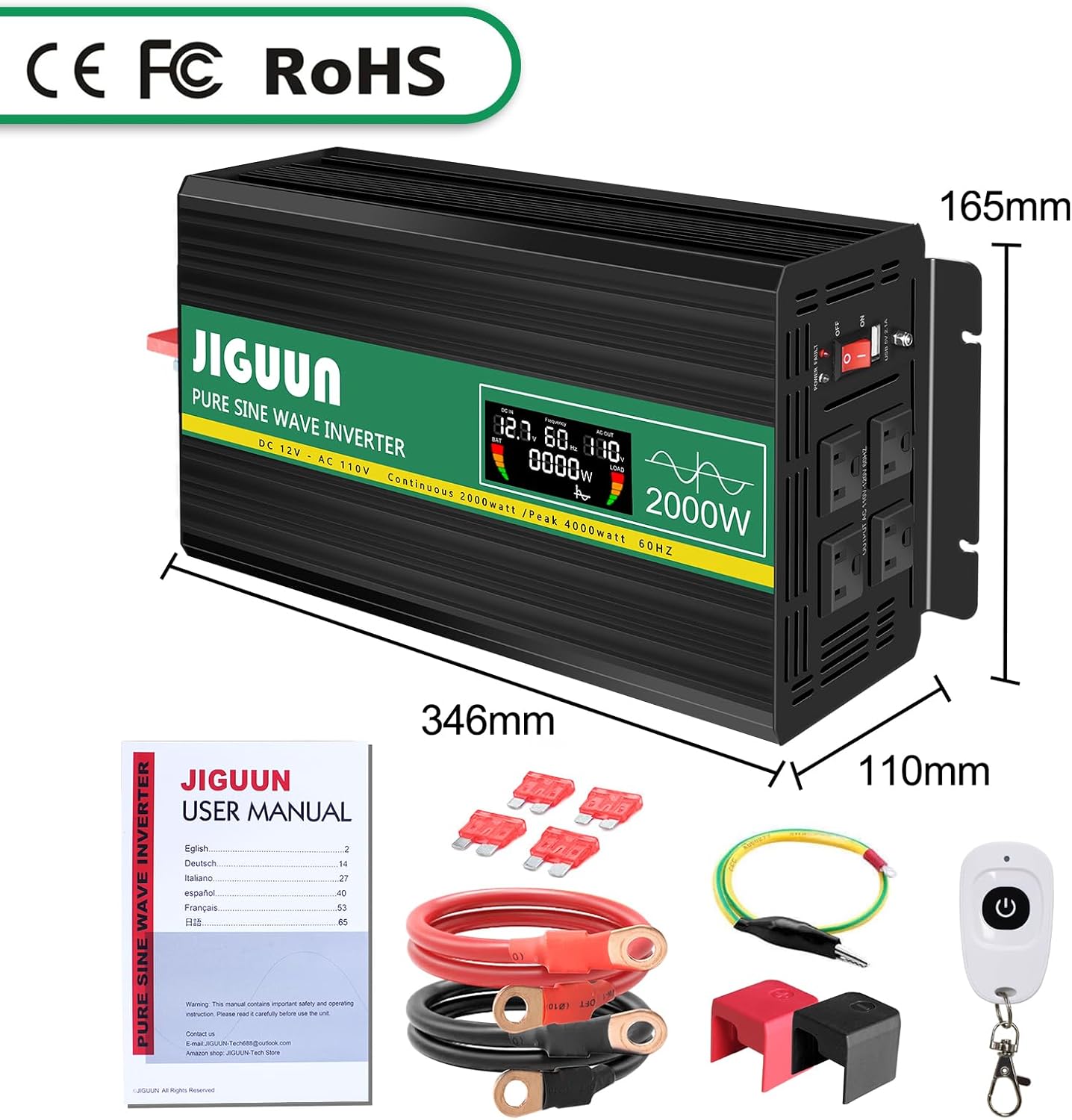
Image: Package contents of the JIGUUN 2000W Pure Sine Wave Inverter.
4. Продукт бүтүп калдыview
4.1 Негизги өзгөчөлүктөрү
- Таза синус толкунунун чыгышы: Provides clean, stable, and interference-free AC power, suitable for sensitive electronics.
- Жогорку натыйжалуулугу: Конверсиянын натыйжалуулугу 90% дан жогору.
- Акылдуу LCD дисплей: Shows real-time input voltage, чыгаруу көлөмүtage, output frequency, battery level, and load power.
- Comprehensive Protection System (BMS): Includes under-voltage, ашыкча томtage, overload, over-temperature, short-circuit, AC ground terminal, and reverse connection protection.
- Муздатуу системасы: Equipped with two high-speed, silent fans that activate automatically when the temperature exceeds 45°C.
- Алыстан башкаруу: Wireless remote for convenient power management.
- Туруктуу курулуш: Aluminum alloy shell for lasting protection.
4.2 Компонентти идентификациялоо

Image: Front and Rear Panel Components.
- Алдыңкы панели:
- AC Receptacles (x4)
- USB Ports (2.1A)
- КҮЙГҮЗҮҮ/ӨЧҮРҮҮ
- LED көрсөткүчү
- LCD дисплей
- AC Ground Terminal
- Арткы Panel:
- Positive DC Terminal (Red)
- Negative DC Terminal (Black)
- Cooling Fans (x2)

Image: Intelligent LCD Display Details.
LCD дисплей төмөнкү маалыматты көрсөтөт:
- Батарея деңгээл тилкеси
- Loads Level Bar
- DC Input Voltage
- AC Output Voltage
- Чыгуу жыштыгы
- Load Power (Watts)
5. Орнотуу нускамалары
5.1 Жайгашкан жерди тандоо
Select a location for the inverter that is:
- Кургак жана нымдуулуктан корголгон.
- Well-ventilated to allow for proper cooling.
- Түз күн нурунан жана жылуулук булактарынан алыс.
- Securely mounted to prevent movement.
5.2 Connecting to a Battery
- Ensure the inverter's ON/OFF switch is in the OFF position.
- Connect the red battery cable to the positive (+) terminal of your 12V battery.
- Кызыл кабелдин экинчи учун инвертордогу оң (+) туруктуу токтун киргизүү терминалына туташтырыңыз.
- Connect the black battery cable to the negative (-) terminal of your 12V battery.
- Кара кабелдин экинчи учун инвертордун терс (-) туруктуу ток киргизүү терминалына туташтырыңыз.
- Ensure all connections are tight and secure. Incorrect polarity will damage the inverter.

Image: Inverter with battery cables for connection.
5.3 Solar System Integration (Conceptual Diagram)
The inverter can be part of a solar power system but cannot be directly connected to solar panels. A typical setup involves solar panels, a charge controller, and a battery, with the inverter drawing power from the battery.

Image: Conceptual diagram of a DIY Solar System with the inverter.
6. Иштөө нускамалары
6.1 Күйгүзүү жана өчүрүү
- After connecting the inverter to the battery, switch the ON/OFF button on the inverter to the ON position.
- The LCD display will illuminate, showing input voltage, чыгаруу көлөмүtage, жана башка параметрлер.
- To power off, switch the ON/OFF button to the OFF position.
6.2 Кондиционер түзмөктөрүн туташтыруу
- Инвертордун күйгүзүлгөнүн текшериңиз.
- Plug your AC devices into the AC outlets on the front panel of the inverter.
- For USB charging, connect your device to the USB port.
- Monitor the LCD display for real-time load power and battery status.

Image: Inverter powering multiple devices.
6.3 Алыстан башкарууну колдонуу
The included remote control allows you to power the inverter ON or OFF wirelessly, providing convenience, especially when the inverter is installed in a less accessible location.

Image: Remote control for the inverter.
6.4 Колдонмо Examples

Image: Inverter applications in car, emergency, home, and work settings.
7. Техникалык тейлөө
- Тазалоо: Keep the inverter clean and free of dust. Use a dry cloth to wipe the exterior. Do not use liquid cleaners.
- Вентиляция: Regularly check that the cooling fans and vents are clear of obstructions. The fans operate automatically when the internal temperature exceeds 45°C to prevent overheating.
- Байланыштары: Periodically inspect battery cable connections to ensure they remain tight and free of corrosion.
- Сактагыч: Инверторду узак убакытка сактасаңыз, аны батареядан ажыратып, салкын, кургак жерде сактаңыз.
8. Кыйынчылыктарды
The JIGUUN inverter is equipped with a 7-point comprehensive protection system to ensure safe operation. If the inverter stops working or an error is indicated, check the following:

Image: Upgraded BMS System and Protection Features.
- No Output Power / Inverter Not Turning On:
- Батарея туташууларынын бекемдигин жана туура полярдуулукту текшериңиз.
- Батареянын көлөмүн текшериңизtage is within the 12V operating range.
- Ensure the inverter's ON/OFF switch is in the ON position.
- Check if the internal fuses have blown (replace with supplied 30A fuses if necessary).
- Төмөн чыгаруу Voltage / Inconsistent Output:
- Ensure the connected load does not exceed the inverter's continuous power rating (2000W).
- Check the battery charge level; a low battery can cause voltage тамчы.
- Verify that the battery cables are of adequate gauge and length for the current draw.
- Ашыкча жүктөн коргоо иштетилди:
- Disconnect some of the connected devices.
- Инверторду кайра иштетиңиз.
- Remember that some inductive loads have high starting power.
- Over-Temperature Protection Activated:
- Ensure the inverter has adequate ventilation and cooling fans are operating.
- Инвертордогу жүктү азайтыңыз.
- Кайра иштетүүдөн мурун, инверторду муздатыңыз.
- Кыска туташуулардан коргоо:
- Disconnect all AC loads.
- Inspect AC cables and devices for any short circuits.
- Инверторду кайра иштетиңиз.
If problems persist after troubleshooting, please contact JIGUUN customer support.
9. Техникалык шарттар
| Өзгөчөлүк | Спецификация |
|---|---|
| Модель аты | 647581563908 |
| Үзгүлтүксүз Wattage | 2000 Ватт |
| Чокусу Ватtage | 4000 Ватт |
| DC Input Voltage | 12V |
| AC Output Voltage | 110V/120V |
| Output Waveform | Таза синус толкуну |
| Конверсиянын эффективдүүлүгү | >90% |
| USB чыгышы | 2.1A |
| Продукциянын өлчөмдөрү | 13.62 x 6.5 x 4.33 дюйм |
| Элемент Салмагы | 11.22 фунт |
| Power Source | Күн жана батарея менен иштейт |
10. Кепилдик жана колдоо
The JIGUUN 2000W Pure Sine Wave Power Inverter comes with a 1 жылдык кепилдик, including free replacement for manufacturing defects.
For any questions, technical assistance, or warranty claims, please contact the JIGUUN support team via email. Our team is dedicated to resolving any issues you may encounter.
Байланыш маалыматы: Please refer to the contact details provided on the product packaging or the official JIGUUN webсайт.
Ask a question about this manual
Ask about setup, troubleshooting, compatibility, parts, safety, or missing instructions. Manuals+ will review the question and use this page’s manual context to help answer it.