
1. Коопсуздук боюнча маанилүү маалымат
Сураныч, чогултуу жана колдонуу алдында бардык нускамаларды кунт коюп окуп чыгыңыз. Бул колдонмону келечектеги маалымат үчүн сактаңыз.
- Always assemble the desk on a stable, flat surface.
- Be cautious when moving the desk to avoid tipping or injury.
- Салмак көтөрө турган күчүнөн ашпаңыз жалпы 132 фунт (33 lbs per shelf) to ensure stability and safety.
- Балдарды жана үй жаныбарларын чогултуу аянтынан алыс кармаңыз.
- Колдонуудан мурун бардык бекиткичтердин бекем бекитилгенин текшериңиз. Мезгил-мезгили менен текшерип, зарылчылыкка жараша кайра бекитиңиз.
2. Продукт бүтүп калдыview жана өзгөчөлүктөрү
The Mount-It! MI-7940 Rolling Standing Desk is designed to provide a flexible and mobile workspace. It features adjustable height, multiple shelves for organization, and locking casters for easy movement and stability.

2.1-сүрөт: Diagram highlighting key features of the MI-7940 desk, including height adjustable tabletop, keyboard tray, utility shelves, durable steel frame, release knobs, decorative base cover, and locking wheel base.
Негизги өзгөчөлүктөрү:
- Flexible Workspace: Easily moves between various environments such as classrooms, offices, and home study areas.
- Жөнгө салынуучу бийиктик: Top shelves adjust through 11 locking intervals, from 37.25 inches to 53.75 inches, allowing for comfortable sitting or standing positions.
- AmpСактагыч: Four sturdy platforms provide dedicated surfaces for monitors, laptops, keyboards, printers, and supplies.
- Жогорку Салмагы: Each shelf supports up to 33 lbs, with a total desk capacity of 132 lbs.
- Жөнөкөй мобилдүүлүк: Equipped with 1.5-inch smooth-rolling casters, two of which are locking, for secure positioning.
- Туруктуу курулуш: Built from high-strength steel and engineered wood for long-term reliability.

2.2-сүрөт: Illustration showing the weight capacity of each shelf (33 lbs) and the total maximum weight capacity of the desk (132 lbs).
3. Монтаждоо боюнча нускамалар
Follow these steps to assemble your Mount-It! MI-7940 Rolling Standing Desk. All necessary tools are typically included, but a Phillips head screwdriver may be useful.
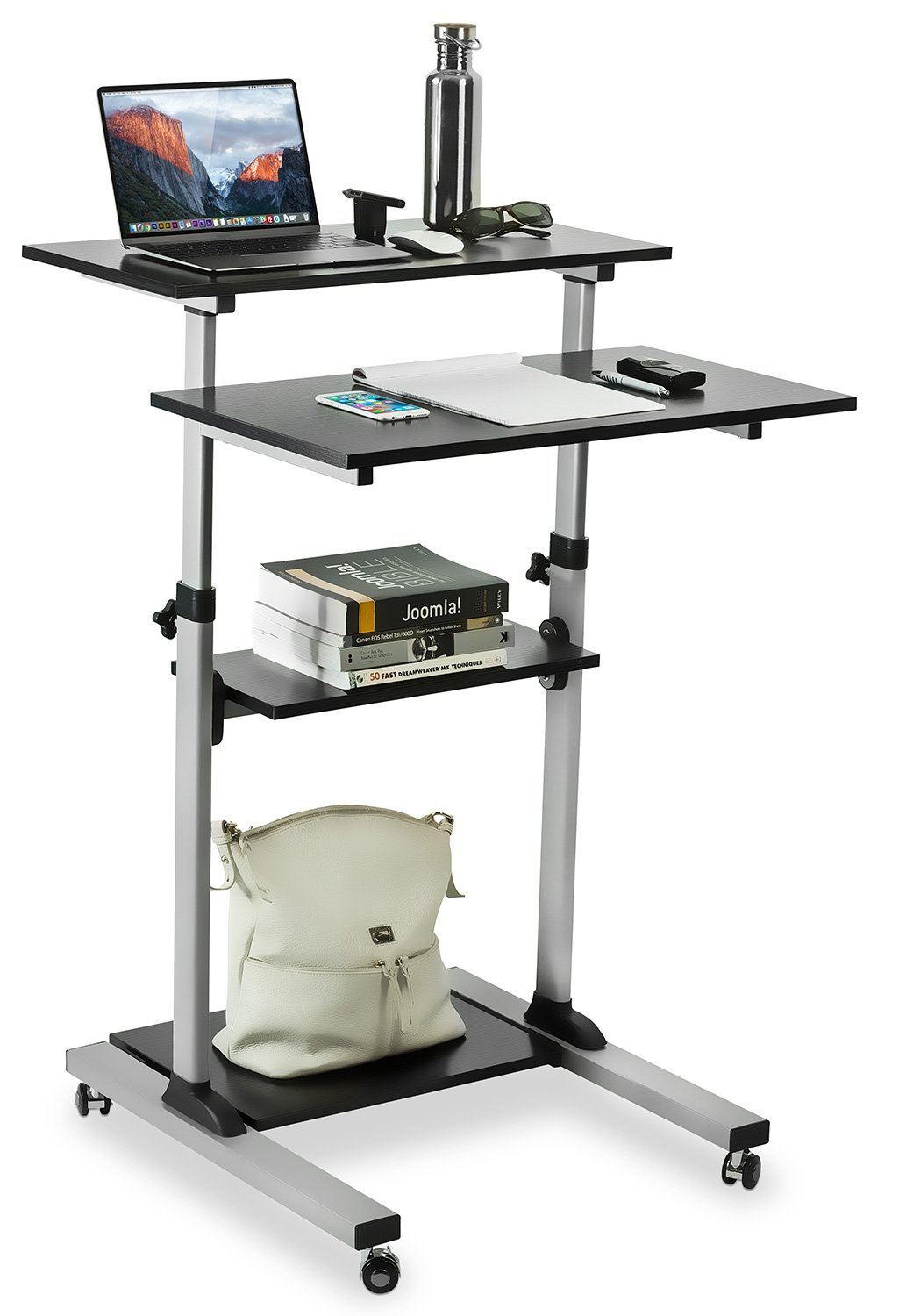
3.1-сүрөт: Fully assembled Mount-It! MI-7940 Rolling Standing Desk, showing its multi-tier design and mobile base.
- Компоненттерди таңгактан чыгаруу: Carefully remove all parts from the packaging and lay them out on a clean, flat, and soft surface to prevent scratches. Verify all components are present against the parts list (not provided in this manual, refer to your product packaging).
- Дөңгөлөктөрдү базага тиркөө: Insert the caster wheels into the designated holes on the base frame. Ensure two of the casters are locking wheels and position them on the front side for easy access. Tighten securely.
- Assemble Vertical Posts: Connect the vertical support posts to the base frame using the provided hardware. Ensure they are oriented correctly according to the design.
- Төмөнкү текче орнотуу: Slide the lowest utility shelf onto the vertical posts and secure it at the desired height using the locking knobs.
- Ортоңку текчени орнотуу: Slide the middle utility shelf onto the vertical posts and secure it using the locking knobs.
- Attach Main Tabletop and Keyboard Tray: Attach the main tabletop and the keyboard tray to the upper sections of the vertical posts. These sections are designed for height adjustment. Secure them with the provided hardware and locking knobs.
- Акыркы текшерүү: Once all components are assembled, gently shake the desk to ensure stability. Re-tighten any loose connections.
4. Иштөө нускамалары
4.1. Бийиктигин тууралоо
The MI-7940 desk allows for flexible height adjustment to switch between sitting and standing positions. The top platforms can be adjusted from 37.25 inches to 53.75 inches.

4.1-сүрөт: Visual representation of the desk's height adjustment range, showing compressed (37.4 inches) and extended (54.7 inches) positions.
- Кулпуну ачуу: Locate the release knobs on the vertical posts supporting the main tabletop and keyboard tray. Turn these knobs counter-clockwise to loosen them.
- Бийиктигин тууралоо: Carefully raise or lower the platforms to your desired height. The desk features 11 locking intervals for precise positioning.
- Кулпу: Once the desired height is reached, turn the release knobs clockwise to securely tighten them. Ensure both knobs are fully tightened to prevent accidental movement.
4.2. Mobility and Locking Casters
The desk is equipped with smooth-rolling casters for easy movement. Two of these casters have locking mechanisms to secure the desk in place.

4.2-сүрөт: Жакын план view of the high-quality caster wheels, highlighting the locking mechanism.
- Жылдыруу үчүн: Ensure the locking brakes on the casters are disengaged (unlocked). Gently push the desk to its new location.
- Коопсуздукту камсыз кылуу үчүн: Once the desk is in the desired position, press down on the locking levers of the two locking casters until they click into place. This will prevent the desk from rolling.
4.3. Posture Guidance
Maintaining correct posture is crucial for comfort and health, especially during prolonged use. The adjustable height feature of this desk can help you achieve an ergonomic setup.

4.3-сүрөт: Comparison of incorrect and correct posture when using a desk, illustrating how an adjustable standing desk can promote better ergonomics.
- Туруу абалы: Adjust the desk height so your elbows are at a 90-degree angle when your hands are on the keyboard. Your monitor should be at eye level.
- Отуруу абалы: If using with a chair, ensure your feet are flat on the floor, knees at a 90-degree angle, and elbows at a 90-degree angle to the keyboard.
5. Техникалык тейлөө
Regular maintenance will help prolong the life and appearance of your Mount-It! MI-7940 Rolling Standing Desk.
- Тазалоо: Беттерди жумшак менен сүртүңүз, гamp кездеме. Катуу химиялык заттардан же абразивдүү тазалагычтардан алыс болуңуз, бул финишке зыян келтирет.
- бекиткичтер: Бардык бурамаларды жана болттордун бекем турганын мезгил-мезгили менен текшерип туруңуз. Туруктуулукту сактоо үчүн зарыл болсо, кайра бекемдеңиз.
- Роликтер: Keep caster wheels free of debris (hair, dust, etc.) to ensure smooth movement.
- Салмактык чектөөлөр: Always adhere to the specified weight limits for each shelf and the total desk to prevent structural damage.
6. Кыйынчылыктарды
Эгерде сиз столуңузда кандайдыр бир көйгөйлөргө туш болсоңуз, төмөнкү кеңири таралган көйгөйлөрдү жана чечимдерди караңыз.
| Көйгөй | Мүмкүн себеп | Чечим |
|---|---|---|
| Үстел солкулдап же туруксуз. | Бош бекиткичтер; тегиз эмес бет. | Check and tighten all screws and bolts. Move the desk to a flat, level surface. |
| Height adjustment is difficult or stuck. | Locking knobs are too tight; mechanism obstructed. | Ensure locking knobs are fully loosened. Check for any obstructions in the adjustment mechanism. |
| Дөңгөлөктөр тегиз жылбайт. | Debris in wheels; locking brake engaged. | Clean any debris from the caster wheels. Ensure locking brakes are disengaged. |
| Desk makes noise during movement. | Loose connections; friction. | Tighten all fasteners. A small amount of silicone spray on moving parts (avoiding wood surfaces) may reduce friction. |
If you are unable to resolve an issue using the troubleshooting guide, please contact Mount-It! customer support for assistance.
7. Техникалык шарттар
Detailed specifications for the Mount-It! MI-7940 Rolling Standing Desk.

7.1-сүрөт: Detailed dimensional drawing of the MI-7940 desk, including height, width, and depth measurements for all shelves and the overall structure.
| Өзгөчөлүк | Спецификация |
|---|---|
| Модель номери | MI-7940 |
| Бренд | Маунт-Ит! |
| Үстөлдүн дизайны | Туруучу стол |
| Түс | Кара |
| Материалдын түрү | Engineered Wood, Steel |
| Аяктоо түрү | Ламинацияланган |
| Минималдуу бийиктик | 37 дюйм (болжол менен 94 см) |
| Максималдуу бийиктик | 54.7 дюйм (болжол менен 139 см) |
| Текчелердин саны | 4 |
| Салмак сыйымдуулугу (текчеге) | 33 фунт |
| Максималдуу салмак сунушу (жалпы) | 132 фунт |
| Кастердин өлчөмү | 1.5 дюйм |
| Элемент Салмагы | 20 фунт |
| UPC | 810041737267 |
8. Кепилдик жана колдоо
8.1. Кепилдик маалыматы
Mount-It! products are backed by a өмүр бою кепилдик, ensuring reliable performance for years to come. This warranty covers defects in materials and workmanship under normal use.
For specific details regarding the lifetime warranty, please refer to the official Mount-It! warranty policy available on their webсайтка же кардарларды колдоо менен байланышыңыз.
8.2. Кардарларды колдоо кызматы
Mount-It! provides expert US-based technical assistance to help you with any questions or issues before, during, and after setup.
For support, please visit the official Mount-It! website or refer to the contact information provided with your product packaging. You can also find additional resources and FAQs on their brand store: