
1. Продукт бүтүп калдыview
The BUNGPUNG 4K@60Hz HDMI Matrix Switch 2x2 is a versatile device designed to manage and distribute HDMI signals. It allows you to connect up to two HDMI source devices (e.g., Blu-ray player, game console, PC) and output their signals to two HDMI displays (e.g., TV, monitor, projector) simultaneously. This unit functions as both an HDMI switcher and a splitter, enabling you to display the same or different content on each output display.
Additionally, it features an integrated audio extractor, allowing you to separate audio signals from the HDMI stream and output them via optical digital (SPDIF) or analog 3.5mm L/R ports. This is particularly useful for connecting to external audio systems like amplifiers, soundbars, or headphones, especially when your display lacks dedicated audio outputs.
The device supports UltraHD 4K@60Hz resolution with RGB 4:4:4 chroma subsampling, and is backward compatible with lower resolutions such as 1080P, 720P, 480P, and 480i. It complies with HDMI 2.0b and HDCP 2.2 standards, and supports High Dynamic Range (HDR) for enhanced visual quality. Advanced EDID management allows for flexible adjustment of display resolution and audio settings, ensuring optimal compatibility across various devices.
2. Продукттын компоненттери жана өзгөчөлүктөрү

Figure 2.1: Front and Back Panel Layout
This diagram illustrates the input and output ports, control buttons, and audio extraction ports on the device. It shows two HDMI inputs (1, 2), two HDMI outputs (A, B), optical and 3.5mm L/R audio outputs, a DC 5V power input, power LED, output selection buttons, EDID management switch, and IR receiver.
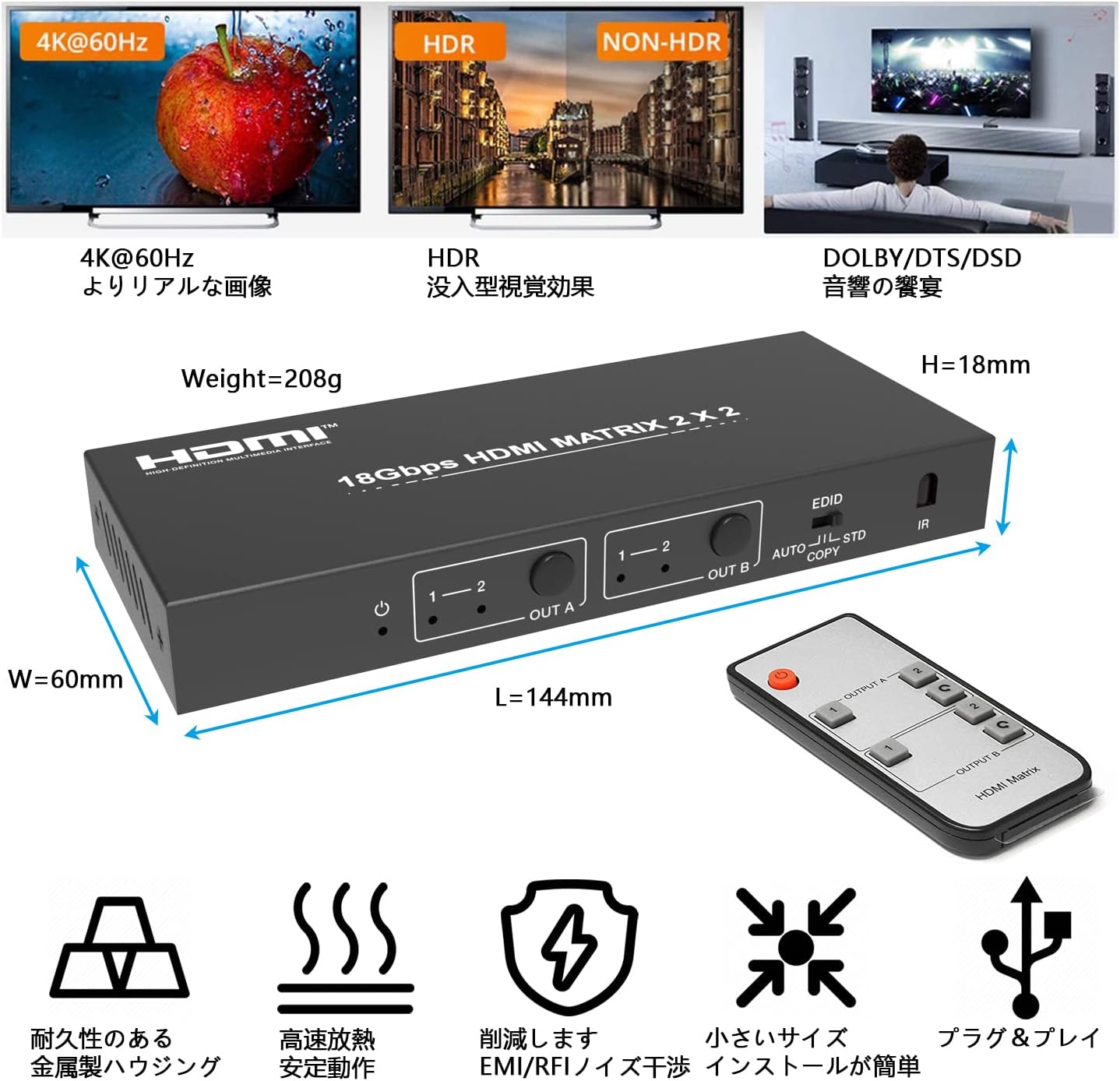
Figure 2.2: Device Dimensions and Feature Highlights
This image provides the physical dimensions of the matrix switch (L=144mm, W=60mm, H=18mm, Weight=208g) and highlights key features such as 4K@60Hz support, HDR, Dolby/DTS/DSD audio, durable metal housing, efficient heat dissipation, EMI/RFI reduction, compact size, and plug-and-play functionality. The included remote control is also shown.
2.1 Алдыңкы панелдин башкаруу элементтери
- Power LED: Аппараттын кубат абалын көрсөтөт.
- Output A Select Button (1-2): Press to switch the input source for HDMI Output A between Input 1 and Input 2.
- Output B Select Button (1-2): Press to switch the input source for HDMI Output B between Input 1 and Input 2.
- EDID Switch (AUTO/STD/COPY): Selects the EDID management mode.
- IR алуучу: Receives signals from the included remote control.
2.2 Арткы панелдин порттору
- HDMI Input 1 & 2: Connect your HDMI source devices (e.g., PC, game console, media player).
- HDMI Output A & B: Connect to your HDMI displays (e.g., TV, monitor, projector).
- Optical Audio Output (SPDIF): Connect to an external audio receiver or soundbar for digital audio.
- 3.5mm L/R Audio Output: Connect to analog audio systems, headphones, or speakers.
- DC 5V кубат киргизүү: Connect the provided 5V power adapter.
3. Орнотуу нускамалары
Follow these steps to set up your HDMI Matrix Switch:
- Өчүрүү түзмөктөрү: Ensure all HDMI source devices and displays are powered off before making any connections.
- HDMI булактарын туташтыруу: Connect your HDMI source devices (e.g., Blu-ray player, PS5, Xbox, PC) to the HDMI Input 1 and HDMI Input 2 ports on the matrix switch using high-quality HDMI cables.
- HDMI дисплейлерин туташтыруу: Connect your HDMI displays (e.g., TV, monitor) to the HDMI Output A and HDMI Output B ports on the matrix switch using high-quality HDMI cables.
- Аудио туташтыруу (кошумча): If you wish to extract audio, connect your optical audio receiver to the Optical (SPDIF) port or your analog audio system/headphones to the 3.5mm L/R port.
- Туташуу кубаты: Connect the provided 5V power adapter to the DC 5V Power Input port on the matrix switch, then plug the adapter into a power outlet. The Power LED on the front panel should illuminate.
- Түзмөктөрдү күйгүзүү: Power on your HDMI displays first, then your HDMI source devices.
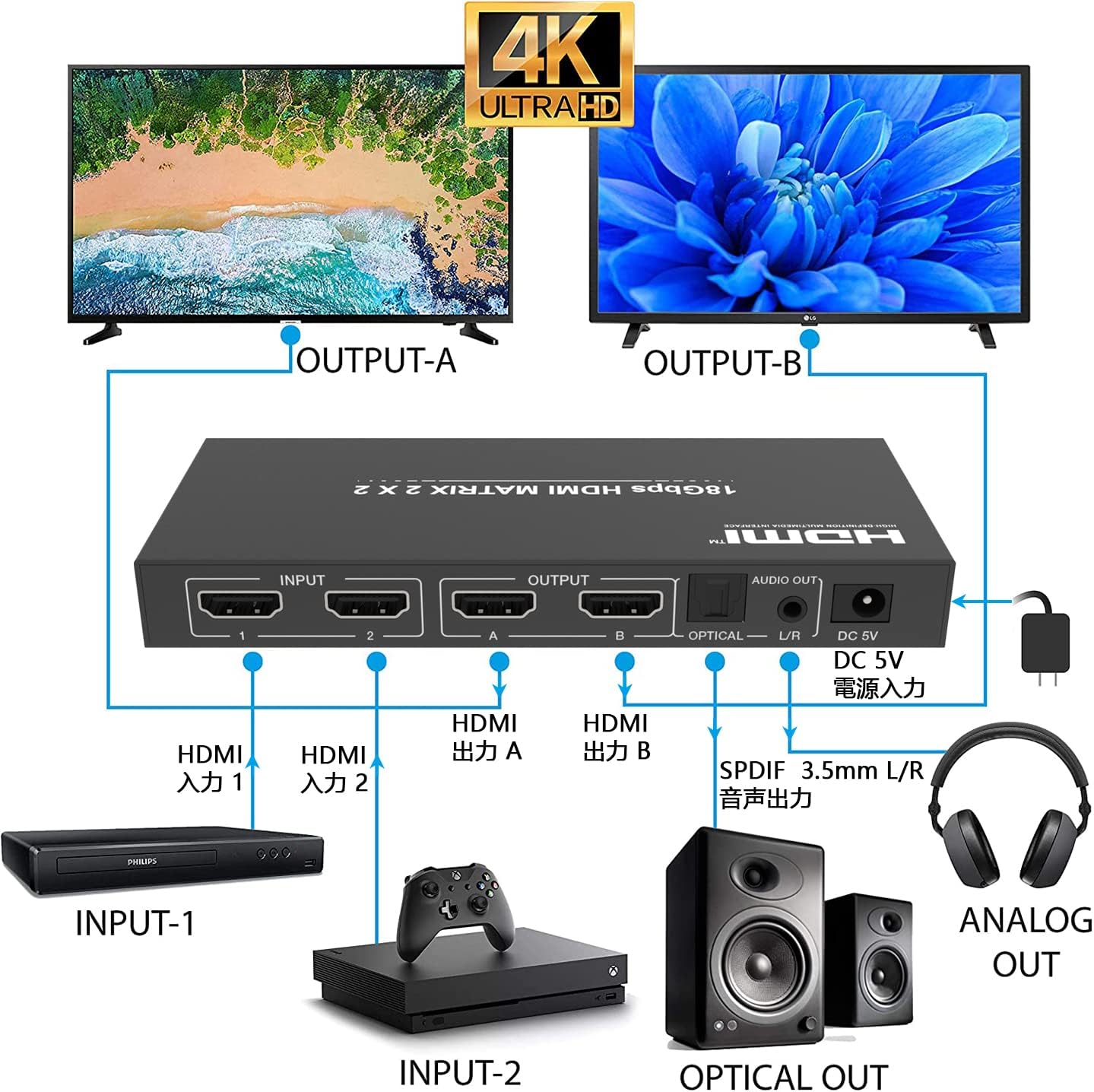
3.1-сүрөт: Типтүү туташуу схемасы
This diagram illustrates how to connect two input sources (e.g., DVD player, Xbox) to the matrix switch and output to two displays (e.g., TVs) while also extracting audio to external speakers or headphones via optical and 3.5mm L/R outputs.
4. Иштөө нускамалары
4.1 Switching Inputs/Outputs
You can control the matrix switch using either the front panel buttons or the included remote control.
- Front Panel баскычтары:
Press the 'OUT A' button to cycle through Input 1 and Input 2 for Output A.
Press the 'OUT B' button to cycle through Input 1 and Input 2 for Output B. - Алыстан башкаруу:
Use the 'OUT A 1', 'OUT A 2' buttons to select the input for Output A.
Use the 'OUT B 1', 'OUT B 2' buttons to select the input for Output B.
4.2 EDID башкаруу
EDID (Extended Display Identification Data) management helps ensure compatibility between your source devices and displays by communicating display capabilities. The matrix switch offers three EDID modes:
- AUTO режими: The switch automatically detects the EDID of the connected displays and selects the best common resolution and audio format supported by both. This is the recommended default setting for most setups.
- STD режими: The switch uses a standard, built-in EDID (e.g., 1080p stereo audio). This can be useful if you encounter compatibility issues with specific displays or sources.
- COPY Mode: The switch copies the EDID from the display connected to HDMI Output A. This ensures that both outputs receive the same EDID information, which can be beneficial when using displays with different capabilities or when a specific resolution/audio format is required across all outputs.
To change the EDID mode, use the EDID switch on the front panel of the device.
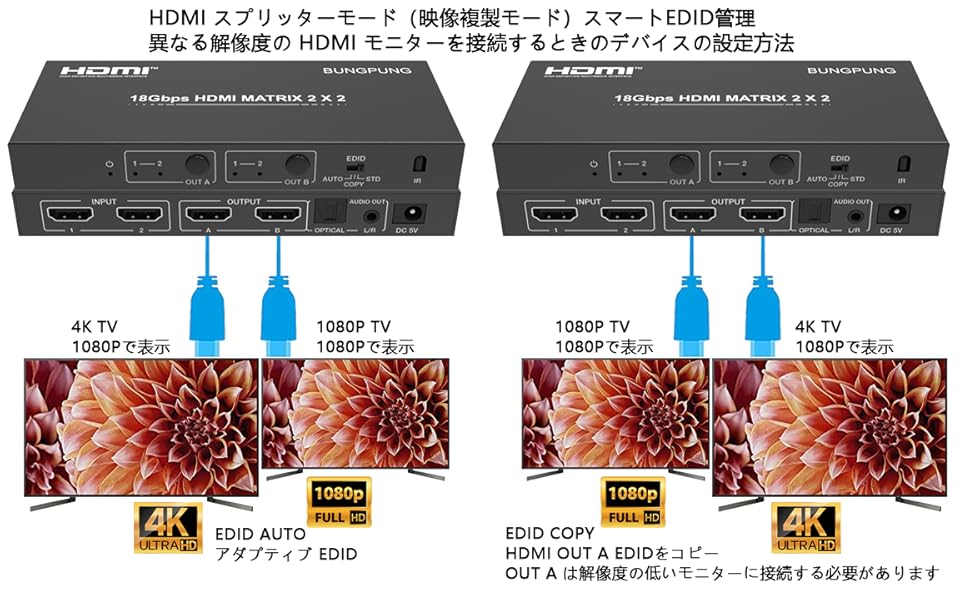
Figure 4.1: EDID Management for Different Resolutions
This diagram illustrates how EDID management works when connecting displays with different resolutions. In 'EDID AUTO' mode, the switch adapts to the lowest common resolution (e.g., 1080p for both a 4K TV and a 1080p TV). In 'EDID COPY' mode, the EDID of Output A is copied, requiring the lowest resolution monitor to be connected to Output A for optimal compatibility across both displays.
4.3 Аудио чыгаруу
The matrix switch can extract audio from the active HDMI input signal and output it through the dedicated audio ports:
- Optical (SPDIF): Provides digital audio output, supporting formats like Dolby Digital and DTS (depending on the source and receiver capabilities).
- 3.5mm L/R: Provides analog stereo audio output, suitable for headphones or analog stereo systems.
The audio output will correspond to the audio embedded in the HDMI signal of the currently selected input source.
5. Техникалык тейлөө
- Тазалоо: Түзмөктү тазалоо үчүн жумшак, кургак чүпүрөктү колдонуңуз. Суюк же аэрозоль тазалоочу каражаттарды колдонуудан алыс болуңуз.
- Вентиляция: Ашыкча ысып кетпеши үчүн, түзмөк жакшы желдетилген жерге коюлганын текшериңиз. Желдетүүчү тешиктерди жаппаңыз.
- Күч: Түзмөк көпкө чейин колдонулбай турганда, кубат адаптерин ажыратыңыз.
- Колдонуу: Аппаратты этияттык менен колдонуңуз. Аны түшүрүүдөн же катуу таасирлерге дуушар кылуудан алыс болуңуз.
6. Кыйынчылыктарды
If you encounter issues with your HDMI Matrix Switch, please refer to the following common troubleshooting steps:
- No Picture or Intermittent Signal:
- Ensure all HDMI cables are securely connected to both the source devices, the matrix switch, and the displays.
- Try using different HDMI cables, especially high-quality ones rated for 4K@60Hz.
- Verify that the correct input is selected on your display and the correct output is selected on the matrix switch.
- Check the EDID setting on the matrix switch. Try switching between AUTO, STD, and COPY modes to see if it resolves the issue. If using COPY mode with displays of different resolutions, ensure the lowest resolution display is connected to Output A.
- Some source devices (e.g., certain game consoles or PCs) may have specific HDCP or resolution requirements. Adjust the output resolution of your source device to match the capabilities of your display.
- Power cycle all devices: Turn off the matrix switch, source devices, and displays. Disconnect and reconnect the power adapter for the matrix switch, then power on the displays, followed by the matrix switch, and finally the source devices.
- Аудио жок же аудио сапаты начар:
- Ensure your audio cables (optical or 3.5mm) are correctly connected to the matrix switch and your audio receiver/speakers.
- Verify that your audio receiver/speakers are powered on and set to the correct input.
- Check the audio settings on your source device to ensure it's outputting an audio format compatible with your audio receiver (e.g., PCM stereo for 3.5mm, or supported digital formats for optical).
- If using optical output, ensure your audio receiver supports the digital audio format being sent by the source.
- Алыстан башкаруу иштебейт:
- Алыстан башкаруу пультунда иштеген батарейкалар бар экенин текшериңиз.
- Point the remote directly at the IR receiver on the front panel of the matrix switch.
- Ensure there are no obstructions between the remote and the IR receiver.
- Аппараттын ысып кетиши:
- Ensure the device is placed in a location with adequate airflow and is not covered.
- If the device feels excessively hot, disconnect power and allow it to cool down before resuming use.
7. Техникалык шарттар
| Модель номери | BP-HDC-MXB22AC |
| Киргизүүлөр | 2 x HDMI |
| Чыгуулар | 2 x HDMI, 1 x Optical (SPDIF), 1 x 3.5mm L/R Audio |
| HDMI версиясы | HDMI 2.0b |
| HDCP Нускасы | HDCP 2.2 |
| Max чечим | 4K@60Hz (RGB 4:4:4) |
| Маалымат ылдамдыгы | 18Gbps |
| Түс тереңдиги | 30/36/48-bit Deep Color |
| HDR колдоо | Ооба |
| EDID башкаруу | AUTO, STD, COPY Modes |
| Электр камсыздоо | DC 5V |
| Продукциянын өлчөмдөрү | 14.4 x 6 x 1.8 см |
| Продукт Салмагы | 210 г |
| Турак жай материалы | Металл |
8. Кепилдик жана колдоо
This BUNGPUNG HDMI Matrix Switch (Model BP-HDC-MXB22AC) comes with a 1 жылдык кепилдик сатып алынган күндөн тартып. Бул кепилдик өндүрүштүк кемчиликтерди камтыйт жана буюмдун нормалдуу колдонууда белгиленгендей иштешин камсыздайт.
While we strive for the highest quality, if you experience any compatibility issues, initial defects, or require technical assistance, please do not hesitate to contact BUNGPUNG customer support. Our team is available to provide guidance and solutions to ensure your satisfaction.
For support, please refer to the contact information provided with your purchase or visit the official BUNGPUNG webсайт.