
1. Киришүү
This manual provides detailed instructions for the installation, operation, and maintenance of your Aideepen LCD Digital AC Power Meter, model PZEM-022. This 6-in-1 device is designed to accurately measure and display various electrical parameters for household and industrial applications. Please read this manual thoroughly before use to ensure safe and correct operation.
2. Негизги өзгөчөлүктөрү
The Aideepen PZEM-022 power meter offers comprehensive monitoring capabilities:
- 6-бирде өлчөө: Бир эле учурда Көлөмдү көрсөтөтtage (AC 80-260V), Current (0-100A), Power (0-22000W), Energy Consumption (0-999kWh), Frequency (45-65 Hz), and Power Factor (0-1PF).
- Жарыкты башкаруу: Easily toggle the LCD backlight on or off with a short button press. Data is automatically saved when the backlight is off.
- Overload Alarm Function: Set a current alarm threshold. The backlight will flash to indicate an overload condition. The alarm stops when the current drops below the threshold.
- Энергия маалыматтарын баштапкы абалга келтирүү: A dedicated function allows for clearing accumulated energy consumption data.
- Маалыматтарды сактоо: Automatically stores measurement data even when power is off.

Figure 2.1: ашыкview of the meter's display showing all 6 measurement parameters and their ranges.
3. Коопсуздук маалыматы
Түзмөккө зыян келтирбөө же жеке жаракат алууну алдын алуу үчүн төмөнкү коопсуздук чараларын сактаңыз:
- Номиналдуу жүк: Ensure that the electrical load connected to the circuit does not exceed the rated power capacity of the meter (22000W) or the current transformer (100A).
- Туура зымдар: Always follow the provided wiring diagram precisely. Incorrect wiring can lead to device malfunction, electrical shock, or fire.
- Үй ичинде гана колдонуу: This product is designed for indoor use in dry environments. Do not install or operate this device outdoors or in damp шарттар.
- Кесиптик орнотуу: If you are not familiar with electrical wiring, seek assistance from a qualified electrician for installation.
- Электр энергиясын өчүрүү: Орнотуу, зымдарды орнотуу же техникалык тейлөө иштерин жүргүзүүдөн мурун ар дайым чынжырды электр кубатынан ажыратыңыз.
4. Пакеттин мазмуну
Пакетте бардык буюмдар бар экенин текшериңиз:
- 1 x Aideepen LCD Digital AC Power Meter (PZEM-022)
- 1 x Current Transformer (CT)
- 1 x User Manual

Figure 4.1: The power meter unit and the current transformer.
5. Орнотуу жана орнотуу
Follow these steps for proper installation of the power meter:
- Кубатты өчүрүү: Before starting any wiring, ensure that the main power supply to the circuit is completely disconnected to prevent electrical shock.
- Mount the Meter: Choose a suitable indoor location for the meter. The meter is designed for panel mounting.
- Кубат булагына туташтыруу: Connect the AC 80-260V power supply to the meter's input terminals as shown in the wiring diagram. Ensure correct polarity if applicable, though for AC, line and neutral are typically interchangeable for the meter's power input.
- Ток трансформаторун (ТТ) орнотуу:
- Identify the load wire (live wire) of the circuit you wish to monitor.
- Open the CT clamp and pass only the load wire through the center hole of the CT. Ensure the arrow on the CT points in the direction of current flow (from source to load).
- Connect the two wires from the CT clamp to the CT input terminals on the meter.
- Байланыштарды текшерүү: Double-check all wiring connections against the diagram to ensure they are secure and correct.
- Күчтү калыбына келтирүү: Once all connections are verified, restore power to the circuit. The meter display should light up.

Figure 5.1: Wiring Diagram. Disconnect power before wiring.
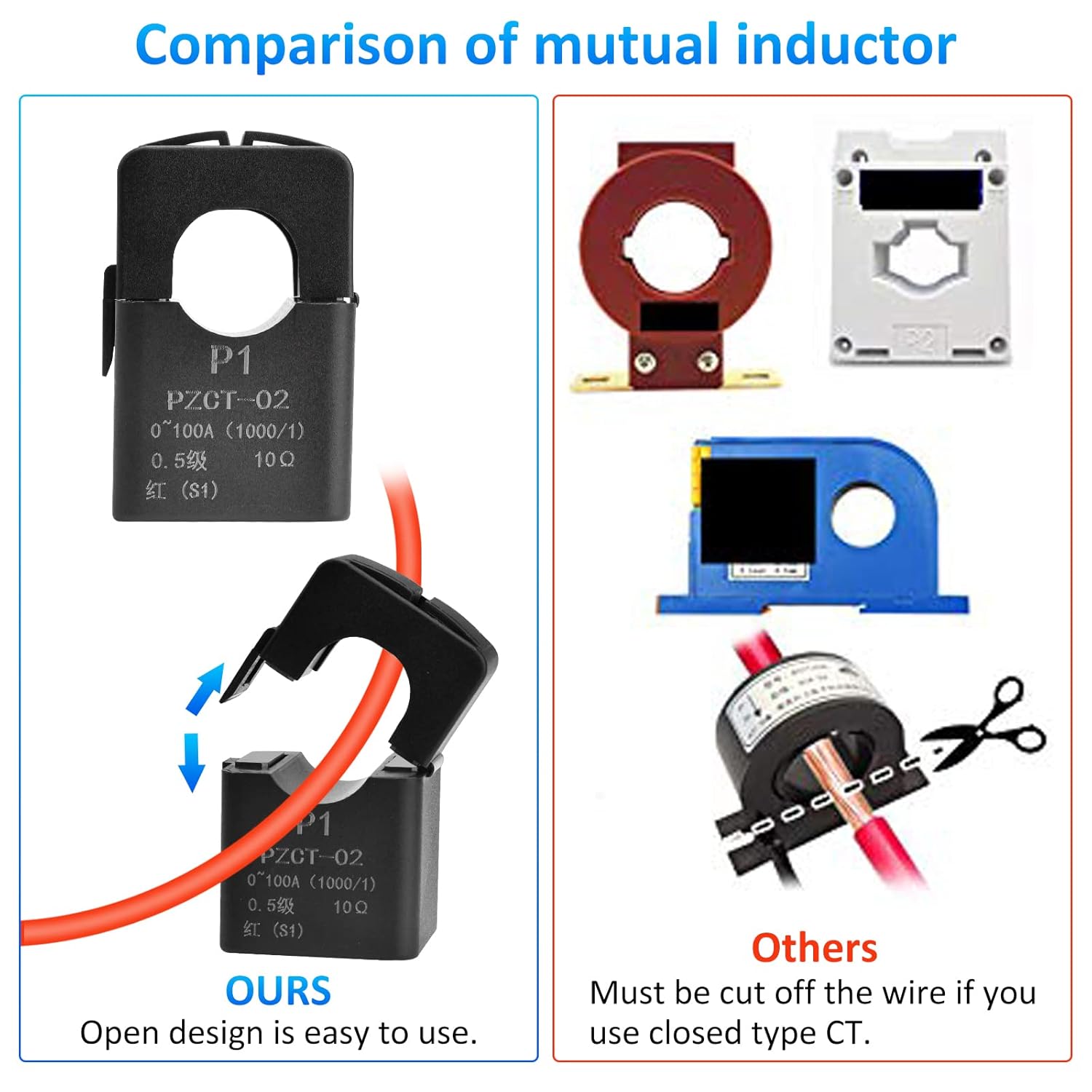
Figure 5.2: The open-design current transformer allows for easy installation without cutting the main wire.
6. Иштөө нускамалары
The meter is designed for straightforward operation. Once powered on, it will immediately begin displaying real-time measurements.
6.1. Арткы жарыкты башкаруу
To control the display backlight:
- Күйгүзүү/өчүрүү: Briefly press the button located on the front panel. Each press will toggle the backlight state.
- Дайындарды сактоо: The meter automatically saves measurement data regardless of the backlight status.
6.2. Overload Alarm Setting
To set or adjust the current overload alarm threshold:
- Орнотуу режимине кириңиз: Press and hold the button for approximately 3 seconds until the current alarm threshold value starts flashing on the display.
- Adjust Threshold: While the value is flashing, briefly press the button to increase the threshold value. The value will cycle through available settings.
- Жөндөөлөрдү сактоо: Stop pressing the button. After 3 seconds of inactivity, the meter will automatically save the new threshold and exit the setting mode.
When the measured current exceeds the set threshold, the backlight will flash to alert you of an overload condition. The flashing will stop once the current drops below the threshold.
6.3. Energy Data Reset
To clear the accumulated energy consumption (kWh) data:
- Баштапкы абалга келтирүүнү баштоо: Press and hold the button for 5 seconds until the energy consumption number starts flashing. Then release the button.
- Калыбына келтирүүнү ырастоо: Briefly press the button again. This action will clear the energy data and stop the flashing.
- Cancel Reset: If no button operation occurs within 5 seconds after the number starts flashing, the reset will be canceled, and the energy data will remain unchanged.

Figure 6.1: Icons illustrating key functions of the meter.
7. Техникалык тейлөө
The Aideepen PZEM-022 power meter requires minimal maintenance:
- Тазалоо: Дисплейди тазалоо үчүн жумшак, кургак чүпүрөктү колдонуңуз жанаasinг. Абразивдүү тазалагычтарды же эриткичтерди колдонбоңуз.
- Курчап турган чөйрө: Ensure the meter is kept in a dry, dust-free environment within its specified operating temperature range.
- Текшерүү: Зымдардын туташууларынын бекемдигин жана эскирүү же бузулуу белгилерин мезгил-мезгили менен текшерип туруңуз.
8. Кыйынчылыктарды
If you encounter issues with your power meter, refer to the following common problems and solutions:
| Көйгөй | Мүмкүн себеп | Чечим |
|---|---|---|
| Дисплей бош | Электр менен камсыздоо жок же зымдар туура эмес туташтырылган. | Check the AC 80-260V power connections to the meter. Ensure power is supplied to the circuit. |
| Current/Power readings are zero or incorrect | CT clamp not installed correctly or connected to the wrong wire. | Ensure the load wire passes through the CT clamp and the CT is connected to the meter. Verify the arrow on the CT points from source to load. |
| Backlight flashing continuously | Overload alarm triggered. | Reduce the load on the circuit or adjust the overload alarm threshold if necessary (refer to Section 6.2). |
| Energy consumption resets unexpectedly | Energy consumption exceeded 999kWh, or accidental reset. | The meter automatically resets if 999kWh is exceeded. Be careful when using the reset function (Section 6.3). |
9. Техникалык шарттар
| Параметр | Нарк |
|---|---|
| Модель номери | ПЗЕМ-022 |
| Operating Voltage | AC 80-260V |
| Учурдагы диапазон | 0-100A |
| Power колому | 0-22000W |
| Energy Consumption Range | 0-999kWh (resets after 999kWh) |
| Жыштык диапазону | 45-65 Гц |
| Power Factor диапазону | 0-1PF |
| Дисплей түрү | Арткы жарык менен LCD |
| Продукциянын өлчөмдөрү (L x W x Y) | 11 x 7 x 3.5 см |
| Элемент Салмагы | 160 грамм |
| Сертификаттар | CE |
| Камтылган компоненттер | Ammeter *1, User Manual *1 |

Сүрөт 9.1: Продукциянын өлчөмдөрү.
10. Кепилдик жана колдоо
Aideepen products are designed for reliability and performance. For warranty information or technical support, please refer to the contact details provided with your purchase or visit the official Aideepen webсайт. Сатып алуу квитанциясын кепилдик дооматтары үчүн сатып алуунун далили катары сактаңыз.