
Amazon Basics DP-882
Amazon Basics 88-Key Semi-Weighted Digital Piano User Manual
Модел: DP-882
Introduction
This manual provides detailed instructions for the setup, operation, maintenance, and troubleshooting of your Amazon Basics 88-Key Semi-Weighted Digital Piano. Designed for performance, this digital piano offers a realistic playing experience with its semi-weighted keys and a wide array of features to enhance your musical journey.
Негизги өзгөчөлүктөр төмөнкүлөрдү камтыйт:
- Realistic semi-weighted 88-key keyboard for authentic piano touch.
- Versatile 1/4" audio output for ampкөтөргүчтөр жана баяндамачылар.
- Expansive music library with 140 tones, 200 rhythms, and 16 demonstration songs.
- Educational features like automatic chords, beginner split keyboard function, and dual timbre functions.
- User-friendly USB MIDI and USB-A ports for smart device connectivity and recording.
Жайгашуу
Пакеттен чыгаруу жана Компонентти идентификациялоо
Бардык компоненттерди таңгактан кылдаттык менен алып салыңыз. Бардык бөлүктөр бар экенин текшериңиз:
- Amazon Basics 88-Key Digital Piano
- Sustain Pedal
- Power Supply адаптер
- USB кабелдери
- Музыкалык стенд

Image: All components included with the Amazon Basics 88-Key Digital Piano.
Secure and Easy Setup
The piano is packaged securely with styrofoam. The power adapter is attached within the styrofoam for quick access.

Image: Digital piano secured in packaging with power adapter.
Connecting the Sustain Pedal and Power Supply
Locate the sustain pedal port on the rear of the piano. Ensure the piano is powered off before connecting or disconnecting the sustain pedal. Connect the power supply adapter to the DC IN port and plug it into a wall outlet.

Сүрөт: Арткы view of the piano showing connectivity ports.
Музыкалык стендди бекитүү
Музыкалык стендди пианинонун үстүнкү панелиндеги белгиленген уячаларга салыңыз.
Иштөө нускамалары
Кубатты күйгүзүү / өчүрүү жана үнүн көзөмөлдөө
To power on the piano, press the 'ON/OFF Power' button. Adjust the master volume using the 'MIN/MAX Master Volume' knob to your desired level.

Image: Control panel with master volume and function buttons.
Selecting Tones and Rhythms
The piano offers 140 tones and 200 rhythms. Use the dedicated buttons on the control panel to select different instrument sounds (e.g., Piano, Electronic Church Organ, Guitar, Bass, Strings) and rhythms. The clear LED display will show your current selection.
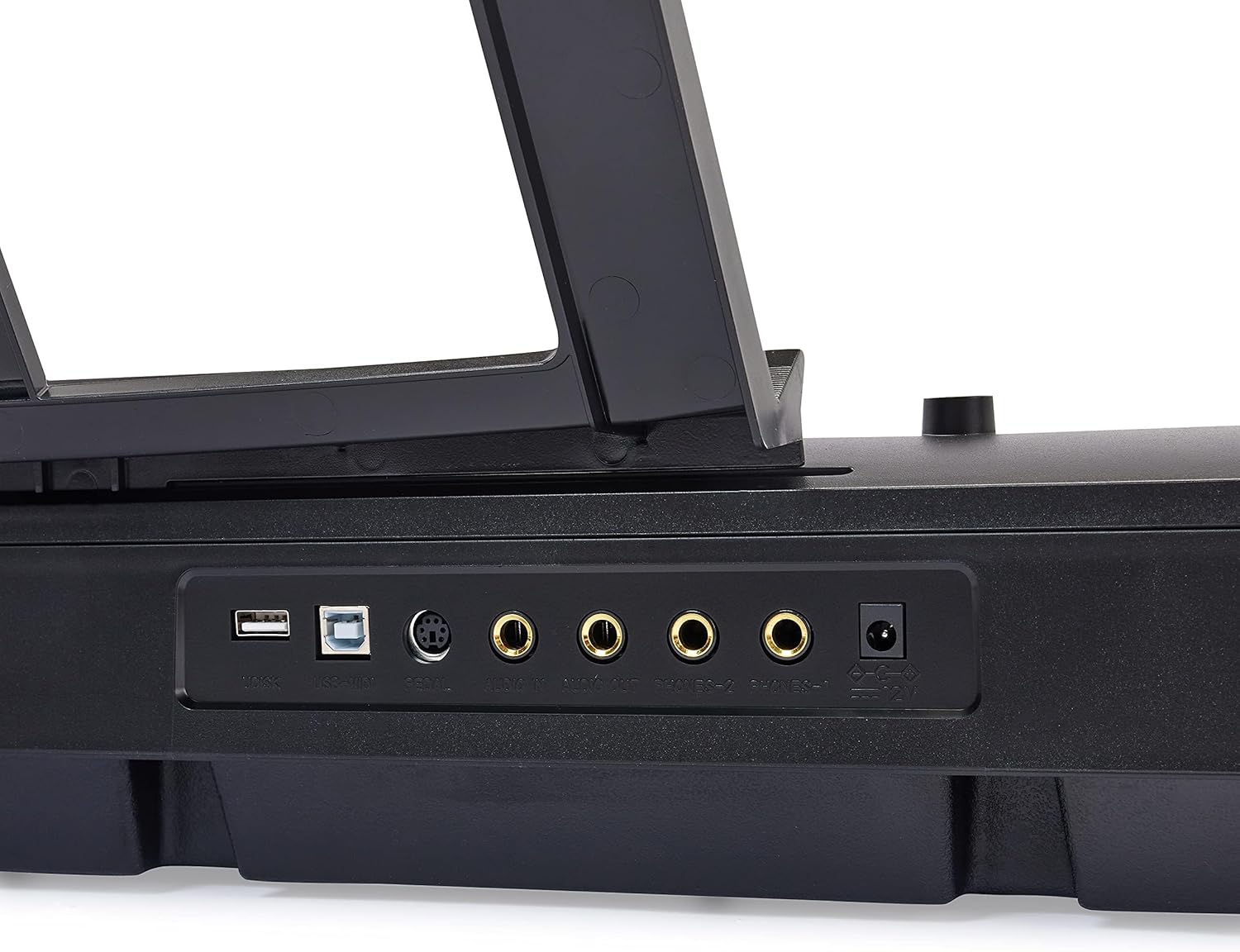
Image: Hand interacting with the piano keys and control panel.
Билим берүү өзгөчөлүктөрү
Enhance your learning with features such as:
- Сабак режими: Utilize the beginner split keyboard function for guided practice.
- Automatic Chords: Simplify chord playing for beginners.
- Dual Timbre: Layer two different instrument sounds simultaneously for richer tones.
- Метроном: Use the built-in metronome for rhythm training.

Сүрөт: бүттүview of learning tools and features.
USB туташуу
The piano features USB MIDI and USB-A ports, allowing for simple integration with smart devices. You can connect to compatible software for recording your music or expanding your creative possibilities.
Техникалык тейлөө
Тазалоо
To clean the piano, use a soft, dry cloth. Do not use abrasive cleaners, waxes, or solvents as they may damage the finish. For stubborn marks, a slightly damp кездемени колдонсо болот, андан кийин дароо кургак кездеме.
Сактагыч
Store the piano in a cool, dry place away from direct sunlight, extreme temperatures, and high humidity. Avoid placing heavy objects on the keyboard.
Проблемаларды чечүү
Үн жок
- Ensure the piano is powered on and the power adapter is securely connected to both the piano and a working electrical outlet.
- Башкы үн баскычын текшерип, анын күйгүзүлгөнүн текшериңиз.
- If external speakers or headphones are connected, ensure they are properly plugged in and their volume is adjusted.
Туруктуу педаль иштебейт
- Verify that the sustain pedal is fully inserted into its designated port on the back of the piano.
- Always ensure the piano is powered OFF before connecting or disconnecting the sustain pedal to prevent potential issues.
Keys Not Responding or Incorrect Sound
- Try selecting a different instrument tone to see if the issue persists across all sounds.
- Power off the piano, wait a few seconds, and then power it back on to reset the system.
Техникалык шарттар
| Өзгөчөлүк | Деталь |
|---|---|
| Модель номери | DP-882 |
| Ачкычтардын саны | 88 |
| Ачкыч түрү | Semi-Weighted |
| Өлчөмдөр (D x W x H) | 11.22"D x 51.1"W x 4.06"H |
| Элемент Салмагы | 14.77 фунт |
| Power Source | Электр зымдары |
| Байланыш технологиясы | USB (USB MIDI, USB-A) |
| Түс | Кара |
| Skill Level | Баары |
| Өзгөчө өзгөчөлүк | Portable |
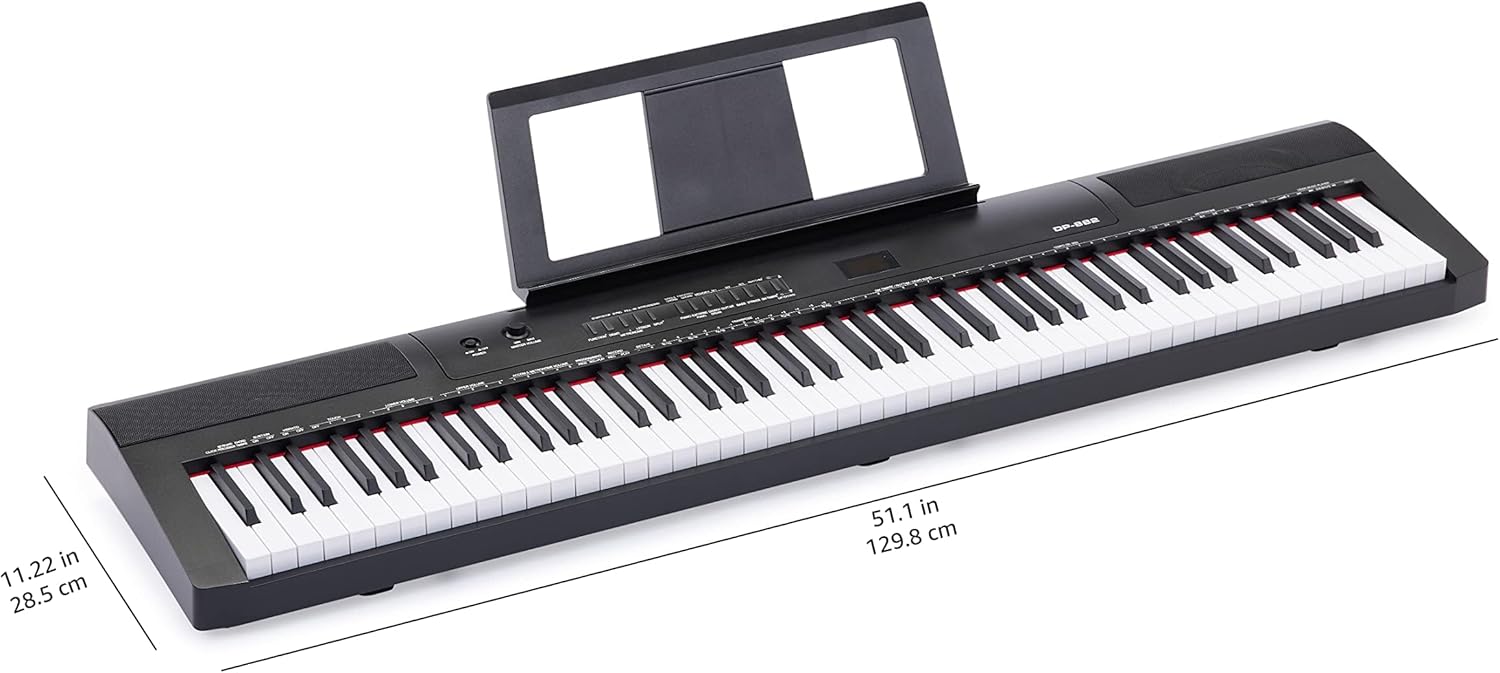
Image: Digital piano with key dimensions.
Кепилдик жана колдоо
Колдонуучунун колдонмосу жана Кепилдик маалыматы
For additional details and comprehensive warranty information, please refer to the official PDF documents:
Коргоо пландары
Extended protection plans may be available for your product. Please check the product listing or your purchase documentation for details on available plans, such as 3-Year or 4-Year Protection Plans.
Кардарларды колдоо
Көбүрөөк жардам, техникалык колдоо же тейлөө боюнча суроолор үчүн, сураныч, төмөнкү дарекке кириңиз Amazon Basics дүкөнү же түздөн-түз Amazon кардарларды тейлөө кызматына кайрылыңыз.
Ask a question about this manual
Ask about setup, troubleshooting, compatibility, parts, safety, or missing instructions. Manuals+ will review the question and use this page’s manual context to help answer it.