Introduction
This document provides essential information for the setup, operation, and maintenance of your Generic replacement remote control for AIWA Compact Disc CD Stereo Systems. This remote is designed to function as a direct replacement for the original remote controls of the listed compatible models. Please note that while this remote is highly compatible, some advanced or specific functions of your original system might not be fully supported. This remote operates using Infrared (IR) technology and cannot be programmed.
Маанилүү эскертүү: As indicated by the manufacturer, this product typically does not include a printed instruction manual. This digital guide is provided to assist you with basic usage.
Жайгашуу
1. Батареяны орнотуу
The remote control requires two (2) AA batteries for operation. Batteries are not included with the remote.
- Пульттун артындагы батарея отсегин табыңыз.
- Батарея бөлүмүнүн капкагын ачуу үчүн ылдый же жебе менен көрсөтүлгөн багытта жылдырыңыз.
- Insert two AA batteries, ensuring the positive (+) and negative (-) terminals align correctly with the markings inside the compartment. Incorrect insertion can prevent the remote from functioning.
- Батарея бөлүкчөсүнүн капкагын бекем чыккыча ордуна жылдырыңыз.

1-сүрөт: Арткы view of the remote with the battery cover removed, illustrating the battery placement area.
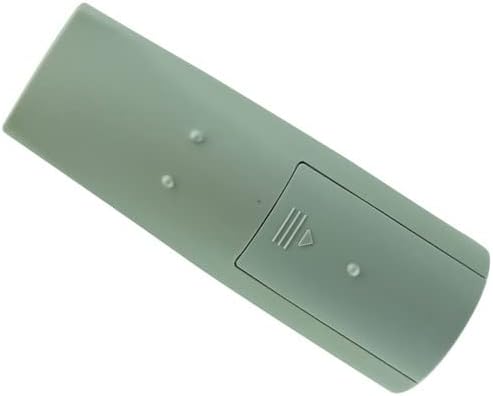
2-сүрөт: Арткы view of the remote with the battery cover installed, ready for use.
2. Биринчи колдонуу
Once batteries are installed, the remote is ready for use. Point the remote control directly at your AIWA Compact Disc CD Stereo System and press any button to test its functionality. No programming or pairing is required as it is an Infrared (IR) remote.
Иштөө нускамалары
This section details the primary functions of the remote control buttons. Refer to the image below for button layout.

Сүрөт 3: Алдыңкы view баскычтардын жайгашуусу менен алыстан башкаруунун.
| баскыч | Функция |
|---|---|
| КҮЧ | Turns the stereo system on or off. |
| ФУНКЦИЯ | Cycles through input sources (e.g., CD, Tuner, Tape, Aux). |
| Numeric Keypad (0-9, +10) | Direct selection of CD tracks, radio presets, or other numerical inputs. The "+10" button adds 10 to the current track/preset number. |
| БАНД | FM жана AM радио тилкелеринин ортосунда которулат. |
| PRESET (Up/Down) | Navigates through stored radio presets. |
| TUNE (Up/Down) | Manually tunes radio frequencies up or down. |
| PLAY/PAUSE (▶/⏸) | CD ойнотууну баштайт же токтотот. |
| STOP (⏹) | CD ойнотууну токтотот. |
| SKIP (⏭/⏮) | Skips to the next or previous track on a CD. |
| REWIND/FAST FORWARD (⏪/⏩) | Fast forwards or rewinds within a track. |
| SET | Used for confirming settings, often in conjunction with navigation buttons. |
| CLEAR | Учурдагы киргизүүнү же тандоону тазалайт. |
| MONO TUNER | Switches the tuner between stereo and mono reception. |
| T-BASS | Activates or deactivates the bass boost feature. |
| ҮЧЧҮ | Үчтүк деңгээлди тууралайт. |
| Көлөмү (+/-) | Негизги үн көлөмүн көбөйтөт же азайтат. |
| DISC DIRECT PLAY (1, 2, 3) | Directly selects and plays a specific disc in a multi-disc changer (if applicable to your system). |
| СААТ | Accesses or sets the system clock. |
For detailed operation of specific features of your AIWA stereo system, please refer to the original user manual of your stereo system.
Техникалык тейлөө
Тазалоо
Алыстан башкаруу пультун көрүнүшүн жана функционалдуулугун сактоо үчүн:
- Бетти жумшак, кургак чүпүрөк менен сүртүңүз.
- өжөр кир үчүн, бир аз гampкездемени суу же жумшак, абразивдүү эмес тазалоочу каражат менен сүртүңүз. Катуу химиялык заттарды же абразивдүү материалдарды колдонбоңуз.
- Avoid getting moisture into the button crevices or battery compartment.
Батареяны алмаштыруу
Replace batteries when the remote's response becomes sluggish or it stops functioning. Always replace both AA batteries at the same time with new ones. Do not mix old and new batteries, or different types of batteries.
Сактагыч
Эгерде алыстан башкаруу пульту көпкө чейин колдонулбаса, агып кетүүсүн жана алыстан башкаруу пульту бузулуп калышы мүмкүн болгон учурларды болтурбоо үчүн батарейкаларды алып салыңыз.
Проблемаларды чечүү
| Көйгөй | Мүмкүн себеп | Чечим |
|---|---|---|
| Пульт иштебейт. | Өлүк же туура эмес салынган батарейкалар. | Батареянын полярдуулугун текшериңиз (+/-). Жаңы AA батарейкалары менен алмаштырыңыз. |
| Пульт иштебейт. | Obstruction between remote and stereo system. | Ensure a clear line of sight between the remote's IR emitter and the stereo system's IR receiver. |
| Пульт иштебейт. | Remote is too far from the stereo system. | Move closer to the stereo system. The effective range is typically up to 20 feet (6 meters). |
| Айрым функциялар иштебейт. | The replacement remote may not support all original functions. | This is a common limitation of universal or replacement remotes. Refer to your stereo system's original manual for functions not covered. |
| Remote is unresponsive after a drop. | Ички зыян. | If troubleshooting steps above do not resolve the issue, the remote may be damaged and require replacement. |
Техникалык шарттар
- Моделдин шайкештиги: AIWA CX-NR11, NSX-R20, CX-LEM52, RC-CAS07, XR-EM30, XR-EM31, XR-EM20, CX-LEM30, CX-LEM31, RC-CAS05, XR-EC10, XR-EC12, XR-TC80, CX-LEM50, CX-LEM20, NSX-R11, NSX-R17 Compact Disc CD Stereo Systems
- Кубат булагы: 2 x AA батарейкалар (киргизилген эмес)
- Байланыш технологиясы: Инфракызыл (IR)
- Контроллердин түрү: Control Button
- Өзгөчө өзгөчөлүгү: IR remote, cannot be programmed
- Өндүрүүчү: СЖКХХД
- Келип чыккан өлкө: Кытай
- ASIN: B0BBN5F2XG
Кепилдик жана колдоо
As a generic replacement product, specific warranty information may vary. Please refer to the seller's return policy or contact the seller directly for any warranty-related inquiries or support needs. The manufacturer, SZHKHXD, typically handles support through the point of purchase.
For further assistance, you may contact the seller, SZHKHXD, through the Amazon platform where the product was purchased. Please provide your order number and a detailed description of the issue.


