
NewPal NP002
Колсуз терүүчү сүрөт эс тутуму зымдуу телефон колдонуучусунун колдонмосу
Бренд: NewPal | Модел: NP002
Introduction
This manual provides comprehensive instructions for the NewPal Hands-Free Dial Photo Memory Corded Phone, Model NP002. This corded telephone is designed for ease of use, featuring large buttons, photo memory dialing, and a speakerphone function. It operates without the need for batteries, drawing power directly from the telephone line, ensuring functionality even during power outages.

Сүрөт 1: Алдыңкы view of the NewPal Corded Phone, showing the large keypad, display, and photo memory buttons.
Негизги өзгөчөлүктөр төмөнкүлөрдү камтыйт:
- Hands-Free Dial Photo Memory Corded Phone with large buttons and speakerphone.
- LCD Display for caller number visibility.
- SOS button for emergency calls.
- Operates without external power, using the telephone line for power.
- Adjustable handset, ringer, and speaker volume.
- Flashing red LED for incoming calls, beneficial for hearing-impaired users.
Пакеттин мазмуну
Пакетте бардык компоненттер бар экенин текшериңиз:
- 1 x NewPal Corded Telephone Unit
- 1 x Телефон
- 1 x Coiled Handset Cord
- 1 x Telephone Line Cord (for wall jack connection)
- 1 x Connecting Line Cord (for telephone unit connection)
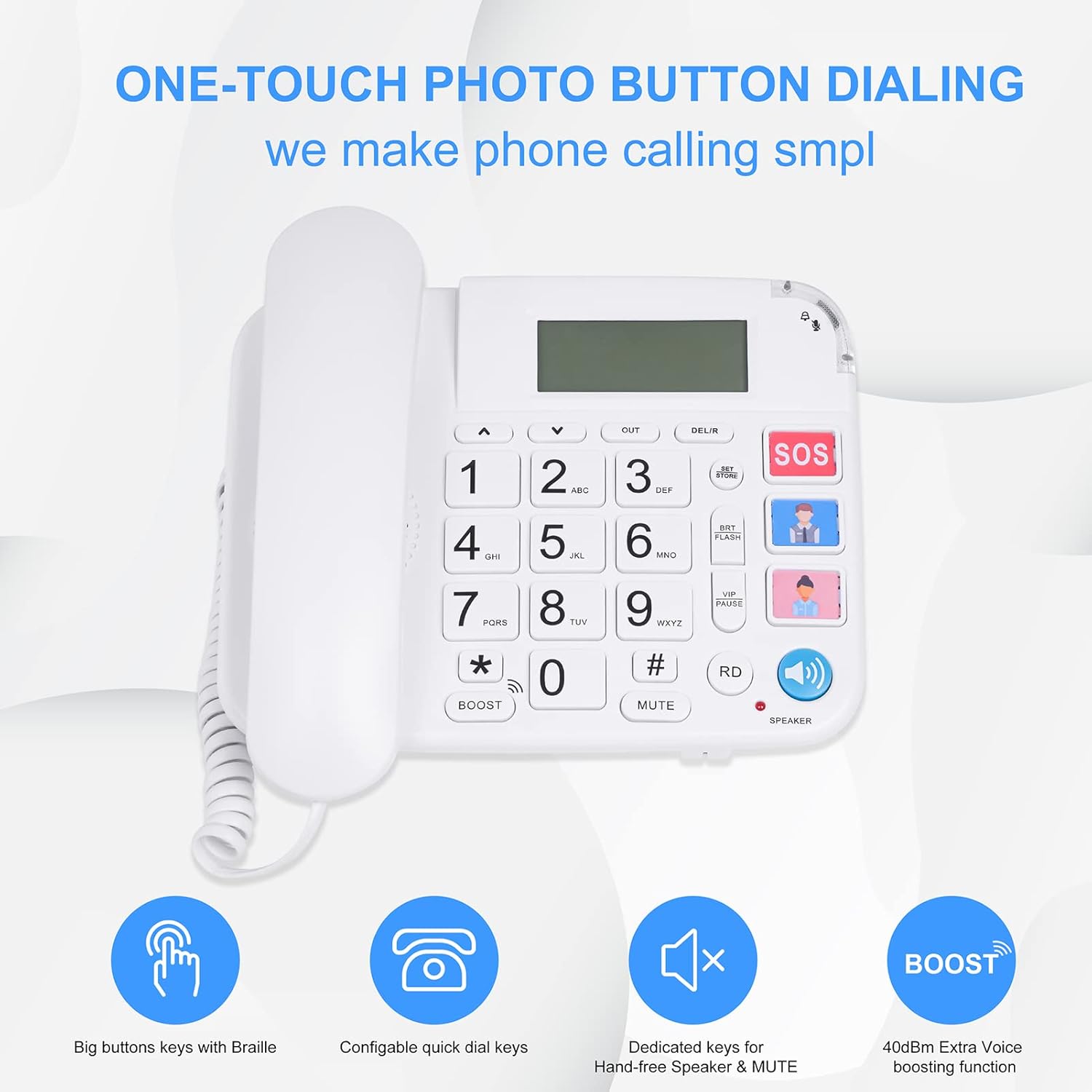
Figure 2: All components included in the NewPal Corded Phone package: telephone unit, handset, coiled cord, telephone line cord, and connecting line cord.
Орнотуу нускамалары
- Телефонду туташтыруу: Plug one end of the coiled handset cord into the handset and the other end into the port labeled "Handset" on the side of the telephone unit.
- Телефон линиясын туташтыруу:
- Locate the two telephone line ports on the back of the phone. One is typically labeled "LINE" or has a phone icon, and the other "EXT" or "EXTENSION".
- Plug one end of the telephone line cord into the "LINE" port on the phone.
- Plug the other end of the telephone line cord into your wall telephone jack.

3-сүрөт: Арткы view of the phone, illustrating the dual port design for main line and extension connections.
- Телефонду кой: Position the phone on a flat, stable surface or mount it on a wall using the integrated wall-mount holes (screws not included).
- Adjust Ringer Volume: On the back of the phone, locate the RINGER switch. Slide it to HI (High), LO (Low), or OFF (Off) as desired.
- Сыноо байланышы: Lift the handset. You should hear a dial tone. If not, refer to the Troubleshooting section.
Setting Photo Memory Buttons (M1-M6)
The phone features six photo memory buttons (M1-M6) that allow for one-touch dialing of frequently called numbers. You can insert small photos of contacts into these slots for easy identification.

Figure 4: The six photo memory buttons, designed for quick dialing of pre-programmed numbers.
- Телефонду көтөрүңүз.
- басыңыз ОРНОТУ/САКТОО баскычы.
- Dial the phone number you wish to store (up to 16 digits).
- басыңыз ОРНОТУ/САКТОО кайра баскычын.
- Press the desired photo memory button (M1-M6) where you want to save the number.
- Replace the handset. The number is now stored.
Repeat this process for each photo memory button you wish to program.
Иштөө нускамалары
Чакыруу
- Стандарттык терүү: Lift the handset, wait for a dial tone, then dial the desired phone number using the large numeric keypad.
- Сүрөт эс тутумунун баскычтарын колдонуу: Lift the handset, then press the desired photo memory button (M1-M6). The stored number will be dialed automatically.
- Динамикти колдонуу: басыңыз СПИКЕР button (blue button with speaker icon). The speakerphone will activate. Dial the number. To end the call, press the СПИКЕР баскычын кайра басыңыз же трубканы алмаштырыңыз.

Figure 5: The phone's large buttons and dedicated photo memory keys simplify dialing.
Чакыруу кабыл алуу
- Телефон шыңгыраганда, жооп берүү үчүн трубканы көтөрүңүз.
- Же болбосо, басыңыз СПИКЕР спикерфон режиминде жооп берүү үчүн баскычты басыңыз.
- The red LED indicator will flash during an incoming call, providing a visual alert.

6-сүрөт: The amplified ringer and flashing red LED provide clear indications of incoming calls, especially useful for hearing-impaired users.
Using the SOS Button
The large red SOS button is designed for emergency situations. When pressed, it will automatically dial a pre-programmed emergency number.
- To Program SOS Number:
- Телефонду көтөрүңүз.
- басыңыз ОРНОТУ/САКТОО баскычы.
- Dial the emergency number (e.g., 911 or a family member's number).
- басыңыз ОРНОТУ/САКТОО кайра баскычын.
- басыңыз SOS баскычы.
- Телефонду алмаштырыңыз.
- To Use SOS: In an emergency, simply press the large red SOS button. The phone will automatically dial the stored emergency number.
Үндү тууралоо
- Телефондун үн деңгээли: Чалуу учурунда колдонуңуз BOOST button (below the * key) to amplify the handset volume.
- Динамиктин үн катуулугу: During a speakerphone call, use the UP (▲) жана ылдый (▼) arrow buttons to adjust the speaker volume.
- Коңгуроонун үнү: As mentioned in Setup, use the RINGER switch on the back of the phone.

Figure 7: The ergonomic handset design is intended to enhance hearing clarity during calls.
Техникалык тейлөө жана кам көрүү
- Тазалоо: Телефондун бетин жумшак, d менен сүртүңүзamp кездеме. Абразивдүү тазалагычтарды же эриткичтерди колдонбоңуз.
- Суюктуктардан алыс болуңуз: Телефонду суудан жана башка суюктуктардан алыс кармаңыз.
- Температура: Do not expose the phone to extreme temperatures or direct sunlight.
- Сактагыч: If storing the phone for an extended period, disconnect it from the telephone line and store it in a cool, dry place.
Проблемаларды чечүү
| Көйгөй | Мүмкүн себеп | Чечим |
|---|---|---|
| Терүү үнү жок. | Telephone line not connected properly or line issue. |
|
| Телефон шыңгыратпайт. | Ringer volume set to OFF. |
|
| Чалуу адамды уга албайт / Чалуу мени уга албайт. | Volume too low or faulty connection. |
|
| Photo memory buttons not working. | Number not stored correctly. |
|
Техникалык шарттар
| Өзгөчөлүк | Деталь |
|---|---|
| Модель номери | NP002 |
| Өлчөмдөрү (L x W x Y) | 7.8 x 7.8 x 2.6 дюйм |
| Элемент Салмагы | 1.4 фунт |
| Түс | Ак |
| Материал | Акрилонитрил бутадиен стирол (ABS) |
| Телефон түрү | жоон |
| Power Source | Зымдуу электр (линия менен иштейт) |
| Терүүчү түрү | Жалгыз баскычтоп |
| Дисплей | LCD (for caller number) |
| Memory Buttons | 6 Photo Memory Buttons, 1 SOS Button |
Кепилдик жана колдоо
For warranty information or technical support, please contact NewPal customer service. Details can typically be found on the product packaging or the official NewPal webсайт.
Өндүрүүчү: agosmart
Бренд: NewPal
Кошумча жардам алуу үчүн, сиз иш сапары менен болот NewPal Store on Amazon.