
FoMaKo KC608 pro+3xKN30A
FoMaKo PTZ NDI Camera System Instruction Manual
Model: KC608 Pro + 3x KN30A
1. Киришүү
This manual provides detailed instructions for the setup, operation, and maintenance of your FoMaKo PTZ NDI Camera System. This comprehensive bundle includes one KC608 Pro PTZ Controller and three KN30A PTZ Cameras, designed for professional live streaming and video production environments such as event centers, conference facilities, churches, and educational institutions. The system offers high-quality video output with advanced features like 30x optical zoom and AI auto-tracking.
2. Продукт бүтүп калдыview жана Негизги өзгөчөлүктөрү
The FoMaKo PTZ NDI Camera System is engineered to deliver professional-grade video for various applications. Below is an overview of the components and their primary features.
2.1 Системанын компоненттери
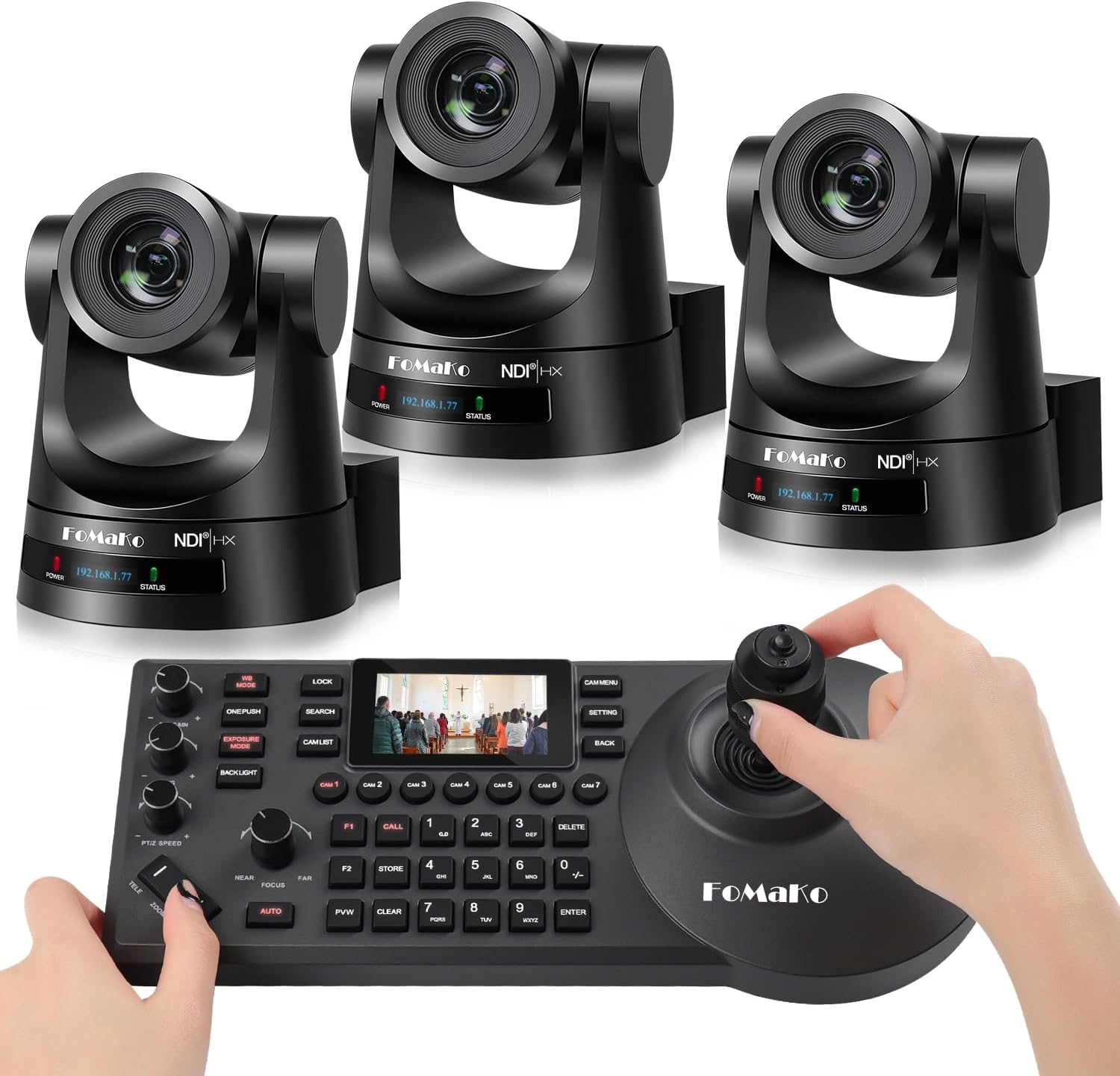
Image: The FoMaKo PTZ NDI Camera System bundle, showing three PTZ cameras and one PTZ controller.
- FoMaKo KC608 Pro PTZ Controller: A dedicated hardware controller with a 4D joystick and a 3-inch LCD screen for precise camera control.
- FoMaKo KN30A PTZ Cameras (x3): High-performance PTZ cameras with 30x optical zoom, capable of 1080p 60FPS video output.
2.2 Camera Features (KN30A)
- Видео чыгаруу: 3G-SDI, HDMI, IP, NDI, USB3.0 for versatile connectivity.
- Оптикалык масштаб: 30x optical zoom for capturing distant subjects with clarity.
- NDI Certified: Official NDI 6 & NDI HX3 certification by Newtek ensures stable, high-quality video over network with low bandwidth optimization.
- Жасалма интеллект менен автоматтык түрдө көзөмөлдөө: Features Gen 3 AI auto-tracking algorithms for smooth and stable subject tracking.
- PoE колдоосу: Power over Ethernet simplifies installation with a single cable for power and data.
- Шайкештик: Compatible with popular live streaming software including vMix, OBS, Propresenter, StreamYards, Streamlabs, Wirecast, and Zoom, across Mac and Windows PC platforms.

Image: A FoMaKo PTZ camera demonstrating its 30X optical zoom capability, showing a wide shot and a zoomed-in view of a speaker in a church.

Image: Banner indicating the camera's Official NDI HX3 Certification.

Image: A FoMaKo PTZ camera demonstrating AI auto-tracking in an educational setting, highlighting the tracking box around a person.

Image: A FoMaKo PTZ camera positioned in front of a monitor displaying live streaming software interfaces, with logos of compatible platforms like vMix, OBS Studio, Wirecast, YouTube, Twitch, and Facebook Live.
2.3 Controller Features (KC608 Pro)
- 4D джойстик: Provides intuitive control over pan, tilt, and zoom functions.
- 3 дюймдук LCD экран: Displays real-time preview and system parameters for efficient monitoring.
- Adjustable PTZ Speed: Dedicated controls for fine-tuning pan, tilt, and zoom speeds.
- Бир нече протоколдор: Supports VISCA, PELCO-P, and PELCO-D protocols.
- Байланыш: RS232, RS422, RS485, and Ethernet IP connections for flexible integration.

Image: A close-up of the 4D joystick on the FoMaKo PTZ controller, illustrating its multi-directional movement.

Image: The 3-inch LCD screen on the FoMaKo PTZ controller, showing two preview modes: a pre-monitoring screen and system parameters.
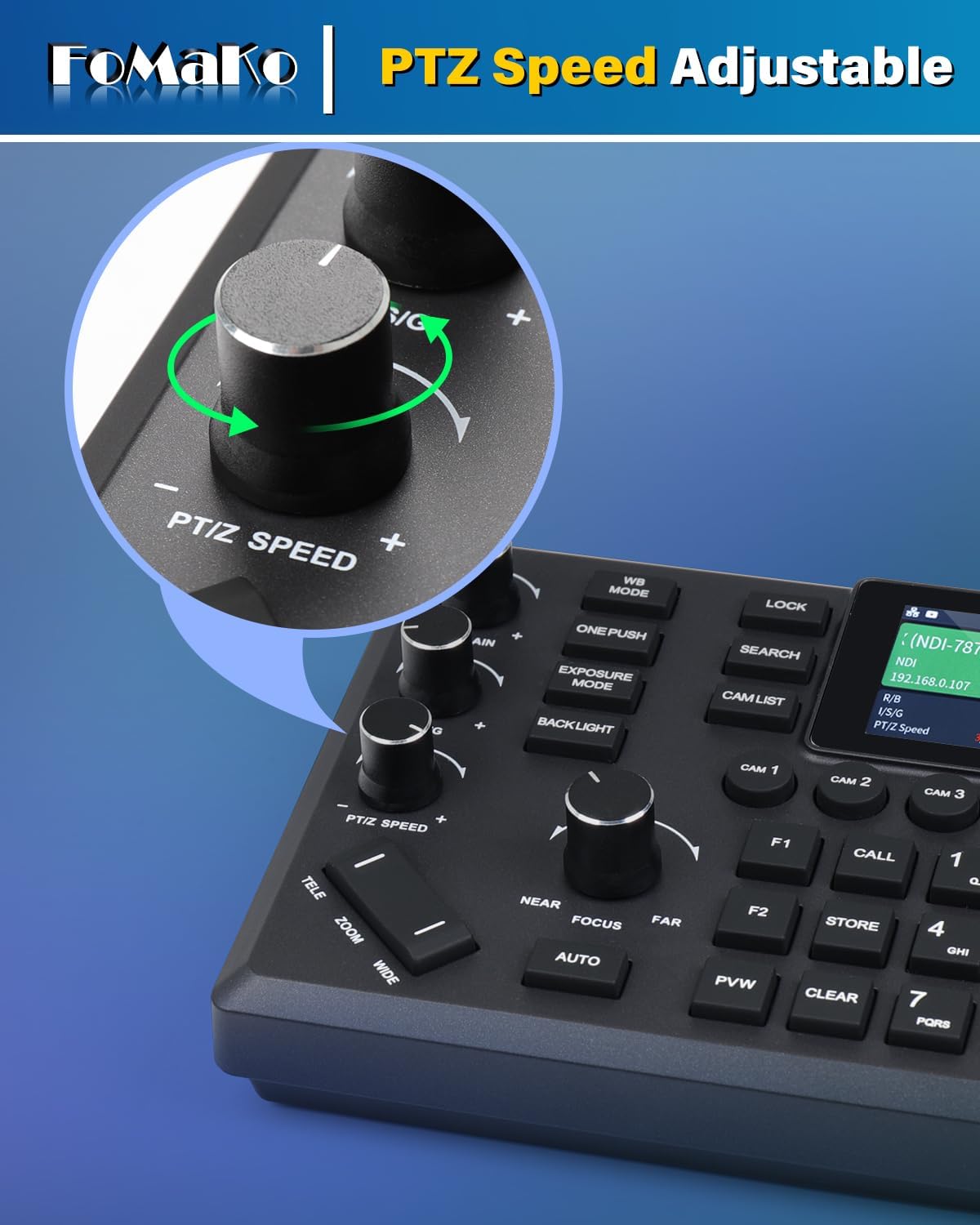
Image: A close-up of the PTZ Speed adjustment knob on the FoMaKo PTZ controller.
3. Орнотуу
Proper setup is crucial for optimal performance of your FoMaKo PTZ NDI Camera System. Follow these steps to get started.
3.1 Таңгактан чыгаруу жана текшерүү
- Бардык компоненттерди кутудан кылдаттык менен чыгарыңыз.
- Verify that all items listed in the 'What's in the Box' section are present: 1x KC608 Pro PTZ Controller, 3x KN30A PTZ Cameras.
- Inspect all components for any signs of physical damage. Contact customer support immediately if any damage is found.
3.2 Camera Installation (KN30A)
The KN30A cameras can be mounted on a wall or ceiling. Ensure the mounting surface is sturdy enough to support the camera's weight. PoE (Power over Ethernet) simplifies cabling by delivering both power and data through a single Ethernet cable.
- Монтаждоо: Securely attach the camera to your desired location using appropriate mounting hardware (not included).
- Байланыштары: Connect an Ethernet cable from the camera's LAN port to a PoE-enabled network switch or injector.
- Видео чыгаруу: Connect HDMI or 3G-SDI cables from the camera to your video mixer, capture card, or display as needed.
- USB 3.0: For direct connection to a computer for streaming or capture.

Image: The rear panel of a FoMaKo PTZ camera, showing various input/output ports including 3G-SDI, HDMI, USB3.0, LAN (PoE), RS232, RS422, and DC12V power.
3.3 Controller Connection (KC608 Pro)
The KC608 Pro controller connects to your network to control the cameras via IP.
- Connect the KC608 Pro controller to your network using an Ethernet cable. Ensure it is on the same network as your PTZ cameras.
- Контроллерди күйгүзүңүз.
- Refer to the controller's on-screen menu to discover and add your KN30A cameras to the control system. This typically involves scanning the network for NDI or IP cameras and assigning them to specific camera buttons on the controller.
3.4 Системалык диаграмма

Image: A diagram illustrating a typical live streaming setup with FoMaKo PTZ cameras, an IP PTZ camera controller, a router/switch (PoE), a video mixer/switcher, and a computer for live streaming to platforms like YouTube and Facebook Live.
4. Иштөө нускамалары
This section details the basic and advanced operations of your FoMaKo PTZ NDI Camera System.
4.1 Камераны башкаруунун негизги ыкмалары
Use the KC608 Pro controller to manipulate the cameras.

Image: A user operating the FoMaKo PTZ controller with a 4D joystick, showing a multi-screen live production setup in the background.
- Камераны тандоо: Press the corresponding camera button (e.g., CAM 1, CAM 2) on the controller to select the camera you wish to control.
- Панорама/Тилт: Use the 4D joystick to pan (horizontal movement) and tilt (vertical movement) the selected camera.
- Чоңойтуу: Use the zoom rocker (TELE/WIDE) to zoom in or out.
- Фокус: Adjust focus using the NEAR/FAR buttons or enable AUTO focus.
- PTZ Speed: Rotate the PTZ SPEED knob to adjust the responsiveness of the pan, tilt, and zoom movements.
4.2 Өркүндөтүлгөн функциялар
- Алдын ала орнотуулар: Store and recall specific camera positions (pan, tilt, zoom, focus) using the numbered preset buttons (0-9) and STORE/CALL functions.
- Жасалма интеллект менен автоматтык түрдө көзөмөлдөө: Activate the AI auto-tracking feature through the controller's menu or dedicated button to automatically follow a designated subject.
- IP дарегин конфигурациялоо: The controller allows you to change the IP address settings of the cameras via its menu.
- Экспозиция жана ак баланс: Adjust exposure modes (e.g., auto, manual) and white balance settings for optimal image quality in different lighting conditions.

Image: A graphic displaying network settings (DHCP, IP Address, Subnet Mask, Gateway) and PTZ parameters (Speed by zoom, Zoom speed, ImageFreezing, Acc Curve, Preset speed, Ptz speed, Preset Lock) that can be adjusted via the camera's menu.
5. Техникалык тейлөө
Regular maintenance ensures the longevity and optimal performance of your FoMaKo PTZ NDI Camera System.
- Тазалоо: Use a soft, dry cloth to clean the camera lenses and controller surfaces. For stubborn dirt, a slightly damp cloth with mild, non-abrasive cleaner can be used, ensuring no liquid enters the device.
- Программалык камсыздоонун жаңыртуулары: Periodically check the FoMaKo official website for firmware updates. Keeping your devices updated ensures access to the latest features and performance improvements. Follow the provided instructions carefully when performing updates.
- Кабелдик башкаруу: Ensure all cables are neatly organized and secured to prevent accidental disconnections or damage. Avoid bending cables sharply.
- Экологиялык шарттар: Operate and store the system in a clean, dry environment within the specified temperature and humidity ranges to prevent damage.
6. Кыйынчылыктарды
Бул бөлүмдө сиз кабылышы мүмкүн болгон жалпы көйгөйлөр каралат жана аларды чечүү жолдору каралган.
| Көйгөй | Мүмкүн себеп | Чечим |
|---|---|---|
| No video output from camera. | Loose cable connection, incorrect input selection on display, power issue. | Check HDMI/SDI/USB cables. Ensure camera is powered on. Verify correct input selected on monitor/mixer. |
| Controller cannot connect to camera. | Network issue, incorrect IP settings, camera not powered on. | Ensure controller and camera are on the same network. Verify camera IP address and controller settings. Restart both devices. |
| PTZ movements are jerky or unresponsive. | PTZ speed setting too low, network latency, physical obstruction. | Adjust PTZ speed on the controller. Check network stability. Ensure no physical obstructions to camera movement. |
| AI Auto-Tracking not working. | Feature not enabled, poor lighting, subject too far/small. | Ensure AI tracking is enabled in camera settings. Optimize lighting conditions. Ensure subject is within optimal range and size for tracking. |
7. Техникалык шарттар
Detailed technical specifications for the FoMaKo PTZ NDI Camera System.
| Өзгөчөлүк | Деталь |
|---|---|
| Бренд | FoMaKo |
| Модел | KC608 Pro (Controller) + KN30A (Camera) |
| Оптикалык масштаб | 30x |
| Видео тартуунун резолюциясы | 1080p |
| Фото сенсор технологиясы | CMOS |
| Байланыш технологиясы | Ethernet, HDMI, 3G-SDI, USB3.0, RS232, RS422, RS485 |
| Колдоого алынган аудио формат | AAC, MP3 |
| Видео тартуу форматы | MP4 |
| Flash эс тутум түрү | SD (for firmware/settings, not for video recording) |
| Өзгөчө өзгөчөлүк | Low Light, AI Auto-Tracking, PoE Support, NDI 6 & NDI HX3 Certified |
| Келип чыккан өлкө | Кытай |
8. Кепилдик жана колдоо
FoMaKo is committed to providing excellent customer service and support for your product.

Image: A graphic illustrating FoMaKo's customer support, highlighting 24-hour response time, 3-year limited warranty, 30-day money-back guarantee, and lifetime customer technical support.
- 3 жылдык Чектелген Кепилдик: Your FoMaKo PTZ NDI Camera System is covered by a 3-year limited warranty from the date of purchase. This warranty covers manufacturing defects and ensures product reliability.
- 30 күндүк акчаны кайтарып берүү кепилдиги: Enjoy a 30-day no-questions-asked money-back guarantee for a risk-free purchase.
- Акысыз онлайн тренинг: Access free online training resources to help you get started and maximize your system's potential.
- 24/7 эксперттик жардам: FoMaKo provides 24/7 expert assistance with responses typically within 37 hours. Please include your Order ID when contacting support.
- Өмүр бою Кардарларды техникалык колдоо: Benefit from lifetime technical support for your product. Remote assistance can be provided if necessary for setup and troubleshooting.
For support inquiries, please refer to the contact information provided with your product packaging or visit the official FoMaKo webсайт.
Ask a question about this manual
Ask about setup, troubleshooting, compatibility, parts, safety, or missing instructions. Manuals+ will review the question and use this page’s manual context to help answer it.